1. Муқаддима
The Mastech MS8250D is a high-performance digital multimeter designed for accurate measurement of AC/DC voltage, AC/DC current, resistance, capacitance, frequency, and temperature. It features a 6600-count display, auto/manual ranging, True RMS, Non-Contact Voltage (NCV) detection, diode and continuity testing, and a USB interface for PC connectivity. This manual provides detailed instructions for safe and effective use of the device.
Хусусиятҳои асосӣ:
- 6600-count digital display
- Automatic and Manual Ranging
- Андозагирии ҳақиқии RMS
- Ҷилди ғайри тамосtage (NCV) ошкор
- Diode and Continuity Tester (buzzer < 50Ω)
- MAX/MIN value recording
- Функсияи нигоҳдории маълумот
- Намоиши рӯшноӣ
- Хомӯшкунии худкор
- Ҳолати андозагирии нисбӣ
- Нишондиҳандаи камии батарея
- USB Interface for Windows OS
2. Маълумот оид ба бехатарӣ
Огоҳӣ: To avoid electric shock or personal injury, and to avoid damage to the meter or to the equipment under test, read all safety information carefully before using the meter. This device complies with CE, RoHS, and UL safety standards.
- Always ensure the test leads are in good condition and properly connected.
- Зиёда аз ҳаҷми баҳошуда муроҷиат накунедtagд, тавре ки дар ҳисобкунак нишон дода шудааст, дар байни терминалҳо ё байни ҳама гуна терминал ва хоки замин.
- Ҳангоми кор бо voltagаз 30V AC RMS, қуллаи 42V ё 60V DC. Ин ҷилдиtagхатари зарбаро ба вуҷуд меорад.
- Before measuring current, ensure the circuit is de-energized and the meter is connected in series.
- Пеш аз тағир додани функсияҳо ё диапазонҳо ҳамеша симҳои санҷиширо аз схема ҷудо кунед.
- Агар ҳисобкунак вайрон ба назар расад ё қуттӣ кушода бошад, онро истифода набаред.
- Барои таъмини дақиқии хониш, батареяро ҳамин ки нишондиҳандаи кам будани батарея пайдо шуд, иваз кунед.
- Adhere to the specified measurement categories (CAT III 1000V / CAT IV 600V) for safe operation.
3. Маҳсулот ба охир расидview
Familiarize yourself with the components of your Mastech MS8250D Digital Multimeter.

Тасвири 3.1: Пеш view of the Mastech MS8250D Digital Multimeter, showing the display, function dial, and input jacks. The display shows "1.987 V", indicating a voltage measurement. The function dial is set to T-RMS. Input jacks are labeled for µA mA, A, VΩHz%, and COM.
Унсурҳои асосӣ:
- Намоиши LCD: Хонишҳои андозагирӣ, воҳидҳо ва нишондиҳандаҳои функсияро нишон медиҳад.
- Рақами функсионалӣ: Used to select the desired measurement function (e.g., Voltage, Current, Resistance, Diode, Continuity, Temperature).
- Тугмаҳои Функсия:
- Нигоҳ доред: Хониши ҳозираи намоишро ях мекунад.
- Қатор: Switches between auto and manual ranging.
- REL: Режими нисбии андозагириро фаъол мекунад.
- МАКС/MIN: Арзишҳои максималӣ ва минималиро сабт мекунад.
- ФУНК: Selects sub-functions within a dial position (e.g., AC/DC, Diode/Continuity).
- T-RMS: (Indicated on dial) True RMS measurement.
- NCV: Ҷилди ғайри тамосtagд ошкор.
- Тугмаи рӯшноӣ: Activates display backlight.
- Ҷекҳои воридотӣ:
- COM: Common terminal for all measurements (negative lead).
- VΩHz%: Вуруд барои ҷилдиtage, resistance, frequency, capacitance, and diode/continuity measurements (positive lead).
- µA mA: Вуруд барои микроampere ва миллиampere current measurements (positive lead). Fused for protection.
- A: Вуруд барои ampere current measurements (positive lead). Fused for protection.
Компонентҳои дохилшуда:
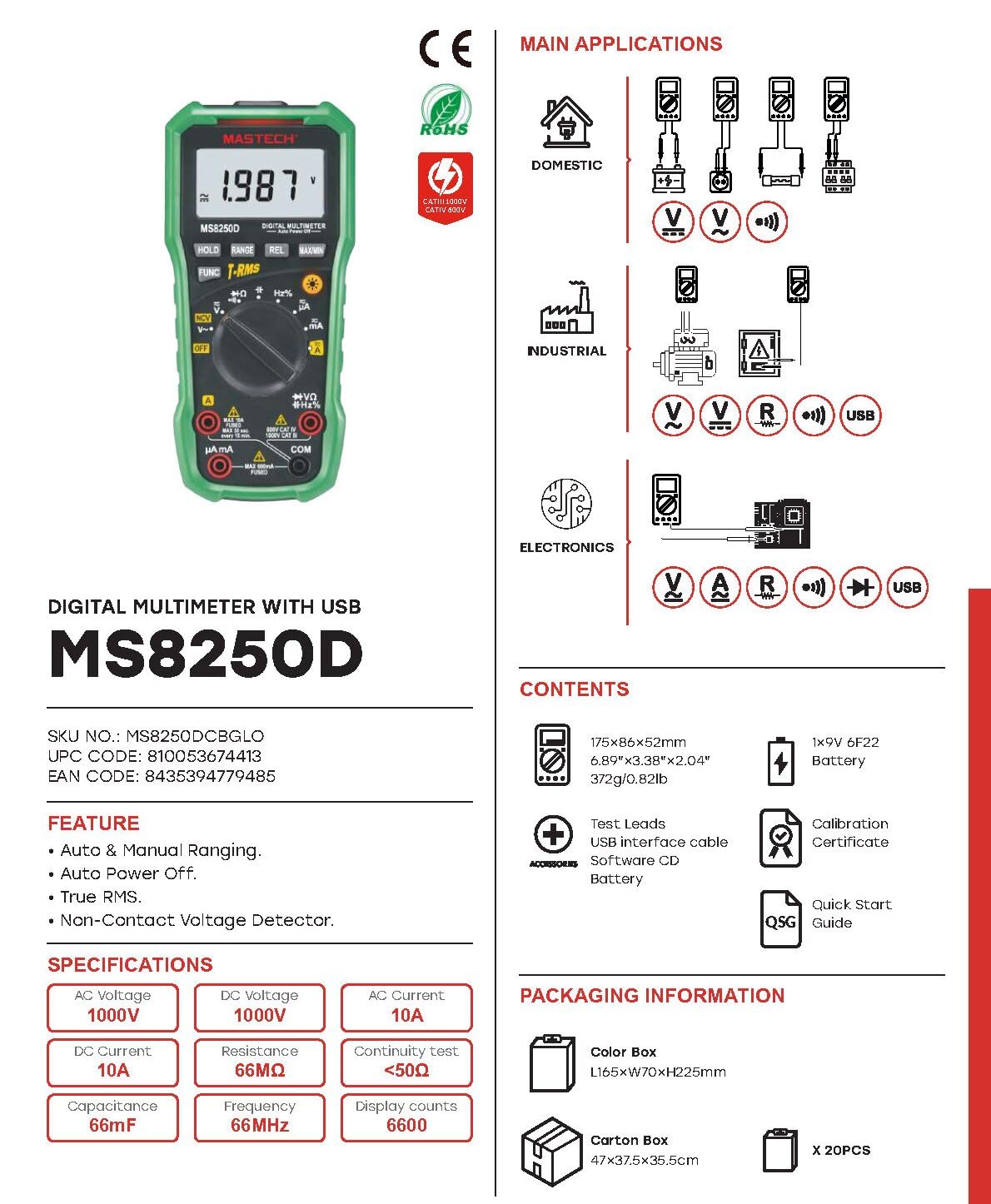
Тасвири 3.2: Diagram showing the Mastech MS8250D Multimeter and its included accessories. The image also illustrates typical applications in domestic, industrial, and electronics settings.
- Мултиметри рақамии Mastech MS8250D
- Рақамҳои санҷишӣ (сурх ва сиёҳ)
- 1x 9V 6F22 Battery (pre-installed or included separately)
- Кабели интерфейси USB
- Software CD (for Windows OS)
- Шаҳодатномаи калибрченкунӣ
- Дастури зуд-оғоз
4. Танзимот
4.1 Насби батарея
The MS8250D requires one 9V 6F22 battery for operation. Two LR44 batteries are also mentioned in specifications, likely for a different internal component or an error in data. For the main power, use the 9V battery.
- Боварӣ ҳосил кунед, ки мултиметр хомӯш карда шудааст.
- Сарпӯши қисмати батареяро дар қафои ҳисобкунак ҷойгир кунед.
- Барои кушодани винт(ҳо), ки сарпӯшро мустаҳкам мекунад, бо як мурваттобак истифода баред.
- Сарпӯшро хориҷ кунед.
- Connect the 9V battery to the battery clips, observing correct polarity (+ and -).
- Батареяро дар қисм ҷойгир кунед.
- Сарпӯши қисмати батареяро иваз кунед ва онро бо винт(ҳо) маҳкам кунед.
Шарҳ: The meter also uses 2 LR44 batteries, which are typically included and pre-installed for specific functions like the backlight or non-contact voltage detection. Refer to the quick-start guide for specific details on these smaller batteries if replacement is needed.
4.2 Пайваст кардани рахҳои санҷишӣ
Ҳамеша сими санҷишии сиёҳро ба васлаки COM пайваст кунед. Сими санҷишии сурхро ба васлаки вуруди мувофиқ вобаста ба намуди андозагирӣ пайваст кунед:
- Барои ҷилдtage, Resistance, Capacitance, Frequency, Diode, and Continuity measurements: Connect the red lead to the VΩHz% Jack.
- For Current measurements (µA or mA): Connect the red lead to the мА мА Jack.
- For High Current measurements (A): Connect the red lead to the A Jack.
Ensure the test leads are fully inserted into the jacks.
5. Дастурҳои истифодабарӣ
5.1 Фаъол кардан/хомӯш кардан
To turn the meter ON, rotate the function dial from the "OFF" position to any desired measurement function. To turn the meter OFF, rotate the function dial back to the "OFF" position.
The meter features an Хомӯшкунии худкор function to conserve battery life. It will automatically power off after a period of inactivity. To disable or re-enable this feature, refer to the quick-start guide or the full user manual provided on the software CD.
5.2 Auto Ranging and Manual Ranging
The MS8250D defaults to Ранги автоматӣ, which automatically selects the best measurement range. Press the РАНГ тугма барои гузаштан Раванди дастӣ. In manual ranging, each press of the РАНГ button cycles through available ranges. To return to auto ranging, press and hold the РАНГ тугма.
5.3 Андозагирии AC/DC Voltagд (V)
- Рақами функсияро ба V~ (AC ҷилдиtagд) ё V- (Ҷилди DCtagд) мавқеъ.
- Сими санҷиши сиёҳро ба. Пайваст кунед COM Ҷек ва роҳнамои санҷишии сурх ба VΩHz% Jack.
- Санҷишҳои санҷиширо тавассути схема ё ҷузъе, ки чен карда мешавад, пайваст кунед.
- Ҷилди хонедtage value on the display. The meter will automatically detect AC or DC if the dial is set to the combined V position, or you can use the Функсия button to toggle between AC and DC if available on your model.
5.4 Measuring AC/DC Current (A, mA, µA)
Огоҳӣ: Ҳеҷ гоҳ метрро ба volt мувозӣ пайваст накунедtagҳангоми чен кардани ҷараён, манбаи электронӣ. Ин метавонад фишангро вайрон кунад ё ба ҳисобкунак зарар расонад.
- Қувваи барқро ба схема Хомӯш кунед.
- Рақами функсияро ба A~ (AC Current), A- (DC Current), мА~, мА-, µA~, ё µA- мавқеъ.
- Сими санҷиши сиёҳро ба. Пайваст кунед COM Jack.
- Нишони санҷиши сурхро ба A jack for high current, or мА мА jack for low current.
- Open the circuit where the current is to be measured and connect the meter in series with the load.
- Ба занҷир қувваи барқро истифода баред.
- Арзиши ҷориро дар экран хонед. Аз он истифода баред Функсия button to toggle between AC and DC if needed.
5.5 Муқовимати ченкунӣ (Ω)
- Рақами функсияро ба Ω мавқеъ.
- Сими санҷиши сиёҳро ба. Пайваст кунед COM Ҷек ва роҳнамои санҷишии сурх ба VΩHz% Jack.
- Боварӣ ҳосил кунед, ки схема ё ҷузъи таҳти санҷиш хомӯш карда шудааст.
- Зондҳои санҷиширо дар тамоми қисм пайваст кунед.
- Арзиши муқовиматро дар экран хонед.
5.6 Санҷиши диод ва санҷиши пайвастагӣ
- Рақами функсияро ба Диод / Давомнокӣ position (often shared with resistance or capacitance).
- Сими санҷиши сиёҳро ба. Пайваст кунед COM Ҷек ва роҳнамои санҷишии сурх ба VΩHz% Jack.
- -ро истифода баред Функсия button to select between Diode Test and Continuity Test.
- Барои санҷиши диод: Зондҳои сурхро ба анод ва зонди сиёҳро ба катоди диод пайваст кунед. Дисплей ҳаҷми пешро нишон медиҳадtage drop (typically 0.5V to 0.8V for silicon diodes). Reversing the probes should show "OL" (Open Loop).
- Барои санҷиши давомнокӣ: Connect the probes across the circuit or component. If resistance is less than approximately 50Ω, the buzzer will sound, indicating continuity.
5.7 Андозагирии иқтидор (F)
- Рақами функсияро ба Иқтидори иқтидор position (often shared with resistance or diode).
- Сими санҷиши сиёҳро ба. Пайваст кунед COM Ҷек ва роҳнамои санҷишии сурх ба VΩHz% Jack.
- Ensure the capacitor is fully discharged before testing to avoid damage to the meter.
- Санҷишҳои санҷиширо тавассути терминалҳои конденсатор пайваст кунед.
- Арзиши иқтидорро дар экран хонед.
5.8 Measuring Frequency (Hz) and Duty Cycle (%)
- Рақами функсияро ба Гц% position (often shared with voltagва).
- Сими санҷиши сиёҳро ба. Пайваст кунед COM Ҷек ва роҳнамои санҷишии сурх ба VΩHz% Jack.
- Санҷишҳои санҷиширо дар манбаи сигнал пайваст кунед.
- The display will show the frequency. Press the Функсия button to toggle to Duty Cycle measurement if available.
5.9 Non-contact Ҷилдиtage (NCV) ошкор
- Рақами функсияро ба NCV мавқеъ.
- Hold the meter with the NCV sensor (usually at the top of the meter) near a live AC voltagд манбаъ.
- Ҳисобкунак мавҷудияти AC voltage through an audible beep and/or visual indicator (e.g., LED).
5.10 USB Interface (Windows OS)
The MS8250D includes a USB interface for connecting to a computer running Windows OS. This allows for data logging and real-time monitoring of measurements. Install the provided software from the CD and follow the on-screen instructions for driver installation and software usage.
6. Нигоҳдорӣ
6.1 Тозакунӣ
Қуттии ҳисобкунакро бо таблиғ пок кунедamp матоъ ва шустушӯи нарм. Абразивҳо ва ҳалкунандаҳоро истифода набаред. Пеш аз истифода боварӣ ҳосил кунед, ки ҳисобкунак комилан хушк аст.
6.2 Иваз кардани батарея
When the low battery indicator appears on the display, replace the 9V battery immediately to ensure accurate readings. Follow the steps in Section 4.1 Battery Installation.
6.3 Иваз кардани сӯзишворӣ
If the meter fails to measure current, the fuse may be blown. Fuses are located inside the meter. To replace a fuse:
- Боварӣ ҳосил кунед, ки ҳисобкунак хомӯш аст ва ҳамаи симҳои санҷишӣ ҷудо карда шудаанд.
- Open the battery compartment cover (and potentially the main case, depending on design).
- Пули кӯҳнаро бодиққат хориҷ кунед.
- Replace with a fuse of the exact same type and rating (e.g., F600mA/250V for mA/µA range, F10A/250V for A range). Refer to the meter's internal markings or the full manual for specific fuse ratings.
- Reassemble the meter, ensuring all screws are tightened.
Огоҳӣ: Never use a fuse with a different rating or bypass the fuse. This can damage the meter and pose a serious safety hazard.
7. Баррасии мушкилот
| Мушкилот | Сабаби эҳтимолӣ | Ҳалли |
|---|---|---|
| Метр фаъол нест. | Батареяи мурда. | Батареяи 9V -ро иваз кунед. |
| "OL" (бори изофабор) нишон дода мешавад. | Андоза аз доираи интихобшуда ё иқтидори максималии метр зиёд аст. | Switch to a higher range (if in manual ranging) or ensure the measurement is within the meter's limits. |
| No current reading. | Blown fuse; incorrect lead connection; open circuit. | Check and replace fuse if necessary. Ensure leads are connected correctly (in series). Verify circuit continuity. |
| Хониши нодуруст. | Low battery; poor lead contact; external interference. | Replace battery. Ensure leads are firmly connected. Move away from strong electromagnetic fields. |
| Display shows "USB" but no PC connection. | Drivers not installed; incorrect software settings. | Install drivers from the provided CD. Refer to software manual for connection instructions. |
8. Мушаххасоти
The following table details the technical specifications of the Mastech MS8250D Digital Multimeter.

Тасвири 8.1: Detailed specifications table for the Mastech MS8250D, outlining ranges, resolutions, and accuracies for various measurement functions.
| Функсия | Диапазон | Резолюция | Дақиқӣ |
|---|---|---|---|
| Ҷилди DCtage | |||
| 660мВ | 0.1мВ | ±(0.8%+3) | |
| 6.6В/66В/660В/1000В | 1мВ/10мВ/0.1В/1В | ±(0.5%+5) | |
| Ҷилди ACtage (True RMS) | |||
| 660мВ | 0.1мВ | ±(1.5%+5) | |
| 6.6В/66В | 1мВ/10мВ | ±(1.2%+5) | |
| 660В/1000В | 0.1В/1В | ±(1.0%+3) | |
| Ҷараёни DC | |||
| 660μA/6600µA/66mA/660mA | 0.1µA/1µA/10µA/0.1mA | ±(1.0%+5) | |
| 10А | 10мА | ±(2.0%+5) | |
| Ҷараёни AC (True RMS) | |||
| 660μA/6600µA/66mA/660mA | 0.1μA/1µA/0.01mA/0.1mA | ±(1.5%+5) | |
| 10А | 10мА | ±(3.0%+5) | |
| Муқовимат | |||
| 660Ω / 6.6kΩ / 66kΩ / 660kΩ / 6.6MΩ | 0.1Ω / 1Ω / 10Ω / 100Ω / 1kΩ | ±(0.8%+5) | |
| 66МΩ | 10кΩ | ±(1.5%+5) | |
| Иқтидори иқтидор | |||
| 6.6nF/66nF/660nF/6.6µF/66µF | 1pF/10pF/0.1nF/1nF/10nF | ±(4.0%+5) | |
| 600 мкФ | 1 мкФ | ±(3.0%+5) | |
| 6.6мФ/66мФ | 1µF/10µF | ±(4.0%+5) | |
| Басомад | |||
| 66Гц/660Гц/6.6кГц/66кГц | 0.01Hz / 0.1Hz / 1Hz / 10Hz | ±(1.5%+5) | |
| 660kHz/6.6MHz/66MHz | 0.1кГц/1кГц/10кГц | ±(1.5%+5) | |
| Сикли вазифавӣ | |||
| 0.1% ~ 99.9% | 0.1% | ±(2.0%+5) | |
Мушаххасоти умумӣ:
- Намоиш: 6600 ҳисоб
- Манбаи нерӯ: 1x 9V 6F22 Battery (main power), 2x LR44 batteries (auxiliary, e.g., backlight)
- Хомӯш кардани худкор: Бале
- RMS ҳақиқӣ: Бале
- Ҷилди ғайри тамосtage (NCV) Detector: Бале
- Ҳаҷми кушодаи диодtage: 3.2В
- Сигнали пайвастагӣ: < 50 Ом
- МАКС/MIN: Бале
- Нигоҳ доштани маълумот: Бале
- Намоиши батареяи кам: Бале
- Нури паси намоиш: Бале
- Интерфейси USB: Yes (Windows OS)
- Рейтинги бехатарӣ: CAT III 1000V / CAT IV 600V
- Дурустии андозагирӣ: 0.4% (general, specific accuracies per function in table)
- Ҷилди амалиётӣtagд (дақ): 3.2 вольт
- Рейтинги ҳарорати боло: 50 дарача гарм
- Андозаҳо (L x W x H): 20 х 15 х 25 см
- Вазни ашё: 1 кг
- Мавод: Акрилонитрил бутадиен стирен (ABS)
- Ранги: Кабуд
- Истеҳсолкунанда: МАСТЕХ
- Кишвари аслӣ: Тайван
- Сертификатсияҳо: CE, RoHS, UL
9. Кафолат ва дастгирӣ
Mastech products are designed for reliability and durability. For specific warranty information, please refer to the warranty card included with your product or contact Mastech customer support directly. Typically, Mastech offers a limited warranty against defects in materials and workmanship.
For technical support, troubleshooting assistance, or warranty claims, please contact your authorized Mastech dealer or visit the official Mastech webсайт барои маълумоти тамос.
Давомнокии дастрасии қисмҳои эҳтиётии ИА: 1 сол


