1. Муқаддима
This manual provides detailed instructions for the setup, operation, and maintenance of your DANFI AUDIO DF TE-103 Vinyl Record Player. This versatile audio system features a 3-speed turntable, Bluetooth input, USB/SD card playback and recording, FM radio, and auxiliary input/output options. Please read this manual thoroughly before use to ensure proper function and longevity of your device.
2. Маълумот оид ба бехатарӣ
- Дастгоҳро ба борон ё намӣ нагузоред.
- Ягон сӯрохиҳои вентилятсияро маҳкам накунед.
- Боварӣ ҳосил кунед, ки сими барқ фишурда нашудааст ё дар болои он роҳ намеравад.
- Дар вақти тӯфони барқӣ ё дар муддати тӯлонӣ истифода нашудани дастгоҳро аз барқ ҷудо кунед.
- Ҳама хидматрасониро ба кормандони соҳибихтисос муроҷиат кунед.
- Дастгоҳро аз нурҳои бевоситаи офтоб, манбаъҳои гармӣ ва майдонҳои магнитии қавӣ дур нигоҳ доред.
3. Мундариҷаи баста
Боварӣ ҳосил кунед, ки ҳамаи ҷузъҳои дар поён овардашуда ба бастаи шумо дохил карда шудаанд:
- DANFI AUDIO DF TE-103 Vinyl Record Player
- Воҳиди барқ
- Адаптери 45 RPM
- Слипмат
- Backup Needle
4. Маҳсулот ба охир расидview
Familiarize yourself with the main components and controls of your record player.

Расми 4.1: Пеш view of the DANFI AUDIO DF TE-103 Vinyl Record Player.
4.1 Назорати панели пеши ва пайвастҳо

Расми 4.2: Муфассал view of the front panel with USB, AUX IN, LED Display, and Mode Switch key.
- Намоиши LED: Ҳолати ҷорӣ, маълумоти трек ё басомади FM-ро нишон медиҳад.
- Тугмаи Гузариш: Toggles between Turntable, Bluetooth, USB/SD, FM Radio, and AUX modes.
- Порти USB: For USB flash drives for playback and recording.
- AUX ДАР: Вуруди 3.5 мм барои пайваст кардани дастгоҳҳои аудиоии беруна.
- Назорати овоз: Ҳаҷми баромадро танзим мекунад.
- Тугмаи EQ: Selects sound equalizer presets (Jazz, Pop, Classical, Rock, Vocal).
4.2 Пайвастҳои панели пушти сар

Figure 4.3: Rear panel with RCA Line Out connections.
- Хати баромади RCA: Ба берунӣ пайваст мешавад ampбаландгӯякҳо ё баландгӯякҳои пурқувват.
- Вуруди барқ: Ба адаптери барқи додашуда пайваст мешавад.
5. Танзимот
- Кушодани: Carefully remove the record player and all accessories from the packaging. Retain packaging for future transport or storage.
- Ҷойгиршавӣ: Place the unit on a stable, level surface away from direct sunlight, heat sources, and excessive dust.
- Сарпӯши чанг: Attach the dust cover to the hinges at the back of the unit.
- Пайвасти барқ: Connect the power unit to the DC input on the rear of the record player, then plug the power adapter into a wall outlet.
- Фаъолсозии ибтидоӣ: Press the power button to turn on the unit. The LED display will illuminate.
6. Дастурҳои истифодабарӣ
6.1 Навохтани пластинкаҳои винилӣ

Figure 6.1: The turntable supports 3 speeds for various record types.
- Боварӣ ҳосил кунед, ки дастгоҳ фаъол аст.
- Сарпӯши чангро бардоред.
- Place a vinyl record on the platter. If playing a 45 RPM single, use the included 45 RPM adaptor.
- Бо истифода аз тугмаи интихобкунандаи суръат суръати мувофиқро (33, 45 ё 78 RPM) интихоб кунед.
- Gently move the tonearm to the desired position on the record. The platter will begin to spin automatically.
- Сатҳи овозро мувофиқи хоҳиши худ танзим кунед.
- The AUTO STOP function will automatically stop the turntable when the record finishes playing.
6.2 Bluetooth Connection (Input Only)
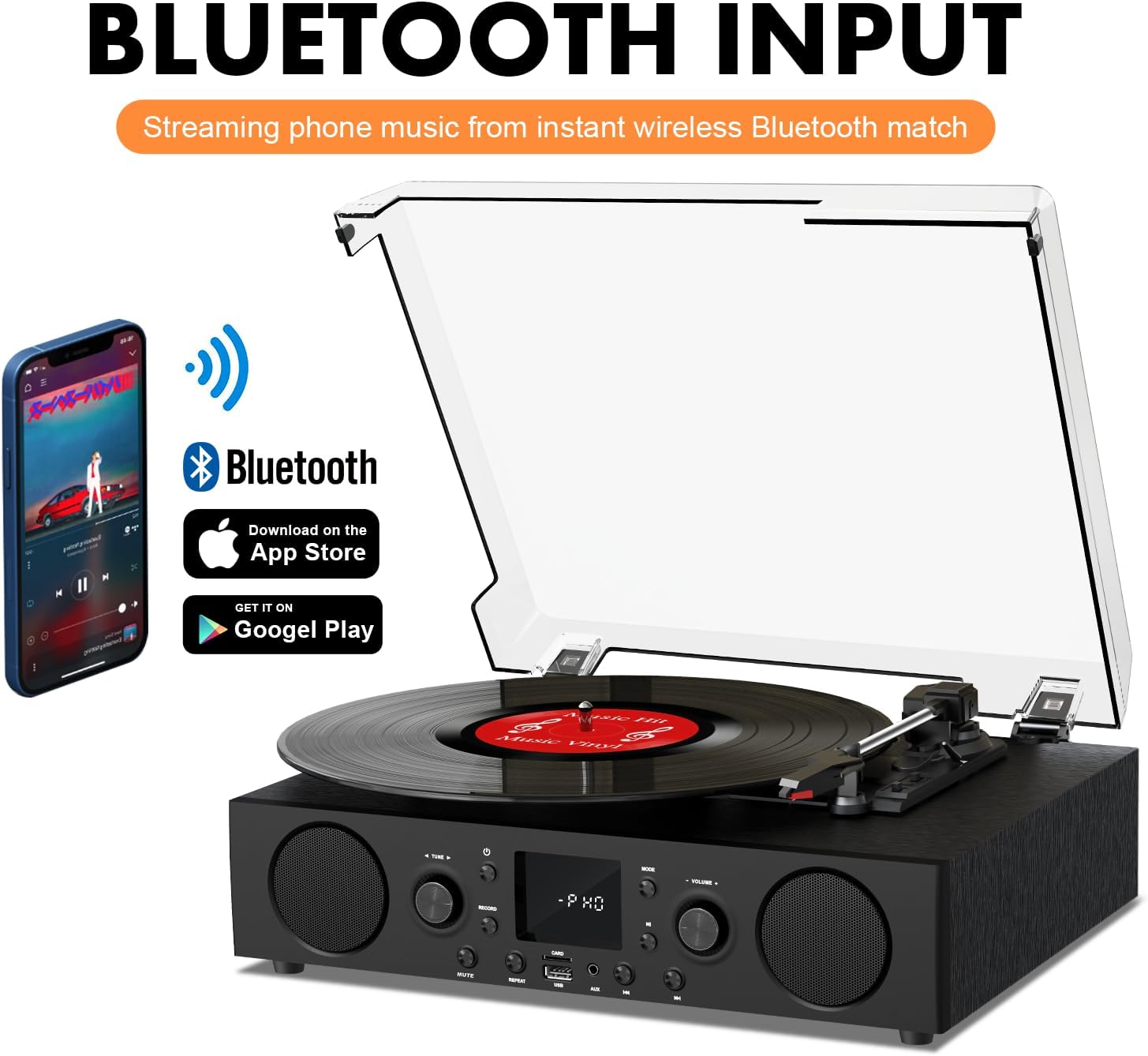
Figure 6.2: Connecting a smartphone via Bluetooth to the turntable.
- -ро пахш кунед Режим button until "Bluetooth" or a similar indicator appears on the LED display. The unit will enter pairing mode.
- Дар смартфон, планшет ё компютери худ Bluetooth-ро фаъол созед ва дастгоҳҳои дастрасро ҷустуҷӯ кунед.
- Select "DANFI AUDIO DF TE-103" (or similar name) from the list of devices to pair.
- Once paired, you can stream audio wirelessly from your device to the record player.
- Шарҳ: This turntable supports Bluetooth input only and cannot transmit audio to Bluetooth headphones or speakers.
6.3 USB/SD Input and MP3 Encoding

Figure 6.3: Vinyl to MP3 encoding process using a USB flash drive.
- Бозии USB/SD: Insert a USB flash drive or SD card into the respective port. Press the Режим button to select USB/SD mode. The unit will automatically play compatible audio files.
- Vinyl to MP3 Encoding:
- Insert a USB flash drive or SD card into the port.
- Start playing a vinyl record.
- -ро пахш кунед Сабт кардан button. The LED display will indicate recording is in progress.
- -ро пахш кунед Сабт кардан button again to stop recording. The recorded audio will be saved as an MP3/WAV file on the USB drive/SD card.
6.4 Радиои FM
- -ро пахш кунед Режим button to select FM Radio mode. The current frequency will appear on the LED display.
- Use the tuning controls (often the Skip/Search buttons) to scan for radio stations.
- The unit can store approximately 20 stations.
6.5 RCA Line Out and AUX Input

Figure 6.4: Connecting to external speakers using RCA Line Out.
- Хати баромади RCA: Connect RCA cables from the rear of the record player to the audio input of an external amplifier or powered speakers. This allows for boosted volume and playback through a larger sound system. The turntable's internal speakers will not be muted automatically when using RCA output.
- Вуруди AUX: Connect an external audio source (e.g., MP3 player, smartphone) to the 3.5mm AUX IN port on the front panel using an audio cable. Press the Режим тугмаро пахш кунед, то режими AUX-ро интихоб кунед, то аудиоро аз дастгоҳи пайвастшуда навозед.
6.6 Эквалайзер (EQ)

Figure 6.5: Available equalizer presets for audio customization.
-ро пахш кунед EQ button to cycle through the available sound equalizer presets: Jazz, Pop, Classical, Rock, and Vocal. Select the preset that best suits your audio preference.
7. Нигоҳдорӣ
- Тозакунӣ: Барои тоза кардани беруни дастгоҳ аз матои нарм ва хушк истифода баред. Барои рӯйпӯши чанг, аз матои каме тар истифода баред.amp матоъро бишӯед ва сипас хуб хушк кунед. Аз тозакунандаҳои абразивӣ худдорӣ кунед.
- Нигоҳубини стилус: Periodically check the stylus (needle) for wear or damage. A worn stylus can damage records and degrade sound quality. Replace the stylus with a compatible backup needle when necessary.
- Нигоҳубини сабтҳо: Пластинкаҳои винили худро тоза ва амудӣ дар остинҳояшон нигоҳ доред, то аз ҷамъшавии чанг ва каҷшавӣ пешгирӣ кунед.
8. Баррасии мушкилот
| Мушкилот | Сабаби эҳтимолӣ | Ҳалли |
|---|---|---|
| Не қудрат | Сими барқ пайваст нашудааст; Васлаки барқ фаъол нест | Боварӣ ҳосил кунед, ки сими барқ ба таври бехатар пайваст карда шудааст; Санҷиши розетка бо дастгоҳи дигар |
| Садо нест | Volume too low; Incorrect mode selected; External speakers not connected/powered | Increase volume; Press Mode button to select correct source; Check RCA connections and external speaker power |
| Табдилдиҳанда чарх намезанад | Unit not powered on; Tonearm not moved over record | Ensure power is on; Gently move tonearm over the record to activate platter |
| Bluetooth пайваст нест | Not in Bluetooth mode; Device too far; Already paired with another device | Select Bluetooth mode; Move device closer; Disconnect from other devices and try pairing again |
| Poor sound quality from vinyl | Dirty record; Worn stylus; Incorrect speed selected | Clean record; Replace stylus; Select correct RPM speed |
9. Мушаххасоти
| Хусусият | Тафсилот |
|---|---|
| Номи модел | TE-103 нест |
| Бренд | DANFI AUDIO DF |
| Андозаҳои маҳсулот | 14.37 x 10.82 x 5.28 инч |
| Вазни ашё | 6.2 фунт |
| Материал | Acrylic, Engineered Wood |
| Суръатҳои гардишгарӣ | 33 1/3, 45, 78 чархзанӣ |
| Компонентҳои дохилшуда | Power unit, 45 rpm adaptor, Slipmat, Backup needle |
| Хусусиятҳои махсус | Equalizer (EQ), FM Radio, USB Input, USB/SD Card Recording, Bluetooth Input |
| Пайвастшавӣ | Bluetooth (Input only), USB, SD Card, AUX Input, RCA Line Out |
| Дастгоҳҳои мувофиқ | Headphones, MP3 Players, Personal Computers, Smartphones, Speakers, Tablets |
| Истеъмоли қувваи барқ (режими фаъол) | 5 ватт |
10. Кафолат ва дастгирӣ
For warranty information or technical support, please refer to the documentation provided with your purchase or contact DANFI AUDIO DF customer service through their official channels. Keep your purchase receipt as proof of purchase for warranty claims.


