Муқаддима
Ташаккур ба шумо барои харидasing the S.M.S.L H400 Headphone Ampliifier & Preamplifier. This manual provides essential information for the proper setup, operation, and maintenance of your device. Please read it thoroughly before use to ensure optimal performance and longevity.
Дар қуттӣ чӣ ҳаст
- Гӯшмонаки SMSL H400 Ampliifier & Preampбаландкунанда x 1
- Идоракунии дурдаст x 1
- Сими барқ х 1
- Дастури корбар x 1
- Brand Card x 1
Маҳсулот ба охир расидview
Панели пеши
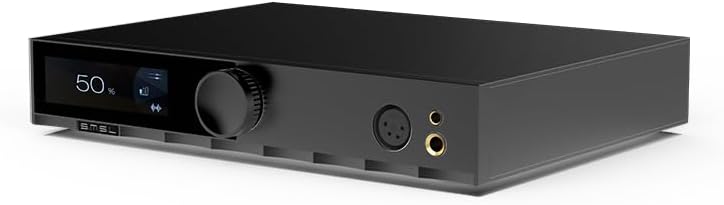
Тасвир: Пеш view of the S.M.S.L H400 Headphone Amplifier. The front panel features a digital display on the left, a large rotary volume knob in the center, and two headphone output jacks (one 4-pin XLR balanced, one 6.35mm unbalanced) on the right.
- Экрани намоиш: Shows current volume level, input source, and other operational information.
- Тугмаи баландии овоз: Controls the output volume. Can also be pressed to access menu options.
- Натиҷаҳои гӯшмонак: Includes a balanced 4-pin XLR output and an unbalanced 6.35mm (1/4 inch) output for connecting headphones.
Панели пушти

Тасвир: Қафо view of the S.M.S.L H400 Headphone Amplifier. From left to right, it features balanced XLR inputs, unbalanced RCA inputs, balanced XLR pre-outputs, unbalanced RCA pre-outputs, a USB-C update port, a ground switch (Floating/Grounded), and the AC power inlet with an integrated power switch.
- Balanced Inputs (XLR): For connecting balanced audio sources.
- Unbalanced Inputs (RCA): For connecting unbalanced audio sources.
- Balanced Pre-Outputs (XLR): Барои пайвастшавӣ ба қувваи беруна ampлиферҳо ё баромадкунандагон фаъол.
- Unbalanced Pre-Outputs (RCA): Барои пайвастшавӣ ба қувваи беруна ampлиферҳо ё баромадкунандагон фаъол.
- UPDATE Port (USB-C): Барои навсозии нармафзор.
- Калиди замин: Selects between Floating and Grounded modes to manage ground loops.
- Воридоти барқи AC: Connects the included power cable.
- Калиди барқ: Дастгоҳро фурӯзон ё хомӯш мекунад.
Ташкил кардан
- Ҷойгиршавӣ: Place the H400 on a stable, flat surface, ensuring adequate ventilation around the unit. Avoid placing it near heat sources or in direct sunlight.
- Пайваст кардани манбаъҳои аудио:
- For balanced sources, connect XLR cables from your source to the H400's Вурудҳои мутавозин (XLR).
- For unbalanced sources, connect RCA cables from your source to the H400's Unbalanced Inputs (RCA).
- Пайваст кардани гӯшмонакҳо: Plug your headphones into either the Balanced 4-pin XLR or Unbalanced 6.35mm headphone output on the front panel.
- Ба барқ пайваст шавед Ampбаландкунанда (ихтиёрӣ): If using the H400 as a preampбардоред, пайваст кунед Balanced Pre-Outputs (XLR) or Unbalanced Pre-Outputs (RCA) ба қудрати шумо ampбаландгӯяк ё баландгӯякҳои фаъол.
- Пайвасти барқ: Connect the included power cable to the Вуруди барқ on the rear panel, then plug the other end into a suitable AC power outlet (100-240V).
- Фаъол: гардонед Калиди барқ on the rear panel to the 'ON' position. The unit will power on, and the display will illuminate.
Дастурҳои амалиётӣ
Амалиёти асосӣ
- Фаъол / Хомӯш: Use the rear panel switch for main power. The remote control can put the unit into standby.
- Назорати овоз: ро гардиш кунед Ҳаҷми тугма on the front panel or use the volume buttons on the remote control to adjust the output level.
- Интихоби вуруд: -ро пахш кунед Ҳаҷми тугма briefly to cycle through available input sources (Balanced, Unbalanced). Alternatively, use the input selection buttons on the remote.
- Танзимоти фоида: The H400 offers High, Medium, and Low gain settings. These can be adjusted via the menu system, typically accessed by pressing and holding the volume knob or a dedicated button on the remote.
- Balanced Gain: Low (-5.8dB), Medium (6dB), High (20.4dB)
- Unbalanced Gain: Low (-11.8dB), Medium (0dB), High (14.4dB)
Назорати дурдаст
The included remote control provides convenient access to all functions, including power, volume, input selection, and menu navigation. Ensure the remote has fresh batteries and an unobstructed line of sight to the H400's front panel sensor.
Нигоҳдорӣ
- Тозакунӣ: Барои тоза кардани берунии дастгоҳ матои мулоим ва хушкро истифода баред. Моеъҳои тозакунанда ё ҳалкунандаҳоро истифода набаред.
- Вентилятсия: Боварӣ ҳосил кунед, ки сӯрохиҳои вентилятсия баста нашудаанд, то аз ҳад зиёд гармшавиро пешгирӣ кунанд.
- Хомӯш: Always power off the unit using the rear switch when not in use for extended periods.
Мушкилкушо
| Мушкилот | Сабаби эҳтимолӣ | Ҳалли |
|---|---|---|
| Не қудрат | Power cable not connected; Rear power switch off; Power outlet faulty. | Check power cable connection; Ensure rear power switch is ON; Try a different power outlet. |
| Баромади садо нест | Incorrect input selected; Volume too low; Headphones not connected properly; Source device not playing. | Select correct input; Increase volume; Reconnect headphones; Verify source device is playing audio. |
| Овози вайроншуда | Input signal too high; Gain setting too high; Faulty cables. | Reduce source volume; Adjust H400 gain setting; Check and replace cables if necessary. |
| Правленияи дурдаст кор намекунад | Batteries depleted; Obstruction between remote and unit; Remote sensor blocked. | Replace batteries; Remove obstructions; Ensure clear line of sight to the unit's front panel. |
Мушаххасоти
| Параметр | Арзиш |
|---|---|
| Пешamp Усули баромад | Мувозинат, мутавозин |
| Output Power (16Ω) | 15W x 2 |
| Output Power (32Ω) | 7.5W x 2 |
| Output Power (300Ω) | 1000 мВт х 2 |
| Output Power (600Ω) | 550 мВт х 2 |
| SNR | 133дБ |
| Диапазони динамикӣ | 133дБ |
| THD+N | -123dB, 0.00006% (1kHz, 32Ω) |
| Импеданси вуруд | 47кΩ |
| Импеданси баромади гӯшмонак | Approximately 0Ω |
| Пешamp Импеданси баромад (мувозинат) | 44 Ом |
| Пешamp Output Impedance (Unbalanced) | 22 Ом |
| Ҷавоби басомад | 20Гц-100кГц (-0.5дБ) |
| Gain (Balanced) | Low (-5.8dB), Medium (6dB), High (20.4dB) |
| Gain (Unbalanced) | Low (-11.8dB), Medium (0dB), High (14.4dB) |
| Consumption (EN60065) | <50 Вт |
| Истеъмоли барқ дар ҳолати интизорӣ | <0.5 Вт |
| Андозаҳо (WxHxD) | 254х46х189мм |
| Вазн | 2.03кг / 4.47лб |
Кафолат ва дастгирӣ
For warranty information and technical support, please refer to the documentation provided with your purchase or visit the official S.M.S.L webсайт. Барои даъвоҳои кафолат далели хариди худро нигоҳ доред.


