1. Муқаддима
This manual provides detailed instructions for the safe and effective operation of your VAR TECH V92S Smart Digital Multimeter. The V92S is a True RMS, fully auto-ranging digital multimeter designed for precise measurements across various electrical parameters. Please read this manual thoroughly before use and retain it for future reference.
2. Маълумот оид ба бехатарӣ
Always adhere to basic safety precautions when using this multimeter to prevent personal injury or damage to the instrument. Improper use can result in electric shock or fire.
- Аз ҳадди аксар арзишҳои вурудии муайяншуда барои ҳар як функсия зиёд накунед.
- Ensure test leads are properly connected and in good condition before making measurements.
- Do not use the multimeter if it appears damaged or if the battery cover is not securely closed.
- Ҳангоми кор бо ҷилди хеле эҳтиёткор бошедtagаз 60V DC ё 30V AC RMS баландтар аст, зеро онҳо хатари зарба доранд.
- Пеш аз чен кардани муқовимат, иқтидор ё пайвастагӣ, ҳамеша барқро ба занҷири зери озмоиш ҷудо кунед.
- Вақте ки нишондиҳандаи камии батарея пайдо мешавад, батареяҳоро фавран иваз кунед, то ки хониши дақиқро таъмин кунад.
- Do not operate the multimeter in explosive atmospheres or near flammable materials.
3. Хусусиятҳои асосӣ
The VAR TECH V92S Smart Digital Multimeter offers a range of advanced features for comprehensive electrical testing:
- Smart Digital Multimeter with Auto Detection TRMS (True Root Mean Square)
- 600 V AC/DC & 10 A AC/DC measurement capabilities
- 6000 Counts HD Display with Primary & Secondary display and Analog bar graph
- Capacitance Test: 6 nF to 60 mF
- Frequency Test: 6 Hz to 10 MHz
- Temperature Test: -40 ºC to 1000 ºC
- Diode & Continuity Test
- NCV (Ҷилди бе тамос)tage) test for live wire detection
- Integrated Torch for illumination in dark environments
- Функсияи хомӯшкунии худкор барои сарфаи мӯҳлати батарея
- Функсияи нигоҳ доштани маълумот барои ях кардани хондан дар экран
- Нишондиҳандаи батареяи кам
- Jack Prompt for correct test lead insertion
- Burnt Fuse Prompt for safety and easy maintenance
- Resistance measurement: 600 Ω to 60 MΩ

Расми 3.1: Пеш view of the VAR TECH V92S Smart Digital Multimeter, showcasing тугмаҳои намоиш ва идоракунии он.

Figure 3.2: The VAR TECH V92S Multimeter held in hand, illustrating its compact and ergonomic design.
4. Қисмҳои маҳсулот
The VAR TECH V92S Smart Digital Multimeter package includes the following items:
- VAR TECH V92S Digital Multimeter
- Рақамҳои санҷишӣ (сурх ва сиёҳ)
- Дастури таълимӣ (ин ҳуҷҷат)
- Халтаи интиқол
- 4 батареяи AAA (қаблан насбшуда ё алоҳида дохил карда шудааст)

Figure 4.1: Contents of the VAR TECH V92S package, including the multimeter, test leads, manual, and carrying pouch.
5. Танзимот
5.1. Насби батарея
The VAR TECH V92S requires 4 AAA batteries for operation. If batteries are not pre-installed, or if replacement is needed:
- Боварӣ ҳосил кунед, ки мултиметр хомӯш аст.
- Қисмати батареяро дар қафои дастгоҳ ҷойгир кунед.
- Барои кушодани сарпӯши қисмати батарея бо мурваттобак истифода баред.
- Insert 4 AAA batteries, observing the correct polarity (+/-) as indicated inside the compartment.
- Сарпӯши қуттии батареяро ба таври бехатар пӯшед.
5.2. Пайваст кардани рахҳои санҷишӣ
Пайваст кардани дурусти симҳои санҷишӣ барои андозагирии дақиқ ва бехатар муҳим аст.
- Insert the black test lead into the “COM” (Common) jack.
- Барои аксари ҳаҷмҳоtage, resistance, continuity, capacitance, frequency, and temperature measurements, insert the red test lead into the “INPUT” jack.
- For current measurements (mA/A), insert the red test lead into the “mA/A” jack.

Figure 5.1: The input jack prompt light feature. When turning on or changing ranges, the corresponding input socket light flashes to indicate where to insert the probe.
6. Дастурҳои истифодабарӣ
6.1. Фаъол/хомӯш
-ро пахш кунед Қувва button (red circle with line) to turn the multimeter on or off.
6.2. Интихоби функсия
The V92S features an auto-ranging function, automatically detecting the measurement type in “SMART” mode. For specific functions, use the СЕЛ ва Функсия тугмаҳо:
- SEL (Select) Button: Used to switch between different measurement types within a primary mode (e.g., AC Voltage ва DC Voltage, or Diode and Continuity).
- FUNC (Function) Buttons: Used to directly select specific measurement functions like Capacitance, Frequency, or Temperature.
6.3. Усулҳои андозагирӣ
Ensure test leads are correctly inserted for the desired measurement.
6.3.1. ҷtage андозагирӣ (AC/DC)
- Insert the red lead into the “INPUT” jack and the black lead into the “COM” jack.
- Turn on the multimeter. It will typically default to auto-ranging voltage андозагирӣ.
- Агар лозим бошад, пахш кунед СЕЛ to switch between AC and DC voltage.
- Зондҳои санҷиширо ба таври мувозӣ ба схема ё ҷузъи ченшаванда пайваст кунед.
6.3.2. Current Measurement (AC/DC)
- Insert the red lead into the “mA/A” jack and the black lead into the “COM” jack.
- Turn on the multimeter. The device automatically enters the current measurement function when the probe is inserted into the mA/A socket.
- Агар лозим бошад, пахш кунед СЕЛ to switch between AC and DC current.
- Санҷишҳои санҷиширо бо схемаи ченшаванда пайваста пайваст кунед.
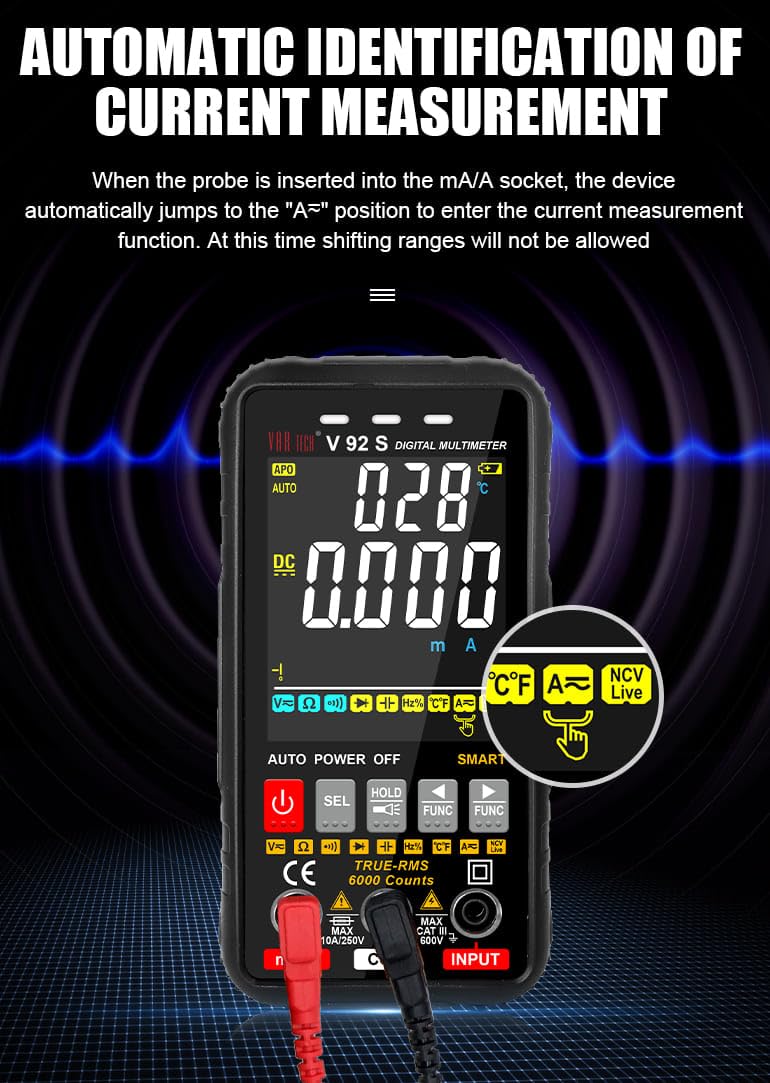
Figure 6.1: Automatic identification of current measurement. The multimeter automatically adjusts to the current measurement function when the probe is inserted into the mA/A socket.
6.3.3. Resistance, Capacitance, Frequency, Temperature, Diode, Continuity
For these measurements, ensure the red lead is in the “INPUT” jack and the black lead in the “COM” jack. Use the СЕЛ or Функсия buttons to select the desired mode. Connect probes to the component or circuit as appropriate for each measurement type.
6.3.4. NCV (Никонтакт ҷилдиtagд) Санҷиш
Функсияи NCV имкон медиҳад, ки ҳаҷми AC муайян карда шавадtagбе тамос бо ноқилҳо.
- Select the NCV function using the appropriate button.
- Bring the top of the multimeter near the conductor or outlet.
- The instrument will emit an audible beep and the alarm indicator light will illuminate when AC signals are detected. A “-H” display indicates a strong signal, while “-L” indicates a weak signal.

Figure 6.2: Auditory and visual alarm during NCV (Non-Contact Voltage) testing, indicating the presence of AC voltage.
6.4. Функсияи нигоҳдории маълумот
-ро пахш кунед ДОРЕД тугмаро барои қатъ кардани хониши ҷорӣ дар дисплей пахш кунед. Барои раҳо кардани функсияи нигоҳдорӣ онро дубора пахш кунед.
6.5. Функсияи дурахш
The multimeter includes a built-in flashlight for illuminating work areas. Activate the flashlight using the designated button (often integrated with the HOLD button or a separate light icon). Press again to turn it off.

Figure 6.3: The integrated flashlight function, useful for working in dimly lit environments.
7. Нигоҳдорӣ
7.1. Тозакунӣ
Ҳолатро бо таблиғ тоза кунедamp cloth and mild detergent. Do not use abrasives or solvents. Ensure the multimeter is powered off and disconnected from all circuits before cleaning.
7.2. Иваз кардани батарея
When the low battery indicator appears on the display, replace the batteries as described in Section 5.1.
7.3. Иваз кардани сӯзишворӣ
The V92S features an intelligent anti-burn function with a built-in safety fuse to protect the circuit. If the safety fuse burns out, the display screen will show a “FUSE” symbol to prompt replacement.
- Ensure the multimeter is powered off and all test leads are disconnected.
- Сарпӯши қисмати батареяро дар қафои дастгоҳ кушоед.
- Carefully locate and remove the blown fuse.
- Replace it with a fuse of the same type and rating (refer to specifications for fuse type).
- Сарпӯши қуттии батареяро ба таври бехатар пӯшед.

Figure 7.1: The intelligent anti-burn function prompt, indicating the location of the fuse for replacement.
8. Баррасии мушкилот
If you encounter issues with your VAR TECH V92S, refer to the following common problems and solutions:
- Намоиши: Ҷойгиркунии батареяро тафтиш кунед ва боварӣ ҳосил кунед, ки батареяҳо тамом нашудаанд. Агар лозим бошад, иваз кунед.
- Хониши нодуруст: Verify test lead connections. Ensure the correct measurement function is selected. Check if the fuse is intact for current measurements.
- “OL” or Overload Indication: The measured value exceeds the range of the selected function. Select a higher range if available, or ensure the input is within the multimeter’s capabilities.
- “FUSE” Display: The fuse has blown. Refer to Section 7.3 for fuse replacement.
If the problem persists, contact VAR TECH customer support for assistance.
9. Мушаххасоти техникӣ
| Параметр | Мушаххасоти |
|---|---|
| Модели | V92S |
| Намоиш | 6000 Counts HD Display |
| RMS ҳақиқӣ | Бале |
| Ҷилди DCtage | То 600 В |
| Ҷилди ACtage | То 600 В |
| Ҷараёни DC | То 10 А |
| Ҷараёни тағирёбанда | То 10 А |
| Муқовимат | 600 Ω to 60 MΩ |
| Иқтидори иқтидор | 6 нФ то 60 мФ |
| Басомад | 6 Гц то 10 МГс |
| Ҳарорат | -40 ºC то 1000 ºC |
| Санҷиши давомнокӣ | Бале |
| Санҷиши диод | Бале |
| NCV (Ҷилди бе тамос)tage) | Бале |
| Манбаи нерӯ | 4 батареяи AAA (дохил) |
| Вазни ашё | 300 гр |
| Андозаҳои маҳсулот (L x W x H) | 14 х 7 х 5 см |
| Рейтинги бехатарӣ | CAT III 600В |
| Сертификатсияҳо | CE, ISO 9001 |

Figure 9.1: A comparison table illustrating the features of various VAR TECH multimeter models, including the V92S.
10. Кафолат ва дастгирӣ
The VAR TECH V92S Smart Digital Multimeter comes with a 1-year warranty against manufacturing defects. For warranty claims or technical support, please contact VAR TECH directly.
Manufacturer: V A R TECH, www.var-tech.com


