1. Муқаддима
This manual provides comprehensive instructions for the safe and efficient use of your Motorola MOTOTRBO XPR 3500e UHF Intrinsically Safe Wi-Fi Radio. Please read this manual thoroughly before operating the device to ensure optimal performance and safety.
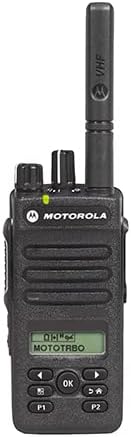
Расми 1: Пеш view of the Motorola MOTOTRBO XPR 3500e radio, showing its display, keypad, and antenna.
Хусусиятҳои асосӣ
- Digital and Analog Transmissions
- 128 Иқтидори канал
- Display and Limited Keypad for intuitive control
- UHF Bands for enhanced communication
- 4 Watts (UHF) Power Output
- Battery Life: Up to 19 hours (standard) and 26 hours (high-capacity battery)
- Integrated Bluetooth 4.0 (up to 33 feet range)
- UL Approved Intrinsically Safe design
- IP67 Waterproof and Dust-proof rating
- 4 Programmable Buttons for customized functions
- Integrated Wi-Fi for advanced features
2. Танзимот
2.1 Кушодани баста
Ҳама ҷузъҳоро аз бастабандӣ бодиққат хориҷ кунед. Боварӣ ҳосил кунед, ки ашёҳои зерин мавҷуданд:
- Motorola MOTOTRBO XPR 3500e Radio
- Батарея
- Антенна
- Пуркунандаи барқ
- Belt Clip (if included)
- Ҳуҷҷатҳо (ин дастур)
2.2 Насби батарея
Барои насб кардани батарея:
- Батареяро бо қисмати батарея дар қафои радио мувофиқ кунед.
- Батареяро ба ҷои худ лағжонед, то он даме, ки он бехатар клик кунад.
- Ensure the battery latch is fully engaged to prevent accidental detachment.
Video 1: Unboxing and initial inspection of a Motorola radio battery, showing its physical characteristics and connection points.
Видео 2: Намоишasing the PMNN4409AR replacement battery, detailing its features and compatibility with Motorola radios.
2.3 Замимаи антенна
Антеннаро бо ақрабаки соат ба васлкунаки болои радио то он даме ки бо ангушт маҳкам бошад, буред. Аз ҳад зиёд сахт накунед.
2.4 Пур кардани батарея
Place the radio with the installed battery into the charging tray. Ensure the charging contacts on the radio align with those on the charger. The charging indicator light will illuminate to confirm charging is in progress. A full charge typically takes several hours.
3. Амалиёт
3.1 Идоракунии асосӣ
Familiarize yourself with the radio's controls:
- Тугмаи барқ/ҳаҷм: Located on the top, turn clockwise to power on and increase volume, counter-clockwise to decrease volume and power off.
- Тугмаи интихоби канал: Located on the top, rotate to select desired communication channels.
- Тугмаи пахш ба гуфтугӯ (PTT): Located on the side, press and hold to transmit, release to listen.
- Programmable Buttons (P1, P2): Located on the front, these can be customized for various functions via programming software.
- Тугмаҳои паймоиш: Used to navigate menus on the display.
3.2 Фурӯзон/хомӯш кардан
To power on the radio, rotate the Power/Volume knob clockwise until you hear a click. To power off, rotate it counter-clockwise until it clicks.
3.3 Интихоби канал
Rotate the Channel Selector knob to choose from the available 128 channels. The selected channel number will be shown on the radio's display. Some Motorola radios feature voice announcements for battery level and channel selection, which can be helpful in low-light conditions or when the display is not easily visible.
Video 3: An informational video from Motorola Solutions highlighting features like voice announcement, channel alias, and NOAA weather alerts, applicable to various Motorola business radios including the XPR 3500e series.
3.4 Танзими садо
Adjust the volume by rotating the Power/Volume knob. Turn clockwise to increase volume and counter-clockwise to decrease it.
3.5 Интиқол ва қабул
To transmit, press and hold the PTT button, speak clearly into the microphone, and then release the button to listen for a response. Ensure the channel is clear before transmitting.
3.6 Тугмаҳои барномарезишаванда
The P1 and P2 buttons can be programmed for quick access to frequently used functions such as scan, monitor, or emergency alerts. Refer to the radio's programming software for customization options.
3.7 Wi-Fi and Bluetooth Connectivity
The XPR 3500e features integrated Wi-Fi and Bluetooth 4.0 for enhanced connectivity. Wi-Fi can be used for firmware updates and data applications, while Bluetooth allows for wireless accessories like headsets. Consult the radio's programming guide for detailed setup of these features.
3.8 Огоҳии обу ҳавои NOAA
The radio supports NOAA Weather Alerts, providing automatic notifications for severe weather conditions. This feature helps ensure preparedness for unexpected weather events. This functionality is typically available in US models with a channel selector knob.
4. Нигоҳдорӣ
4.1 Тозакунӣ
Беруни радиоро бо нарм тоза кунед, гamp cloth. Do not use harsh chemicals or abrasive cleaners. Ensure all ports and covers are sealed before cleaning to maintain its IP67 rating.
4.2 Нигоҳубин ва нигоҳдории батарея
To prolong battery life, avoid fully discharging the battery frequently. Store the battery in a cool, dry place when not in use. Do not expose the battery to extreme temperatures or direct sunlight.
5. Баррасии мушкилот
- Радио фаъол нест: Ensure the battery is correctly installed and charged. Check the power/volume knob position.
- Интиқол ё қабул карда наметавонад: Verify that the radio is on the correct channel and within range of other radios. Check antenna connection.
- Сифати аудиои паст: Adjust the volume. Ensure the microphone and speaker are not obstructed. Check for interference.
- Батарея пур намешавад: Ensure the charger is properly connected to a power source and the radio is correctly seated in the charging tray.
For further assistance, refer to the support section or contact Motorola Solutions customer service.
6. Мушаххасоти
| Хусусият | Тафсилот |
|---|---|
| Рақами модел | XPR3500E |
| Вазни ашё | 2.04 фунт |
| Андозаҳои бастаҳо | 9.57 x 6.14 x 4.53 инч |
| Шумораи каналҳо | 128 |
| Хусусияти махсус | Rechargeable, Intrinsically Safe (UL Rated), Wi-Fi, Bluetooth |
| Диапазони басомад | 400-470 МГс (UHF) |
| Масофаи ҳадди аксар | 33 Feet (Bluetooth range, actual radio range varies by terrain) |
| Ҷилдиtage | 7.4 Вольт (ДС) |
| Сатҳи муқовимат ба об | IP67 Waterproof and Dust-proof |
| Компонентҳои дохилшуда | Пуркунандаи барқ |
| Дастгоҳҳои мувофиқ | Wi-Fi enabled devices, Bluetooth compatible devices, other Motorola Solutions two-way radios, compatible charging devices, and devices operating in the 400-470 MHz frequency range |
| Муҳлати батарея | 19 Hours (standard), up to 26 hours (high-capacity) |
7. Маълумот дар бораи кафолат
This product comes with a 1-year manufacturer's warranty. For detailed terms and conditions, please refer to the warranty card included with your product or visit the official Motorola Solutions webсайт.
8. Дастгирӣ
For additional support, frequently asked questions, or to purchase accessories, please visit the official Motorola Solutions Store:


