1. Муқаддима
Thank you for choosing the Inateck Bluetooth Keyboard KB01104. This ultra-thin keyboard features an integrated touchpad, multi-device Bluetooth connectivity, and support for various operating systems including Windows, iPad OS, Android, and iOS. It also incorporates an AI function and is compatible with the Inateck Origin application for enhanced functionality. This manual provides detailed instructions for setup, operation, and maintenance to ensure optimal performance.
2. Мундариҷаи баста
- Inateck Bluetooth Keyboard KB01104
- Сими пуркунандаи USB
- Дастури корбар (ин ҳуҷҷат)
3. Маҳсулот ба охир расидview
The Inateck KB01104 keyboard is designed for portability and versatility. It features a QWERTZ layout, a large touchpad, and backlit keys. The power switch and Bluetooth indicators are located on the top right side of the keyboard.

Пеш view of the Inateck KB01104 Bluetooth Keyboard, showing the QWERTZ layout, integrated touchpad, and backlit keys.
4. Дастурамал оид ба насб
4.1. Пуркунии клавиатура
Before first use, fully charge the keyboard using the provided USB charging cable. Connect the cable to the keyboard's charging port and a standard USB power source. The charging indicator light will show the charging status.
4.2. Фаъол/хомӯш
Locate the power switch on the top right side of the keyboard. Slide the switch to the 'ON' position to power on the keyboard. Slide it to 'OFF' to power it down.
4.3. Ҷуфти Bluetooth
The KB01104 supports up to three Bluetooth connections, allowing seamless switching between devices.
- Клавиатураро фаъол созед.
- -ро пахш карда нигоҳ доред Fn тугма ва яке аз тугмаҳои канали Bluetooth (1, 2, ё 3) for 3-5 seconds until the corresponding Bluetooth indicator light flashes rapidly. This indicates the keyboard is in pairing mode.
- On your device (tablet, smartphone, computer), go to Bluetooth settings and search for available devices.
- Select "Inateck KB01104" from the list of found devices to connect.
- Пас аз пайвастшавӣ, чароғи нишондиҳанда пеш аз хомӯш шудан милт-милт карданро қатъ мекунад ва барои чанд сония устувор мемонад.
- Repeat these steps for up to two additional devices using the remaining Bluetooth channels.

Diagram illustrating the Inateck KB01104 Bluetooth Keyboard connecting to a tablet, iPhone, PC, and laptop via its three Bluetooth channels.
5. Дастурҳои истифодабарӣ
5.1. Гузариш байни дастгоҳҳои пайвастшуда
Барои гузаштан байни дастгоҳҳои ҷуфтшуда, танҳо тугмаро пахш кунед Fn тугмаро якҷоя бо тугмаи мувофиқи канали Bluetooth (1, 2, ё 3) that your desired device is paired to. The keyboard will automatically connect to the selected device.
5.2. Истифодаи сенсорӣ
The integrated touchpad provides precise navigation and supports multi-touch gestures. It features an anti-error contact function to prevent accidental inputs.
- Бо як ангуштзанӣ: Тугмаи чапро пахш кунед.
- Ду ангушт занед: Тугмаи ростро пахш кунед.
- Ҳаракати ду ангушт: Ба боло ё поён ҳаракат кунед.
- Чимч кардан барои калон кардан: Zoom in or out (supported on compatible operating systems).

Image showing a hand interacting with the large touchpad of the Inateck KB01104 keyboard, highlighting palm rejection and multi-touch gesture capabilities.
5.3. Назорати равшанӣ
Клавиатура дорои чароғаки 7-ранга бо 3 сатҳи равшании танзимшаванда мебошад.
- пахш кунед Fn + Light Bulb icon key барои гузариш аз рангҳои рӯшноии пасӣ.
- пахш кунед Fn + Up Arrow key барои баланд бардоштани равшанӣ.
- пахш кунед Fn + Down Arrow key барои кам кардани равшанӣ.
The Inateck KB01104 keyboard displaying its 7-color adjustable backlight feature with three brightness levels, shown alongside a tablet.
5.4. Inateck App and AI Function
The Inateck KB01104 integrates with the Inateck Origin application, offering advanced features such as data transfer and AI capabilities. Ensure the Inateck Origin app is installed on your device for full functionality.
- Activating AI Model: пахш кунед Fn + R to activate the AI model within the Inateck app. This enables features like pop-up translation and AI-powered Q&A.
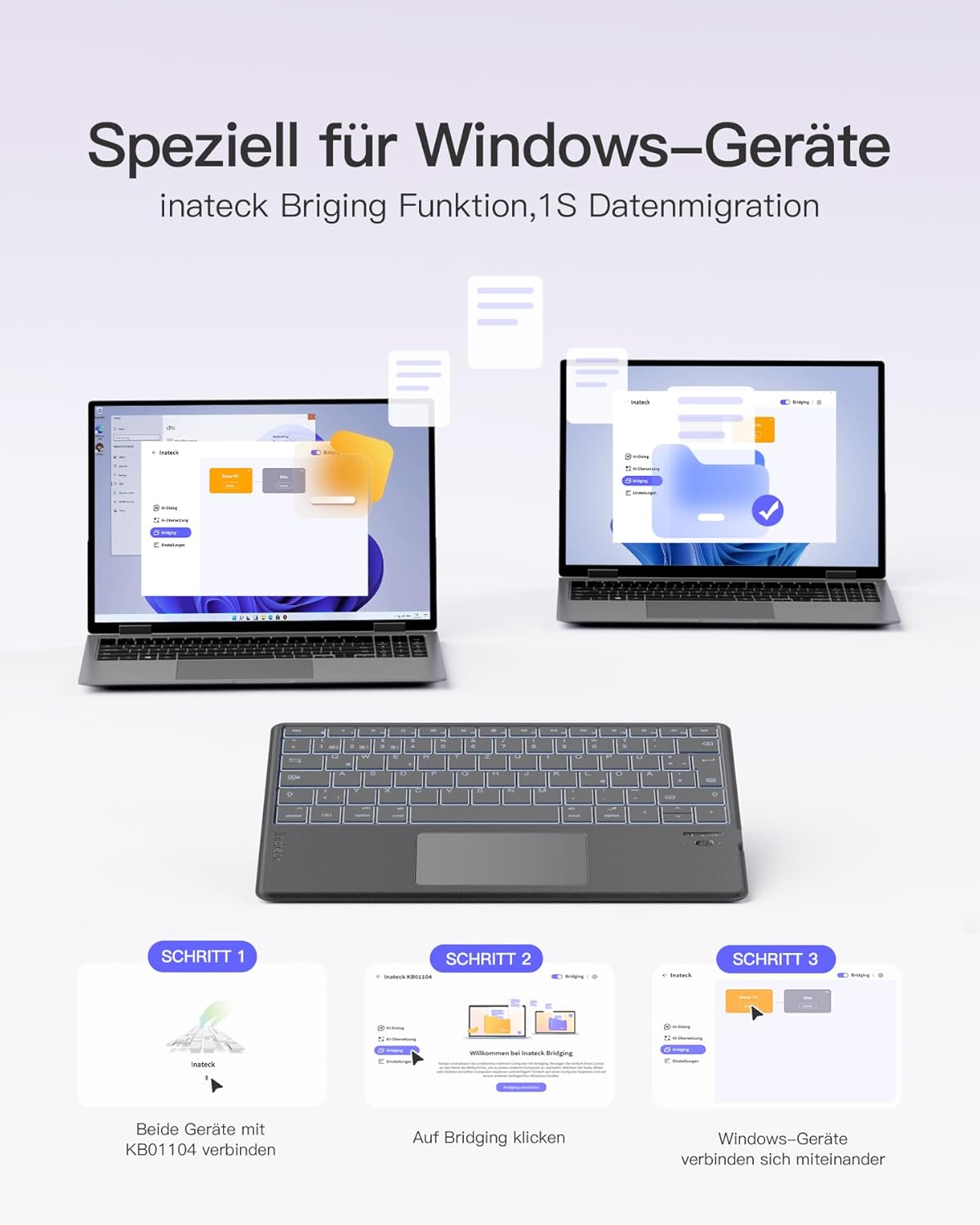
- Data Migration (Windows): The Inateck Bridging function allows for quick data migration between Windows devices. Connect both devices to the KB01104 and use the app to initiate the transfer.

Screenshot of the Inateck Origin app interface on a tablet, demonstrating its features in conjunction with the Inateck KB01104 keyboard.
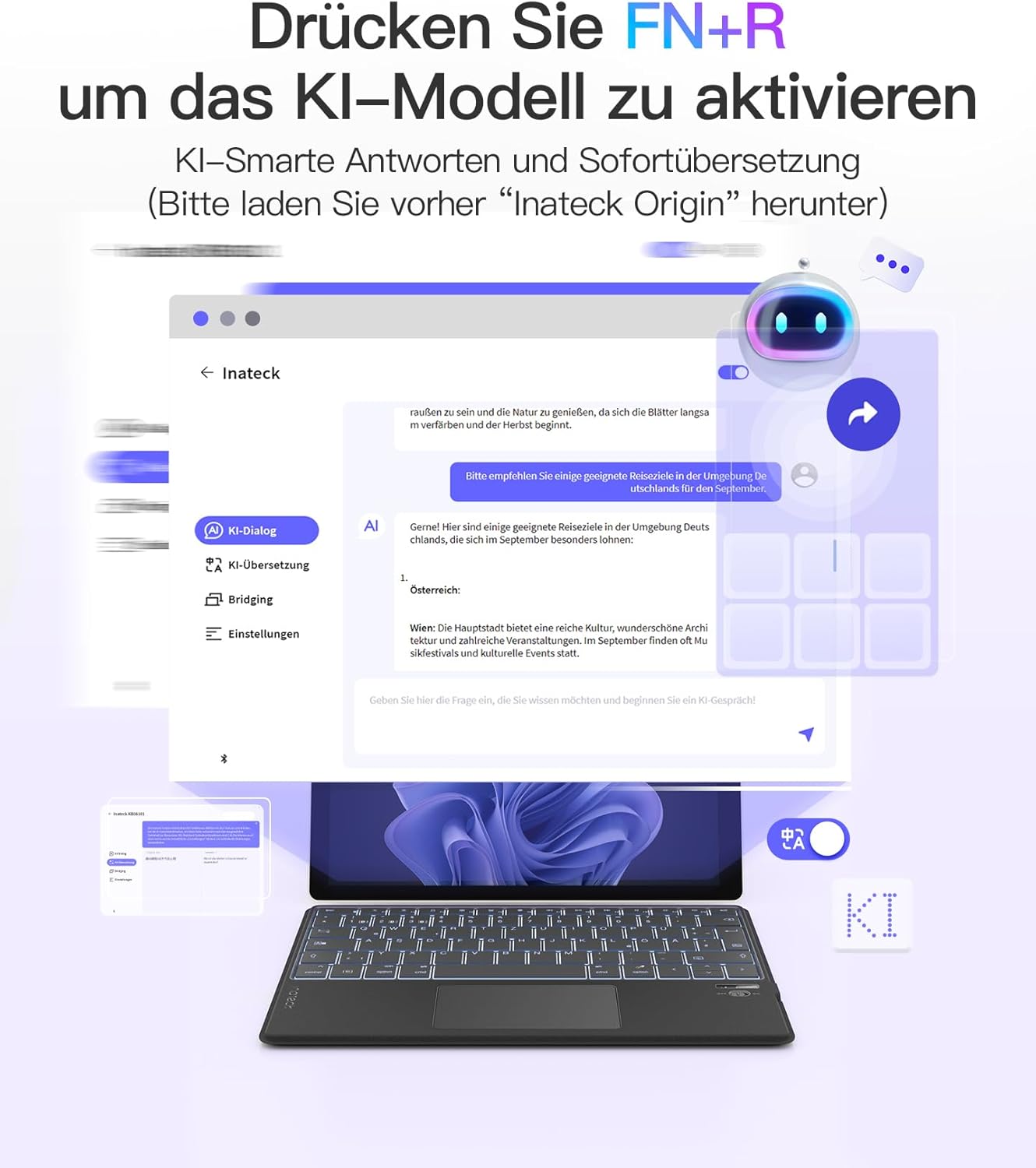
Illustration showing how to activate the AI model function on the Inateck KB01104 keyboard by pressing FN+R, with examples of AI-powered translation and Q&A.

Visual guide demonstrating the Inateck Bridging function for 1-second data migration between Windows devices using the KB01104 keyboard.
5.5. Мутобиқати система
The Inateck KB01104 is compatible with a wide range of operating systems and devices:
- Windows
- iPad OS
- Android
- iOS
- Compatible devices include: iPad 10/9/8, iPad Air, 12.9"/11"/10.5" iPad Pro, iPad Mini 7/6/5.

Icons representing the Inateck KB01104 keyboard's compatibility with Windows, iPad OS, Android, and iOS operating systems.
6. Мушаххасоти
| Бренд | Инатек |
| Рақами модел | KB01104 |
| Технологияи пайвастшавӣ | блутуз |
| Хусусиятҳои махсус | AI Function, Ultra-thin design, 7-color Backlight |
| Дастгоҳҳои мувофиқ | Windows, iPad OS, Android, iOS, iPad 10/9/8, iPad Air, 12.9"/11"/10.5" iPad Pro, iPad Mini 7/6/5 |
| Таркиби батарея | Литий-ион (1 дохил) |
| Тавсифи клавиатура | Фасеҳ |
| Истифодаи тавсияшаванда | Business, Student |
| Компонентҳои дохилшуда | Сими USB |
7. Нигоҳдорӣ
To ensure the longevity and optimal performance of your Inateck KB01104 keyboard, follow these maintenance guidelines:
- Тозакунӣ: Use a soft, dry, lint-free cloth to wipe the keyboard surface and touchpad. For stubborn dirt, slightly dampМатоъро бо об ё маҳлули нарми тозакунанда бишӯед. Аз намӣ аз ҳад зиёд худдорӣ кунед.
- Нигоҳдорӣ: Клавиатураро дар ҷои хунук ва хушк, дур аз нури бевоситаи офтоб ва ҳарорати аз ҳад зиёд нигоҳ доред.
- Аз моеъ худдорӣ кунед: Do not expose the keyboard to liquids, as this can cause damage to internal components.
- Бо эҳтиёт муносибат кунед: The keyboard is ultra-thin; avoid bending or applying excessive force to prevent damage.
8. Баррасии мушкилот
If you encounter issues with your Inateck KB01104 keyboard, refer to the following common solutions:
- Клавиатура пайваст намешавад:
- Боварӣ ҳосил кунед, ки клавиатура фаъол аст ва пурра пур карда шудааст.
- Боварӣ ҳосил кунед, ки Bluetooth дар дастгоҳи шумо фаъол аст.
- Put the keyboard into pairing mode again (Fn + 1/2/3 for 3-5 seconds) and re-attempt pairing from your device's Bluetooth settings.
- Forget the device in your device's Bluetooth settings and try pairing again.
- Ensure your device is within the effective Bluetooth range (typically 10 meters).
- Тугмаҳо ҷавоб намедиҳанд ё нодуруст чоп мекунанд:
- Check if the keyboard is connected to the correct device channel.
- Restart both the keyboard and your connected device.
- Ensure the keyboard's battery is not critically low.
- Сенсори панел кор намекунад:
- Ensure the touchpad is not accidentally disabled (check for a function key combination to toggle it).
- Clean the touchpad surface to remove any dirt or debris.
- Клавиатура ва дастгоҳи худро аз нав фаъол созед.
- Чароғаки қафо кор намекунад ё канда мешавад:
- Боварӣ ҳосил кунед, ки клавиатура фаъол аст.
- Try adjusting the brightness or changing colors using the Fn + Arrow/Light Bulb keys.
- Charge the keyboard, as low battery might affect backlight functionality.
9. Кафолат ва дастгирӣ
For warranty information, technical support, or further assistance, please refer to the manufacturer's official website or your purchase documentation. Contact details for customer service are typically provided with your product packaging or on the Inateck webсайт.


