Муқаддима
This manual provides instructions for the installation, operation, and maintenance of your Xtreme Smart Wi-Fi Window & Door Sensor. This device is designed to enhance home security by detecting the opening and closing of windows and doors, sending instant notifications to your smartphone.
Маълумот оид ба бехатарӣ
- Дастгоҳро ба ҳарорати аз ҳад зиёд, нури бевоситаи офтоб ё намӣ нагузоред.
- Дастгоҳро худатон ба қисмҳо ҷудо кунед ё таъмир накунед. Ин кафолатро бекор мекунад.
- Батареяҳоро аз дастрасии кӯдакон дур нигоҳ доред. Агар фурӯ бурда шавад, фавран ба ёрии тиббӣ муроҷиат кунед.
- Батареяҳоро мувофиқи қоидаҳои маҳаллӣ нобуд созед. Батареяҳои кӯҳна ва навро омехта накунед.
- Ensure the installation surface is clean and dry for proper adhesive attachment.
Мундариҷаи баста
Боварӣ ҳосил кунед, ки ҳама ашё дар бастаи шумо мавҷуданд:
- Xtreme Smart Wi-Fi Window & Door Sensor (Main Unit)
- Xtreme Smart Wi-Fi Window & Door Sensor (Magnetic Contact)
- Дастури корбар (ин ҳуҷҷат)

Image: The main sensor unit and the smaller magnetic contact unit.
Дастури насб
1. Насби батарея
- Gently slide open the battery cover on the main sensor unit.
- Ду батареяи AAA-ро (дохил карда нашудааст) гузоред, ки қутбияти дурустро (+/-) таъмин кунед.
- Сарпӯши батареяро бехатар пӯшед.
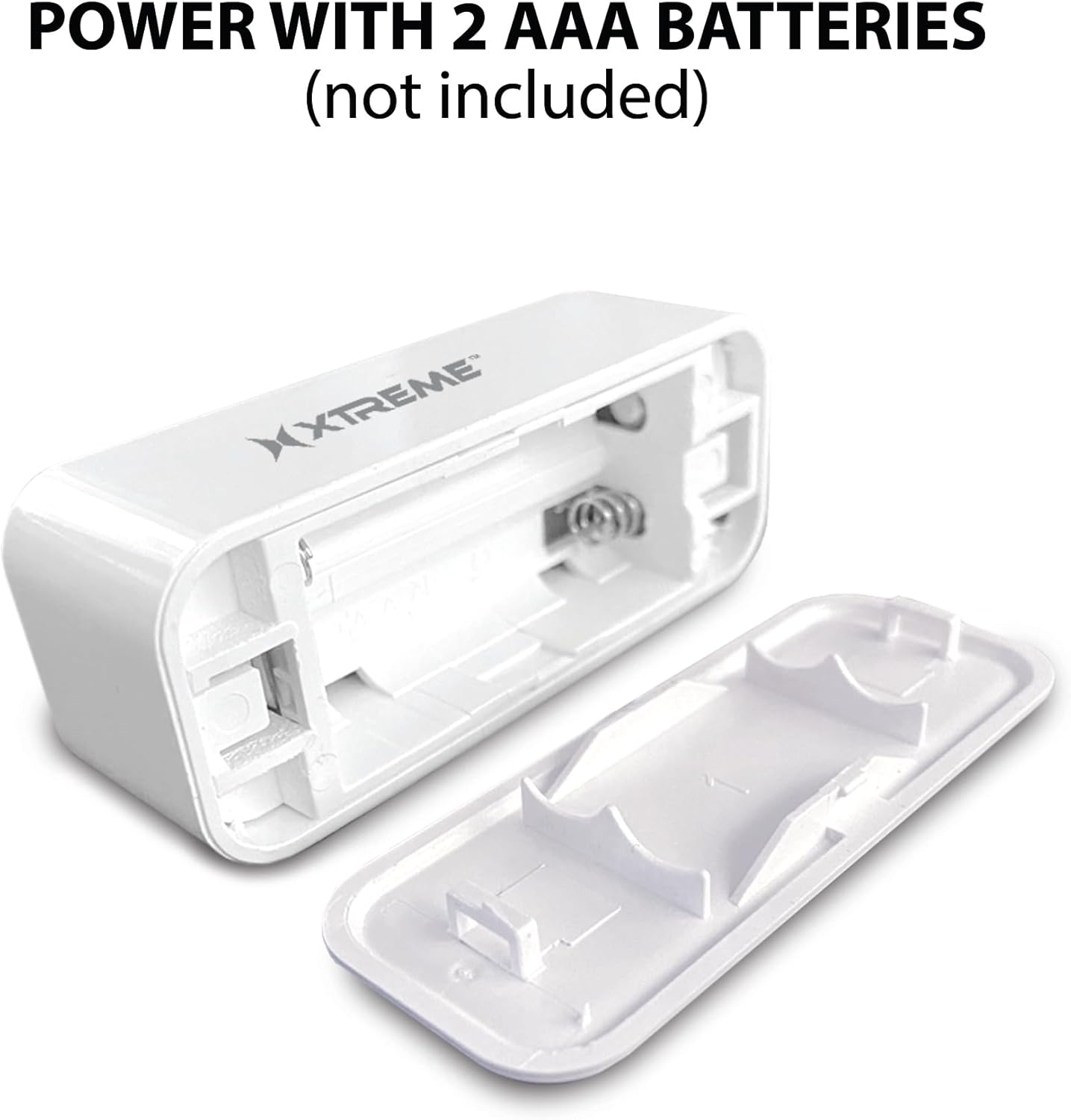
Image: The main sensor unit with its battery compartment open, showing where to insert two AAA batteries.
2. Боргирии барнома ва эҷоди ҳисоб
- -ро зеркашӣ кунед Xtreme Connect Home App from the Apple App Store (for iOS 11 or higher) or Google Play Store (for Android 7.0 or higher).
- Барномаро кушоед ва дастурҳои дар экран бударо иҷро кунед, то ҳисоби нав эҷод кунед ё ворид шавед, агар шумо аллакай дошта бошед.

Image: The product box illustrating the Xtreme Connect Home App download options for both iOS and Android devices.
3. Ҷуфткунии дастгоҳ
- Ensure your smartphone is connected to a 2.4GHz Wi-Fi network. The sensor does not support 5GHz networks.
- In the Xtreme Connect Home App, tap the "+" icon to add a new device.
- Select "Sensor" or "Door/Window Sensor" from the device list.
- Follow the app's instructions to put the sensor into pairing mode (usually involves pressing and holding a button on the sensor until an indicator light flashes).
- Confirm the Wi-Fi network and enter the password in the app. The sensor will then connect to your home network.
- Once successfully paired, you can name your sensor within the app (e.g., "Front Door," "Bedroom Window").
4. Насби ҷисмонӣ
The sensor consists of two parts: a main unit and a smaller magnetic contact. These two parts must be installed close to each other (within 1 cm) on a door or window frame.
- Choose a clean, dry, and flat surface on your door or window frame.
- Peel off the protective backing from the adhesive on both the main unit and the magnetic contact.
- Қисми асосиро ба қисми собитшудаи чаҳорчӯбаи дар/тиреза пайваст кунед.
- Attach the magnetic contact to the moving part of the door/window (the door or window itself), aligning it with the main unit so they are no more than 1 cm apart when the door/window is closed.
- Test the installation by opening and closing the door/window. The app should register the change in status.


Image: Left: The sensor installed on a window sill with the window closed. Right: The sensor detecting an open window, with the magnetic contact separated from the main unit.
Амалиёт
Monitoring Door/Window Status
Once installed and paired, the Xtreme Smart Wi-Fi Window & Door Sensor will continuously monitor the open/closed status of your designated entry point. When the magnetic contact separates from the main unit (door/window opens), the sensor will detect this change.
Огоҳиҳои фаврӣ
Upon detecting an open or close event, the sensor will send an instant notification to your smartphone via the Xtreme Connect Home App. Ensure app notifications are enabled in your phone's settings to receive these alerts.
Дастрасии дурдаст
Ту метавонӣ view the current status of your sensor (open or closed) and review event history from anywhere using the Xtreme Connect Home App, provided your smartphone has an internet connection.
Smart Scenes Integration
The Xtreme Connect Home App allows you to create "Smart Scenes" to automate actions based on sensor activity. For exampле:
- "If door opens, then turn on living room lights."
- "If window opens after 10 PM, then send an alert to family members."
Explore the "Smart Scenes" section within the app to customize your home automation.
Нигоҳдорӣ
Иваз кардани батарея
The sensor is powered by two AAA batteries. When the battery level is low, you may receive a notification via the Xtreme Connect Home App. To replace batteries:
- Gently slide open the battery cover on the main sensor unit.
- Батареяҳои кӯҳнаро хориҷ кунед.
- Insert two new AAA alkaline batteries, ensuring correct polarity (+/-).
- Сарпӯши батареяро бехатар пӯшед.
Note: The sensor is designed for up to four months of battery life under normal usage conditions.
Тозакунӣ
Wipe the sensor with a soft, dry cloth. Do not use liquid cleaners or abrasive materials, as these can damage the device.
Мушкилкушо
| Мушкилот | Сабаби эҳтимолӣ | Ҳалли |
|---|---|---|
| Сенсор ба Wi-Fi пайваст нест. | Incorrect Wi-Fi password; 5GHz network used; sensor too far from router. | Ensure correct 2.4GHz Wi-Fi network and password. Move sensor closer to the router. Re-attempt pairing. |
| Ягон огоҳинома қабул нашуд. | App notifications disabled; sensor offline; app not running in background. | Check phone's notification settings for the Xtreme Connect Home App. Verify sensor status in the app. Ensure app is allowed to run in the background. |
| Sensor not detecting open/close. | Sensor parts misaligned; dead batteries. | Ensure the main unit and magnetic contact are within 1 cm when closed. Replace batteries if low. |
| Муҳлати кӯтоҳи батарея. | Frequent activations; poor quality batteries. | Use high-quality alkaline batteries. Reduce unnecessary activations if possible. |
Мушаххасоти
| Хусусият | Тафсилот |
|---|---|
| Рақами модел | XHS7-2001-WHT |
| Манбаи нерӯ | 2 x батареяҳои AAA (дохил карда намешаванд) |
| Навъи батарея | Алкалин |
| Ҷилдиtage | 1.5 Вольт (ДС) |
| Пайвастшавӣ | 2.4GHz 802.11n Wi-Fi, Bluetooth 4.0 (optional) |
| Усули назорат | App (Xtreme Connect Home) |
| OS мувофиқ | Android 7.0+, iOS 11+ |
| Навъи васлкунӣ | Adhesive / Wall Mount |
| Андозаҳои маҳсулот | 2.7 x 2.4 x 4.6 инч |
| Вазни ашё | 2.39 унция |
| Ранги | Сафед |
| UPC | 805106232399 |
Кафолат ва дастгирӣ
For warranty information and technical support, please refer to the documentation included with your purchase or visit the official Xtreme Digital Lifestyle Accessories website. Do not attempt to return the product to the retailer without first contacting customer support, as per manufacturer guidelines.
Истеҳсолкунанда: Xtreme
Бренд: Лавозимоти тарзи ҳаёти рақамии XTREME


