Муқаддима
This manual provides detailed instructions for the Mesqool Alarm Clock with Bluetooth Speaker, FM Radio, USB Chargers, Dimmer, Snooze, and Battery Backup (Model CR1025). Please read this manual thoroughly before operating the device to ensure proper use and optimal performance.
The Mesqool CR1025 is a versatile bedside device combining multiple functions:
- Alarm Clock with 2 optional sounds (radio or buzzer) and 9-minute snooze.
- Bluetooth 5.0 Speaker for wireless audio streaming.
- Digital FM Radio (87.5-108MHz) with auto-scan and 20 station presets.
- Adjustable Night Light.
- Dual USB Charging Station (Type-C & USB-A, 5V/1A each).
- Large LED display with 5-level dimmer and 12/24H time format.
- Battery backup for settings retention during power outages.

Image: The Mesqool Alarm Clock highlighting its five main features: Alarm Clock, Bluetooth V5.0, FM Radio, Night Light, and 2 USB Chargers.
Ташкил кардан
Power Connection and Battery Backup
The Mesqool CR1025 operates on AC power. Connect the provided power adapter to the DC IN port on the back of the unit and plug it into a standard wall outlet. The device also includes a battery backup feature (1 AAA battery included) to retain time and alarm settings during a power interruption. The battery does not power the display or alarm functions during an outage.

Image: The alarm clock connected to power, demonstrating its compact design suitable for a bedside table.
Танзими вақти ибтидоӣ
- -ро пахш кунед Вақт 12/24 тугмача. Рақамҳои соат ба дурахшидан шурӯъ мекунанд.
- Rotate the right knob (Scan) to adjust the hour.
- -ро пахш кунед Вақт 12/24 боз тугмаи. Рақамҳои дақиқа дурахшанда мешаванд.
- Rotate the right knob (Scan) to adjust the minute.
- -ро пахш кунед Вақт 12/24 Барои тасдиқи танзимоти вақт тугмаро бори дигар пахш кунед.
Video: Demonstrates how to set the time on the Mesqool Alarm Clock by pressing the Time button and rotating the knob to adjust hours and minutes.
Формати вақти 12/24 соат
To switch between 12-hour and 24-hour time formats, press and hold the Вақт 12/24 button for 2 seconds. The display will change between AM/PM indicators for 12-hour format and no indicator for 24-hour format.
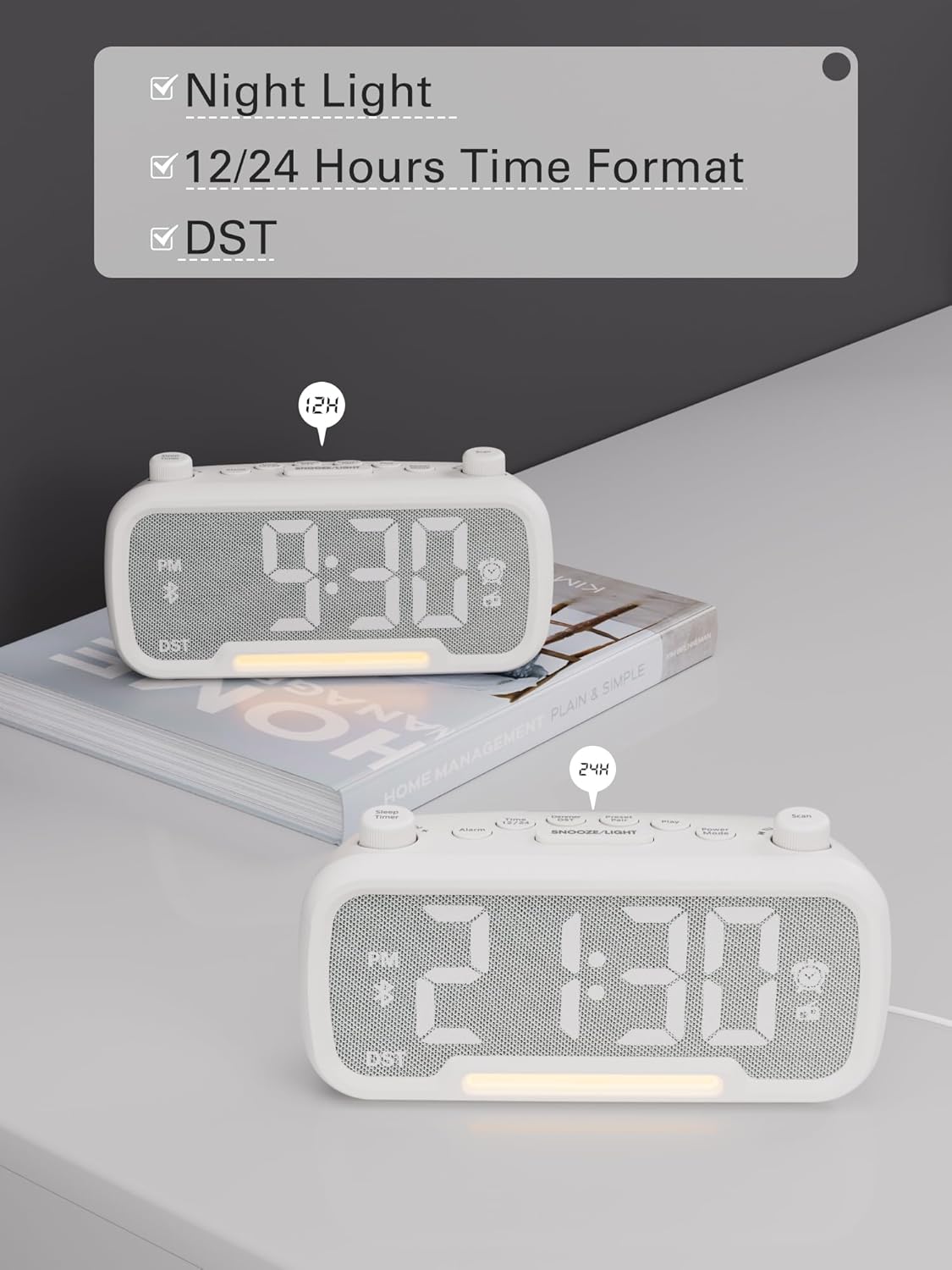
Image: The alarm clock displaying time in both 12-hour (with PM indicator) and 24-hour formats, also showing the DST indicator.
Daylight Saving Time (DST) Mode
To activate or deactivate Daylight Saving Time (DST), press the Dimmer DST button. The time will adjust by one hour forward or backward, and the "DST" indicator will appear or disappear on the display.
Video: Demonstrates how to activate or deactivate DST mode by pressing the DST button, showing the time adjustment.
Дастурҳои амалиётӣ
Танзимоти ҳушдор
- -ро пахш карда нигоҳ доред Огоҳӣ тугмаро барои 2 сония пахш кунед. Рақамҳои соат чашмак мезананд.
- Rotate the left knob (Sleep Timer) to adjust the hour.
- -ро пахш кунед Огоҳӣ боз тугмаи. Рақамҳои дақиқа дурахшанда мешаванд.
- Rotate the left knob (Sleep Timer) to adjust the minute.
- -ро пахш кунед Огоҳӣ button again to select the alarm sound: bell or last radio channel.
- Rotate the left knob (Sleep Timer) to adjust the alarm volume (L01-L16).
- -ро пахш кунед Огоҳӣ button once more to complete the alarm setting.
Video: Illustrates the steps to set the alarm time, choose the alarm sound (bell or radio), and adjust the alarm volume.
Бекор кардани ҳушдор
To cancel the alarm, press the Огоҳӣ button. The alarm icon on the display will turn off, indicating that the alarm has been canceled.
Функсияи таъхир
Вақте ки ҳушдор садо медиҳад, тугмаи БУРД / НУР button to activate the snooze function. The alarm will pause for 9 minutes and then sound again.

Image: The alarm clock with the SNOOZE/LIGHT button clearly marked, explaining its 9-minute snooze function.
Фаъолияти баландгӯякҳои Bluetooth
- -ро пахш кунед Ҳолати барқ button repeatedly until "bt" appears on the display. The Bluetooth icon will start flashing, indicating it's ready for pairing.
- On your mobile device, search for Bluetooth devices and select "CR1025" to connect.
- Once connected, the Bluetooth icon will stop flashing. You can now stream audio from your device.
Video: Shows how to enter Bluetooth mode and pair the alarm clock with a mobile device, indicated by the flashing and solid Bluetooth icon.

Image: The alarm clock wirelessly connected to a smartphone, demonstrating its Bluetooth 5.0 audio streaming capability.
Фаъолияти радиои FM
- -ро пахш кунед Ҳолати барқ button repeatedly until the radio icon lights up and a frequency is displayed.
- Авто-скан: -ро пахш кунед Скан button to automatically search for and store up to 20 FM stations (P01-P20).
- Ҷустуҷӯи дастӣ: Rotate the right knob (Scan) to browse frequencies manually.
- Saving a Station: While listening to a desired station, press and hold the Preset Pair button for 2 seconds. Use the right knob (Scan) to select a preset number (P01-P20), then press Preset Pair боз барои наҷот.
- Ба ёд овардани танзимоти пешакӣ: -ро кӯтоҳ пахш кунед Preset Pair тугмаро барои гузариш аз истгоҳҳои захирашуда пахш кунед.
- Танзими овоз: Rotate the left knob (Sleep Timer) to control the volume (16 levels).
Video: Demonstrates how to operate the FM radio, including auto-scanning, manual tuning, saving presets, and adjusting volume.

Image: The alarm clock showing an FM radio frequency, illustrating its use as a radio.
Танзими таймери хоб
When using the FM radio or Bluetooth speaker functions, you can set a sleep timer to control playback duration before the device automatically turns off.
- -ро пахш кунед Вақтсанҷи хоб button on the top left.
- Rotate the left knob (Sleep Timer) to select the desired duration: 15, 30, 60, 90, or 120 minutes. You can also select "OFF" to disable the sleep timer.
Video: Demonstrates how to set the sleep timer for the FM radio or Bluetooth speaker, showing available duration options.
Диммерро намоиш диҳед
The LED display has 5 levels of brightness. To adjust the brightness, press the Dimmer DST button repeatedly to cycle through the levels (L01-L05).
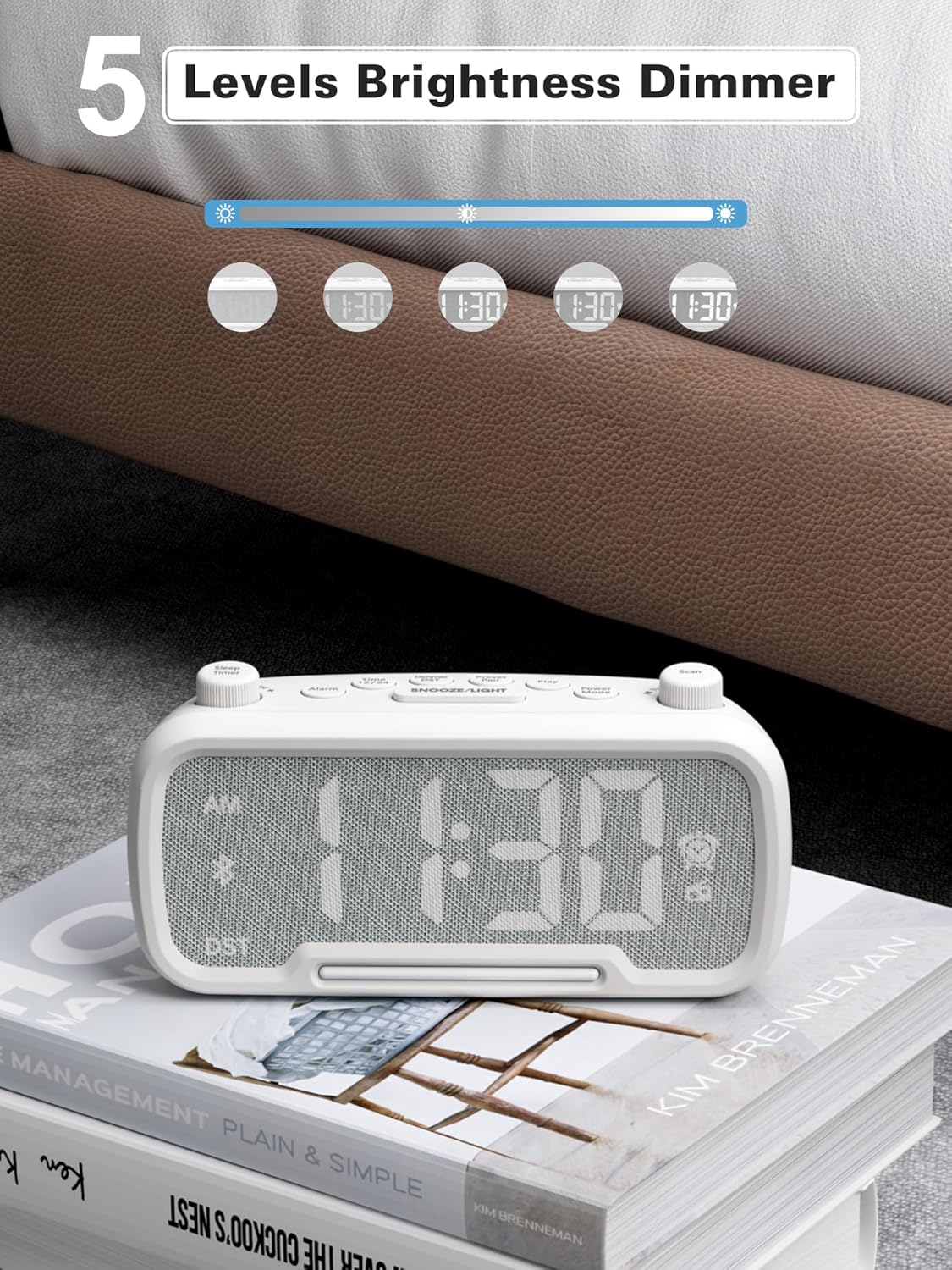
Image: The alarm clock illustrating the five different brightness levels for its LED display.
Нури шаб
The alarm clock features a gentle fixed night light. To turn the night light on or off, press the БУРД / НУР button. This light creates a sleep-friendly environment.

Image: The alarm clock's warm night light glowing, positioned next to a teddy bear, suggesting its use in a child's room.
Портҳои пуркунандаи USB
The device includes two USB charging ports: one Type-C and one USB-A. Both ports provide 5V/1A output, allowing you to conveniently charge your smartphone, tablet, or other USB-powered devices simultaneously.

Image: The alarm clock with a smartphone connected to its Type-C port and a smartwatch to its USB-A port, demonstrating simultaneous charging.
Нигоҳдорӣ
- Тозакунӣ: Барои тоза кардани сатҳи соати зангдор аз матои нарм ва хушк истифода баред. Аз тозакунандаҳои моеъ ё маводҳои абразивӣ истифода набаред.
- Нигоҳдорӣ: If storing the device for an extended period, disconnect it from power and remove the backup battery. Store in a cool, dry place.
- Аз намӣ канорагирӣ кунед: Keep the device away from water, high humidity, and direct sunlight to prevent damage.
Мушкилкушо
| Мушкилот | Сабаби эҳтимолӣ | Ҳалли |
|---|---|---|
| Дисплей нест/Дастгоҳ фаъол нест | Адаптери барқ пайваст нашудааст ё васлаки нодуруст. | Ensure the power adapter is securely plugged into the device and a working wall outlet. Test the outlet with another device. |
| Огоҳӣ садо намедиҳад | Alarm not set, alarm volume too low, or alarm canceled. | Verify alarm time is set correctly, alarm icon is visible, and volume is adequate. Ensure the alarm was not accidentally canceled. |
| Bluetooth пайваст нест | Дастгоҳ дар ҳолати ҷуфтшавӣ нест, берун аз диапазони пайвастшавӣ аст ё аллакай ба дастгоҳи дигар пайваст аст. | Ensure the clock is in Bluetooth pairing mode ("bt" flashing). Move your mobile device closer. Disconnect from other Bluetooth devices. |
| Қабули сусти радиои FM | Weak signal, antenna not extended. | Fully extend the FM antenna. Try repositioning the clock for better reception. Perform an auto-scan again. |
| Пуркунии USB кор намекунад | Cable issue, device not compatible, or device already fully charged. | Check the USB cable for damage. Ensure your device is compatible with 5V/1A charging. Verify the device requires charging. |
Мушаххасоти
- Бренд: Маскул
- Рақами модел: CR1025
- Ранги: Сафед
- Навъи намоиш: НН - НУРНИШОН
- Манбаи нерӯ: Corded Electric (AC power)
- Нусхаи батарея: 1 батареяи AAA (дохил)
- Андозаҳои маҳсулот: 3.31"W x 2.32"H (Note: Length is 6.61" from feature bullets)
- Вазни ашё: 7.7 унция
- Мавод: Fabric, Acrylonitrile Butadiene Styrene
- Басомади радиои FM: 87.5-108 МГц
- баромади USB: Type-C ва USB-A, ҳар кадоме 5V/1A
- Овозҳои ҳушдор: Bell, FM Radio
- Равшании намоиш: 5 сатҳ
- Формати вақт: 12/24
- Хусусиятҳои махсус: Bluetooth 5.0, Night Light, DST adjustment, Snooze
Кафолат ва дастгирӣ
For warranty information or technical support, please refer to the contact details provided with your purchase or visit the official Mesqool webсайт. Квитансияи хариди худро барои даъвоҳои кафолат нигоҳ доред.


