Муқаддима
This user manual provides comprehensive instructions for the setup, operation, and maintenance of your Kogan 55" QLED 4K 144Hz Smart AI Google TV (Model: KAQL55XQ98GSTA). Please read this manual thoroughly before using your TV to ensure proper functionality and to maximize your viewтачриба. Ин дастурро барои истинод дар оянда нигоҳ доред.

Figure 1: Kogan 55" QLED 4K 144Hz Smart AI Google TV
This image shows the Kogan 55-inch QLED 4K 144Hz Smart AI Google TV from the front, highlighting its slim bezels and the vibrant display. The Kogan logo is visible on the bottom left, and the screen displays a colorful abstract pattern, emphasizing its QLED technology.
Ташкил кардан
Кушодан ва санҷиши ибтидоӣ
Carefully remove the TV from its packaging. Inspect the TV and all accessories for any signs of damage. If any damage is found, do not proceed with setup and contact Kogan customer support immediately.
Attaching the Stand or Wall Mounting
Your TV comes with a stand for tabletop placement. For wall mounting, a VESA-compatible wall mount (not included) is required. Refer to the wall mount's instructions for proper installation.
- Ҷойгиркунии стенд:
- Барои пешгирӣ кардани осеби экран, телевизорро рӯ ба поён ба рӯи мулоим ва тоза ҷойгир кунед.
- Қавсҳои стендро бо сӯрохиҳои винт дар поёни телевизор мувофиқ кунед.
- Бо истифода аз винтҳои додашуда стендро мустаҳкам кунед. Боварӣ ҳосил кунед, ки стенд сахт пайваст карда шудааст.
- Монтажи девор:
This TV supports wall mounting. Ensure you use a compatible wall mount and follow the manufacturer's instructions for safe and secure installation. Professional installation is recommended for wall mounting.
Пайваст кардани дастгоҳҳои периферӣ
Connect your external devices such as set-top boxes, gaming consoles, or sound systems to the TV's input ports (HDMI, USB, etc.).
- Пайвастҳои HDMI: Use HDMI cables for high-definition video and audio. This TV features multiple HDMI inputs.
- Пайвастҳои USB: Дастгоҳҳои USB-ро барои бозикунии медиа пайваст кунед.
- Пайвасти барқ: Сими барқро ба вуруди барқи телевизор ва сипас ба васлаки деворӣ пайваст кунед.
Дастурҳои амалиётӣ
First-Time Setup and Google TV
Upon first power-on, the TV will guide you through the initial setup process, including network connection, Google account login, and channel scanning. Google TV integrates your favorite streaming services and content into one personalized hub.

Figure 2: Google TV Interface in Use
This image depicts two individuals comfortably seated in a living room, viewing the Kogan Google TV. The TV screen displays the Google TV interface with various streaming app icons and content recommendations, illustrating the user-friendly nature of the smart TV system.

Figure 3: Detailed Google TV Home Screen
This image provides a closer look at the Google TV home screen, showcasing content recommendations like "Nine Perfect Strangers" and various app icons such as Netflix, YouTube, and Prime Video. The interface is clean and organized, making content discovery intuitive.

Figure 4: All Your Favorite Apps
This image highlights the extensive selection of streaming applications available on the Kogan Google TV. It displays numerous popular app logos, including Netflix, Prime Video, Disney+, YouTube, and Stan, emphasizing the TV's capability to serve as a comprehensive entertainment hub.
Хусусиятҳо ва вазифаҳои асосӣ
- Технологияи QLED: Experience mesmerizing color reproduction and vibrant visuals thanks to Quantum Dot Technology.
- Қарори 4K UHD: Enjoy stunning clarity and detail with 3840 x 2160 pixel resolution.

Figure 5: Ultra HD (4K) Visual Comparison
This image visually compares Full HD and Ultra HD (4K) resolutions using a scenic view of boats on clear water. The 4K side demonstrates significantly clearer picture quality and sharper colors, illustrating the enhanced immersive viewing experience provided by 4K resolution.
- Суръати навсозии тағйирёбандаи 144Hz (VRR): Achieve smoother and tear-free visuals, especially beneficial for fast-paced scenes and gaming.

Figure 6: 144Hz Variable Refresh Rate in Action
This image illustrates the benefit of a 144Hz Variable Refresh Rate (VRR) for gaming. It shows a split screen with a racing game, comparing the visual quality "Without 144Hz VRR" (blurry) and "With 144Hz VRR" (sharp and smooth), highlighting the enhanced gaming experience.
- Dolby Vision™: Enjoy cinematic immersion with lifelike and vibrant visuals.
- High-Dynamic Range (HDR): Delivers brighter highlights, better contrast, and more realistic colors.
- Chromecast-и дарунсохти Google: Stream content directly from your smartphone, laptop, or tablet to your TV.
- Дӯкони Google Play: Access over 400,000 movies, TV episodes, live TV, and a wide range of applications.
- Арзёбии ҳаракат ва ҷуброни ҳаракат (MEMC): Improves clarity and reduces blur in fast-moving scenes for smoother visuals.
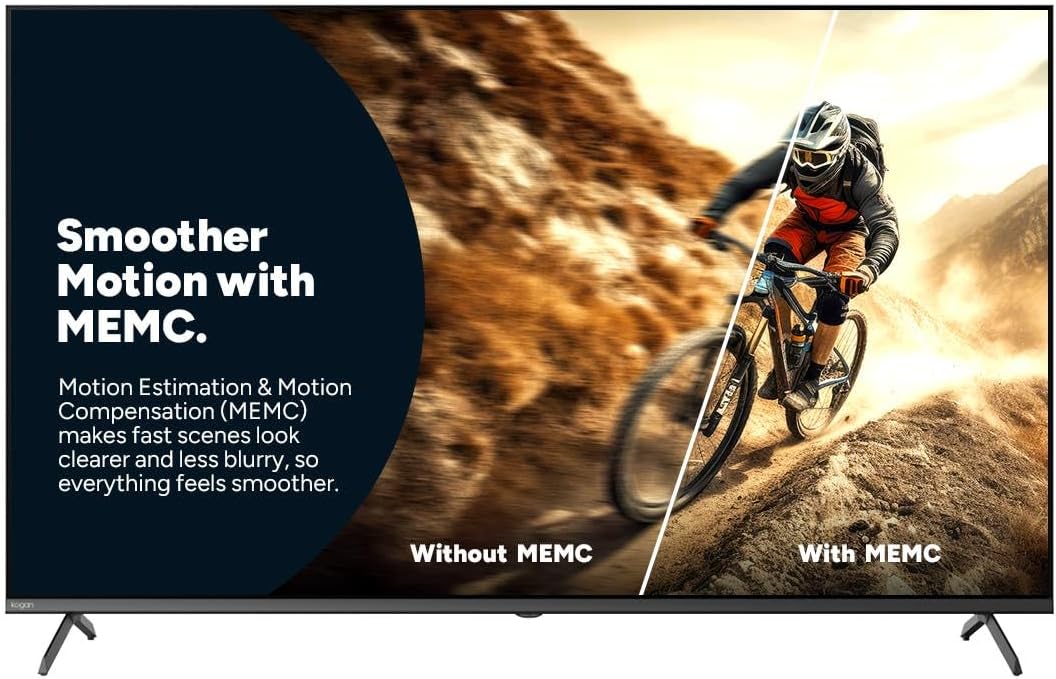
Figure 7: Smoother Motion with MEMC
This image demonstrates the effect of Motion Estimation & Motion Compensation (MEMC). It shows a split view of a cyclist in motion, comparing the visual "Without MEMC" (blurry) and "With MEMC" (clearer and smoother), illustrating how MEMC enhances the clarity of fast-paced scenes.
- Ҳолати худкори таъхири паст (ALLM): Automatically reduces response time for an ultra-smooth and lag-free gaming experience.
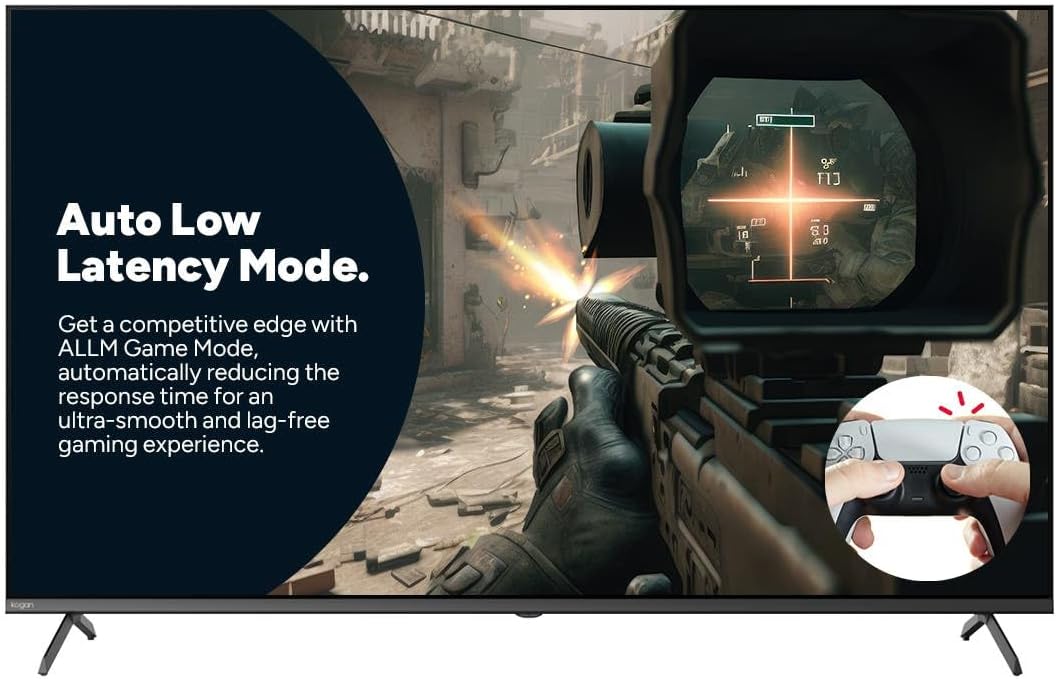
Figure 8: Auto Low Latency Mode for Gaming
This image highlights the benefits of Auto Low Latency Mode (ALLM) for gaming. It features a first-person shooter game scene, emphasizing how ALLM automatically reduces response time, providing a competitive edge with ultra-smooth and lag-free gameplay.
Истифодаи назорати дурдаст
The included remote control allows you to navigate the Google TV interface, adjust settings, change channels, and control connected devices. Familiarize yourself with the button layout for optimal use.
Нигоҳдорӣ
Тоза кардани телевизор
- Экран: Экранро бо матои мулоим ва бе пахта нарм тоза кунед. Барои аломатҳои якрав, тозакунандаи экранро, ки махсус барои телевизорҳо пешбинӣ шудааст, истифода баред, на бевосита ба экран.
- Чорчӯба: Чаҳорчӯбаи телевизорро пок кунед ва бо матои хушку мулоим гузоред.
- Истифода набаред: Аз истифодаи тозакунакҳои абразивӣ, мумҳо ё ҳалкунандаҳо худдорӣ намоед, зеро онҳо метавонанд ба ороиши телевизор зарар расонанд.
Нигоҳубини умумӣ
- Барои пешгирии аз ҳад зиёд гарм шудани телевизор вентилятсияи мувофиқро таъмин кунед.
- Телевизорро аз нурҳои бевоситаи офтоб, манбаъҳои гармӣ ва чанги аз ҳад зиёд дур нигоҳ доред.
- Ҳангоми тӯфони баркӣ ё дар муддати тӯлонӣ беназорат мондани телевизорро аз васлаки барқ ҷудо кунед.
Мушкилкушо
If you encounter issues with your Kogan TV, refer to the following common problems and solutions. If the problem persists, contact Kogan customer support.
| Мушкилот | Сабаби эҳтимолӣ / Ҳалли |
|---|---|
| Не қудрат | Check if the power cord is securely plugged into the TV and the wall outlet. Ensure the wall outlet has power. Try a different outlet. |
| Тасвир / садо нест | Verify the correct input source is selected (e.g., HDMI 1, TV). Check cable connections to external devices. Ensure volume is not muted or too low. |
| Идоракунии дурдаст кор намекунад | Батареяҳоро тафтиш кунед ва иваз кунед. Боварӣ ҳосил кунед, ки байни пулти дурдаст ва сенсори IR-и телевизор ягон монеа вуҷуд надорад. |
| Сифати тасвири паст | Check antenna/cable connection. Adjust picture settings (brightness, contrast, sharpness). Ensure the source content is high quality. |
| Пайвасти интернет нест | Check Wi-Fi router and modem. Reconnect to the Wi-Fi network in TV settings. Try restarting the TV and router. |
Мушаххасоти
| Хусусият | Тафсилот |
|---|---|
| Бренд | Коган |
| Номи модел | Коган 55" QLED 4K 144Hz Smart AI Google ТВ |
| Рақами модел | KAQL55XQ98GSTA |
| Андозаи экран | 55 инч |
| Технологияи намоиш | QLED |
| Резолюция | 4K (3840 x 2160) |
| Меъёри навсозӣ | 144 Гц |
| Низоми амал | Google TV |
| Андозаи RAM | 3 ГБ |
| Хусусиятҳои махсус | Chromecast, Dolby Vision, HDR, MEMC, ALLM |
| Технологияи пайвастшавӣ | USB, HDMI |
| Мутобиқати вуруди аудио | USB, HDMI |
| Ҷилдиtage | 240 вольт |
| Вазни ашё | 18.2 кг |
| Андозаҳои бастаҳо | 134 х 85 х 14 см |
Кафолат ва дастгирӣ
For warranty information and technical support, please refer to the warranty card included with your product or visit the official Kogan website. You can also contact Kogan customer service directly for assistance with product issues or inquiries.
Kogan Support: https://www.kogan.com/au/help/


