Муқаддима
Thank you for choosing the KLIM K7 Cassette Tape Player and MP3 Converter. This device allows you to enjoy your classic cassette tapes and convert them into digital MP3 files for modern playback. It features a built-in microphone for recording, an integrated speaker, and a rechargeable battery for portability. This manual provides detailed instructions for setup, operation, and maintenance of your KLIM K7.
Маҳсулот ба охир расидview
Хусусиятҳои асосӣ
- Cassette to MP3 Converter: Effortlessly convert cassette tapes to digital MP3 files directly onto an SD card.
- Тарҳрезии сайёр: Lightweight and compact for on-the-go listening.
- Микрофони дарунсохт: Record audio directly to the SD card.
- Баландгӯяки дарунсохт: Share your audio without external devices.
- Батареяи барқгиранда: Integrated 1000mAh battery provides extended playback.
- SD Card Player: MP3 бозӣ кунед files дар корти SD нигоҳ дошта мешавад.
- 3.5 мм Jack барои гӯшмонак: For private listening with included earphones.
Қисмҳо ва ҷузъҳои дастгоҳ
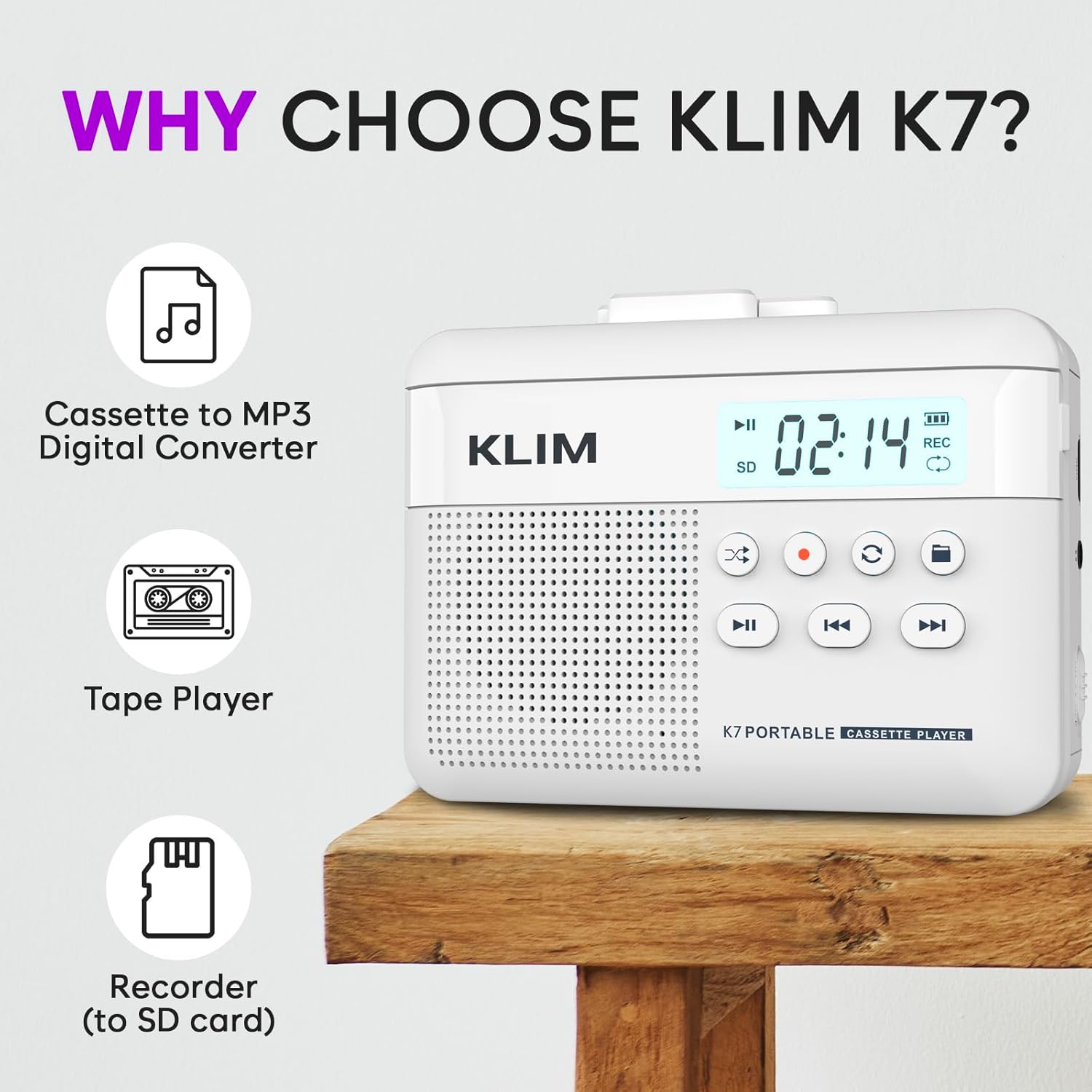
Расми 1: Пеш view of the KLIM K7 Cassette Player, showing the speaker grille, LCD display, and control buttons (Play/Pause, Rewind, Fast Forward, Stop, Record, Mode, Folder, Loop).
- Намоиши LCD: Shows track number, recording status, and battery level.
- Маърузачй: Баландгӯяки ҳамгирошуда барои бозикунии аудио.
- Play/Pause Button (►▮): Навозишро оғоз мекунад ё таваққуф мекунад.
- Rewind Button (◀◀): Rewinds the cassette tape or navigates backward through MP3 tracks.
- Fast Forward Button (►►): Fast forwards the cassette tape or navigates forward through MP3 tracks.
- Тугмаи қатъ (■): Бозӣ ё сабтро қатъ мекунад.
- Record Button (●): Initiates or stops recording.
- Mode Button (↻): Switches between cassette playback and SD card MP3 playback.
- Folder Button (🖿): Navigates through folders on the SD card.
- Loop Button (⟳): Треки ҷорӣ ё ҳамаи трекҳоро такрор мекунад.

Расми 2: Тараф view of the KLIM K7 Cassette Player, highlighting the SD card slot, 3.5mm headphone jack, and On/Off switch.
- Ковокии корти SD: Insert your Micro SD card here for recording and MP3 playback.
- 3.5 мм Jack гӯшмонак: Connect the included earphones or other standard headphones.
- Гузариш / Хомӯш: Дастгоҳро фаъол ё хомӯш мекунад.
- Назорати овоз: Сатҳи баромади аудиоро танзим мекунад.

Расми 3: боло view of the KLIM K7 Cassette Player with the cassette compartment open, showing the tape mechanism.
- Қисми кассетӣ: Insert your cassette tapes here.
- Cassette Door Release: Opens the cassette compartment.
Ташкил кардан
1. Пуркунии батарея
Before first use, fully charge the KLIM K7. The device comes with a 1000mAh rechargeable battery.
- Locate the Type-C USB charging port on the side of the device.
- Connect the included Type-C USB cable to the charging port and the other end to a USB power adapter (not included) or a computer's USB port.
- The charging indicator on the LCD display will show charging status. A full charge typically takes approximately 2 hours.

Расми 4: The KLIM K7 connected to a Type-C USB cable for charging.
2. Ҷойгиркунии корти SD
An SD card (16GB included) is required for converting tapes to MP3 and for recording with the built-in microphone.
- Locate the SD card slot on the side of the device (refer to Figure 2).
- Корти Micro SD-ро бо оҳистагӣ ба слот бо контактҳои тиллоӣ ба поён то он даме ки ба ҷои худ ламс кунад, ҷойгир кунед.
- To remove, push the SD card inward until it clicks, then release, and it will eject.

Расми 5: Inserting the Micro SD card into the KLIM K7.
3. Ворид кардани лентаи кассетӣ
- Press the Cassette Door Release button to open the cassette compartment.
- Insert your cassette tape with the open side facing upwards and the tape reels aligned with the player's mechanism.
- Close the cassette compartment door firmly until it clicks.
Дастурҳои амалиётӣ
1. Навозиши лентаҳои кассетӣ
- Ensure the device is powered on using the On/Off switch.
- Insert a cassette tape as described in the Setup section.
- -ро пахш кунед Навозиш/Таваққуф (►▮) тугма барои оғози навозиш.
- Бо истифода аз назорати садо баландро танзим кунед.
- -ро истифода баред Rewind (◀◀) ва Fast Forward (►►) тугмаҳо барои паймоиш дар навор.
- -ро пахш кунед Ист (■) тугмаи барои анҷоми бозӣ.
2. Converting Cassette Tapes to MP3
The KLIM K7 allows direct conversion of cassette audio to MP3 files on the inserted SD card, without needing a computer or additional software.
- Ensure an SD card is inserted and the device is powered on.
- Insert the cassette tape you wish to convert.
- -ро пахш кунед Навозиш/Таваққуф (►▮) button to start playing the tape.
- Пахши дароз ба Record (●) button. The 'REC' indicator on the LCD display will illuminate, indicating that recording has started.
- Барои қатъ кардани сабт, -ро пахш кунед Record (●) button again. The 'REC' indicator will turn off. The recorded audio will be saved as an MP3 file дар корти SD.
- You can then remove the SD card and use the included SD card reader to transfer the MP3 files to a computer or other device.

Расми 6: Visual guide for converting cassette audio to MP3 files.
3. Using the Built-in Microphone for Recording
The KLIM K7 can also record audio directly from its built-in microphone to the SD card.
- Ensure an SD card is inserted and the device is powered on.
- -ро пахш кунед Mode (↻) button until the device is in SD card mode (no cassette playing).
- Пахши дароз ба Record (●) button. The 'REC' indicator will light up, and the device will start recording audio from its microphone.
- Барои қатъ кардани сабт, -ро пахш кунед Record (●) button again. The 'REC' indicator will turn off, and the recording will be saved as an MP3 file.

Расми 7: Using the KLIM K7's built-in microphone for recording.
4. Playing MP3 Files from SD Card
- Ensure an SD card with MP3 files is inserted and the device is powered on.
- -ро пахш кунед Mode (↻) button to switch to SD card playback mode. The LCD display will show track information.
- -ро пахш кунед Навозиш/Таваққуф (►▮) тугма барои оғози навозиш.
- -ро истифода баред Rewind (◀◀) ва Fast Forward (►►) тугмаҳо барои гузариш ба роҳҳо.
- Дар Folder (🖿) button allows navigation through different folders on the SD card.
- Дар Loop (⟳) button can be used to repeat the current track or all tracks.
- Бо истифода аз назорати садо баландро танзим кунед.
- -ро пахш кунед Ист (■) тугмаи барои анҷоми бозӣ.

Расми 8: Enjoying audio with the KLIM K7 and included earphones.
Нигоҳдорӣ
Proper maintenance ensures the longevity and optimal performance of your KLIM K7.
- Тозакунӣ: Барои тоза кардани берунии дастгоҳ аз матои мулоим ва хушк истифода баред. Аз тозакунандаҳои моеъ ё ҳалкунандаҳо истифода набаред.
- Қисми кассетӣ: Сарҳои лентаро мунтазам тоза кунед ва ғилдиракҳоро бо латтаи пахтагӣ каме фишуредampened with isopropyl alcohol to prevent audio quality degradation. Ensure the device is off and dry before use.
- Нигоҳдорӣ: Дастгоҳро дар ҷои хунук ва хушк дур аз нури бевоситаи офтоб ва ҳарорати аз ҳад зиёд нигоҳ доред.
- Нигоҳубини батарея: For long-term storage, charge the battery to about 50% every few months to maintain battery health.
Мушкилкушо
If you encounter any issues with your KLIM K7, please refer to the following common solutions:
| Мушкилот | Сабаби эҳтимолӣ | Ҳалли |
|---|---|---|
| Дастгоҳ фаъол нест. | Батарея тамом шудааст. | Charge the device using the provided Type-C USB cable. |
| No sound during cassette playback. | Volume is too low or headphones are not connected properly. | Increase the volume. Ensure headphones are fully plugged into the 3.5mm jack. |
| Recording to MP3 fails or produces no file. | SD card is full, not inserted correctly, or corrupted. | Check SD card insertion. Ensure sufficient space on the SD card. Try reformatting the SD card (this will erase all data). |
| Poor audio quality from cassette. | Dirty tape heads or worn-out cassette tape. | Clean the tape heads and pinch rollers. Try a different cassette tape to determine if the issue is with the tape itself. |
| Дастгоҳ ях мекунад ё ҷавоб намедиҳад. | Хатогии муваққатии нармафзор. | Turn the device off and then on again. If the issue persists, allow the battery to fully discharge and then recharge. |
Мушаххасоти
- Андозаҳои маҳсулот: 4.76 x 3.61 x 1.56 инч
- Вазни ашё: 9.9 унция
- Батарея: 1 батареяи литий-ион (дохил карда шудааст), 1000 мАч
- Вақти пуркунӣ: Тақрибан 2 соат
- Нигоҳдорӣ: Корти Micro SD-ро дастгирӣ мекунад (16 ГБ дохил карда шудааст)
- Натиҷаи аудио: Built-in speaker, 3.5mm headphone jack
- Формати сабт: MP3

Расми 9: Dimensions of the KLIM K7 Cassette Player.
Кафолат ва дастгирӣ
KLIM is committed to producing quality electronics. The KLIM K7 Cassette Tape Player comes with a Кафолати 5-сола. If you encounter any problems with your device, please contact KLIM customer support for assistance.
Нақшаҳои муҳофизатии иловагӣ метавонанд барои харид дастрас бошанд:
- Нақшаи 2-солаи муҳофизат: $3.99 (one-time)
- Нақшаи 3-солаи муҳофизат: $5.99 (one-time)
- NEW Complete Protect: $16.99 (monthly)
Барои дастгирии иловагӣ, боздид кунед KLIM Store on Amazon.


