1. Муқаддима
This manual provides comprehensive instructions for the safe and efficient operation of your TIDRADIO TD-M11 FRS Two-Way Radio. Please read this manual thoroughly before using the device to ensure proper functionality and to prevent damage. The TD-M11 is a robust, waterproof FRS radio designed for reliable communication in various environments.
2. Мундариҷаи баста
Боварӣ ҳосил кунед, ки ҳама ашё дар бастаи шумо мавҷуданд:
- 2 x TIDRADIO TD-M11 Walkie Talkies
- 2 х 1000 мАч батареяҳои Li-ion
- 2 x USB Charging Cables & Adapters
- 2 x клипҳои камарбанд
- 1 x Дастури корбар
3. Маҳсулот ба охир расидview
The TIDRADIO TD-M11 is a compact and durable FRS two-way radio. It features an integrated LED display, a rotary knob for power and volume, and side buttons for channel selection and Push-to-Talk (PTT).
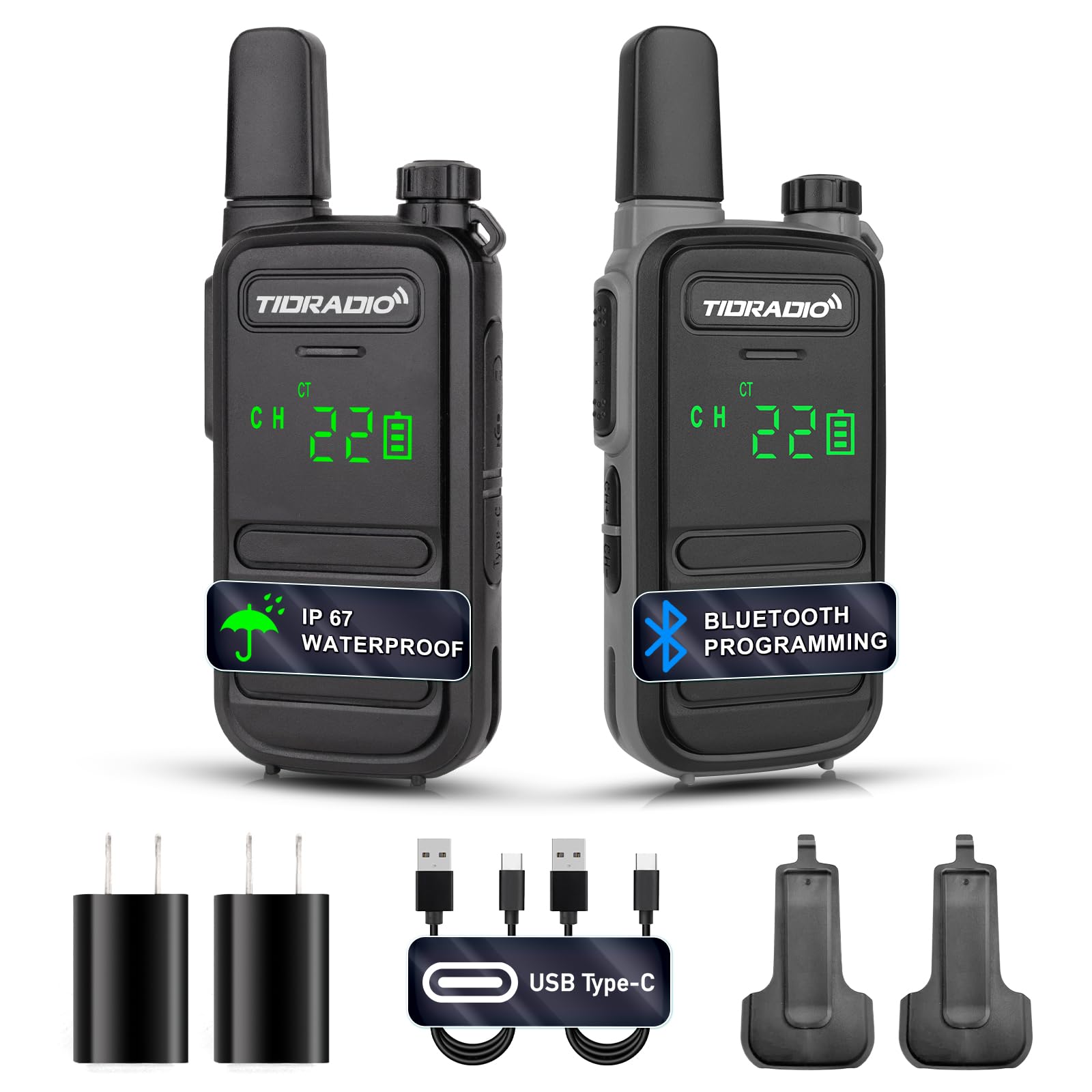
Расми 3.1: Пеш view of the TIDRADIO TD-M11 Walkie Talkie.

Figure 3.2: Dimensions and weight of the TD-M11 radio. The radio weighs approximately 0.2 lbs, with a thickness of 0.7 inches and a height of 5.3 inches.
4. Танзимот
4.1 Насби батарея
- Боварӣ ҳосил кунед, ки радио хомӯш аст.
- Сарпӯши қисмати батареяро дар қафои радио ҷойгир кунед.
- Slide the cover downwards or unlatch it to remove.
- Insert the 1000mAh Li-ion battery, ensuring the contacts align correctly.
- Сарпӯши қисмати батареяро иваз кунед ва онро маҳкам кунед.
4.2 Пур кардани батарея
The TD-M11 features a Type-C charging port for convenience. Use the provided USB charging cable and adapter.
- Connect the Type-C end of the charging cable to the radio's charging port.
- Connect the USB-A end to the provided power adapter or a compatible USB power source (e.g., power bank, PC, vehicle charger).
- The LED indicator on the radio will show charging status.
- Charging efficiently and quickly extends the battery life.

Figure 4.1: The TD-M11 supports Type-C charging via adapter, power bank, PC, or vehicle charger.
5. Дастурҳои истифодабарӣ
5.1 Фурӯзон/хомӯш ва танзими баландии овоз
To power on the radio, rotate the top knob clockwise. Continue rotating to increase the volume. Rotate counter-clockwise to decrease volume and power off.
5.2 Интихоби канал
Use the CH+ and CH- buttons located on the side of the radio to cycle through the available 22 FRS channels.
5.3 Интиқол ва қабул
To transmit, press and hold the Push-to-Talk (PTT) button on the side of the radio and speak clearly into the microphone. Release the PTT button to receive.
5.4 Функсияи VOX (Мубодилаи овозӣ)
The built-in VOX function allows for hands-free operation. When activated, the radio will transmit automatically when it detects your voice. This feature can be configured via the Odmaster APP.

Figure 5.1: Illustration of the VOX function, enabling voice-activated transmission.
5.5 Bluetooth Programming with Odmaster APP
The TD-M11 can be programmed wirelessly using the Odmaster APP on your mobile phone. This allows for reading and writing frequencies, and searching for nearby repeaters.
- Радиоро даргиронед.
- Long press the CH+ button to activate Bluetooth. The LED indicator will show a red light.
- Download the Odmaster APP from Google Play Store or Apple App Store.
- Open the APP and connect to the radio via Bluetooth.
- Select the TD-M11 model within the APP.
- Read the current radio settings.
- Modify parameters as needed (e.g., RX/TX frequencies, power levels, VOX settings).
- Write the new settings to the radio.
Video 5.1: This video demonstrates the process of connecting your mobile phone to the TIDRADIO TD-M11 and programming it using the Odmaster application. It shows how to activate Bluetooth on the radio, pair it with the app, select the radio model, read current settings, and write new configurations.

Figure 5.2: Step-by-step guide for connecting the TD-M11 to the Odmaster APP via Bluetooth for programming. Note: Bluetooth is for programming only and cannot be connected to other accessories.
5.6 NOAA Weather Forecast
The LED display can clearly show NOAA weather forecasts, providing essential weather information.
5.7 Бастани каналҳои банд (BCLO)
BCLO automatically or manually prevents transmission on busy communication channels to avoid interference and maintain clear communication.
6. Хусусиятҳо
- 2W Output Power & 22 FRS Channels: Provides reliable long-range communication.
- IP67 Waterproof Performance: Designed to withstand various weather conditions, suitable for outdoor activities like hiking and hunting.
- Bluetooth Connection for Programming: Connects to the Odmaster APP for mobile programming of frequencies and settings.
- Built-in VOX: Муоширати дастиро фаъол мекунад.
- Намоиши LED: Hidden LED lighting clearly displays working status and NOAA weather forecasts, offering better dustproof effect.
- Пуркунандаи навъи C: Convenient USB charging for the 1000 mAh Li-ion battery.
- Сабук ва сайёр: Compact design for easy carrying and one-handed control.
- Busy Channel Lockout (BCLO): Prevents transmission on occupied channels.
- Ба зарба ва чанг тобовар: Устувории беҳтаршуда барои муҳитҳои душвор.

Figure 6.1: The TD-M11 is designed to be shockproof and drop-proof for increased durability.

Figure 6.2: The TD-M11 features IP67 waterproofing. Note: The TD-M11 cannot be used underwater. If it falls into water, shake or wipe the water off the walkie-talkie first before using it again.

Figure 6.3: The TD-M11's LED display shows channel, volume, and battery status, designed for clarity in various conditions.
7. Мушаххасоти
| Хусусият | Мушаххасоти |
|---|---|
| Рақами модел | TD-M11 |
| Вазни ашё | 3.2 унция |
| Андозаҳои маҳсулот | 0.7 x 2.1 x 5.3 инч |
| Батареяҳо | 2 батареяи литий полимерӣ лозим аст (дохил карда шудааст) |
| Шумораи каналҳо | 22 |
| Хусусияти махсус | IP67 обногузар |
| Диапазони басомад | UHF 400-480MHz |
| Масофаи ҳадди аксар | 5 километр |
| Ҷилдиtage | 3.7 вольт |
| Сатҳи муқовимат ба об | Обногузар |
8. Нигоҳдорӣ
8.1 Тозакунӣ
Радиоро бо нарм пок кунед, гamp cloth. Do not use harsh chemicals or abrasive cleaners. Ensure the Type-C port cover is securely closed to maintain water resistance.
8.2 Нигоҳубини батарея
To prolong battery life, avoid fully discharging the battery frequently. Store the radio and batteries in a cool, dry place when not in use for extended periods. If the radio will not be used for a long time, charge the battery to about 50% before storage.
8.3 Муқовимат ба об
While the TD-M11 is IP67 waterproof, it is not designed for submersion. If the radio gets wet, wipe it dry immediately. Ensure all port covers are sealed to maintain water resistance.
9. Баррасии мушкилот
9.1 Radio Does Not Power On
- Санҷед, ки батарея дуруст насб ва пур карда шудааст.
- Ensure the power/volume knob is rotated sufficiently clockwise.
9.2 Cannot Transmit or Receive
- Verify that the radio is on the same channel as the other party.
- Санҷед, ки сатҳи батарея кофӣ аст.
- Ensure you are within range. Obstacles like buildings and terrain can reduce range.
- If Busy Channel Lockout (BCLO) is active, you may not be able to transmit on an occupied channel.
9.3 Сифати пасти аудио
- Сатҳи овозро танзим кунед.
- Ensure the microphone and speaker are not obstructed.
- Move closer to the other radio or to an area with fewer obstructions.
9.4 Bluetooth Programming Issues
- Ensure Bluetooth is activated on the radio (long press CH+).
- Make sure the Odmaster APP is updated to the latest version.
- Restart both the radio and your mobile device.
10. Кафолат ва дастгирӣ
10.1 Маълумот дар бораи кафолат
The TIDRADIO TD-M11 comes with a 60-day hassle-free replacement warranty. Please retain your proof of purchase for warranty claims.
10.2 Дастгирии муштариён
For further assistance, technical support, or warranty inquiries, please contact TIDRADIO customer service through the retailer's platform or the official TIDRADIO webсайт.


