1. Муқаддима
Thank you for choosing the AUTO-VOX T9 Pro Mirror Dash Cam. This device is designed to enhance your driving safety and provide reliable recording of your journeys. It features a 10-inch Full HD touch screen, split front and rear cameras, advanced imaging technologies like HDR/WDR, and smart functions such as parking monitoring and GPS tracking. This manual provides detailed instructions for installation, operation, and maintenance to ensure optimal performance.
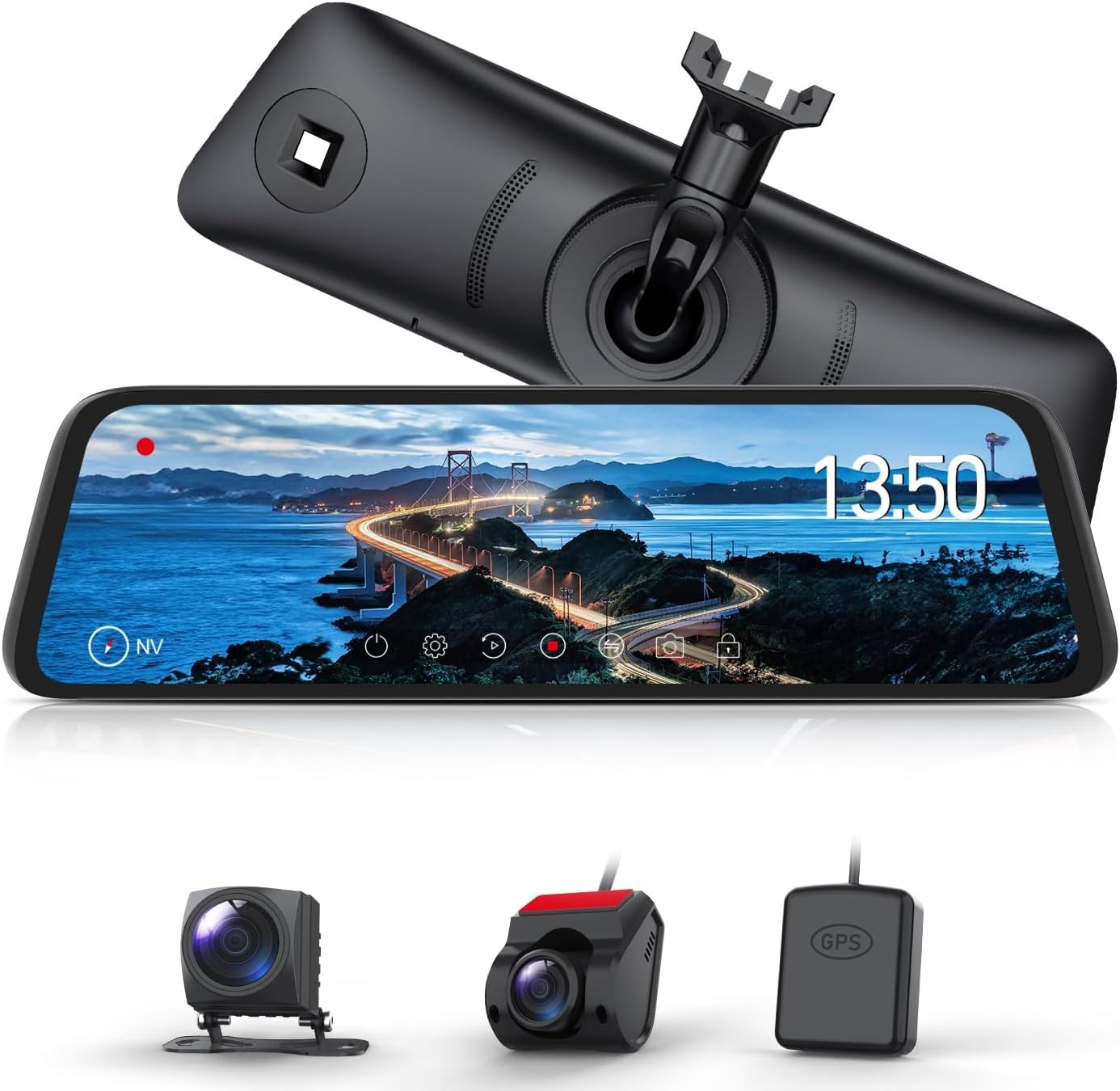
Figure 1: AUTO-VOX T9 Pro Mirror Dash Cam components.
2. Хусусиятҳои маҳсулот
- Genuine Mirror Replacement Design: The T9 Pro is designed to replace your vehicle's original rearview mirror, offering a seamless and integrated look without the bulk of clip-on devices.
- Hidden Wiring: The design allows for discreet wiring, preventing clutter and maintaining a clean vehicle interior.
- 10-inch Full HD Touch Panel: A large, responsive touch screen provides a clear view and intuitive control. Its trapezoidal design ensures compatibility with most sun visors.
- Танзими худкори равшанӣ: Equipped with a light sensor, the device automatically detects ambient light and adjusts screen brightness for optimal visibility, reducing glare in tunnels or at night.
- Split Camera Design: The front camera can be mounted separately on the windshield, eliminating obstructed views common with integrated dash cams. The rear camera offers flexibility in installation and supports normal/mirror image switching.
- Wide-Angle Rear Camera: A 160-degree wide-angle rear camera displays footage on the 10-inch screen, reducing blind spots by up to three times for enhanced safety.
- Smart Parking Monitoring: Automatically activates recording upon detecting impacts or hit-and-runs while parked. Footage is locked and saved securely to the SD card.
- Reverse Interlocking with Guide Lines: When reversing, the digital mirror automatically adjusts the viewing angle downwards and displays adjustable parking guide lines for safer parking maneuvers.
- Хусусиятҳои бехатарӣ: Utilizes a high-temperature resistant super capacitor power supply to prevent overheating and ensure safety even in hot conditions. The screen's 70% transmittance and low reflectivity prevent double images in bright sunlight.
- Функсияи GPS: Records driving trajectory and location information alongside video data. Dedicated GPS data playback software for PC allows viewing of location (latitude/longitude), date/time, speed, and driving trajectory.
- Noise Reduction & LED Signal Light Compatibility: Designed with noise countermeasures to minimize interference with car electronics (AM/FM/ETC/navigation). Records LED traffic lights clearly at 27.5 FPS, avoiding the flickering issue seen in conventional dash cams.

Figure 2: Simultaneous front and rear camera display.
3. Мундариҷаи баста
Лутфан тафтиш кунед, ки ҳама ашё дар баста мавҷуд аст:
- AUTO-VOX T9 Pro Mirror Dash Cam Main Unit
- Камераи пеши
- Камераи пушти
- Модули GPS
- Кабели барқ
- Video Data Cable
- Standard Mounting Bracket (for most car models)
- Various Adapters (for different vehicle types)
- Дастури корбар

Расми 3: Лавозимот ва ҷузъҳои дохилшуда.
4. Танзим ва насб
The AUTO-VOX T9 Pro is designed for a clean, integrated installation by replacing your vehicle's original rearview mirror. The split camera design allows for flexible placement of the front and rear cameras.
4.1. Mirror Unit Installation
The main unit replaces your existing rearview mirror. Use the provided standard bracket or select an appropriate adapter from the various types included to ensure a secure and flush fit. The goal is a 'genuine part' look.

Figure 4: Integrated mirror replacement design.

Figure 5: Selection of mounting brackets for vehicle compatibility.
4.2. Насби камера
The front camera can be mounted on the front windshield, separate from the mirror unit, to avoid obstructing your view. The rear camera can be installed in a suitable position at the rear of the vehicle, offering flexibility due to its normal/mirror image switching capability.

Figure 6: Front camera mounted on the windshield.

Расми 7: Advantages of the split camera system.
4.3. Васл
Connect the power cable, video data cable, and GPS module as shown in the wiring diagram. The hidden wiring design helps maintain a tidy interior. Ensure all connections are secure.

Figure 8: Wiring diagram for installation.
5. Дастурҳои истифодабарӣ
The T9 Pro features a user-friendly 10-inch touch screen for easy operation.
5.1. Basic Screen Operations
- Танзими равшанӣ: Tap the screen and slide your finger to adjust the display brightness manually. The device also features an automatic brightness adjustment function.
- Камера View Гузариш: Tap the screen to switch between front camera view, камераи пушти view, or a split-screen display showing both simultaneously.
- Назорати сабт: Tap the record icon to start or stop recording. A red indicator typically signifies active recording.
- Аксбардорӣ: Tap the camera icon to take a still photo.
- Сабти аудио: Toggle the microphone icon to turn audio recording on or off.

Figure 9: Adjusting screen brightness via touch.

Figure 10: Split screen display of front and rear views.
5.2. Video Demonstration of Features
Watch this video for a comprehensive demonstration of the AUTO-VOX T9 Pro's features, including touch screen operation, camera view switching, and driving performance in various conditions.
Video 1: Demonstration of AUTO-VOX T9 Pro features and driving footage.
6. Хусусиятҳои пешрафта
6.1. Танзими худкори равшанӣ
The built-in light sensor automatically detects ambient light conditions and adjusts the screen brightness accordingly. This ensures optimal visibility day and night, reducing eye strain and improving safety.

Figure 11: Automatic brightness adjustment feature.
6.2. Smart Parking Monitoring
When your vehicle is parked, the dash cam automatically activates monitoring upon detecting any impact. It records 30 seconds of high-resolution footage (before and after the event), which is then locked and saved to prevent overwriting. This feature provides security against hit-and-runs or vandalism.

Figure 12: Smart parking monitoring in action.
6.3. Reverse Interlocking Function with Guide Lines
Upon engaging reverse gear, the digital mirror automatically adjusts the rear camera's viewing angle and displays dynamic parking guide lines. These guidelines are adjustable by sliding your finger up or down on the screen, assisting in safe and precise parking.

Figure 13: Reverse guide lines for safe parking.
6.4. Функсияи GPS
The included GPS module records your driving trajectory, speed, and location data. This information is stored alongside your video recordings. Dedicated PC software allows you to review this data, including latitude, longitude, date, time, speed, and route on a map.

Figure 14: GPS data playback on computer software.
6.5. HDR/WDR Technology
High Dynamic Range (HDR) and Wide Dynamic Range (WDR) technologies are integrated to provide clear and balanced video footage in challenging lighting conditions. This includes scenes with strong contrasts, such as entering/exiting tunnels or driving at night, where bright headlights or dark shadows can obscure details.

Figure 15: HDR/WDR technology for enhanced night vision.
6.6. Head-Up Display (HUD) Mode
Long-pressing the screen for 3 seconds activates the HUD mode, displaying essential driving information such as speed and compass direction directly on the mirror for quick reference.

Figure 16: Head-Up Display (HUD) mode.
7. Нигоҳдорӣ
- Тозакунӣ: Use a soft, dry cloth to clean the screen and camera lenses. Avoid abrasive cleaners or solvents.
- Идоракунии корти SD: Regularly format the SD card (at least once a month) to ensure optimal recording performance and prevent data corruption. Use a high-quality, high-speed SD card (Class 10 or higher, U3 recommended).
- Навсозии нармафзор: Check the AUTO-VOX official webбарои навсозиҳои нармафзор ба таври даврӣ ба сомона муроҷиат кунед, то боварӣ ҳосил кунед, ки дастгоҳи шумо дорои хусусиятҳои навтарин ва ислоҳи хатогиҳо мебошад.
8. Баррасии мушкилот
If you encounter any issues with your AUTO-VOX T9 Pro, please refer to the following common troubleshooting tips:
- Дастгоҳ фаъол нест: Ensure the power cable is securely connected and the vehicle's ignition is on. Check the fuse in your vehicle's power outlet.
- Масъалаҳои сабт: Format the SD card. Ensure the SD card is inserted correctly and is not full. Try a different compatible SD card.
- Screen flickering or poor image quality: Check for loose cable connections. Ensure the lenses are clean. If driving in bright sunlight, the screen's low reflectivity should prevent double images.
- Сигнали GPS ёфт нашуд: Ensure the GPS module is installed in a location with a clear view аз осмон.
- Interference with other electronics: The device has noise reduction features. If interference persists, ensure proper grounding and cable routing away from sensitive electronics.
For further assistance, please contact AUTO-VOX customer support.
9. Мушаххасоти
| Хусусият | Мушаххасоти |
|---|---|
| Андозаи экран | 10 инч |
| Андозаҳои маҳсулот | 1.3 х 25.5 х 7.5 см |
| Вазни маҳсулот | 1.51 кг |
| Усули назорат | ламс кунед |
| Навъи васлкунӣ | Front Glass Mount (Mirror Replacement) |
| Қарори сабти видео | 1944p |
| Хусусиятҳои махсус | G-Sensor, Parking Monitor, Split Camera, Auto Brightness Adjustment |
| Навъи автомобили мувофиқ | Мошин |
| Навъи намоиш | LCD |
| Компонентҳои дохилшуда | GPS, Front Camera, Rear Camera |
| Батарея дохил карда шудааст | Не |
| Истифодаи батарея | Не |
10. Кафолат ва дастгирӣ
The AUTO-VOX T9 Pro comes with an 18-month manufacturer's warranty. For any product inquiries, technical support, or warranty claims, please contact AUTO-VOX customer service. Our support team is dedicated to providing excellent assistance.


