1. Муқаддима
Ташаккур ба шумо барои харидasing the LONPOO Portable CD Player Boombox, model ZXG-608B. This device offers versatile audio playback options including CD, Bluetooth 5.3, FM radio, USB, and AUX input, along with a microphone port for added functionality. Its compact design and rechargeable battery make it suitable for various environments.
This manual provides essential information for safe operation, setup, and maintenance of your boombox. Please read it thoroughly before use and retain it for future reference.

Image 1.1: The LONPOO ZXG-608B Portable CD Boombox highlighting its multiple playback options: Bluetooth, CD, FM Radio, USB, MIC Port, and AUX-IN.
2. Маълумот оид ба бехатарӣ
- Манбаи нерӯ: Use only the provided AC power cable or the internal rechargeable battery. Ensure the voltage ба талаботи дастгоҳ мувофиқат мекунад.
- Об ва намӣ: Do not expose the device to rain, moisture, or immerse it in water. Avoid placing objects filled with liquids, such as vases, on the device.
- Гармӣ: Дастгоҳро аз манбаъҳои гармӣ, аз қабили радиаторҳо, регистрҳои гармӣ, бухорӣ ё дигар асбобҳои гармидиҳанда дур нигоҳ доред.
- Вентилятсия: Вентилятсияи дурустро таъмин кунед. Ягон сӯрохиҳои вентилятсияро маҳкам накунед.
- Тозакунӣ: Unplug the device from the power outlet before cleaning. Use a dry, soft cloth. Do not use liquid cleaners or aerosol cleaners.
- Хизматрасонӣ: Худатон кӯшиш накунед, ки ба ин маҳсулот хидмат расонад. Ҳама хидматрасониро ба кормандони соҳибихтисос муроҷиат кунед.
- Коркарди CD: Handle CDs by their edges. Avoid touching the data side. Keep CDs clean and free from scratches.
- Бехатарии батарея: Батареяи дарунсохтро ба қисмҳо ҷудо накунед, майда накунед ё ба ҳарорати аз ҳад зиёд дучор накунед. Батареяҳоро мувофиқи қоидаҳои маҳаллӣ партов кунед.
3. Мундариҷаи баста
Боварӣ ҳосил кунед, ки ҳама ашё дар баста мавҷуд аст:
- 1x LONPOO Portable CD Player Boombox (Model ZXG-608B)
- 1x Сими барқи AC
- 1x Remote Control (Батареяҳо дохил карда нашудаанд)
- 1x Дастури корбар (Ин ҳуҷҷат)

Image 3.1: Contents of the package, including the boombox, remote control, AC power cable, and user manual. The image also shows the product dimensions: 20 cm (7.8 inches) height, 23 cm (9 inches) width, and 15 cm (5.9 inches) depth, with a weight of 4.4 lbs.
4. Маҳсулот ба охир расидview
Familiarize yourself with the main components and controls of your boombox.
4.1 Назорати панели пеши ва намоиш

Тасвири 4.1: Пеш view of the boombox and its remote control. The front panel features a large LCD display, STANDBY button, MODE button, previous/next track buttons, a large volume knob, EQ button, and USB port.
- Намоиши LCD: Shows track number, time, mode, and other status indicators.
- Тугмаи STANDBY: Дастгоҳро фаъол ё хомӯш мекунад.
- Тугмаи MODE: Switches between CD, Bluetooth, FM Radio, USB, and AUX modes.
- Previous/Next Buttons (|<>|): Роҳҳо/истгоҳҳоро паймоиш мекунад.
- Play/Pause/Scan Button (▶/SCAN): Plays/pauses media or scans FM radio stations.
- STOP Button (■): Бозиро қатъ мекунад.
- Тугмаи баландии овоз: Сатҳи баромади аудиоро танзим мекунад.
- Тугмаи EQ: Cycles through equalizer presets (Flat, Rock, Pop, Classic, Jazz).
- Порти USB: Барои навохтани аудиои рақамӣ fileс аз гардонандаи флеши USB.
- Гӯшаки гӯшмонак: Барои гӯш кардани хусусӣ.
4.2 Пайвастҳои панели пушти сар
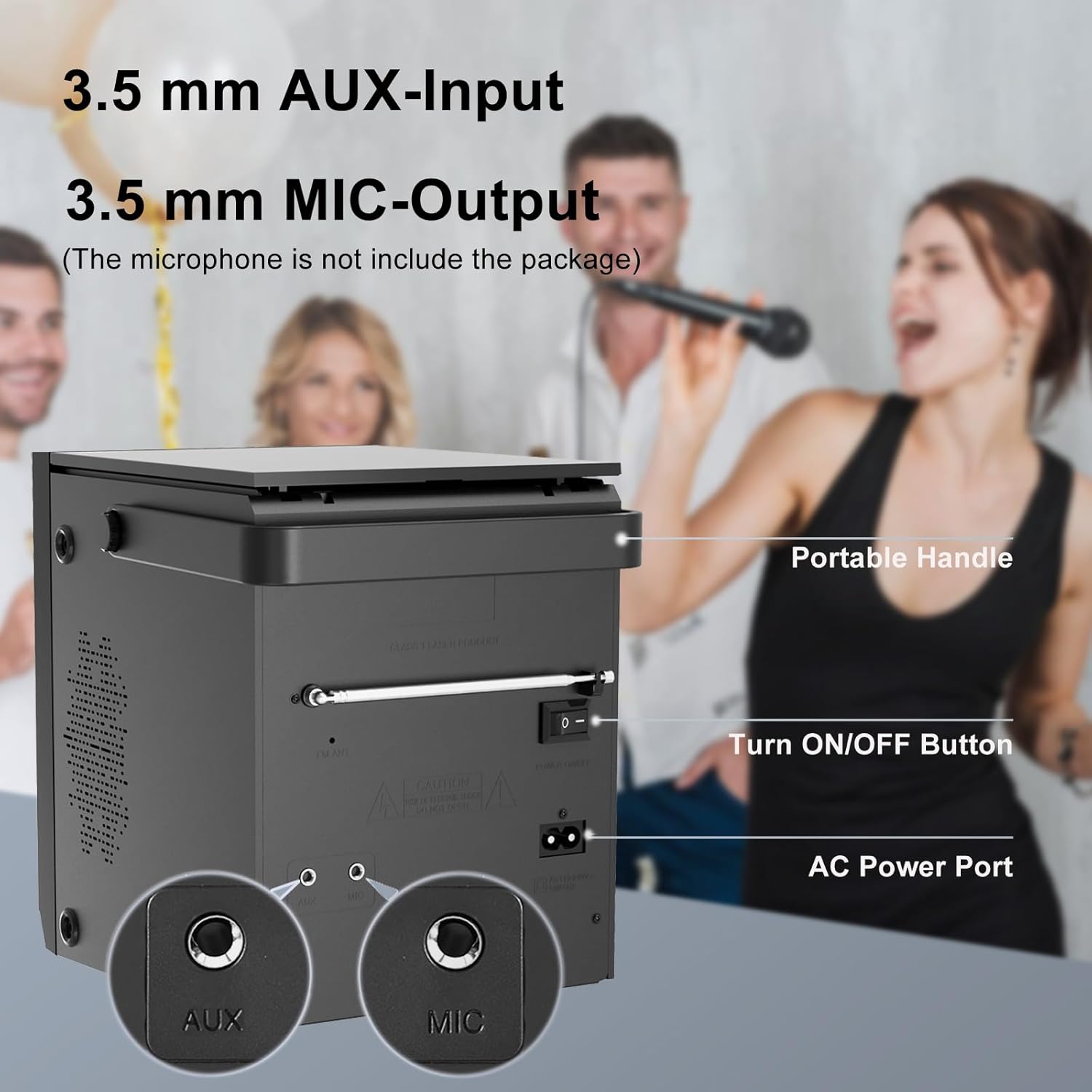
Image 4.2: Rear panel of the boombox, detailing the 3.5 mm AUX-Input, 3.5 mm MIC-Output, the main ON/OFF button, and the AC Power Port. A portable handle is also visible at the top.
- Вуруди AUX (3.5 мм): Дастгоҳҳои аудиоии берунаро пайваст кунед.
- MIC Output (3.5mm): Connect a microphone for karaoke or voice input.
- Тугмаи фурӯзон/хомӯш: Калиди асосии барқ барои дастгоҳ.
- Порти барқи AC: Connect the AC power cable for power and charging.
- Антеннаи FM: Барои қабули беҳтари радиои FM дароз кунед.
4.3 Top-Loading CD Compartment

Image 4.3: The top-loading CD compartment shown open with a CD inside. Icons illustrate playback options: Play in order, Single cycle, Repeat all, and Random play.
The CD compartment is located on the top of the unit. Gently lift the lid to access it.
4.4 Идоракунии дурдаст
The included remote control allows for convenient operation from a distance. (Batteries not included. Requires 2x AAA batteries, typically.)
5. Танзимот
5.1 Пайвастшавии барқ
- Қувваи AC: Connect the supplied AC power cable to the AC Power Port on the rear of the boombox and then to a standard wall outlet.
- Батареяи барқгиранда: The boombox has a built-in 2000 mAh rechargeable battery, providing over 5 hours of continuous use at medium volume. The battery charges automatically when connected to AC power.

Image 5.1: The boombox powered by its internal rechargeable battery, capable of providing approximately 5 hours of playback.
5.2 Фаъолсозии ибтидоӣ
- Ensure the main ON/OFF switch on the rear panel is in the "ON" position.
- -ро пахш кунед ОМОДА button on the front panel or the remote control to turn on the unit.
- The LCD display will illuminate.
6. Дастурҳои истифодабарӣ
6.1 Бозии CD
- -ро пахш кунед РЕЖИМ button until "CD" mode is selected on the display.
- Сарпӯши қисмати CD-ро, ки дар болои дастгоҳ ҷойгир аст, кушоед.
- Place a CD with the label side facing up. Gently close the lid.
- The boombox will read the CD, and playback should start automatically. If not, press the ▶/SCAN тугма.
- -ро истифода баред |<>| тугмаҳо барои гузариш ба роҳҳо.
- -ро пахш кунед ▶/SCAN тугмаи барои таваққуф/давом навозиш.
- -ро пахш кунед ■ ИСТОДА тугма барои қатъ кардани навозиш.
- -ро пахш кунед ТАКРОР КУНЕД button on the remote control to cycle through repeat modes (Single, All, Random).
6.2 Ҳолати Bluetooth
ШАРҲ: This device supports Bluetooth connection for audio input from external devices but does not support Bluetooth earphones.
- -ро пахш кунед РЕЖИМ button until "BT" or "Bluetooth" is displayed. The unit will enter pairing mode, indicated by a flashing Bluetooth icon or "PAIR".
- Дар дастгоҳи дорои Bluetooth (масалан, смартфон, планшет)-и худ, Bluetooth-ро фаъол созед ва дастгоҳҳои дастрасро ҷустуҷӯ кунед.
- Select "LONPOO ZXG-608B" (or similar name) from the list.
- Once paired, the boombox will emit a confirmation sound, and the Bluetooth indicator will stop flashing.
- You can now play audio from your connected device through the boombox.

Image 6.1: Illustrates the process of pairing a smartphone with the boombox via Bluetooth for wireless audio streaming.
6.3 Радиои FM
- Extend the FM antenna on the rear panel for optimal reception.
- -ро пахш кунед РЕЖИМ button until "FM" mode is selected.
- -ро пахш карда нигоҳ доред ▶/SCAN тугмаи барои скан ва захира кардани мавҷҳои дастраси FM.
- -ро истифода баред |<>| тугмаҳо барои паймоиш дар байни истгоҳҳои захирашуда.
6.4 Бозии USB
- Диски флеши USB-ро ба порти USB дар панели пеш ҷойгир кунед.
- -ро пахш кунед РЕЖИМ button until "USB" mode is selected.
- Дастгоҳ ба таври худкор садои мувофиқро муайян мекунад ва навохтанро оғоз мекунад files (масалан, MP3).
- -ро истифода баред |<>| тугмаҳо барои гузариш ба роҳҳо.
- -ро пахш кунед ▶/SCAN тугмаи барои таваққуф/давом навозиш.
- -ро пахш кунед ■ ИСТОДА тугма барои қатъ кардани навозиш.
6.5 Вуруди AUX
- Connect an external audio device (e.g., MP3 player, smartphone) to the AUX Input port on the rear panel using a 3.5mm audio cable (not included).
- -ро пахш кунед РЕЖИМ button until "AUX" mode is selected.
- Навозиш ва баландии овозро аз дастгоҳи берунаи пайвастшудаи худ идора кунед.

Image 6.2: Demonstrates connecting external devices like a smartphone via AUX input and using the USB port for playback.
6.6 Вуруди микрофон
- Connect a microphone (not included) to the MIC Output port on the rear panel.
- Adjust the volume using the main volume knob. The microphone input will mix with the currently playing audio source.

Image 6.3: Shows the boombox being used with a microphone, illustrating its karaoke function.
6.7 Танзимоти эквалайзер (EQ)
-ро пахш кунед EQ button on the front panel or remote control to cycle through preset equalizer modes:
- Ҳамвор
- Рок
- Поп
- Классик
- Ҷаз

Image 6.4: Highlights the 20W stereo sound output and lists the available 3 repeat modes (Single, All, Random) and 5 EQ modes (Flat, Rock, Pop, Classic, Jazz).
7. Нигоҳдорӣ
- Тозакунӣ: Қисми берунии дастгоҳро бо матои мулоим ва хушк пок кунед. Тозакунанда ё ҳалкунандаҳои абразивиро истифода набаред.
- Нигоҳубини линзаи CD: Агар мушкилоти навохтани CD ба миён ояд, диски тозакунандаи линзаи CD-ро, ки аз фурӯш дастрас аст, истифода баред.
- Давомнокии батарея: Барои дароз кардани мӯҳлати кори батарея, аз холӣ кардани пурраи батарея зуд-зуд худдорӣ кунед. Ҳатто агар дастгоҳ муддати тӯлонӣ истифода нашавад ҳам, онро мунтазам пур кунед.
- Нигоҳдорӣ: When storing the unit for a long time, ensure it is powered off and disconnected from the AC supply. Store in a cool, dry place.
8. Баррасии мушкилот
| Мушкилот | Сабаби эҳтимолӣ | Ҳалли |
|---|---|---|
| Не қудрат | AC cable not connected; Main power switch off; Battery depleted. | Check AC connection; Ensure rear ON/OFF switch is ON; Charge the battery. |
| CD not playing / "NO DISC" error | CD inserted incorrectly; CD is dirty or scratched; CD lens is dirty; Incompatible CD format. | Reinsert CD label side up; Clean CD; Use a CD lens cleaner; Ensure CD is audio CD format. |
| Bluetooth пайваст намешавад | Boombox not in BT mode; Device too far; Bluetooth already connected to another device. | Select BT mode; Move device closer; Disconnect from other devices and try again. |
| Қабули сусти радиои FM | Антенна дароз карда нашудааст; Сигнали заиф. | Fully extend the FM antenna; Reposition the unit for better signal. |
| Мушкилоти бозикунии USB | Диски USB дуруст ворид карда нашудааст; номувофиқ аст file форматкунӣ; диски USB вайрон шудааст. | Reinsert USB drive; Ensure files are MP3 or compatible; Try a different USB drive. |
| No sound from AUX | AUX cable not connected; Incorrect mode selected; Volume too low on external device. | Check AUX cable connection; Select AUX mode; Increase volume on external device. |
9. Мушаххасоти
- Модели: ZXG-608B
- Бренд: ЛОНПУО
- Андозаҳои маҳсулот (L x W x H): 4.72 x 7.09 x 5.91 инч (12 x 18 x 15 см)
- Вазни ашё: 5.63 фунт (2.55 кг)
- Натиҷаи баландгӯяк: 20 Вт RMS (10 Вт x 2)
- Пайвастшавӣ: Bluetooth 5.3, USB, AUX Input (3.5mm), MIC Port (3.5mm)
- Манбаи нерӯ: AC Power (Corded Electric) / Built-in Rechargeable Battery
- Иқтидори батарея: 2000 мАч
- Playback Time (Battery): >5 hours (at medium volume)
- ВАО дастгирӣшаванда: Audio CD, CD-R/RW, USB (MP3)
- Танзимгари радио: FM
- Усулҳои EQ: Flat, Rock, Pop, Classic, Jazz
- Лавозимотҳои дохилшуда: AC Power Cable, Remote Control, User Manual
10. Кафолат ва дастгирӣ
LONPOO products are designed for reliability and performance. For warranty information, please refer to the warranty card included with your purchase or contact LONPOO customer support.
If you encounter any issues or have questions regarding your LONPOO Portable CD Player Boombox, please contact our customer support team for assistance. Contact details can typically be found on the official LONPOO webсайт ё дар бастаи маҳсулот.