Муқаддима
The REACHER Sleep Trainer Alarm Clock K2 is a versatile 3-in-1 device designed to assist families in establishing healthy sleep routines. It functions as a gentle night light, a calming white noise machine, and a reliable sleep training clock for toddlers. This manual provides detailed instructions for setup, operation, and maintenance to ensure optimal performance and a better night's rest for the entire family.

Image: The REACHER Sleep Trainer Alarm Clock K2, highlighting its three core functions: Sleep Trainer, Night Light, and Sound Machine, positioned on a bedside table in a child's room.
Мундариҷаи баста
Лутфан қуттии ҷузъҳои зеринро тафтиш кунед:
- REACHER Sleep Trainer Alarm Clock K2 Unit
- Сими пуркунандаи USB
- Адаптери барқ
- Дастури корбар (ин ҳуҷҷат)
Маҳсулот ба охир расидview & Назоратҳо
The K2 features intuitive controls on its top panel and dimmers on the bottom for display and light brightness.
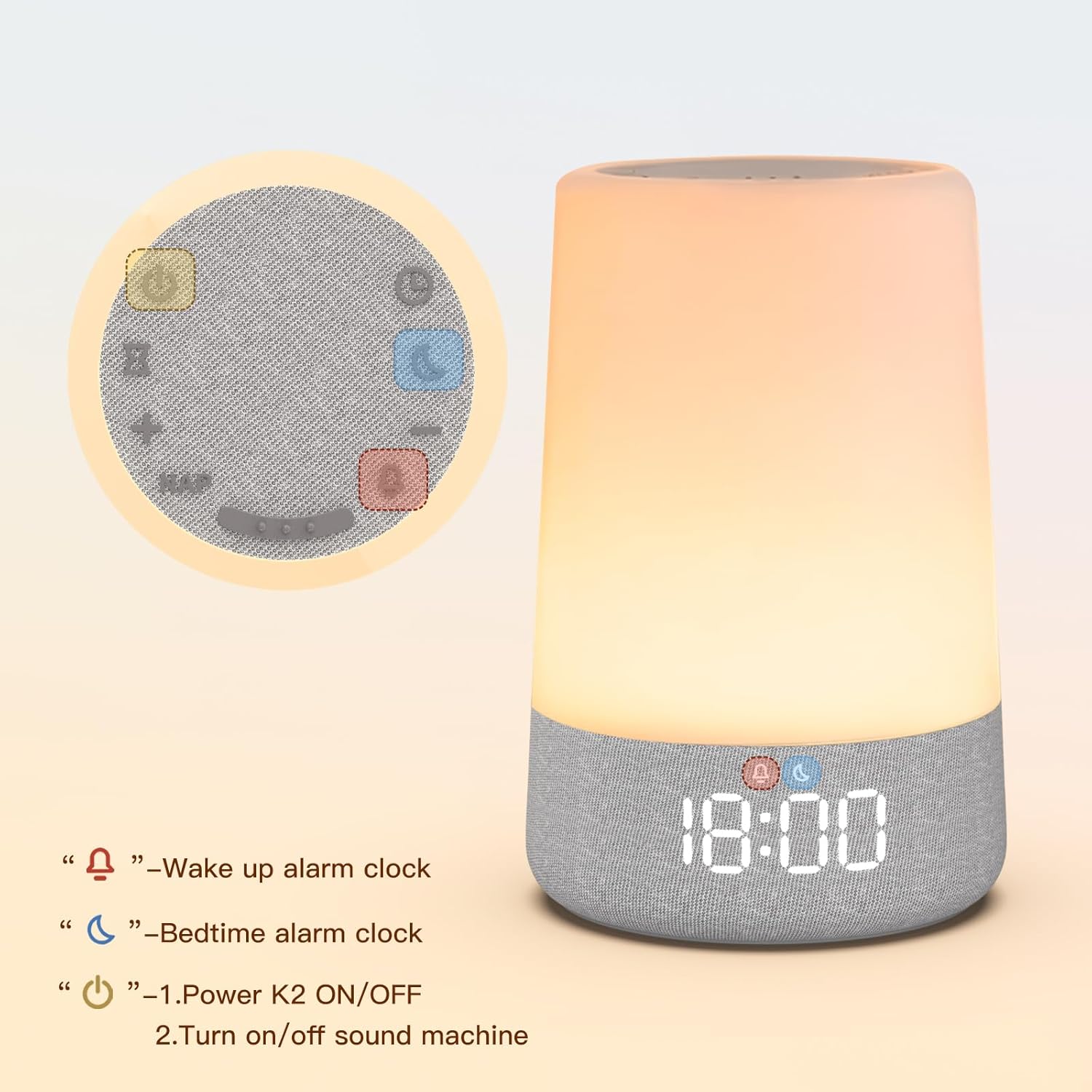
Image: Top panel of the K2 device, illustrating the layout of the control buttons for various functions.
- Тугмаи барқ (①): Hold for 3 seconds to power on/off. Press to turn sound machine on/off.
- Timer Button (②): Press repeatedly to change sleep sounds. Hold for 2 seconds to turn off sound machine. Press to set auto-off timer when light or sound is playing.
- Nap Button (NAP): Press to set nap timer.
- Баланд/Поёни овоз (+/-): Овозро танзим кунед.
- Wake Up Alarm Button (④): Enter snooze when alarm goes off. Press to turn on/hold 2 seconds to turn off light. Press repeatedly to change light color. Enter/confirm wake alarm setting.
- Bedtime Alarm Button (⑤): Enter/confirm sleep alarm setting. Hold to turn sleep alarm on/off.
- Time Setting Button (③): Enter/confirm time setting.
On the bottom of the unit, you will find sliders for Диммерро намоиш диҳед ва Нур Диммер to adjust brightness levels independently.
Ташкил кардан
Пур кардани дастгоҳ
The K2 features a rechargeable battery for cordless use, but can also be powered via plug-in for continuous operation.
- Connect the USB charging cable to the DC 5V port on the back of the K2 unit.
- Plug the other end of the USB cable into the power adapter, then into a standard household outlet.
- The indicator light will show red while charging and turn green when fully charged.
- When the battery is completely drained, the K2 will automatically shut down safely. Recharge it to resume use.

Image: The K2 unit, emphasizing its rechargeable and app-free design, suitable for home or travel.
Дастурҳои амалиётӣ
1. Муқаррар кардани вақт
- Press the Time Setting button (③). The hour display will flash.
- Use the Volume Up (+) and Volume Down (-) buttons to adjust the hour.
- Press the Time Setting button (③) again to confirm the hour and move to minute adjustment.
- Use the Volume Up (+) and Volume Down (-) buttons to adjust the minute.
- Press the Time Setting button (③) once more to confirm the minute.
- To switch between 12H/24H format, press the Time Setting button (③) after setting the minutes.
2. Wake/Sleep Alarm Setting (OK-to-Wake System)
The K2 uses a simple red and green light system to signal sleep and wake times, helping children understand routines.

Image: The K2 displaying a red light with '20:00' for bedtime and a green light with '9:00' for wake-up time, illustrating the OK-to-Wake system.
Setting Wake Alarm:
- Press the Wake Up Alarm button (④). The hour display will flash.
- Adjust the hour using Volume Up (+) and Volume Down (-) buttons.
- Press the Wake Up Alarm button (④) to confirm the hour and adjust minutes.
- Adjust minutes using Volume Up (+) and Volume Down (-) buttons.
- Press the Wake Up Alarm button (④) to confirm minutes and select ringtone.
- Use Volume Up (+) and Volume Down (-) to choose a ringtone.
- Press the Wake Up Alarm button (④) to confirm the alarm setting.
Setting Sleep Alarm:
- Press the Bedtime Alarm button (⑤). The hour display will flash.
- Adjust the hour using Volume Up (+) and Volume Down (-) buttons.
- Press the Bedtime Alarm button (⑤) to confirm the hour and adjust minutes.
- Adjust minutes using Volume Up (+) and Volume Down (-) buttons.
- Press the Bedtime Alarm button (⑤) to confirm the alarm setting.
Шарҳ: Wake/Sleep alarm light and night light share the same brightness setting.
3. Night Light Setting
The K2 offers customizable light colors and adjustable brightness to create a soothing environment.

Image: The K2 unit displaying various gentle colors like soft blue, warm amber, calming green, and elegant pink, indicating customizable options.
- To turn on the night light, press the Wake Up Alarm button (④).
- Press the Wake Up Alarm button (④) repeatedly to cycle through different light colors.
- To adjust brightness, use the 'Light Dimmer' slider on the bottom of the unit.
- To turn off the night light, hold the Wake Up Alarm button (④) for 2 seconds.

Image: A visual representation of the adjustable brightness feature, showing the K2 light at 5% and 100% intensity.
4. Sound Machine Setting
The K2 offers 17 soothing sleep sounds to create an immersive bedtime routine.

Image: The K2 unit on a bedside table with a sleeping child, illustrating the variety of 17 soothing sleep sounds available, categorized as White Noise, Lullabies, Fans, and Natural Music.
- To turn on the sound machine, press the Power button (①).
- Press the Timer button (②) repeatedly to cycle through different sleep sounds.
- Adjust the volume using the Volume Up (+) and Volume Down (-) buttons.
- To turn off the sound machine, hold the Power button (①) for 2 seconds.
5. Nap Timer
Set a flexible nap timer from 15 to 180 minutes to suit your child's needs.

Image: The K2 unit on a bedside table with a sleeping child in the background, displaying the nap timer function with options ranging from 15 to 180 minutes.
- Press the Nap button (NAP). The nap duration will be displayed.
- Use the Volume Up (+) and Volume Down (-) buttons to adjust the nap duration.
- The nap timer will start automatically after selection.
6. Қулфи кӯдак
Қулфи кӯдакро фаъол созед, то аз тағироти тасодуфӣ дар танзимот пешгирӣ кунед.

Image: A baby interacting with the K2 unit, with an overlay showing a lock icon, indicating the child lock feature for worry-free use.
- To activate the child lock, press and hold both the Volume Up (+) and Volume Down (-) buttons simultaneously for 3 seconds. A lock icon will appear on the display.
- To deactivate the child lock, repeat the same action (press and hold Volume Up (+) and Volume Down (-) buttons for 3 seconds). The lock icon will disappear.
7. Auto-off Timer
Set a timer for the sleep machine and night light to turn off automatically.

Image: Close-up of the K2's top panel, highlighting the auto-off timer button (hourglass icon) for setting sleep duration.
- While the night light or sound machine is active, press the Timer button (②).
- Each press will cycle through available timer durations (e.g., 1 hour, 2 hours, 3 hours).
- Select your desired duration, and the device will automatically turn off after the set time.
Нигоҳдорӣ
To ensure the longevity and proper functioning of your REACHER Sleep Trainer Alarm Clock K2, please follow these maintenance guidelines:
- Тозакунӣ: Use a soft, dry cloth to wipe the exterior of the device. Do not use abrasive cleaners, solvents, or harsh chemicals, as these may damage the surface.
- Таъсири об: Keep the device away from water and moisture. It is not waterproof.
- Нигоҳдорӣ: Вақте ки муддати тӯлонӣ истифода набаред, дастгоҳро дар ҷои хунук ва хушк, дур аз нурҳои бевоситаи офтоб ва ҳарорати аз ҳад зиёд нигоҳ доред.
- Нигоҳубини батарея: To maintain battery health, avoid fully discharging the battery frequently. Recharge the device when the battery level is low.
Мушкилкушо
If you encounter any issues with your REACHER Sleep Trainer Alarm Clock K2, please refer to the following table for common problems and solutions:
| Мушкилот | Сабаби эҳтимолӣ | Ҳалли |
|---|---|---|
| Дастгоҳ фаъол нест. | Low battery or not plugged in. | Ensure the device is fully charged or connected to a power source. Hold the power button for 3 seconds. |
| Display is blank or light not working. | Display dimmer is set to minimum or light is off. | Adjust the 'Display Dimmer' slider on the bottom. Press the Wake Up Alarm button (④) to turn on the light. |
| Дастгоҳи садоӣ кор намекунад. | Sound is off or volume is too low. | Press the Power button (①) to turn on sound. Increase volume using the Volume Up (+) button. |
| Огоҳӣ садо намедиҳад. | Alarm is not set or volume is too low. | Verify alarm settings and ensure volume is adequate. |
| Settings change unexpectedly. | Child lock is not activated. | Activate the child lock by holding Volume Up (+) and Volume Down (-) buttons for 3 seconds. |
Мушаххасоти
- Номи модел: K2
- Бренд: РЕЙЧЕР
- Андозаҳои маҳсулот: 4.33 x 4.33 x 6.89 инч
- Вазни ашё: 1.61 фунт (0.73 килограмм)
- Мавод: Акрилонитрил бутадиен стирен (ABS)
- Ранги: Сафед
- Батареяҳо: 1 AA batteries required (for internal clock backup, not main power)
- Вуруди барқ: DC 5V (via USB cable and power adapter)
Видеои расмии маҳсулот
Watch this official video from the seller for a quick overview of the REACHER Sleep Trainer Alarm Clock K2's features and benefits.
Video: An official product video titled "Sleep Trainer Alarm Clock for Kids" by ReacherDirect, demonstrating the key functionalities of the K2 sleep trainer.
Кафолат ва дастгирӣ
For warranty information or technical support, please contact REACHER customer service:
- Почтаи электронӣ: customer@reachershop.com
- Please refer to your purchase receipt for specific warranty terms and conditions.


