Муқаддима
Thank you for choosing the TECKNET Wireless Doorbell TK-WD004. This manual provides detailed instructions for the installation, operation, and maintenance of your new doorbell system. Please read this manual thoroughly before use to ensure proper functionality and safety.
The TECKNET Wireless Doorbell offers a reliable and convenient solution for your home or office. Key features include a long wireless range of up to 400 meters, IP65 waterproof rating for outdoor use, 60 selectable melodies, 5 adjustable volume levels, and RGB indicators for visual alerts.
Мундариҷаи баста
Лутфан бастаро барои ҷузъҳои зерин тафтиш кунед:
- 1 x Wireless Doorbell Transmitter (Push Button)
- 1 x Wireless Doorbell Receiver (Chime Unit)
- 1 x CR2032 Lithium Battery (pre-installed in transmitter)
- Mounting Hardware (screws, anchors, double-sided adhesive tape)
- Дастури корбар

Image: The package contents, showing the doorbell transmitter, receiver, and installation accessories.
Маҳсулот ба охир расидview
The TECKNET Wireless Doorbell system consists of two main components: the transmitter (push button) and the receiver (chime unit).
Transmitter (Push Button)
- Тугмаи пахш: Activates the doorbell chime.
- Нишондиҳандаи LED: Illuminates when the button is pressed.
- Бахши батарея: Он батареяи CR2032-ро дар бар мегирад.
- Обногузар Casing: IP65 rated for outdoor durability.
Receiver (Chime Unit)
- Маърузачй: Emits the selected melody.
- Тугмаи баландии овоз: Adjusts the chime volume (5 levels, 0-120 dB).
- Тугмаи Интихоби Оҳанг: Cycles through 60 available melodies.
- Тугмаи режим: Selects between LED flash, chime, or both.
- RGB Indicator: Provides visual alerts with customizable lighting modes.
- Васлаки барқ: Plugs directly into a standard electrical outlet.

Тасвир: Муфассал view of the doorbell receiver and transmitter, highlighting the RGB indicator, melody selection buttons, volume control, and the push button.
Насб ва насб
The TECKNET Wireless Doorbell is designed for easy installation. Follow these steps to set up your doorbell system.
Step 1: Install the Receiver
- Plug the receiver into a standard electrical outlet in your desired location. Ensure the outlet is easily accessible and within the wireless range of the transmitter.
- The receiver does not require batteries.
Step 2: Install the Transmitter (Push Button)
The transmitter can be installed using either adhesive tape or screws.
Option A: Adhesive Mounting
- Clean the mounting surface thoroughly to ensure it is dry and free of dust or grease.
- Peel off one side of the double-sided adhesive tape and apply it firmly to the back of the transmitter.
- Peel off the other side of the tape and press the transmitter firmly onto the desired location (e.g., door frame or wall). Hold for at least 30 seconds.
Варианти B: Монтажи винт
- Open the transmitter casing бодиққат.
- Mark the positions for the screw holes on your desired mounting surface.
- Агар лозим бошад, сӯрохиҳои пилотӣ парма кунед ва лангарҳои деворро гузоред.
- Secure the transmitter base to the wall using the provided screws.
- Reattach the transmitter casing.

Image: Visual guide for installing the doorbell transmitter using either adhesive tape or screws.
Note: The transmitter comes with a pre-installed CR2032 lithium battery, offering a lifespan of up to 3 years.
Дастурҳои амалиётӣ
1. Тағйир додани оҳангҳо
- Press the "Melody Selection" button on the receiver to cycle through the 60 available melodies.
- Once you hear your desired melody, stop pressing the button. The receiver will automatically save your selection.

Image: The doorbell receiver displaying musical notes, illustrating the selection of 60 different melodies.
2. Танзими баландии овоз
- Press the "Volume" button on the receiver to adjust the sound level.
- There are 5 adjustable volume levels, ranging from 0 dB (mute) to 120 dB.
- The mute mode (0 dB) is useful for quiet environments or when visual alerts are preferred.
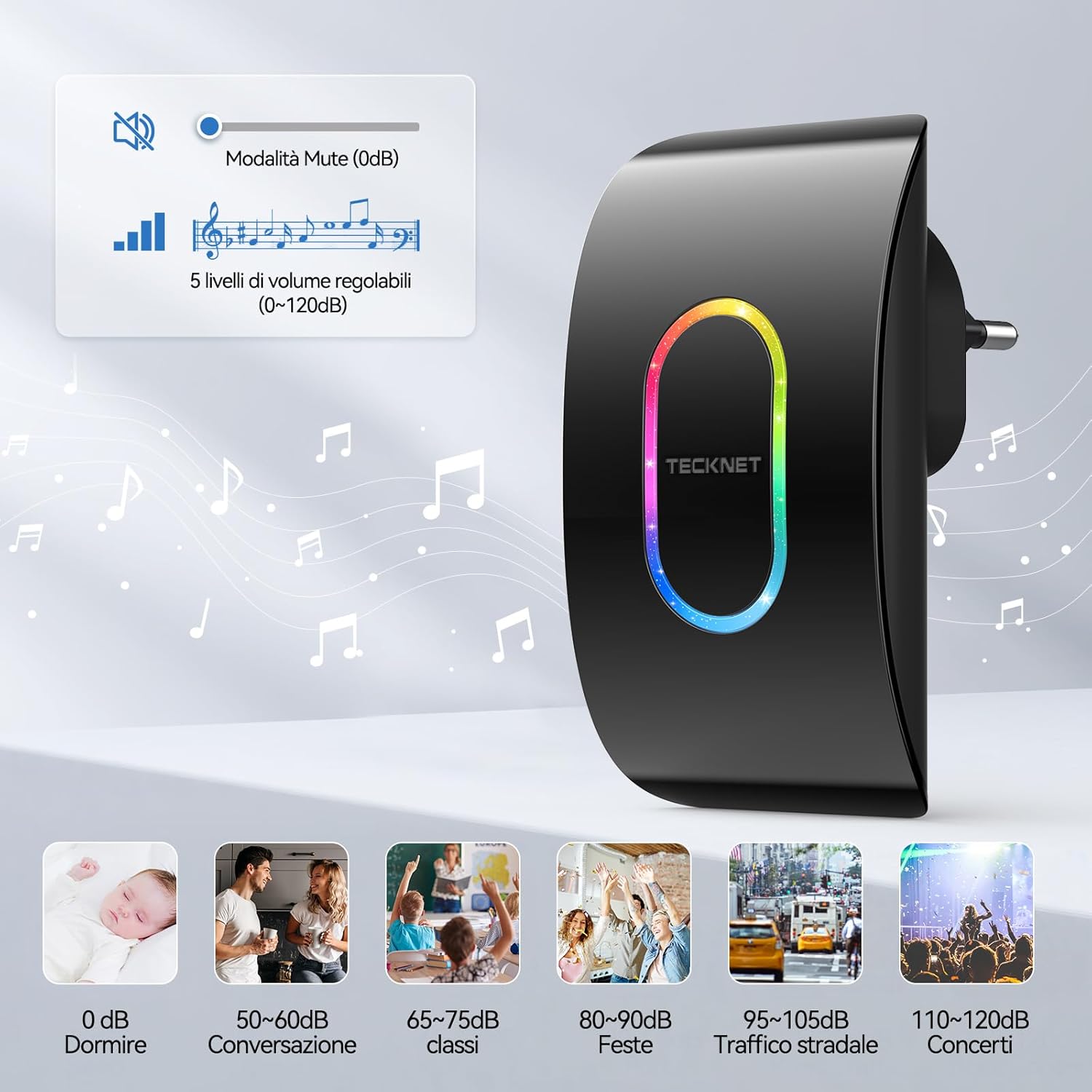
Image: A visual representation of the 5 volume levels, from silent (0 dB) to loud (120 dB), with corresponding typical sound environments.

Image: The doorbell receiver in silent mode, ideal for environments like a baby's room.
3. Selecting Lighting Modes (RGB Indicators)
- Press the "Mode" button on the receiver to switch between different notification modes.
- Available modes typically include:
- LED and Chime: Both sound and visual alert.
- Only LED: Visual alert only (silent mode).
- Only Chime: Sound alert only (no LED flash).
- The RGB indicator also offers various flash patterns such as "Ghost Flash", "Marching Flash", and "Breathing Flash" for visual distinction.

Image: Illustration of the three distinct RGB flash modes: Ghost Flash, Marching Flash, and Breathing Flash, providing visual cues for doorbell activation.

Image: The doorbell receiver's side view with labeled buttons for mode, melody, and volume, alongside visual examples of the three working modes: LED and chime, LED only, and chime only.
4. Вазифаи хотира
The doorbell receiver features a memory function that retains your last selected melody and volume level even after a power outage or if unplugged.

Image: A graphic illustrating the doorbell's memory function, which saves your preferred melody and volume settings.
Нигоҳдорӣ
Battery Replacement (Transmitter)
The transmitter uses a CR2032 lithium battery with an estimated lifespan of up to 3 years. When the transmitter's LED indicator no longer lights up or the range decreases significantly, it's time to replace the battery.
- Интиқолдиҳандаро бодиққат кушоед casing.
- Батареяи кӯҳнаи CR2032-ро хориҷ кунед.
- Батареяи нави CR2032-ро бо тарафи мусбат (+) ба боло гузоред.
- casing бехатар.
Тозакунӣ
Wipe the doorbell units with a soft, dry cloth. Do not use abrasive cleaners or solvents, as these may damage the surface or internal components.
Муқовимати обу ҳаво
The transmitter is IP65 rated, meaning it is protected against dust ingress and low-pressure water jets from any direction. It is designed to withstand various weather conditions, including temperatures from -20°C (-4°F) to 60°C (140°F).

Image: The doorbell transmitter demonstrating its IP65 waterproof and dustproof capabilities, along with its operational temperature range.
Мушкилкушо
| Мушкилот | Сабаби эҳтимолӣ | Ҳалли |
|---|---|---|
| Занги дар садо намедиҳад. |
|
|
| Масофаи кӯтоҳи алоқаи бесим. |
|
|
| Занг гоҳ-гоҳ садо медиҳад. |
|
|
Мушаххасоти
| Хусусият | Тафсилот |
|---|---|
| Рақами модел | TK-WD004 |
| Диапазони бесим | То 400 метр (1300 фут) |
| Оҳангҳо | 60 занги интихобшаванда |
| Сатҳи садо | 5 adjustable levels (0 dB to 120 dB) |
| Рейтинги обногузар (интиқолдиҳанда) | IP65 |
| Ҳарорати корӣ | -20°C то 60°C (-4°F то 140°F) |
| Батареяи интиқолдиҳанда | 1 x CR2032 Lithium Battery (included) |
| Қувваи қабулкунанда | AC powered (plugs into outlet) |
| Андозаҳои маҳсулот | Receiver: 8.7 x 7.5 x 11.2 cm; Transmitter: 5.8 x 4.1 x 7.5 cm (approximate, based on image) |
| Вазн | 160 grams (total package weight) |

Image: Visual representation of the dimensions for both the receiver and the transmitter units.
Кафолат ва дастгирӣ
TECKNET provides a 36-month support period for this product. If you encounter any issues during the use of the product, please contact the professional TECKNET customer service team for assistance.
For further support or warranty claims, please refer to the contact information provided on the TECKNET official webсайт ё ҳуҷҷатҳои хариди шумо.


