1. Муқаддима
The IFYOO G53 Wireless Vertical Ergonomic Mouse is designed to provide superior comfort and enhance productivity. Its unique vertical design promotes a natural handshake position, reducing wrist strain and discomfort often associated with traditional mice. This tri-mode mouse offers versatile connectivity options and customizable features to adapt to various computing environments.

Figure 1.1: IFYOO G53 Wireless Vertical Ergonomic Mouse.
2. Хусусиятҳои асосӣ
- Superior Ergonomic Design: Keeps your hand in a natural handshake position to reduce wrist stress and pain, helping to prevent Carpal Tunnel Syndrome.
- Пайвастагии семоҳа: Supports 2.4GHz wireless, Bluetooth 5.1, and wired USB-C connections, allowing seamless switching between multiple devices.
- DPI танзимшаванда: Max 8400 DPI for smooth and accurate tracking, with multiple DPI settings (500, 1600, 2400, 3200, 4000, 4800, 8400) for precise control.
- Равшании динамикӣ RGB: Features 9 RGB lighting modes for customizable visual effects, which can also be turned off. DPI changes are indicated by logo color.
- 5 Programmable Side Buttons: Boost productivity with shortcuts for forward/backward webpage navigation, changing lighting effects, opening file explorer, or returning to desktop. (Note: Some side button shortcuts may not work with Mac OS, iPad OS, and other operating systems, except for light switch, and are primarily supported on Windows 10/11).
- Батареяи барқгиранда: Built-in 600mAh rechargeable battery with intelligent power saving. Charges via USB-C.

Figure 2.1: Ergonomic design promotes a natural hand position, reducing wrist strain.
3. Мундариҷаи баста
Лутфан боварӣ ҳосил кунед, ки ҳама ашё дар баста мавҷуд аст:
- 1x IFYOO G53 Wireless Vertical Ergonomic Mouse
- 1x Дастури корбар (ин ҳуҷҷат)
- 1x сими пуркунандаи USB Type-C
- 1x 2.4 GHz USB Receiver (stored at the bottom of the mouse)
4. Танзимот
4.1 Пур кардани муш
Before first use, it is recommended to fully charge the mouse. Connect the provided USB-C cable to the charging port on the front of the mouse and the other end to a USB power source (e.g., computer USB port, USB wall adapter). The RGB lighting may indicate charging status.
4.2 Пайвастшавӣ ба дастгоҳи худ
The G53 mouse offers three connection modes:
- Ҳолати бесими 2.4 ГГц:
- Locate the 2.4 GHz USB receiver stored in the magnetic compartment at the bottom of the mouse.
- Қабулкунаки USB-ро ба порти дастраси USB дар компютери худ пайваст кунед.
- Slide the mode switch at the bottom of the mouse to the "2.4G" position. The mouse should connect automatically.
- Ҳолати Bluetooth (BT):
- Slide the mode switch at the bottom of the mouse to the "BT" position.
- On your device (Windows, Mac, iPad OS, Android), go to Bluetooth settings and search for new devices.
- Select "IFYOO G53" from the list of available devices to pair.
- Усули симдор:
- Connect the provided USB-C cable to the mouse's charging port and the USB-A end to your computer's USB port.
- Slide the mode switch at the bottom of the mouse to the "Wired" position. The mouse will function as a wired device and charge simultaneously.

Figure 4.1: Seamless multi-device connectivity with 2.4G, Wired, and Bluetooth modes.
4.3 Driver Software (Windows Only)
To modify mouse configurations and customize buttons (excluding light switch), driver software is available for Windows OS only. Visit www.ifyoo.net to download the latest driver. This software allows for personalized profiles, macro settings, and advanced RGB control.

Figure 4.2: Professional driver software interface for Windows customization.
5. Дастурҳои истифодабарӣ
5.1 Функсияҳои тугмаҳо
The IFYOO G53 mouse features 10 buttons for enhanced control:

Figure 5.1: Mouse layout and button overview.
- Тугмаи чап (1): Функсияи стандартии клик бо тугмаи чапи муш.
- Scroll Wheel (2): Ба боло/поён ҳаракат кунед, тугмаи миёнаро клик кунед.
- Тугмаи рост (3): Функсияи стандартии тугмаи рости муш.
- Тугмаи DPI (4): Давраҳо тавассути танзимоти DPI.
- Тугмаи пеш (5): Ба пеш ҳаракат мекунад web браузерҳо/барномаҳо.
- Тугмаи қафо (6): Ба қафо дарун ҳаракат мекунад web браузерҳо/барномаҳо.
- Light Effect Button (7): Changes RGB lighting modes.
- File Resource Manager (8): мекушояд File Explorer (Windows only).
- BOSS Button (9): Returns to desktop (Windows only).
- Mode Indicator (10): Displays current connection mode.
- 2.4G Receiver (11): USB dongle for 2.4GHz wireless connection.
- Тугмаи режим (12): Switch between 2.4G, Wired, and BT modes.
Note: Due to system compatibility, functions of buttons 5, 6, 8, and 9 can only be used on Windows OS.
5.2 Танзими ҳассосияти DPI
-ро пахш кунед Тугмаи DPI (4) to cycle through the available DPI settings. Each change in DPI will typically be indicated by a change in the logo's LED color, allowing you to visually confirm your current sensitivity level.
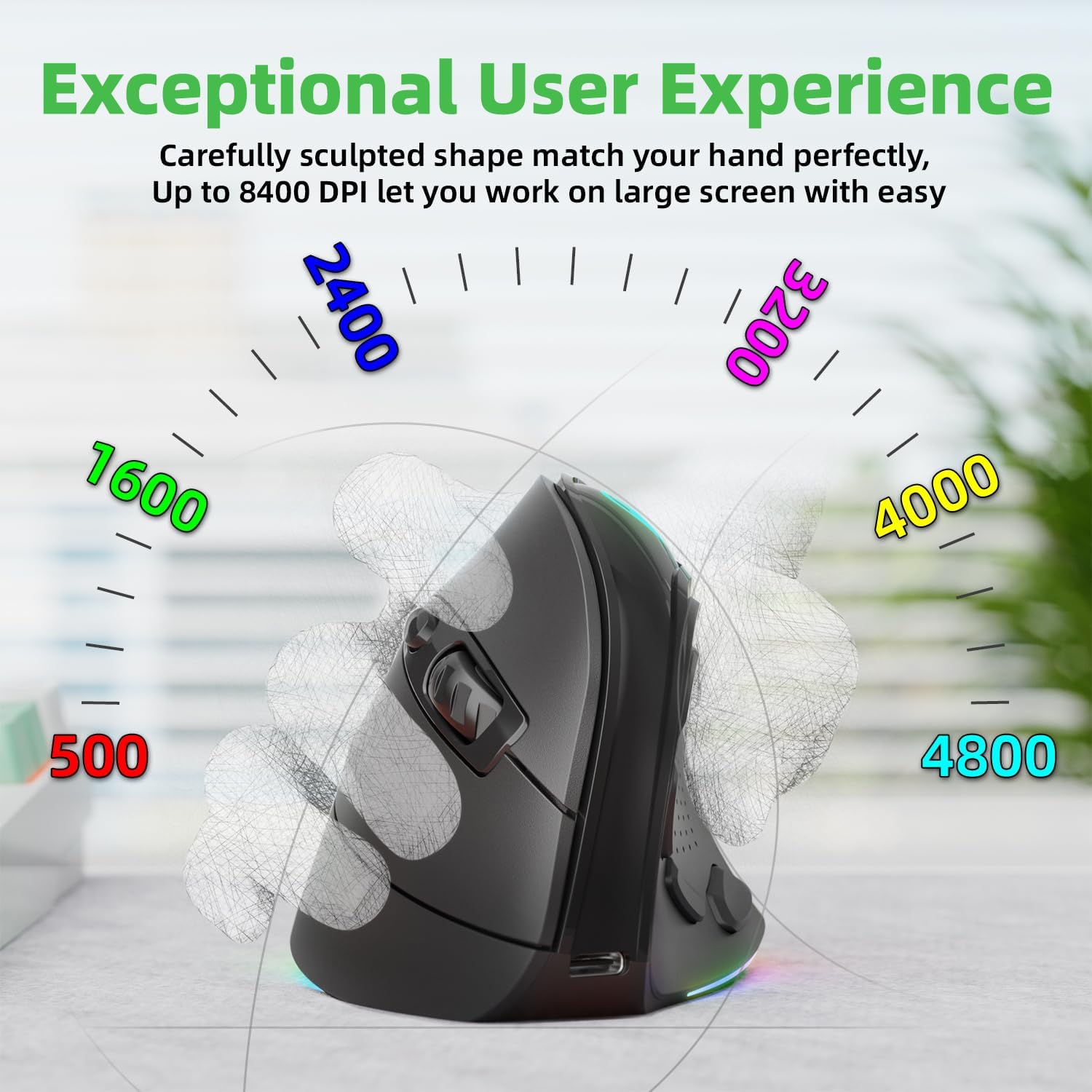
Figure 5.2: Adjustable DPI up to 8400, with logo color indicating current DPI.
5.3 Назорати равшании RGB
-ро пахш кунед Light Effect Button (7) to cycle through the 9 dynamic RGB lighting modes. Continue pressing to find your preferred effect or to turn the lighting off.
6. Нигоҳдорӣ
- Тозакунӣ: Барои тоза кардани муш матои мулоим ва хушкро истифода баред. Барои лойҳои якрав, каме гampматоъро бо об ё маҳлули ҳалим тоза кунед. Аз маводи кимиёвии сахт ё маводи абразивӣ худдорӣ намоед.
- Нигоҳдорӣ: When not in use for extended periods, store the mouse in a cool, dry place. Ensure the 2.4 GHz receiver is stored securely in its compartment at the bottom of the mouse.
- Нигоҳубини батарея: To prolong battery life, avoid fully discharging the mouse frequently. Charge it when the battery indicator is low.
7. Баррасии мушкилот
- Муш ҷавоб намедиҳад:
- Боварӣ ҳосил кунед, ки муш пур карда шудааст.
- Check the connection mode switch (2.4G, Wired, BT) is in the correct position.
- For 2.4GHz, ensure the USB receiver is securely plugged in. Try a different USB port.
- Барои Bluetooth, боварӣ ҳосил кунед, ки Bluetooth дар дастгоҳи шумо фаъол аст ва муш ҷуфт карда шудааст. Кӯшиш кунед, ки дубора пайваст кунед.
- In wired mode, ensure the USB-C cable is properly connected.
- Ҳаракати курсор номунтазам ё суст аст:
- Танзимоти DPI-ро бо истифода аз тугмаи DPI танзим кунед.
- Ensure the mouse sensor is clean and free from debris.
- Мушро дар сатҳи тоза, инъикоснашаванда ё тахтаи муш истифода баред.
- Side buttons not working (Mac OS/iPad OS):
- As noted, some side button functions (Forward, Backward, File Resource Manager, BOSS Button) are system-specific and primarily supported on Windows OS. The Light Effect Button should function across all compatible OS.
8. Мушаххасоти
| Бренд | IFYOO |
| Рақами модел | IFYOO-G53-Black3 |
| Технологияи пайвастшавӣ | 2.4GHz Wireless, Bluetooth 5.1, Wired (USB-C) |
| Технологияи муайянкунии ҳаракат | Оптикӣ |
| Шумораи тугмаҳо | 10 |
| Танзимоти DPI | Up to 8400 (Adjustable) |
| Батарея | 600mAh Lithium Polymer (Rechargeable) |
| Порти пуркунандаи барқ | USB-C |
| Мутобиқати | Windows 11/10/7/8, Mac OS, iPad OS, Android |
| Вазни ашё | 8.4 унция |
| Андозаҳои бастаҳо | 5.87 x 4.49 x 3.31 инч |
| Кишвари аслӣ | Хитой |
9. Кафолат ва дастгирӣ
9.1 Кафолати яксола
IFYOO offers a 90-day free replacement and one-year warranty service from the date of purchase. If there are any problems with the product, please do not hesitate to contact us.
9.2 Дастгирии муштариён
- расмӣ Webсайт: www.ifyoo.net
- Почтаи электронии хидматрасонии муштариён: cs@ifyoo.net (9:00 - 18:00 Monday to Friday)
- Manuals, Drivers, Firmware Updates: support.ifyoo.net
- Дарсҳои видеоӣ: www.youtube.com/IFYOO


