1. Муқаддима
This manual provides essential information for the safe and efficient use of your Acer SA270G0bi 27-inch IPS Full HD Monitor. Please read it thoroughly before operating the device and keep it for future reference.
2. Маълумот оид ба бехатарӣ
- Манбаи нерӯ: Танҳо адаптери барқро, ки бо монитор дода мешавад, истифода баред. Боварӣ ҳосил кунед, ки васлаки барқ дуруст ба замин пайваст карда шудааст.
- Ҷойгиршавӣ: Place the monitor on a stable, flat surface. Avoid direct sunlight, heat sources, and areas with high humidity or dust.
- Вентилятсия: Кушодани вентилятсияро манъ накунед. Барои ҷараёни дурусти ҳаво дар атрофи монитор фазои кофӣ ҷудо кунед.
- Тозакунӣ: Пеш аз тоза кардан сими барқро ҷудо кунед. Аз матои мулоим ва хушк истифода баред. Аз тозакунакҳои моеъ ё пошидани аэрозол худдорӣ кунед.
- Liquid and Foreign Objects: Do not allow liquids or foreign objects to enter the monitor. If this occurs, immediately unplug the monitor and contact service personnel.
- Бароҳатии чашм: Take regular breaks to reduce eye strain. Adjust screen brightness and contrast to a comfortable level.
3. Мундариҷаи баста
Боварӣ ҳосил кунед, ки ҳама ашё дар бастаи шумо мавҷуданд:
- Acer SA270G0bi Monitor
- Monitor Stand (Round Base)
- Сими барқ
- Кабели HDMI
- Mini D-Sub (VGA) Cable
- Дастури корбар (ин ҳуҷҷат)
4. Танзимот
4.1 Монтажи стенди монитор
- Монитор ва ҷузъҳои стендро бодиққат аз баста ҷудо кунед.
- Гардани стендро ба панели монитор часпонед. Боварӣ ҳосил кунед, ки он дар ҷои бехатар клик мекунад.
- Attach the round base to the stand neck. Tighten the screw at the bottom of the base to secure it.
4.2 Кабелҳои пайвастшавӣ
Кабелҳои заруриро ба монитор ва компютери худ пайваст кунед:
- Сими барқ: Сими барқро ба вуруди барқи монитор ва сипас ба васлаки барқии заминӣ пайваст кунед.
- Кабели видеоӣ: Connect either an HDMI cable or a Mini D-Sub (VGA) cable from your computer's video output to the corresponding input on the monitor.

Тасвир: Қафо view of the Acer SA270G0bi monitor showing dimensions and available ports. It features one HDMI 1.4 port and one Mini D-Sub 15-pin port. The monitor has a tilt angle of 15 degrees up and 5 degrees down. Please note that this model does not include built-in speakers or a headphone jack.
4.3 Фаъолсозии барқ
Press the power button located on the monitor to turn it on. The monitor will automatically detect the active input source.
5. Истифода бурдани монитор
5.1 Менюи Намоиши экран (OSD).
The OSD menu allows you to adjust various monitor settings. Use the buttons on the monitor (usually located on the bottom right or rear) to navigate the menu.
Танзимоти умумии OSD:
- Равшанӣ/Контраст: Равшанӣ ва контрасти умумии экранро танзим кунед.
- Танзимоти ранг: Ҳарорати ранг, гамма ва сатҳҳои инфиродии RGB-ро тағир диҳед.
- Манбаи вуруд: Manually select between HDMI and Mini D-Sub inputs.
- Ҳолати тасвир: Select predefined display modes (e.g., Standard, ECO, Game, Movie).
5.2 Хусусиятҳои асосӣ
- Панели IPS: Аз рангҳои дурахшон ва васеъ лаззат баред viewing angles (178° horizontal/vertical) with the Full HD (1920x1080) IPS panel. The non-glare surface reduces reflections.
- 120Hz Refresh Rate & 1ms VRB: Experience smoother visuals with a 120Hz refresh rate and a rapid 1ms Visual Response Boost (VRB) to reduce motion blur and ghosting.
- AdaptiveSync: Суръати навсозии мониторро бо суръати кадри корти графикии шумо ҳамоҳанг месозад, то кандашавӣ ва лағжиши экранро аз байн барад.
- Тарҳрезии чаҳорчӯбаи сифр: The ultra-thin bezel design maximizes screen space and is ideal for multi-monitor setups.
- Acer VisionCare™: Technologies like Flicker-less, Blue Light Shield, and Low Dimming are integrated to help reduce eye fatigue during prolonged use.

Image: The Acer SA270G0bi monitor highlighting its IPS display technology, Full HD (1920x1080) resolution, wide 178-degree viewing angles, and non-glare panel for comfortable viewing.
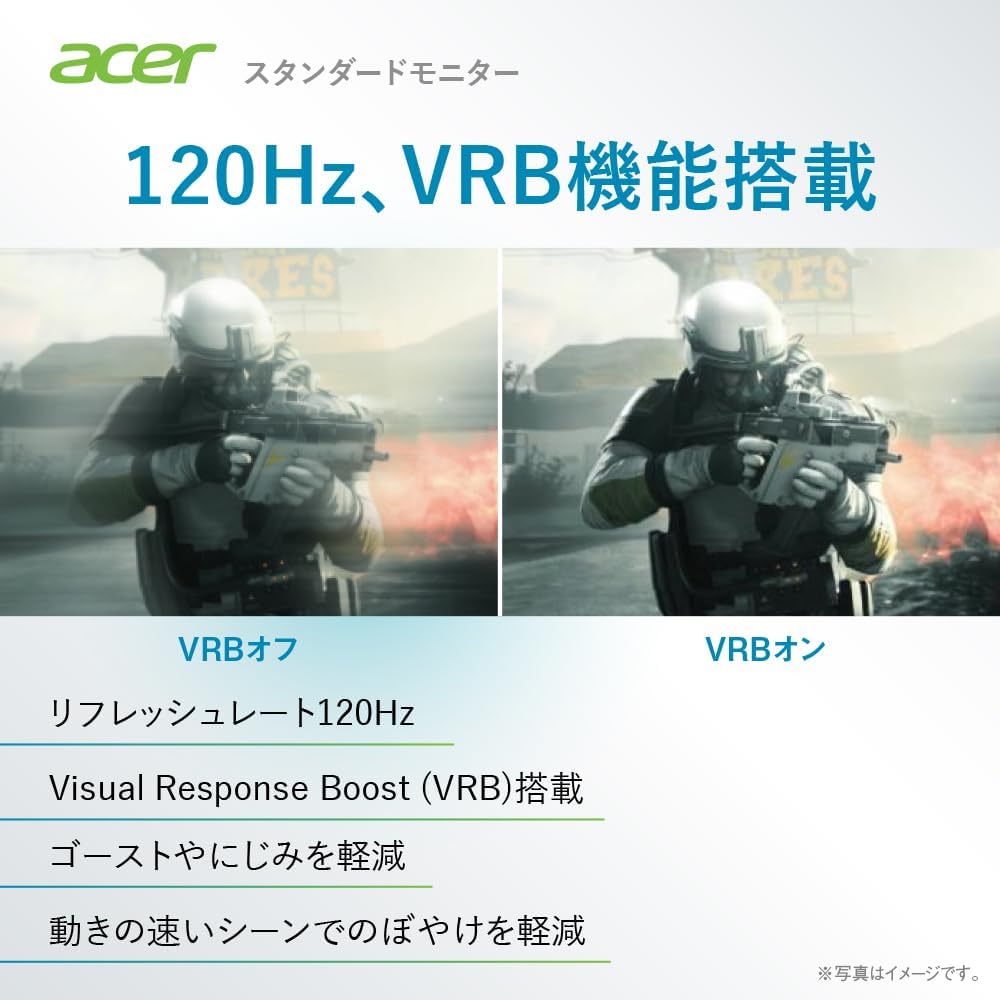
Image: A comparison demonstrating the effect of Visual Response Boost (VRB) on the Acer SA270G0bi monitor. The left side shows VRB off with more motion blur, while the right side shows VRB on, resulting in clearer images during fast-moving scenes.

Тасвир: паҳлӯ ва пеш view of the Acer SA270G0bi monitor, illustrating its ultra-thin profile and Zero Frame design, which minimizes the bezel for an expansive viewтаҷрибаи ғанӣ.

Image: The Acer SA270G0bi monitor displaying a city skyline, with an overlay indicating Acer VisionCare™ technology. This feature includes Flicker-less, Blue Light Shield, and Acer Low Dimming technologies designed to reduce eye strain.
5.3 Acer Display Widget
The Acer Display Widget software allows for intuitive control of monitor settings directly from your PC. Download and install the application to access various display modes and split-screen functions.

Image: Screenshot of the Acer Display Widget interface, showing options for Visual Modes (sRGB, Reading, Darkroom, User, Standard, ECO, Graphic, Movie), Visual Sync, and Split Screen settings, allowing PC-based control of the monitor.
6. Нигоҳдорӣ
6.1 Тоза кардани монитор
- Пеш аз тоза кардан ҳамеша мониторро аз васлаки барқ ҷудо кунед.
- Аз матои мулоим ва матои пок каме истифода баред гampened with water to clean the screen. Avoid using alcohol-based cleaners, solvents, or abrasive materials.
- Барои монитор вasing, матои мулоими хушкро истифода баред.
7. Баррасии мушкилот
| Мушкилот | Ҳалли имконпазир |
|---|---|
| Ягон тасвир дар экран нест | Ensure the power cable is securely connected. Check if the video cable (HDMI/D-Sub) is properly connected to both the monitor and the computer. Press the monitor's power button. Select the correct input source via the OSD menu. |
| Тасвир норавшан ё таҳриф шудааст | Check the video cable connection. Ensure the display resolution and refresh rate are set correctly in your computer's display settings. For D-Sub connections, use the OSD's auto-adjust function. |
| Рангҳо нодурустанд | Adjust color settings (brightness, contrast, color temperature) in the OSD menu. Reset the monitor to factory default settings. |
| Мониторҳои милк | Ensure the refresh rate is set correctly. Enable Acer VisionCare's Flicker-less feature if available. Check for external interference. |
8. Мушаххасоти
| Хусусият | Тафсилот |
|---|---|
| Номи модел | SA270G0bi |
| Андозаи панел | 27 инч |
| Навъи панел | IPS, Non-glare |
| Резолюция | Full HD (1920 x 1080 пиксел) |
| Таносуби тараф | 16:9 |
| Меъёри навсозӣ | 120Hz (HDMI), 56-75Hz (Mini D-Sub) |
| Вақти ҷавоб | 1мс (VRB) |
| Viewкунҷи ангушт | 178° (H) / 178° (V) |
| Намоиши рангҳо | тахминан. 16.77 миллион ранг |
| Терминалҳои вуруд | 1 x HDMI 1.4, 1 x Mini D-Sub 15-pin |
| Маърузачиён | Not equipped |
| Ҷеки гӯшмонак | Not equipped |
| Андозаҳо (W x D x H) | 61.2 х 21.2 х 44.7 см |
| Вазн | 3.5 кг |
| Кунҷи майл | Up 15°, Down 5° |
9. Кафолат ва дастгирӣ
For product support, warranty information, and frequently asked questions, please visit the official Acer support page:
Support business hours: 10:00 - 19:00, 365 days a year (excluding company-designated holidays).


