1. Муқаддима
Welcome to the CUBOT GT1 Smartwatch user manual. This guide provides essential information for setting up, operating, maintaining, and troubleshooting your new smartwatch. The CUBOT GT1 is designed for outdoor enthusiasts, featuring a durable zinc alloy casing, high-precision dual-frequency GPS, a 1.43-inch HD AMOLED display, and comprehensive health monitoring capabilities.
2. Танзимот
2.1 Мундариҷаи баста
- CUBOT GT1 Smartwatch
- Кабели пуркунандаи барқ
- Дастури корбар (ин ҳуҷҷат)
2.2 Пуркунии ибтидоӣ
Before first use, fully charge your CUBOT GT1 Smartwatch. Connect the provided charging cable to the charging port on the back of the watch and to a standard USB power adapter (not included). The watch will display a charging indicator. A full charge can take approximately 2-3 hours.
Note: The watch features a 480 mAh high-voltage polymer battery. A single charge can last up to 90 days in standby mode, 20-30 days with normal daily use, and up to 22 hours with continuous GPS activation.
2.3 Пайвастшавӣ бо смартфони худ
- Download the official CUBOT smartwatch application from your smartphone's app store (compatible with Android 9.0+ and iOS 9.0+).
- Боварӣ ҳосил кунед, ки Bluetooth дар смартфони шумо фаъол аст.
- Open the CUBOT app and follow the on-screen instructions to create an account or log in.
- Дар барнома "Илова кардани дастгоҳ" ё "Ҷуфт кардани дастгоҳи нав"-ро интихоб кунед.
- The app will search for your CUBOT GT1. Select it from the list of available devices.
- Дархости пайвасткуниро ҳам дар смартфони худ ва ҳам дар соатҳои интеллектуалӣ тасдиқ кунед.
Пас аз пайвастшавӣ, соат маълумот ва огоҳиҳоро бо смартфони шумо ҳамоҳанг мекунад.
3. Дастурҳои истифодабарӣ
3.1 Идоракунии асосӣ
The CUBOT GT1 features a 1.43-inch HD AMOLED touchscreen and two physical buttons:
- Шишаи ламсӣ: Swipe to navigate menus, tap to select, swipe down for quick settings, swipe up for notifications.
- Тугмаи барқ: Press to wake the screen, return to the main watch face, or access the main menu.
- Тугмаи фармоишӣ: Configurable for quick access to a specific function (e.g., sport mode). Long press for stopwatch.
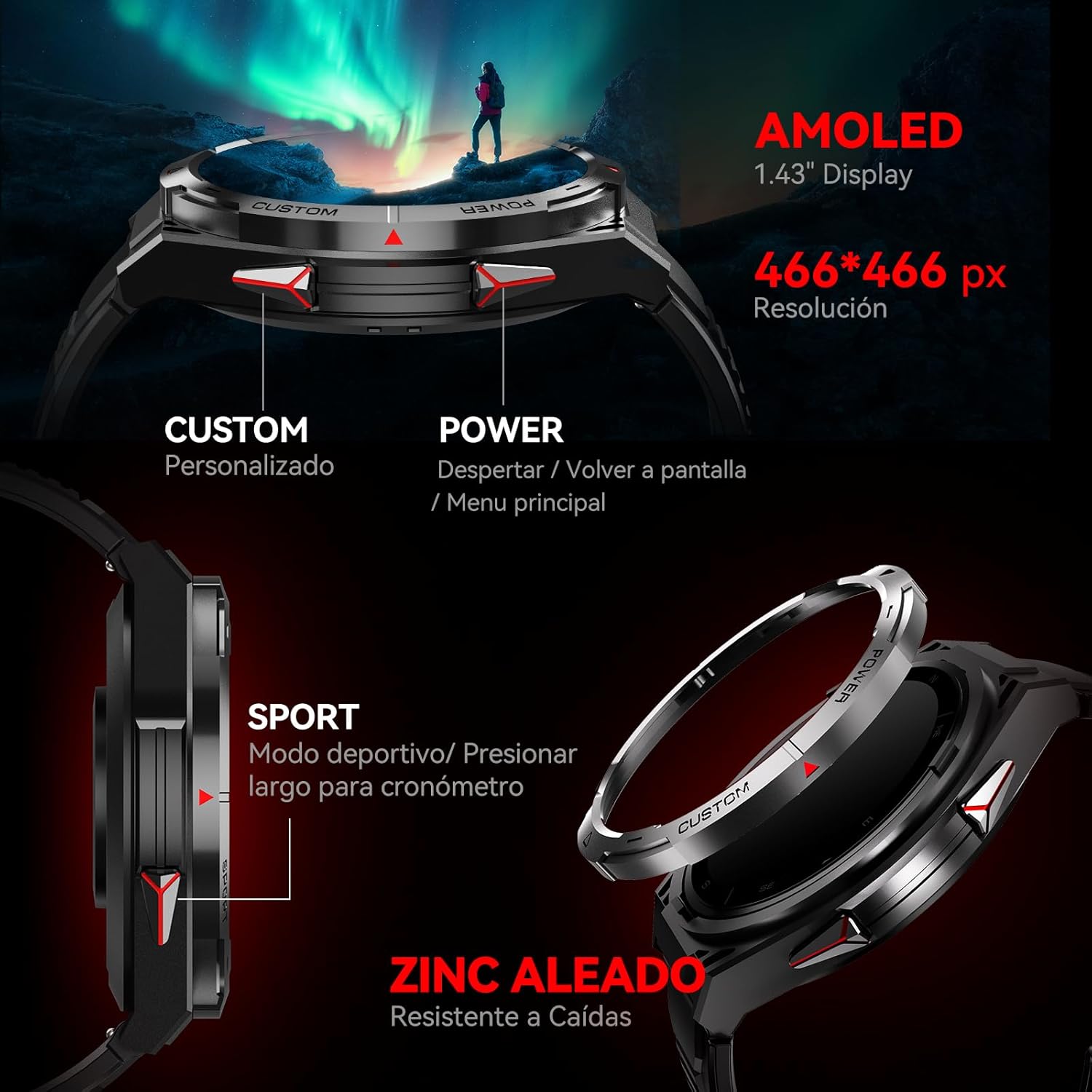
Тасвир: тараф view of the CUBOT GT1 Smartwatch, highlighting the 'CUSTOM' and 'POWER' buttons and indicating the 1.43-inch AMOLED display with 466x466 pixel resolution.
3.2 Функсияи GPS
The smartwatch integrates a dual-frequency L1+L5 GPS system for high-precision positioning. This system supports features such as:
- Пайгирии вақти воқеӣ: Calibrates exercise routes and distances.
- Return-to-Start: Guides you back to your starting point via the same path or a straight line.
- Environmental Resilience: Provides reliable positioning in various environments.

Image: The CUBOT GT1 Smartwatch displaying a GPS tracking map on its screen, with satellites in the background, illustrating its dual-frequency GPS precision for navigation.
3.3 намуди варзиш
The GT1 offers over 150 built-in sport modes. It utilizes the professional Savy sports algorithm and can automatically recognize 6 common sport modes. Each mode provides detailed exercise data to help users train scientifically.
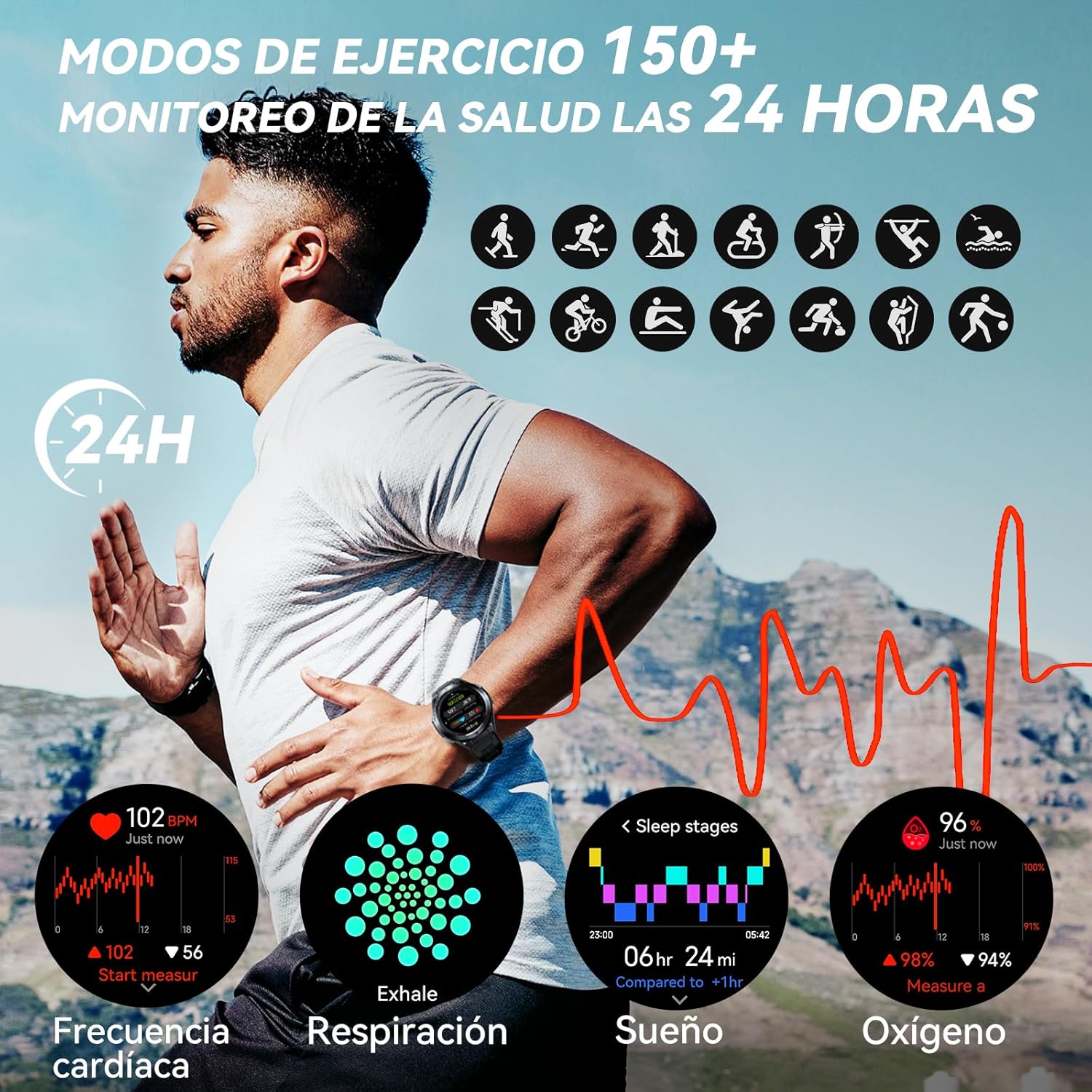
Image: A visual representation of various sport modes icons and health monitoring graphs for heart rate, respiration, sleep, and blood oxygen, indicating 24-hour tracking.
3.4 Мониторинги саломатӣ
The smartwatch provides comprehensive 24-hour health monitoring through scientific algorithms, including:
- Мониторинги суръати дил
- Blood Oxygen Saturation (SpO2) tracking
- Sleep Data analysis
- Real-time Pressure detection
3.5 Огоҳиҳо ва зангҳо
Connect your smartwatch to your smartphone via the app to receive real-time notifications for incoming calls, text messages, and social media alerts (e.g., Facebook, Instagram, Twitter). You can answer or reject calls directly from the watch.

Image: The CUBOT GT1 Smartwatch displaying various communication features, including WhatsApp notifications, AI assistant interaction, Bluetooth call handling, and an SOS call screen.
3.6 Хусусиятҳои иловагӣ
The CUBOT GT1 offers several other convenient functions:
- Назорати мусиқӣ: Навозишро дар смартфони худ назорат кунед.
- Дурдасти камера: Камераи смартфони худро аз масофа фаъол созед.
- Обу ҳаво: View шароити обу ҳавои кунунӣ.
- Огоҳии нишастан: Ба шумо хотиррасон мекунад, ки пас аз давраҳои ғайрифаъолӣ ҳаракат кунед.
- Тугмаи SOS: For emergency situations (refer to app settings for configuration).
- Сенсорҳои муҳити зист: Includes atmospheric pressure, altitude, and compass.

Image: A collage of various smartwatch functions, including an 'All In One Smartwatch' screen showing app icons, music control, sedentary alert, camera control, and weather display.
4. Нигоҳдорӣ
4.1 Муқовимат ба об
The CUBOT GT1 is water-resistant up to 5 ATM (50 meters), making it suitable for swimming. However, it is crucial to follow these guidelines:
- After exposure to water, especially deep water or corrosive liquids like seawater, activate the drainage function on the watch. This function vibrates the watch to expel water from the speaker and microphone holes.
- Always drain and dry the device thoroughly after use in water.
- Store the watch in a dry place to prolong its lifespan.
- Аз таъсири оби гарм, буғ ё ҷӯйборҳои оби фишори баланд худдорӣ кунед.

Image: The CUBOT GT1 Smartwatch submerged in water, illustrating its 5 ATM water resistance. Additional icons show IP69K dustproof rating and resistance to drops, along with atmospheric pressure, altitude, and compass features.
4.2 Тозакунӣ
Regularly clean your smartwatch and strap to prevent skin irritation and maintain functionality:
- Соат ва тасмаро бо матои нарм пок кунед, damp, матои бехат.
- Моддаҳои кимиёвии сахт, тозакунандаи абразивӣ ё ҳалкунандаҳоро истифода набаред.
- Пеш аз пур кардан, боварӣ ҳосил кунед, ки контактҳои барқгиранда тоза ва хушк мебошанд.
4.3 Нигоҳубини батарея
- Аз ҳарорати шадид худдорӣ кунед, ки метавонад мӯҳлати хизмати батареяро коҳиш диҳад.
- Соатро барои муддати тӯлонӣ пурра холӣ нагузоред.
- If the watch will not be used for a long time, charge it to about 50% before storing.

Image: The back of the CUBOT GT1 Smartwatch showing the heart rate sensor and charging contacts, with text detailing battery life: 90 days standby, 25 days daily, 22 hours continuous GPS, and 10 days frequent use, powered by a 480mAh battery.
5. Баррасии мушкилот
- Тамошои фаъол нест: Боварӣ ҳосил кунед, ки соат пурра пур шудааст. Онро ба сими пуркунандаи барқ ва манбаи барқ пайваст кунед.
- Бо смартфон пайваст кардан мумкин нест:
- Боварӣ ҳосил кунед, ки Bluetooth дар телефон ва соати шумо фаъол аст.
- Make sure the CUBOT app is installed and running.
- Ҳам соат ва ҳам смартфони худро аз нав оғоз кунед.
- Санҷед, ки оё соат аллакай бо дастгоҳи дигар ҷуфт карда шудааст.
- Маълумоти нодурусти саломатӣ: Боварӣ ҳосил кунед, ки соат дар банди шумо маҳкам пӯшида мешавад, на аз ҳад танг ва на хеле озод. Сенсорро дар қафои соат тоза кунед.
- Масъалаҳои сигнали GPS: Боварӣ ҳосил кунед, ки шумо дар майдони кушод бо равшанӣ ҳастед view of the sky. GPS performance can be affected by buildings, dense foliage, or adverse weather.
- Экран ҷавоб намедиҳад: Try restarting the watch by long-pressing the power button. If unresponsive, allow the battery to fully drain and then recharge.
- Water damage after swimming: Although the watch is water-resistant, improper drainage or exposure to corrosive liquids can cause issues. Always activate the drainage function and dry thoroughly after water exposure. If issues persist, contact support.
6. Мушаххасоти
| Хусусият | Мушаххасоти |
|---|---|
| Бренд | CUBOT |
| Модели | GT1 |
| Андозаи намоиш | 1.43 инч |
| Навъи намоиш | AMOLED |
| RAM | 256 Мб |
| Иқтидори батарея | 480 миллионamp Соатхо |
| Мӯҳлати миёнаи батарея | 7 days (normal use), up to 90 days (standby), 22 hours (continuous GPS) |
| Пайвастшавӣ | блутуз |
| Низоми муайянкунии ҷаҳонии ҷои ист | Integrated GPS (Dual-frequency L1+L5) |
| Муқовимат ба об | 5 банкомат (50 метр) |
| Хусусиятҳои махсус | SOS Button, GPS, Phone Calls, Notifications, Music Player, Touchscreen |
| Дастгоҳҳои мувофиқ | Смартфон (Android 9.0+, iOS 9.0+) |
| Лавозимот васлкунӣ | Сими пуркунандаи барқ |
7. Кафолат ва дастгирӣ
7.1 Маълумот дар бораи кафолат
For detailed warranty information, please refer to the warranty card included with your product packaging or the purchase documentation provided by your retailer. Keep your proof of purchase for any warranty claims.
7.2 Дастгирии муштариён
If you encounter any issues or have questions not covered in this manual, please visit the official CUBOT website or contact their customer support through the contact information provided on their webсайт ё платформаи хариди шумо.


