1. Муқаддима
Ташаккур ба шумо барои харидasing the LONPOO LP-816 Compact Micro HiFi System. This manual provides essential information for the safe and efficient operation of your new audio system. Please read this manual thoroughly before use and retain it for future reference.
2. Дастурамал оид ба бехатарӣ
- Манбаи нерӯ: Таъмини таъминоти барқ voltage бо рейтинги дар дастгоҳ нишондодашуда мувофиқат мекунад.
- Вентилятсия: Сӯрохиҳои вентилятсияро набандед. Барои гардиши дурусти ҳаво дар атрофи дастгоҳ фазои кофӣ гузоред.
- Об ва намӣ: Дастгоҳро ба борон, намӣ ё моеъҳои қатрагӣ/пошиданӣ нагузоред. Ба болои дастгоҳ ашёҳои пур аз моеъ, аз қабили гулдонҳоро нагузоред.
- Гармӣ: Дастгоҳро аз манбаъҳои гармӣ ба монанди радиаторҳо, регистрҳои гармидиҳӣ, плитаҳо ё дигар дастгоҳҳо (аз ҷумла аз он ҷумла) дур нигоҳ доред. ampлифтҳо), ки гармӣ истеҳсол мекунанд.
- Тозакунӣ: Пеш аз тоза кардан, дастгоҳро аз розетка ҷудо кунед. Танҳо матои мулоим ва хушкро истифода баред. Аз тозакунандаҳои моеъ ё аэрозолӣ истифода набаред.
- Хизматрасонӣ: Худатон кӯшиш накунед, ки ба ин маҳсулот хидмат расонад. Ҳама хидматрасониро ба кормандони соҳибихтисос муроҷиат кунед.
- Ҷойгиршавӣ: Дастгоҳро дар сатҳи устувор ва ҳамвор ҷойгир кунед, то аз афтидан пешгирӣ кунад.
3. Мундариҷаи баста
Боварӣ ҳосил кунед, ки ҳамаи ҷузъҳои дар поён овардашуда ба бастаи шумо дохил карда шудаанд:
- LONPOO LP-816 Micro HiFi System Unit
- Назорати дурдаст
- Адаптери барқ
- Антеннаи FM
- Дастури корбар (ин ҳуҷҷат)
4. Маҳсулот ба охир расидview
4.1 Front and Rear Panel Controls
Familiarize yourself with the various buttons, ports, and indicators on your LP-816 system.
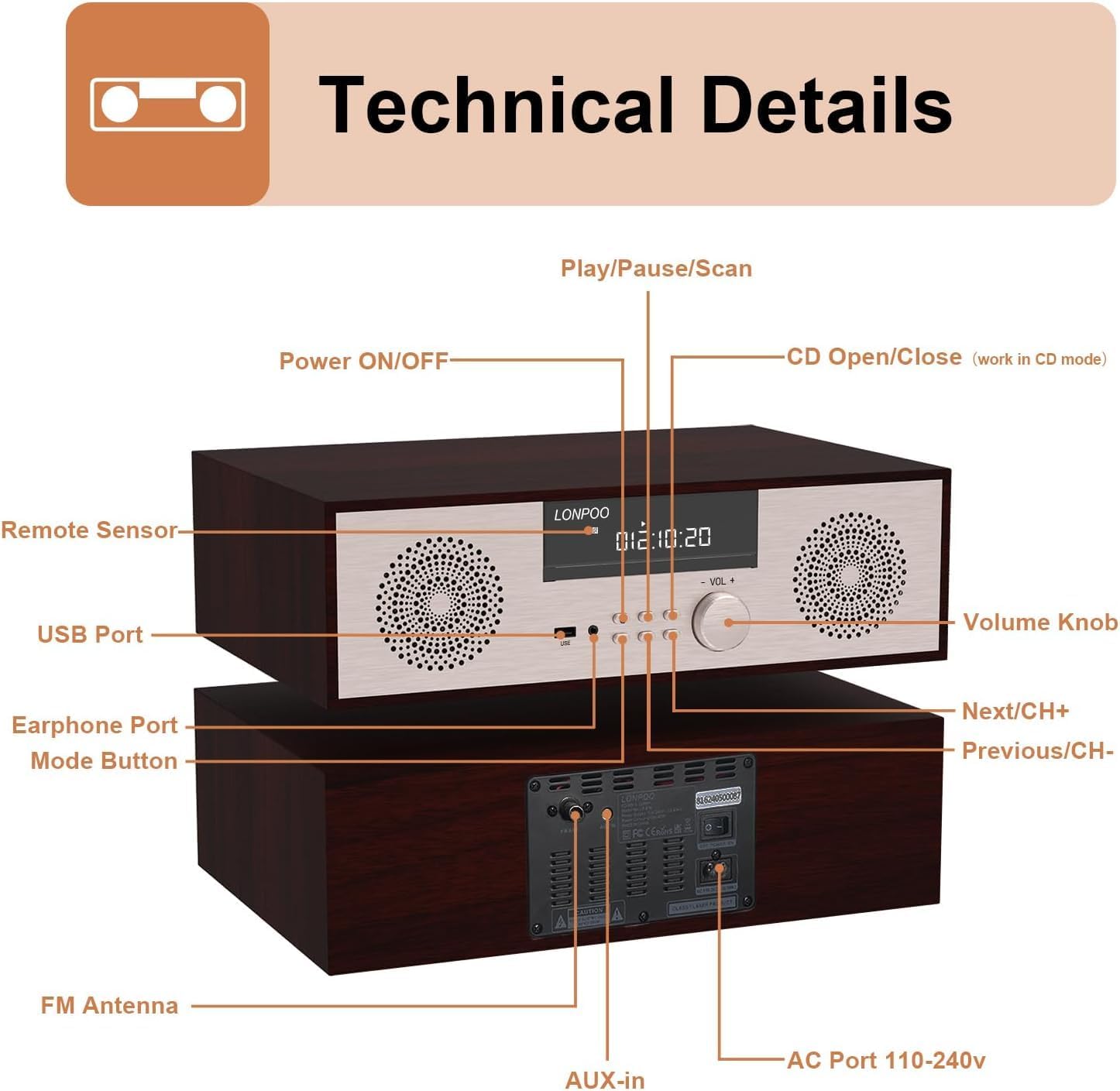
Тасвир: Пеш ва пушти view of the LONPOO LP-816 system, highlighting the LCD display, control buttons, volume knob, USB port, earphone port, mode button, remote sensor, CD compartment, AUX-in, FM antenna port, and AC power port.
- Қувваи барқ фурӯзон/хомӯш: Дастгоҳро фурӯзон ё хомӯш мекунад.
- Намоиши LCD: Shows current mode, track information, frequency, and time.
- Қисми CD: Барои ворид кардани CD-ҳои аудио.
- Порти USB: Connect USB flash drives for audio playback.
- Порти гӯшмонак: 3.5 мм сурохии барои пайваст кардани гӯшмонакҳо.
- Тугмаи режим: Switches between CD, FM, Bluetooth, AUX, and USB modes.
- Play/Pause/Scan Button: Controls playback and initiates FM scan.
- Next/CH+ Button: Skips to the next track or FM preset.
- Previous/CH- Button: Skips to the previous track or FM preset.
- Тугмаи баландии овоз: Баландии садоро танзим мекунад.
- Санҷандаи дурдаст: Аз идоракунии дурдаст сигналҳоро қабул мекунад.
- AUX-дар: 3.5 мм сурохии барои пайваст кардани дастгоҳҳои аудио беруна.
- Антеннаи FM: Connects the included FM antenna for radio reception.
- AC Port 110-240V: Адаптери барқро пайваст мекунад.
4.2 Идоракунии дурдаст
The remote control provides convenient access to all functions of the LP-816 system.

Image: Close-up of the LONPOO LP-816 remote control, showing various buttons for power, mode selection, volume, track control, EQ, and numeric input.
Insert two AAA batteries (not included) into the remote control, observing the correct polarity.
5. Танзимот
5.1 Ҷойгиркунӣ
Place the LP-816 system on a flat, stable surface. Ensure there is adequate space around the unit for proper ventilation. Avoid placing it near strong magnetic fields or direct sunlight.
5.2 Пайваст кардани мавҷгири FM
Connect the supplied FM antenna to the 'FM Antenna' port on the rear of the unit. Extend the antenna fully for optimal FM reception.
5.3 Пайвастшавии барқ
Connect the power adapter to the 'AC Port 110-240V' on the rear of the unit, then plug the adapter into a wall outlet.
6. Дастурҳои истифодабарӣ
6.1 Фаъол кардан/хомӯш кардан
Press the 'Power ON/OFF' button on the front panel or the remote control to turn the unit on or off.
6.2 Бозии CD
To play an audio CD:
- Press the 'Mode' button until 'CD' mode is selected on the display.
- Press the 'CD Open/Close' button (if available on the unit or remote) or gently insert the CD into the slot. The unit will automatically load the CD.
- The CD will begin playing automatically. If not, press the 'Play/Pause' button.
- Use the 'Next/CH+' and 'Previous/CH-' buttons to skip tracks.
- Press 'Play/Pause' to pause or resume playback.

Image: The LONPOO LP-816 system with its CD player compartment open, ready to accept a disc.
6.3 Радиои FM
Барои гӯш кардани радиои FM:
- Press the 'Mode' button until 'FM' mode is selected.
- Сканкунии автоматӣ: Press and hold the 'Play/Pause/Scan' button to automatically scan and save available FM stations.
- Танзими дастӣ: Use the 'Next/CH+' and 'Previous/CH-' buttons to manually tune to a specific frequency.
- Интихоби танзимоти пешакӣ: Use the 'Next/CH+' and 'Previous/CH-' buttons (short press) to cycle through saved preset stations.

Image: The LONPOO LP-816 system displaying an FM radio frequency (87.50 MHz) on its screen, with a visual representation of the FM band.
6.4 Пайвасти Bluetooth
Барои пайваст кардани дастгоҳи Bluetooth:
- Press the 'Mode' button until 'BT' (Bluetooth) mode is selected. The display will show 'BT' and the unit will enter pairing mode.
- On your Bluetooth-enabled device (e.g., smartphone), enable Bluetooth and search for available devices.
- Select 'LP-816' from the list of devices.
- Once paired, the unit will indicate a successful connection, and you can play audio from your device through the LP-816.

Image: The LONPOO LP-816 system displaying 'BT' on its screen, with a smartphone nearby showing a successful Bluetooth connection to 'LP-816'.
6.5 AUX-in Connection
To play audio from an external device via AUX-in:
- Connect a 3.5mm audio cable (not included) from the headphone jack or line-out of your external device to the 'AUX-in' port on the rear of the LP-816.
- Тугмаи 'Mode' -ро то он даме ки ҳолати 'AUX' интихоб карда шавад, пахш кунед.
- Play audio from your external device. The sound will be output through the LP-816 speakers.
6.6 Бозии USB
Барои бозӣ кардани аудио files from a USB flash drive:
- Insert a USB flash drive into the 'USB Port' on the front panel.
- Press the 'Mode' button until 'USB' mode is selected.
- Дастгоҳ ба таври худкор садои мувофиқро муайян мекунад ва навохтанро оғоз мекунад files аз гардонандаи USB.
- Use the 'Next/CH+' and 'Previous/CH-' buttons to skip tracks.

Image: A close-up of the LONPOO LP-816 system's front panel, showing a USB flash drive inserted into the USB port.
6.7 Баромади гӯшмонак
Connect standard 3.5mm headphones to the 'Earphone Port' on the front panel for private listening. When headphones are connected, sound will no longer be output from the main speakers.
7. Нигоҳдорӣ
7.1 Тозакунӣ
To clean the unit, first unplug it from the power outlet. Use a soft, dry, lint-free cloth to wipe the exterior surfaces. Do not use abrasive cleaners, waxes, or solvents as they may damage the finish.
7.2 Нигоҳубини плеери CD
Handle CDs by their edges to avoid fingerprints and scratches. If a CD is dirty, wipe it gently with a soft, dry cloth from the center outwards. Do not use solvents or abrasive cleaners on CDs.
8. Баррасии мушкилот
| Мушкилот | Сабаби эҳтимолӣ | Ҳалли |
|---|---|---|
| Не қудрат | Сими барқ пайваст нашудааст; Васлаки барқ фаъол нест | Боварӣ ҳосил кунед, ки сими барқ боэътимод пайваст карда шудааст. Васлаки дигари барқро санҷед. |
| Садо нест | Volume too low; Mute function active; Incorrect mode selected; Headphones connected | Increase volume. Deactivate mute. Select correct input mode. Disconnect headphones. |
| CD бозӣ намекунад | CD inserted incorrectly; CD is dirty or scratched; CD format not supported | Reinsert CD correctly. Clean or replace CD. Ensure CD is an audio CD. |
| Bluetooth пайваст нест | Bluetooth not in pairing mode; Device too far; Device already connected to another unit | Ensure unit is in BT pairing mode. Move device closer. Disconnect from other devices. |
| Қабули сусти FM | Antenna not extended; Weak signal; Interference | Extend and adjust FM antenna. Relocate unit for better signal. |
9. Мушаххасоти
- Модели: ЛП-816
- Андозаҳои маҳсулот (L x W x H): 15.8 x 10.5 x 4.5 инч
- Вазни ашё: 11.57 фунт
- Технологияи пайвастшавӣ: Ёрӣ, Bluetooth, USB
- Навъи баландгӯяк: Стерео
- Натиҷаи аудио: 40 Ватт RMS
- Вижагиҳо: CD Player, FM Radio, Bluetooth, AUX-in, Headphone Output, DSP Technology
10. Кафолат ва дастгирӣ
LONPOO products are designed and manufactured to the highest quality standards. For warranty information and technical support, please refer to the warranty card included with your product or visit the official LONPOO webсайт. Квитансияи хариди худро ҳамчун далели харид нигоҳ доред.


