Муқаддима
Thank you for choosing the COOPER 360 MagBase Stand. This stand is designed to securely hold your official Apple MagSafe Charger (not included) and provide a stable, adjustable platform for your iPhone and AirPods. It enhances your charging experience by offering flexible viewing angles and a tidy setup for various environments.
Маҳсулот ба охир расидview
The COOPER 360 MagBase Stand features a robust design for stability and versatility. It is engineered to integrate seamlessly with your official Apple MagSafe Charger.
- MagSafe Charger Slot: Securely holds your Apple MagSafe Charger for precise alignment.
- 360° гардиш: Allows for full rotational adjustment of your device.
- Multi-Angle Adjustability: Фасеҳро таъмин мекунад viewing angles for various uses.
- Reinforced Carbon Steel Base: Ensures stability and prevents tipping.
- Лағжиши ғайрифаъол: Protects surfaces and keeps the stand in place.
- Тарроҳии пӯшида: Compact for easy storage and portability.
- Шиддати танзимшаванда: Allows customization of arm tightness for preferred stability.

Image: The COOPER 360 MagBase Stand in Space Grey, holding an iPhone vertically. The stand features an adjustable arm and a circular base.
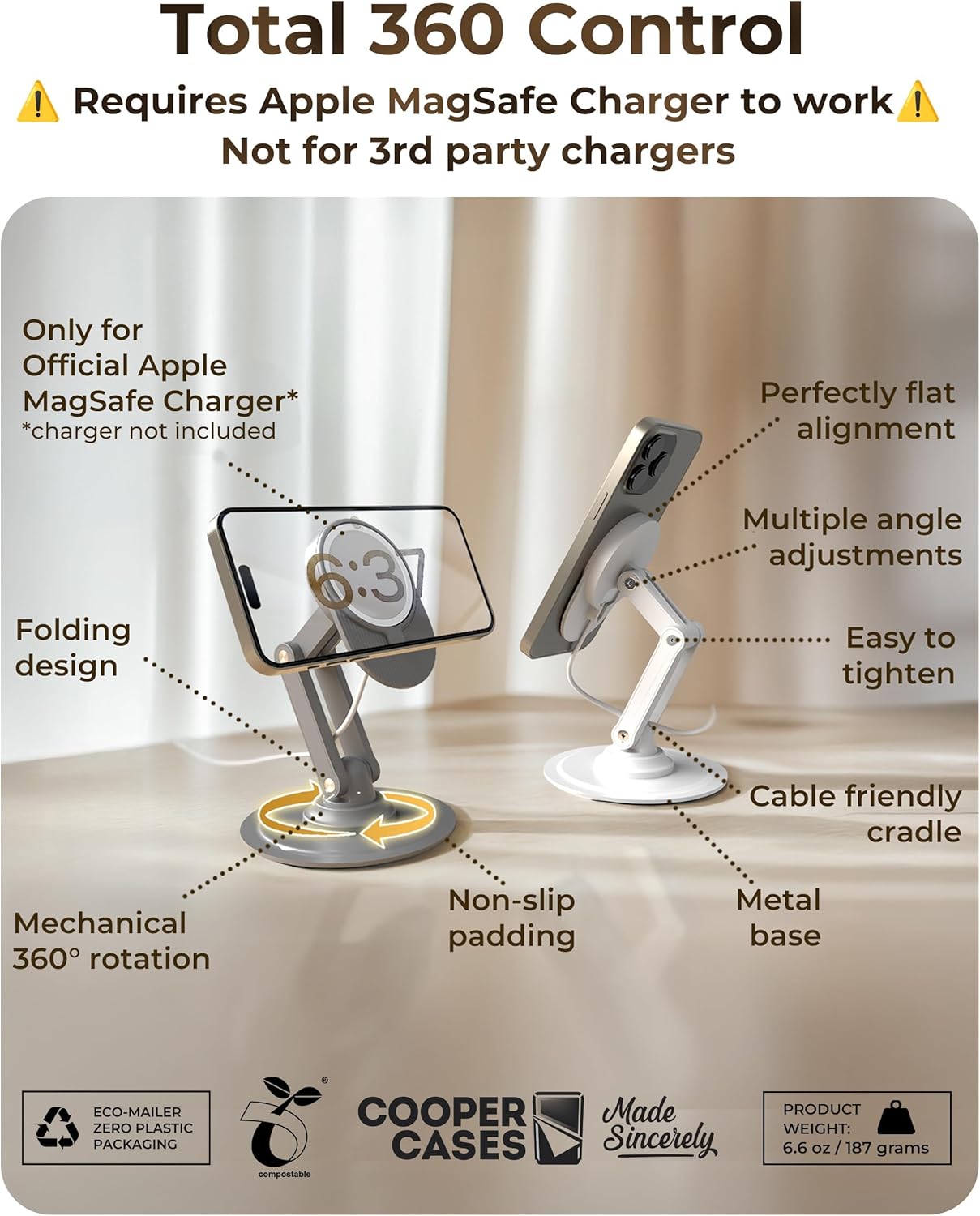
Image: A diagram illustrating the key features of the COOPER 360 MagBase Stand, including the folding design, mechanical 360° rotation, non-slip padding, metal base, cable-friendly cradle, multiple angle adjustments, and easy-to-tighten screws. It also shows the stand in both Space Grey and White color options.

Image: A detailed diagram highlighting the stand's components: silicone pad for device protection, metal screws for adjustable tension, and a carbon steel base for stability. Key dimensions are shown: max height 4.8 inches (12.1 cm), folded height 1.9 inches (4.8 cm), and base diameter 4 inches (10.5 cm). The product weight is 6.6 oz / 187 grams.
Дастурҳои насб
- Кушодани: Carefully remove the COOPER 360 MagBase Stand from its packaging.
- Пуркунандаи MagSafe-ро ворид кунед: Place your official Apple MagSafe Charger (models A3250, A2580, A2140) into the designated circular slot on the stand's magnetic head. Ensure it fits snugly. The charger is not included with the stand.
- Сими масир: Guide the MagSafe charger cable through the integrated cable management channel on the stand's arm and base to maintain a tidy setup.
- Ҷойгиршавӣ: Place the stand on a flat, stable surface. The non-slip padding on the base will help secure it.

Image: A visual guide showing the COOPER 360 MagBase Stand, an Apple MagSafe Charger, and the combined unit forming a MagSafe charging iPhone stand for a desk. This stand is only compatible with official Apple MagSafe Charger models A3250, A2580, A2140.
Дастурҳои амалиётӣ
Using with iPhone:
- Attach iPhone: Gently place your MagSafe-compatible iPhone onto the MagSafe Charger embedded in the stand. The magnets will align and secure your device.
- Танзими кунҷ: Adjust the stand's arm and the magnetic head to achieve your desired viewing angle. The stand supports 360° rotation and multi-angle adjustments.
- Utilize Standby Mode: When placed horizontally, your iPhone can enter Standby Mode, displaying useful information like time, widgets, and Live Activities.
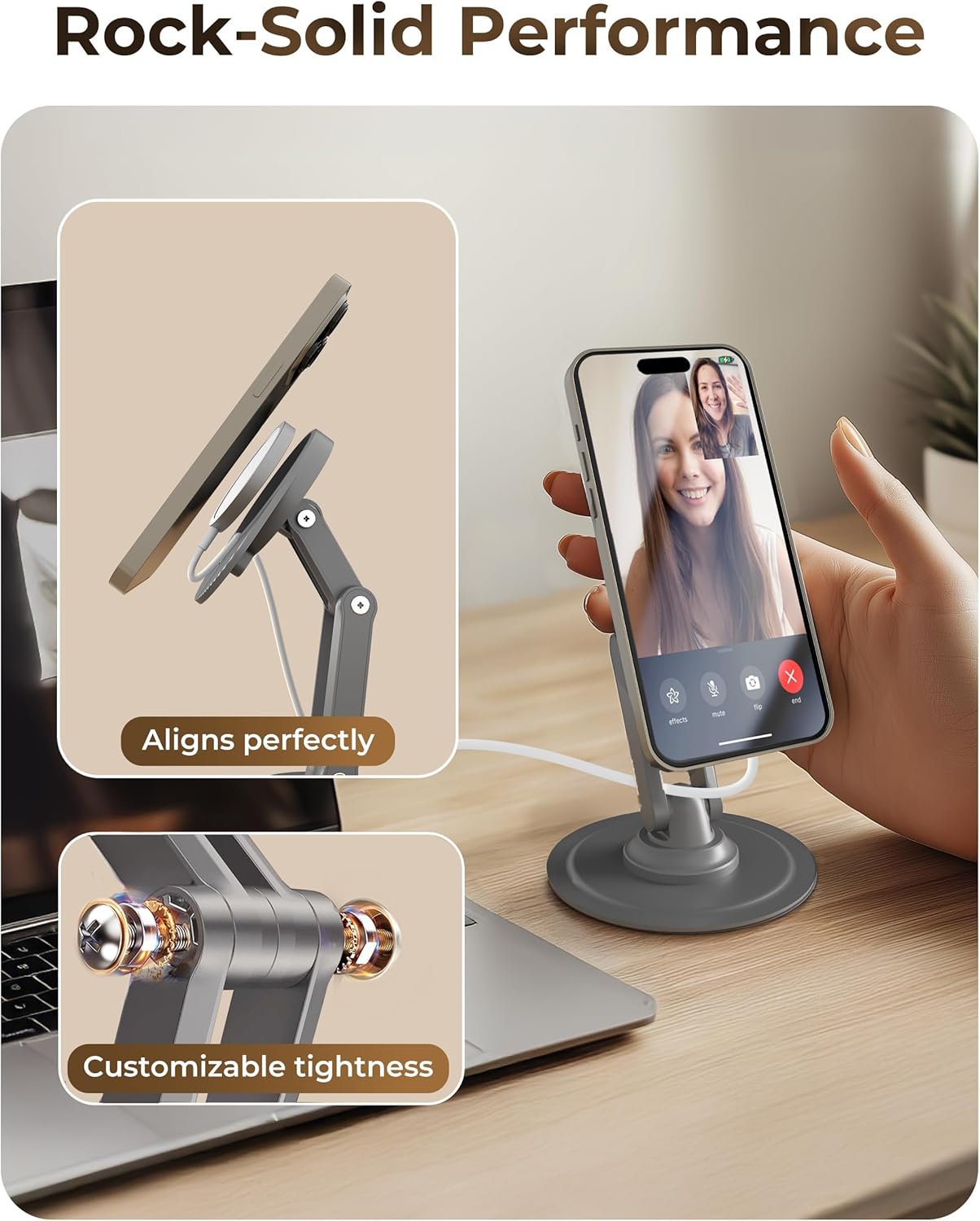
Image: An iPhone securely attached to the COOPER 360 MagBase Stand, demonstrating perfect alignment for charging and video calls. An inset shows the customizable tightness mechanism on the stand's arm.

Image: A collage showing the COOPER 360 MagBase Stand used in different scenarios: a woman using it at a desk, a bedside setup showing Standby Mode, a living room table with the stand, and a woman working on a laptop with the stand. This illustrates its versatility for various setups.
Using with AirPods:
The COOPER 360 MagBase Stand can also be used to charge your AirPods (Pro/3/4) if they support wireless charging. Simply tilt the MagSafe base upward and place your AirPods charging case on the MagSafe charger.

Image: AirPods charging case placed on the tilted MagSafe charging surface of the COOPER 360 MagBase Stand, next to a computer keyboard.
Танзими шиддат
The stand features adjustable tension points on its arm to ensure your device stays securely in position at your preferred angle. If the stand feels too loose or too stiff, you can adjust the tightness.
- Locate Adjustment Screws: Identify the small screws on the joints of the stand's arm.
- Танзими шиддат: Use a small screwdriver (not included) to gently tighten or loosen these screws.
- Turn clockwise to increase tension (make it stiffer).
- Turn counter-clockwise to decrease tension (make it looser).
- Устувории санҷиш: Adjust until the stand holds your device firmly at various angles without sagging.
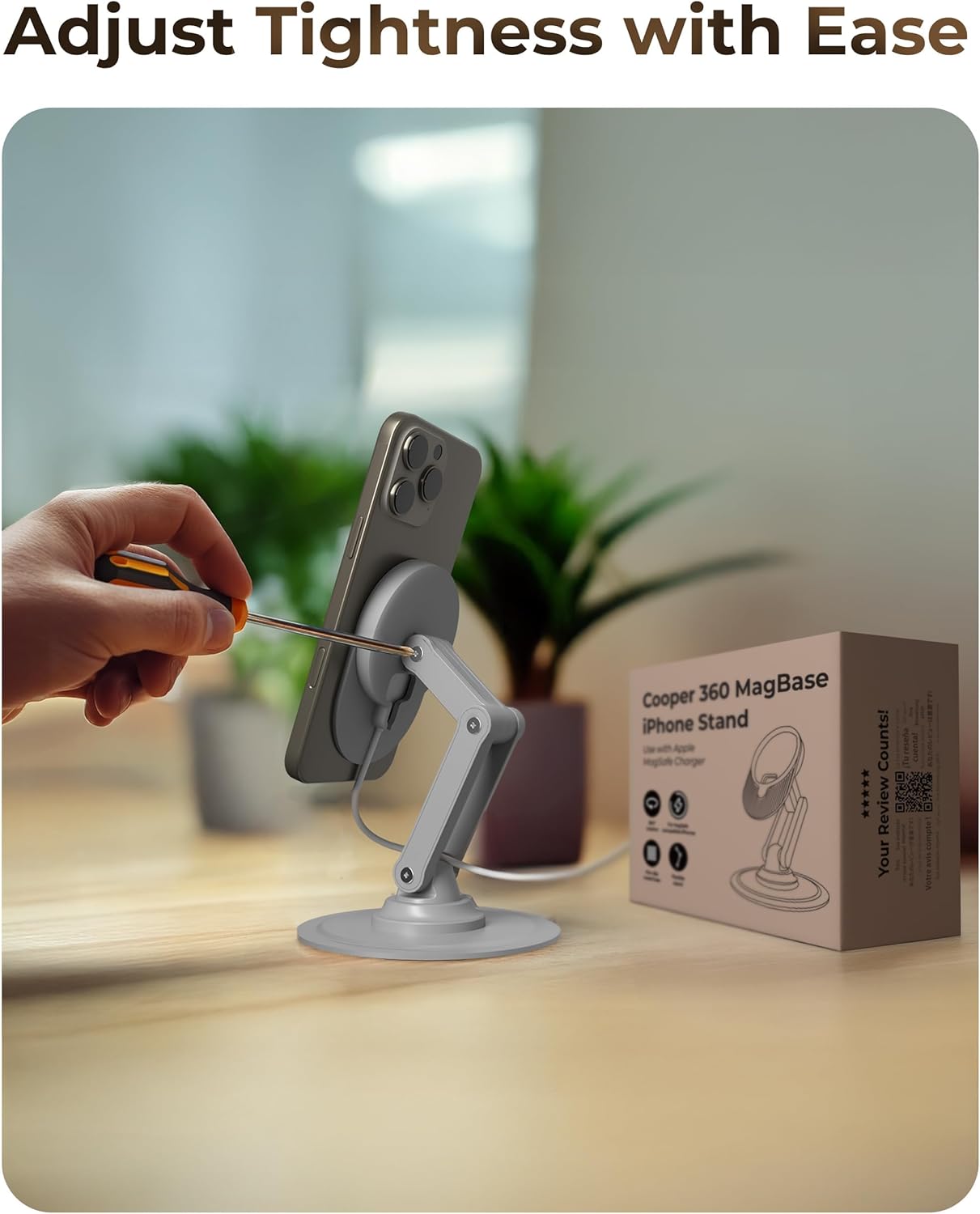
Image: A hand using a screwdriver to adjust the tightness of the COOPER 360 MagBase Stand's arm, with an iPhone mounted on it.
Мутобиқати
The COOPER 360 MagBase Stand is specifically designed for use with official Apple MagSafe Chargers (models A3250, A2580, A2140). It is not designed for third-party MagSafe chargers.
Compatible with the following Apple devices (when used with an official Apple MagSafe Charger):
- iPhones: iPhone 17 Pro, iPhone 17 Pro Max, iPhone 17, iPhone 17 Air, iPhone 16 Pro, iPhone 16 Pro Max, iPhone 16, iPhone 16 Plus, iPhone 15 Pro, iPhone 15 Pro Max, iPhone 15, iPhone 15 Plus, iPhone 14 Pro, iPhone 14 Pro Max, iPhone 14, iPhone 14 Plus, iPhone 13 Pro, iPhone 13 Pro Max, iPhone 13 mini, iPhone 13, iPhone 12 Pro, iPhone 12 Pro Max, iPhone 12.
- AirPods: AirPods Pro, AirPods (3rd Generation), AirPods (4th Generation).
Image: A graphic emphasizing that the stand is only compatible with official Apple MagSafe Charger models A3250, A2580, A2140, and not with third-party chargers.
Нигоҳубин ва нигоҳдорӣ
- Тозакунӣ: Wipe the stand with a soft, dry cloth. Avoid using abrasive cleaners or solvents that may damage the finish.
- Нигоҳдорӣ: When not in use or for travel, fold the stand into its compact form to protect its components.
- Аз ҳад зиёд аз ҳад зиёд канорагирӣ кунед: Do not over-tighten the adjustment screws, as this may strip the threads or damage the joints.
Мушкилкушо
| Мушкилот | Ҳалли |
|---|---|
| iPhone/AirPods not charging. |
|
| Stand arm is too loose/sags. |
|
| Stand is unstable or slides. |
|
Мушаххасоти
- Рақами модел: CPR233GRY060
- Андозаҳои маҳсулот: 4.13 x 1.73 x 4.72 дюйм (паҳншуда)
- Вазни ашё: 6.7 унсия (187 грамм)
- Мавод: Reinforced Carbon Steel Base, Silicone Padding
- Ранги: Фазои Грей
- Мутобиқат: Official Apple MagSafe Charger (A3250, A2580, A2140), MagSafe-compatible iPhones (12-17 series), AirPods Pro/3/4.
- Навъи васлкунӣ: Монтажи болои миз
Кафолат ва дастгирӣ
For warranty information or technical support, please refer to the official COOPER website or contact their customer service directly. Details are typically provided with your purchase documentation or on the manufacturer's webсайт.
Истеҳсолкунанда: Купер


