Муқаддима
The MiLi LiTag Duo is a versatile Bluetooth object locator designed to help you keep track of your valuable items. Compatible with both Apple and Android devices, it leverages the extensive "Find My" networks to provide real-time location tracking and assist in finding misplaced belongings. Its compact, lightweight, and durable design makes it ideal for attaching to keys, wallets, bags, luggage, and more.

Four MiLi LiTag Duo trackers, each with a keyring, highlighting the compact design and readiness for attachment to various items.
Мундариҷаи баста
- MiLi LiTag Duo (quantity as per pack purchased)
- CR2032 Coin Cell Battery (pre-installed)
- Keyring(s)
- Дастури корбар (ин ҳуҷҷат)
Дастури насб
1. Powering On Your LiTag Дуо
The MiLi LiTag Duo comes with a pre-installed CR2032 battery. To activate the device:
- Gently twist the two halves of the LiTag Duo counter-clockwise to open it.
- Remove the small plastic tab if present, which prevents battery contact during shipping.
- Press the button on the device once to power it on.
- Align the two halves and twist clockwise to securely close the device.

This diagram provides a clear visual guide on how to open the MiLi LiTag Duo by rotating, replace the internal CR2032 coin cell battery, and then securely close the device.
2. Пайвастшавӣ бо смартфони худ
The MiLi LiTag Duo is compatible with both Apple's "Find My" network (iOS 14.5 or later) and Google's "Find My Device" network (Android 9.0 or later). You can pair it with either system, but it can only be connected to one device at a time.
Барои дастгоҳҳои Apple iOS:
- Боварӣ ҳосил кунед, ки Bluetooth дар iPhone-и шумо фаъол аст.
- Open the "Find My" app.
- Go to the "Items" tab.
- Tap the "+" icon and select "Add Other Item".
- Follow the on-screen instructions to connect your LiTag Дуо.
Барои дастгоҳҳои Android:
- Боварӣ ҳосил кунед, ки Bluetooth дар смартфони Android-и шумо фаъол аст.
- Download and open the Google "Find My Device" app from the Google Play Store.
- Follow the in-app instructions to add a new device. The LiTag Duo should appear as a discoverable item.

This image illustrates the MiLi LiTag Duo's compatibility with both Apple and Android ecosystems, showing how the device appears within the respective 'Find My' applications on smartphone screens.
Дастурҳои амалиётӣ
Ҷойгир кардани ашёи шумо
Once paired, you can use your smartphone's "Find My" or "Find My Device" app to locate your LiTag Дуо.
- Map Location: The app will display the last known location of your LiTag Duo on a map, leveraging the global network of Apple and Android devices.
- Навозиши садо: If your item is nearby (within Bluetooth range), you can tap the "Play Sound" option in the app to make the LiTag Duo emit an audible signal, helping you pinpoint its exact location.
- Навигатсия: For items located further away, the app can provide navigation directions to the LiTag Duo's last known location.
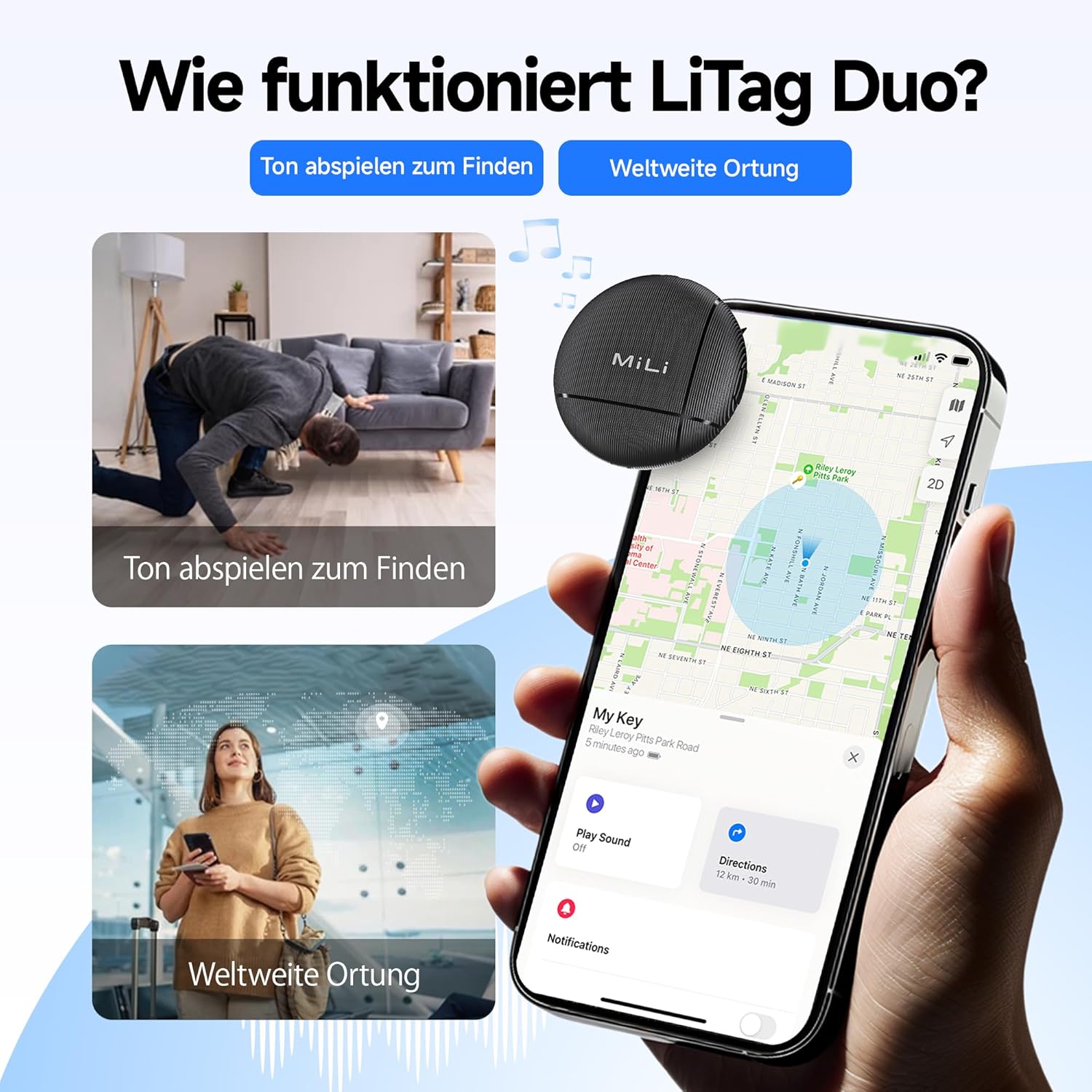
This visual explains the two primary functions of the LiTag Duo: using an audible signal to locate nearby items and leveraging global networks for wider location tracking on a map.

This image highlights the 'Play Sound' feature, allowing users to make the LiTag Duo emit an audible signal to easily locate misplaced items, even if hidden.
Sharing Your LiTag Дуо
You can share access to your LiTag Duo's location with family or friends through the respective "Find My" applications. This allows multiple trusted individuals to track the same item.

This image explains the device sharing capability, allowing users to share a link so family or friends can also view the tracker's location.
Махфият ва Амният
The MiLi LiTag Duo is designed with your privacy in mind. Location data transmitted through the Apple "Find My" and Google "Find My Device" networks is end-to-end encrypted. This means only you (and those you share access with) can view the location of your LiTag Duo, ensuring your personal information remains protected.

This image underscores the privacy features of the LiTag Duo, explaining that location data is end-to-end encrypted to protect user privacy on both Apple and Google networks.
Нигоҳдорӣ
Иваз кардани батарея
The MiLi LiTag Duo uses a standard CR2032 coin cell battery, which typically lasts up to 12 months. You can check the battery status within your "Find My" or "Find My Device" app. When the battery is low, replace it as follows:
- Gently twist the two halves of the LiTag Duo counter-clockwise to open it.
- Батареяи кӯҳнаи CR2032-ро бодиққат хориҷ кунед.
- Батареяи нави CR2032-ро бо тарафи мусбат (+) ба боло гузоред.
- Align the two halves and twist clockwise to securely close the device.

This image details the internal structure of the LiTag Duo, emphasizing its replaceable CR2032 battery which offers an 8 to 12 month lifespan, with battery status viewable via the Find My apps.
Тоза ва нигоҳубин
The MiLi LiTag Duo has an IP67 rating, meaning it is resistant to dust and can withstand immersion in water up to 1 meter for 30 minutes. To clean your device:
- Дастгоҳро бо нарм пок кунед, гamp матоъ.
- Аз истифодаи кимиёвии сахт ё тозакунандаи абразив худдорӣ намоед.
- Ensure the device is securely closed after battery replacement to maintain its water and dust resistance.

This image visually demonstrates the IP67 water and dust resistance of the LiTag Duo, showing scenarios where the device can withstand exposure to elements like sand and water.
Мушкилкушо
| Мушкилот | Сабаби эҳтимолӣ | Ҳалли |
|---|---|---|
| LiTag Duo not discoverable during pairing. | Device not powered on, battery low, or too far from phone. | Ensure the device is powered on (press the button once). Check battery level and replace if necessary. Bring the LiTag Duo closer to your smartphone. |
| Cannot hear the sound from LiTag Дуо. | Device out of Bluetooth range, sound muted in app, or battery low. | Move closer to the LiTag Duo. Ensure the "Play Sound" feature is activated and not muted in the app. Check and replace battery. |
| Location not updating on map. | Device out of range of "Find My" network devices, or battery low. | Лиро таъмин кунедTag Duo is in an area where other Apple or Android devices (part of the network) are present. Check battery level. |
| LiTag Duo disconnects frequently. | Interference, outdated app/OS, or low battery. | Avoid strong electromagnetic interference. Update your smartphone's OS and "Find My" app. Replace battery. |
Мушаххасоти
- Модели: HD-P16-6
- Бренд: MiLi
- Андозаҳо: 32 x 32 x 8 мм (1.26 x 1.26 x 0.31 инч)
- Вазн: 7 грамм (0.25 унс)
- Ранги: Сиёҳ
- Мавод: Акрилонитрил бутадиен стирен (ABS)
- Навъи батарея: Ҳуҷайраи тангаи CR2032 (ивазшаванда)
- Ҳаёти батарея: То 12 моҳ
- Муқовимат ба об ва чанг: IP67 (то 1 метр барои 30 дақиқа)
- Пайвастшавӣ: блутуз
- Мутобиқат: iOS 14.5 or later (Apple Find My network), Android 9.0 or later (Google Find My Device network)
- Усули назорат: Барномаи смартфон
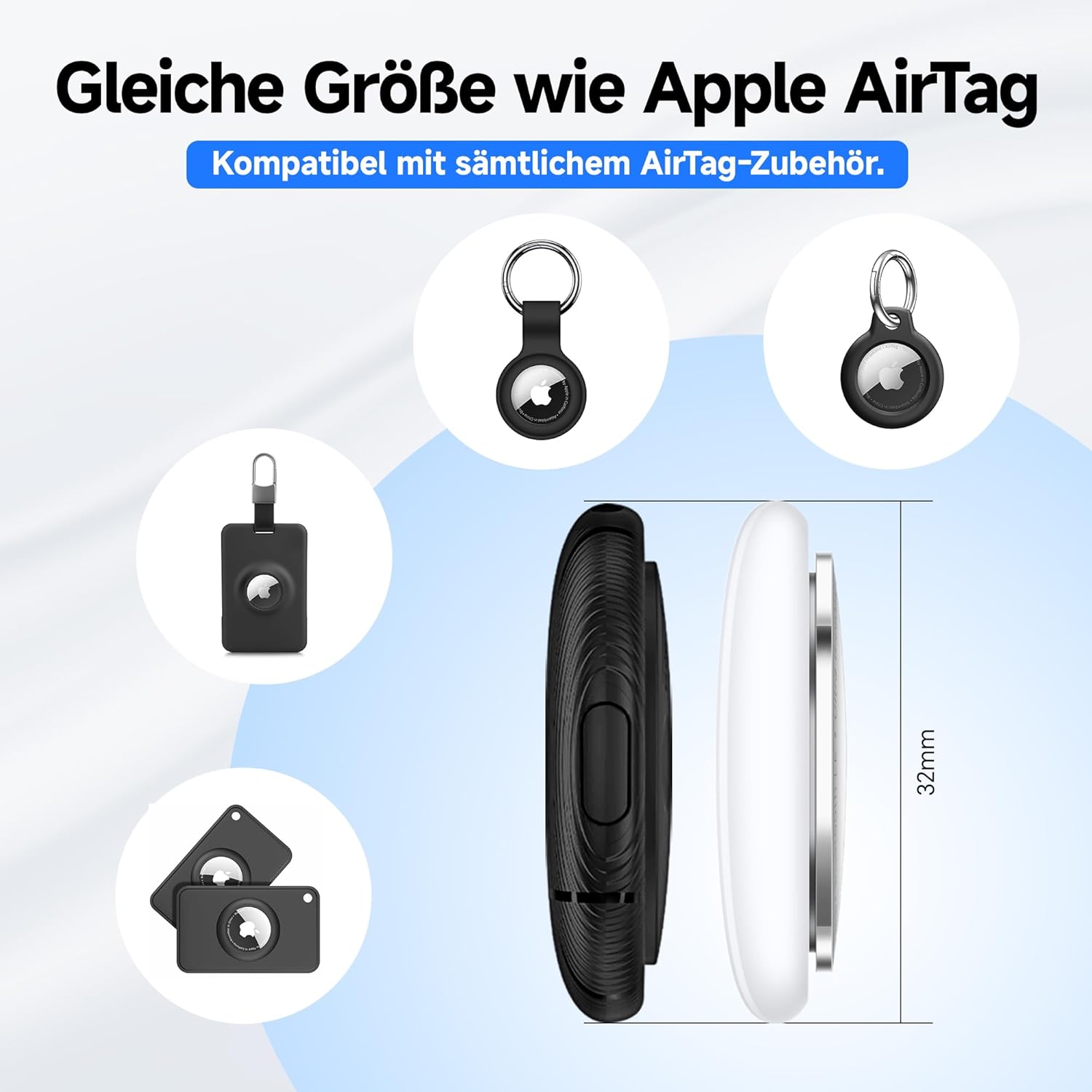
The MiLi LiTag Duo is designed to be compact and lightweight, with dimensions similar to an Apple AirTag, ensuring compatibility with many existing accessories.
Кафолат ва дастгирӣ
Кафолати истеҳсолкунанда
The MiLi LiTag Duo comes with a Кафолати 1-солаи истеҳсолкунанда аз санаи харид. Ин кафолат камбудиҳои мавод ва корҳоро ҳангоми истифодаи муқаррарӣ фаро мегирад. Он зарареро, ки дар натиҷаи истифодаи нодуруст, садамаҳо, тағйироти беиҷозат ё фарсудашавии муқаррарӣ ба вуҷуд омадааст, фаро намегирад.
Лутфан далели хариди худро барои даъвоҳои кафолат нигоҳ доред.
Дастгирии муштариён
For technical assistance, troubleshooting, or warranty inquiries, please contact MiLi customer support. Refer to the contact information provided on the product packaging or the official MiLi webсайт.
Манбаъҳои онлайн: For the latest FAQs, software updates, and additional support, please visit the official MiLi webсайт.
Маълумоти муҳим оид ба бехатарӣ
- Do not attempt to disassemble or modify the LiTag Duo beyond battery replacement.
- Батареяҳоро аз дастрасии кӯдакон дур нигоҳ доред. Агар фурӯ бурда шавад, фавран ба ёрии тиббӣ муроҷиат кунед.
- Батареяҳои истифодашударо мувофиқи қоидаҳои маҳаллӣ партов кунед.
- Дастгоҳро ба муддати тӯлонӣ дар зери ҳарорати аз ҳад зиёд ё нурҳои бевоситаи офтоб дур накунед.


