Муқаддима
This manual provides detailed instructions for the setup, operation, and maintenance of your LENRUE E-1103 Computer Speaker Soundbar. Please read this manual thoroughly before using the product to ensure proper function and longevity.

Image: The LENRUE E-1103 Computer Speaker Soundbar, a sleek black soundbar with RGB lighting on the ends and a USB-A cable with a USB-C adapter.
Мундариҷаи баста
Боварӣ ҳосил кунед, ки ҳама ашё дар баста мавҷуд аст:
- LENRUE E-1103 Computer Speaker Soundbar
- Адаптери USB-C
- Дастури корбар (ин ҳуҷҷат)
Маҳсулот ба охир расидview
The LENRUE E-1103 features a compact soundbar design with integrated stereo speakers and touch-controlled ambient lighting. It connects via a single USB cable for both power and audio.
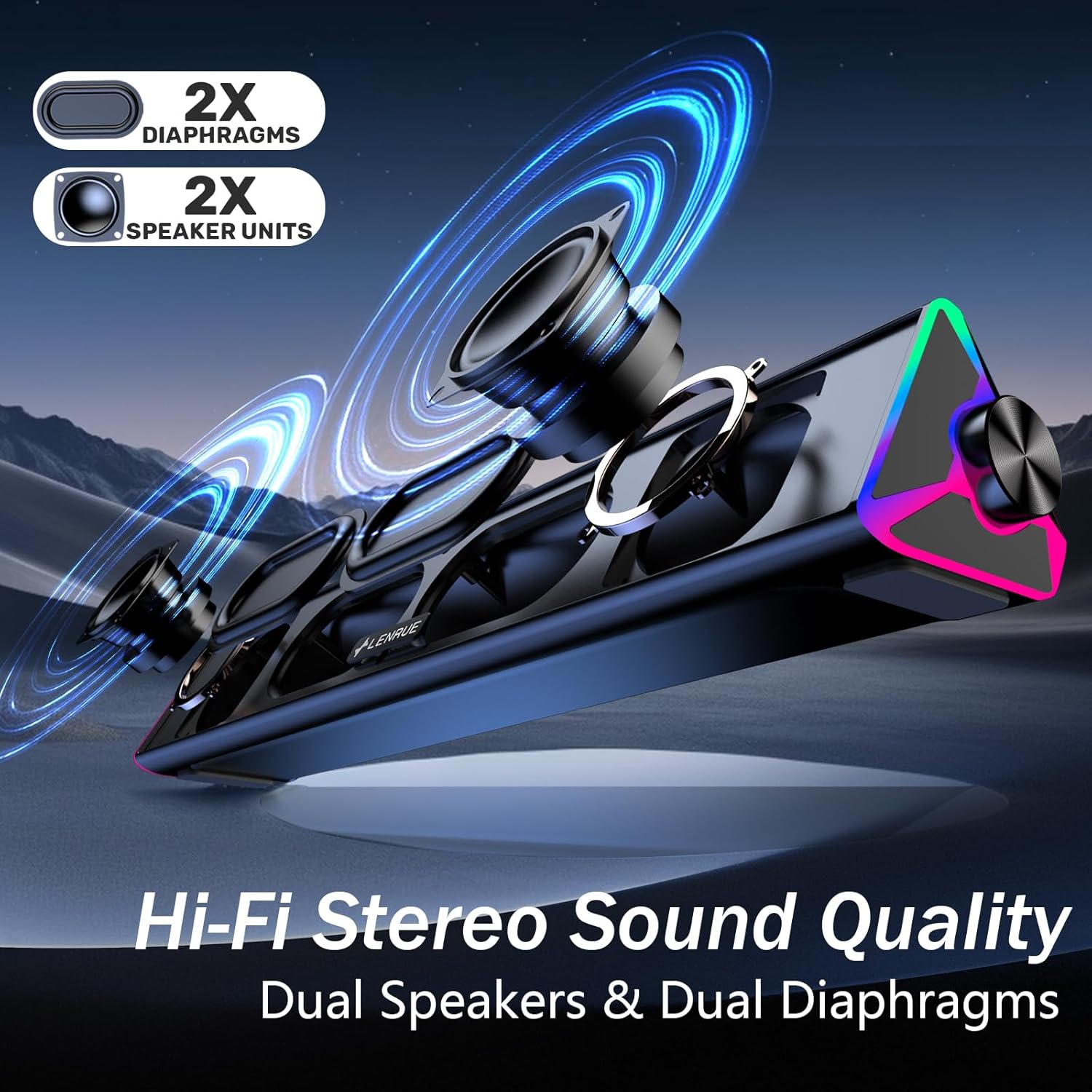
Тасвир: таркиш view of the LENRUE E-1103 speaker, highlighting its dual speaker units and dual diaphragms for stereo sound.
Компонентҳои асосӣ:
- Панҷи баландгӯяк: Front-facing mesh covering the speaker drivers.
- Тугмаи баландии овоз: Located on the right side, for adjusting audio output level.
- Сенсори ламс: Integrated into the right side for controlling the ambient lighting.
- USB Cable (USB-A): Main connection for power and audio.
- Адаптери USB-C: For compatibility with USB-C ports.
- Равшании RGB: Dynamic lighting effects on both ends of the soundbar.
Ташкил кардан
Follow these steps to set up your LENRUE E-1103 speaker:
- Ҷойгиршавӣ: Position the soundbar on a stable surface, such as your desktop, beneath your monitor, or in front of your laptop. Ensure the speaker grille faces towards you for optimal sound delivery.
- Connect to Power and Audio:
- Барои порти USB-A: Plug the USB-A connector of the speaker's cable directly into an available USB-A port on your computer (desktop PC or laptop).
- Барои порти USB-C: Attach the included USB-C adapter to the USB-A connector of the speaker's cable, then plug the USB-C adapter into an available USB-C port on your computer.

Image: A visual guide demonstrating how to connect the LENRUE E-1103 speaker to a laptop using either the standard USB-A cable or the included USB-C adapter.
The speaker is plug-and-play; no additional drivers or software installation is required.
- Танзими ибтидоии баландии овоз: After connecting, ensure your computer's audio output is set to the LENRUE E-1103 speaker. Adjust the volume using the physical volume knob on the right side of the speaker. It is recommended to start with a lower volume and gradually increase it to a comfortable listening level.

Image: A diagram illustrating the compact dimensions of the LENRUE E-1103 speaker and its single USB cable for both power and audio, designed to minimize cable clutter.
Дастурҳои амалиётӣ
Назорати овоз:
The speaker features a rotary volume knob located on the right side. Rotate the knob clockwise to increase the volume and counter-clockwise to decrease it. For optimal sound, ensure your computer's system volume is also appropriately set.

Image: A three-step visual guide showing how to adjust the volume, including checking computer settings and using the speaker's physical volume knob.
Ambient Lighting Control:
The LENRUE E-1103 includes dynamic RGB lighting on both ends. To control the lighting:
- Фурӯзон/хомӯш кардан: Gently touch the touch-sensitive area near the volume knob on the right side of the speaker. Each touch will toggle the lighting on or off.
- The lighting features a soft breathing effect, providing ambient illumination.

Image: A close-up of the right side of the LENRUE E-1103 speaker, highlighting the touch control icon for activating or deactivating the gentle breathing ambient lighting.
Нигоҳдорӣ
Proper maintenance ensures the longevity and performance of your speaker:
- Тозакунӣ: Use a soft, dry, lint-free cloth to wipe the surface of the speaker. Do not use liquid cleaners, aerosols, or solvents, as these may damage the finish or internal components.
- Нигоҳдорӣ: Вақте ки барои муддати тӯлонӣ истифода набаред, баландгӯякро дар ҷои хунук ва хушк аз нурҳои бевоситаи офтоб ва ҳарорати аз ҳад зиёд дур нигоҳ доред.
- Аз намӣ канорагирӣ кунед: Keep the speaker away from water and high humidity environments.
- Бо эҳтиёт муносибат кунед: Нагузоред, ки баландгӯякро афтонед ё ба таъсири сахт дучор кунед.
Мушкилкушо
If you encounter issues with your LENRUE E-1103 speaker, refer to the following common problems and solutions:
| Мушкилот | Сабаби эҳтимолӣ | Ҳалли |
|---|---|---|
| Аз баландгӯяк садое нест. |
|
|
| Овоз вайрон ё норавшан аст. |
|
|
| Ambient lights are not working. |
|
|
| Speaker not recognized by computer. |
|
|
Мушаххасоти
| Хусусият | Тафсилот |
|---|---|
| Бренд | ЛЕНРУ |
| Номи модел | E-1103 |
| Технологияи пайвастшавӣ | USB |
| Ҳолати баромади аудио | Стерео |
| Баландгӯяк Максимум қудрати баромади | 5 Ватт |
| Ҷавоби басомад | 20 КГц |
| Андозаҳои маҳсулот | 2.5"D x 15"W x 2.5"H (6.35см D x 38.1cm В x 6.35cm H) |
| Вазни ашё | 15.3 унсия (435 Грам) |
| Ранги | Сиёҳ |
| Истифодаи тавсияшаванда | For Computers (Desktop PCs, Laptops, Monitors) |
| Мутобиқати | Windows PCs, some macOS and Chrome OS laptops. Not compatible with Xbox gaming systems or Projectors. |
Кафолат ва дастгирӣ
LENRUE products are designed for reliability and performance. For warranty information or technical support, please refer to the contact details provided on the product packaging or the official LENRUE webсайт. Квитансияи хариди худро ҳамчун далели харид барои даъвоҳои кафолат нигоҳ доред.
Барои кӯмаки иловагӣ, лутфан боздид кунед LENRUE Store on Amazon.


