1. Муқаддима
This manual provides detailed instructions for the setup, operation, maintenance, and troubleshooting of your Transformers TF-Crystal 85 Keys Mechanical Keyboard. Please read this manual thoroughly before using the product to ensure proper functionality and longevity.
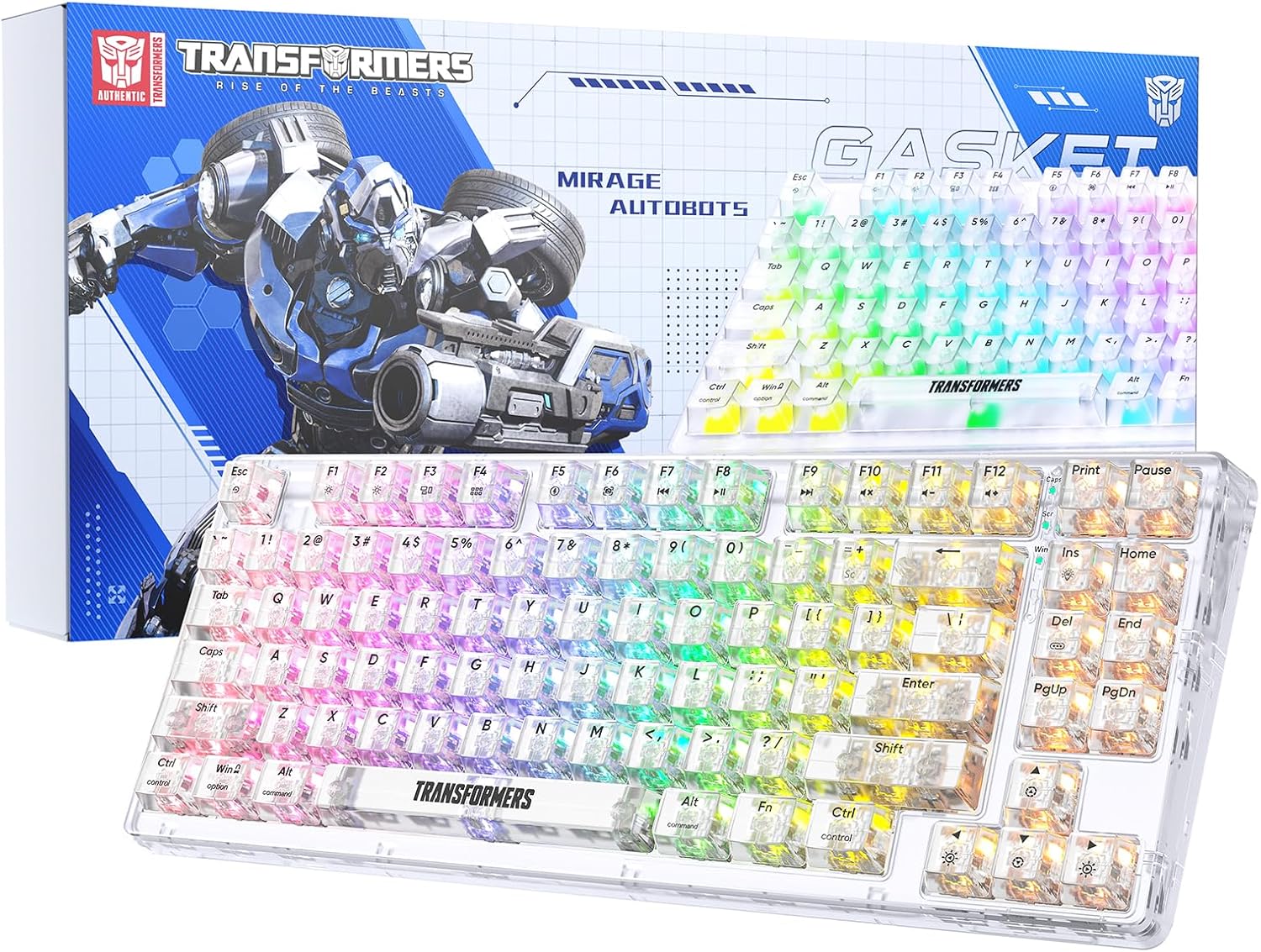
Image 1.1: Transformers TF-Crystal 85 Keys Mechanical Keyboard with its packaging, showcasing the transparent design and RGB lighting.
2. Маҳсулот ба охир расидview
2.1 Хусусиятҳои асосӣ
- 85 - Тарҳбандии калидӣ: Compact 75% design retaining essential functions, arrow, and navigation keys.
- Пайвастагии семоҳа: Supports Bluetooth 5.0, 2.4GHz wireless, and USB-C wired connections.
- PCB-и ивазшавандаи гарм: Compatible with most 3-pin and 5-pin mechanical switches, allowing for easy customization and replacement.
- Linear Switches: Pre-lubricated switches with a 50 million keystroke lifespan for durability and smooth operation.
- Сохтори прокладка: Incorporates high-quality gasket materials and a silicone pad to absorb vibrations and reduce typing noise.
- Равшании паси RGB-и танзимшаванда: Features 20 built-in backlight modes, 16.8 million color options, and dynamic music rhythm effects.
- Programmable Driver: Enables macro customization, key function remapping, and advanced lighting control.
- Ҳаёти батареяи дароз: Equipped with a 4000mAh battery, providing up to 240 hours of continuous use in 2.4GHz mode without backlighting.
- Мутобиқати васеъ: Supports Mac, Windows, iOS, Android, PC, Laptop, Smartphone, Tablet, Switch, Xbox, and PlayStation.
- Тарҳрезии шаффоф: Features transparent keycaps and base for enhanced aesthetic appeal.
3. Танзимот
3.1 Пур кардани клавиатура
Before initial use, fully charge the keyboard. Connect the provided USB-C cable to the keyboard's USB-C port and the other end to a powered USB port (e.g., computer, wall adapter). The charging indicator will show the charging status.
3.2 Пайвастшавӣ тавассути режими бесими 2.4 ГГц
- Locate the 2.4GHz USB receiver, typically stored in a compartment on the keyboard.
- Қабулкунаки USB-ро ба порти дастраси USB дар компютери худ пайваст кунед.
- Toggle the mode switch on the keyboard to the 2.4Г мавқеъ.
- The keyboard will automatically connect to your device.
3.3 Connecting via Bluetooth 5.0 Mode
- Toggle the mode switch on the keyboard to the BT мавқеъ.
- Пахш кунед ва доред Фн + 1 (ё Фн + 2, Фн + 3) for 3-5 seconds until the indicator light flashes rapidly, indicating pairing mode.
- Дар дастгоҳи худ (компютер, планшет, смартфон), Bluetooth-ро фаъол созед ва дастгоҳҳои навро ҷустуҷӯ кунед.
- Select "TF-Crystal 85" from the list of available devices to pair.
- Once paired, the indicator light will stop flashing and remain solid. You can pair up to three Bluetooth devices using Фн + 1, Фн + 2, ва Фн + 3.
3.4 Connecting via USB-C Wired Mode
- Сими USB-C-и додашударо ба порти USB-C-и клавиатура пайваст кунед.
- Қисми дигари сими USB-C-ро ба порти дастраси USB дар компютери худ пайваст кунед.
- The keyboard will automatically switch to wired mode and function without battery power.

Image 3.1: Diagram illustrating the three connection modes: Bluetooth 5.0, 2.4GHz wireless, and USB-C wired, compatible with various devices.
4. Дастурҳои истифодабарӣ
4.1 Гузариш байни режимҳо
Use the physical switch located on the keyboard to select between BT (Блутуз), 2.4Г (2.4GHz wireless), and USB-C (wired) modes.
4.2 Идоракунии чароғаки RGB
The keyboard features customizable RGB backlighting. Use the following key combinations to adjust:
- Fn + Ins: Аз 20 эффекти гуногуни рӯшноӣ гузаред.
- Fn + Del: Switch backlight colors within certain modes.
- Фн + ↑ / ↓: Равшании чароғакро танзим кунед (5 сатҳ).
- Фн + ← / →: Adjust backlight effect speed (5 levels).
- Fn + Esc (hold for 3s): Reset backlight settings to default.

Image 4.1: Visual guide for controlling RGB backlight effects, brightness, and speed using Fn key combinations.
4.3 Programmable Driver Usage
The keyboard includes a programmable driver for advanced customization. This driver allows you to:
- Таҳрири макро: Record and edit complex key sequences.
- Таърифи калидӣ: Customize the function of individual keys.
- RGB Effect Customization: Fine-tune lighting modes, colors, and speeds, including music rhythm lighting effects.
Refer to the software's dedicated user interface for detailed instructions on using these features.

Image 4.2: Screenshot of the programmable driver interface, showing options for macro editing, RGB effects, and key redefinition.
4.4 Калидҳои ивазкунии гарм
The TF-Crystal 85 keyboard features a hot-swappable PCB, allowing you to change mechanical switches without soldering. This supports most 3-pin and 5-pin mechanical switches.
- Клавиатураро хомӯш кунед ё онро аз дастгоҳи худ ҷудо кунед.
- Барои бодиққат кушодани сарпӯши тугмаи дилхоҳ, аз кашандаи сарпӯши тугмаи додашуда истифода баред.
- Use the provided switch puller to gently grip the switch from its top and bottom clips, then pull it straight up to remove it.
- Пинҳои калиди навро бо сӯрохиҳои дар платаи электронӣ буда ҳамвор кунед. Боварӣ ҳосил кунед, ки пинҳо рост ҳастанд.
- Gently press the new switch into place until it clicks securely. Do not force it.
- Сарпӯши клавиатураро иваз кунед.

Image 4.3: Illustration of the hot-swappable feature, showing how to remove and insert 3-pin/5-pin switches and the linear switch specifications.
5. Нигоҳдорӣ
5.1 Тоза кардани клавиатура
- Пеш аз тоза кардан клавиатураро аз ҳама манбаъҳои барқ ҷудо кунед.
- Аз матои мулоим ва матои пок каме истифода баред гampбо об ё маҳлули ҳалим тозакунӣ барои тоза кардани клавиатураҳо ва шасси.
- Барои чанг ва хошок байни калидҳо, ҳавои фишурда ё хасу хурд истифода баред.
- Avoid using harsh chemicals or abrasive materials that could damage the keyboard's surface.
5.2 Нигоҳубини батарея
- Батареяро зуд-зуд пурра холӣ накунед.
- Клавиатураро дар ҷои хунук ва хушк нигоҳ доред, вақте ки дар муддати тӯлонӣ истифода намешаванд.
- Агар клавиатура муддати тӯлонӣ истифода нашавад, пеш аз нигоҳдорӣ онро тақрибан то 50% пур кунед.
6. Баррасии мушкилот
| Мушкилот | Сабаби эҳтимолӣ | Ҳалли |
|---|---|---|
| Клавиатура дар ҳолати бесим ҷавоб намедиҳад. | Low battery, incorrect mode selected, receiver not connected, Bluetooth not paired. | Charge the keyboard. Ensure the mode switch is set correctly (2.4G or BT). Re-insert the 2.4G receiver. Re-pair Bluetooth. |
| Калидҳо ба қайд гирифта нашудаанд ё дукарата чоп мекунанд. | Калиди нодуруст, ифлосшавӣ дар зери сарпӯши клавиатура, мушкилоти нармафзор. | Clean under the keycap. Try hot-swapping the switch with a known working one. Restart your computer. |
| RGB backlight not working or incorrect. | Backlight turned off, incorrect settings, software conflict. | Бо истифода аз равшанӣ танзим кунед Fn + ↑. Cycle modes with Fn + Ins. Reset backlight with Fn + Esc (3 сонияро нигоҳ доред). Check programmable driver settings. |
| Keyboard not charging. | Faulty USB-C cable, power source issue, keyboard port damage. | Try a different USB-C cable. Use a different USB port or power adapter. Ensure the cable is fully inserted. |
7. Мушаххасоти
| Хусусият | Тафсилот |
|---|---|
| Рақами модел | TF-Crystal 85 |
| Тарҳбандии калид | 85 калид (75% компакт) |
| Пайвастшавӣ | Bluetooth 5.0, 2.4 ГГц бесим, сими USB-C |
| Навъи гузариш | Pre-lubricated Linear Mechanical Switches |
| Ҳаётро иваз кунед | 50 миллион клик |
| Гарм-ивазшаванда | Бале (мувофиқ бо 3-пин/5-пин) |
| Нури паси | RGB (20 modes, 16.8 million colors) |
| Иқтидори батарея | 4000 мАч |
| Battery Life (2.4G, no light) | То 240 соат |
| Муҳлати кори батарея (равшании пасӣ фаъол аст) | Тақрибан 22 соат |
| Андозаҳо (L x W x H) | 34.7 х 14 см х 4.5 см |
| Мутобиқати | Mac, Windows, iOS, Android, PC, Laptop, Smartphone, Tablet, Switch, Xbox, PlayStation |

Image 7.1: Visual representation of the keyboard's battery life: 240 hours with backlight off, 22 hours with backlight on, powered by a 4000mAh battery.
8. Кафолат ва дастгирӣ
Transformers is committed to providing exceptional customer service. If you encounter any problems with your TF-Crystal 85 Keys Mechanical Keyboard, our after-sales support team is available to assist you. This includes technical support, exchanges, or installation guidance.
Please contact our customer service for assistance. We guarantee a hassle-free service experience.


