Муқаддима
This manual provides essential information for the setup, operation, maintenance, and troubleshooting of your Onn 22 inch 1080P 100 Hz FHD LED Monitor. Please read this guide thoroughly before using the product to ensure optimal performance and safety.
The Onn 22 inch FHD LED Monitor is designed for a variety of applications, offering a vivid 1920x1080 resolution, a 100Hz refresh rate, and a 6.5ms response time for efficient performance. Its slim profile and T-shaped base are ideal for saving desk space.
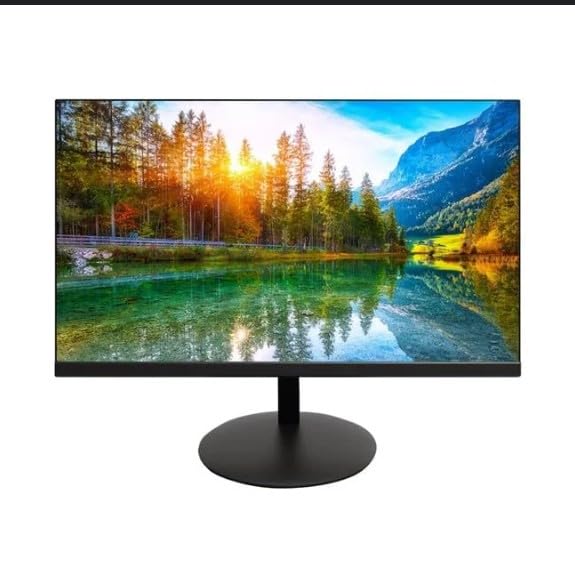
The image shows the Onn 22 inch FHD LED Monitor, highlighting its 100Hz refresh rate and 1080p resolution. The monitor features a slim design and a T-shaped base.
Дастурҳои насб
- Кушодани: Carefully remove the monitor and all accessories from the packaging. Ensure all components are present: monitor, T-shaped base, HDMI cable, and power adapter.
- Ҷойгиркунии стенд: Attach the T-shaped base to the monitor. The design is screw-less for easy assembly. Ensure it is securely fastened.
- Пайвастшавӣ ба дастгоҳ:
The monitor supports both HDMI and VGA inputs. Connect the provided HDMI cable from your computer's HDMI output to the HDMI IN port on the monitor. Alternatively, use a VGA cable for VGA input.

This image displays the rear panel of the Onn monitor, illustrating the available input ports: HDMI IN, VGA IN, and the DC 12V power input. These ports are essential for connecting the monitor to a computer or other devices.
- Пайвасти барқ: Connect the power adapter to the DC 12V input port on the monitor, then plug the adapter into a power outlet.
- Танзими монитор: The monitor is capable of swivel, tilt, rotation, and height adjustment. Adjust the screen to your preferred viewкунҷи кунҷ барои бароҳатии эргономикӣ.
- Танзимоти монитор дугона: This monitor is suitable for a fully functioning dual monitor setup. Connect a second monitor using the appropriate cables and configure your operating system's display settings.
Дастурҳои амалиётӣ
- Фаъол / Хомӯш: Press the power button, usually located on the bottom or back of the monitor, to turn it on or off.
- Интихоби вуруд: If the monitor does not automatically detect the input source, use the On-Screen Display (OSD) menu buttons to manually select between HDMI and VGA inputs.
- Навигатсияи менюи OSD: Use the physical buttons on the monitor (typically on the back or bottom edge) to navigate the OSD menu. This allows you to adjust settings such as brightness, contrast, color temperature, and input source.
- Ҳалли ва суръати навсозӣ: The monitor supports a native resolution of 1920x1080 at a 100Hz refresh rate. Ensure your computer's display settings are configured to these specifications for the best visual experience.
- Синхронизатсияи мутобиқшавӣ: The monitor features Adaptive Sync for gaming, which helps to reduce screen tearing and stuttering. Ensure this feature is enabled in your graphics card settings if supported.
Нигоҳдорӣ
- Тоза кардани экран: Экранро бо матои мулоим ва бе пахта нарм тоза кунед. Барои аломатҳои якрав, сабук гampen the cloth with water or a non-abrasive, monitor-specific cleaning solution. Avoid spraying liquids directly onto the screen.
- Тоза кардани Casing: Барои тоза кардани монитор матои хушк ва мулоимро истифода баред вasing. Do not use strong detergents or solvents, as they may damage the finish.
- Вентилятсия: Боварӣ ҳосил кунед, ки сӯрохиҳои вентилятсияи монитор баста нашудаанд, то аз ҳад зиёд гармшавиро пешгирӣ кунанд.
- Нигоҳдорӣ: Вақте ки муддати тӯлонӣ истифода набаред, мониторро дар ҷои хунук ва хушк, дур аз нурҳои бевоситаи офтоб ва ҳарорати аз ҳад зиёд нигоҳ доред.
Мушкилкушо
- Не қудрат:
- Санҷед, ки сими барқ ҳам ба монитор ва ҳам ба васлаки барқ боэътимод пайваст шудааст.
- Боварӣ ҳосил кунед, ки васлаки барқ дуруст кор мекунад.
- Сигнал нест:
- Ensure the video cable (HDMI or VGA) is firmly connected to both the monitor and the computer.
- Бо истифода аз менюи экрани монитор манбаи дурусти вурудро интихоб кунед.
- Санҷед, ки компютери шумо фаъол аст ва дар ҳолати хоб нест.
- Flickering Screen or Poor Image Quality:
- Сими видеоиро барои осеб ё пайвасти фуҷур санҷед.
- Adjust the resolution and refresh rate settings on your computer to match the monitor's specifications (1920x1080, 100Hz).
- Танзимоти мониторро тавассути менюи экран ба ҳолати пешфарз аз нав барқарор кунед.
- Тугмаҳо ҷавоб намедиҳанд:
- Unplug the monitor from the power outlet, wait for 30 seconds, and then plug it back in.
Агар мушкилот идома ёбанд, лутфан ба маълумоти дастгирӣ, ки дар бахши "Дастгирӣ ва кафолат" пешниҳод шудааст, муроҷиат кунед.
Мушаххасоти
| Бренд | Онн |
| Рақами модел | 100140681 |
| Номи модел | ОТТО |
| Андозаи экран | 21.5 инч |
| Навъи намоиш | LED, LCD |
| Резолюция | 1920 x 1080 (FHD 1080p) |
| Меъёри навсозӣ | 100 Гц |
| Вақти ҷавоб | 6.5 Миллисония |
| Интерфейси сахтафзор | hdmi, vga |
| Хусусиятҳои махсус | Танзими баландӣ |
| Viewкунҷи ангушт | 160 дараҷа |
| Таносуби тараф | 16:9 |
| Андозаҳои маҳсулот | 49.2 x 20 x 37.2 см; 3.24 кг |
Дастгирӣ ва кафолат
For technical support, product inquiries, or warranty information, please visit the official Onn support webсайт ё бо хидмати мизоҷони худ тамос гиред.
- Дастгирии расмӣ Webсайт: onnsupport.ca
- Кафолат: Specific warranty details may vary by region and purchase date. Please refer to the documentation included with your product or visit the support webсайт барои маълумоти охирини кафолат.


