1. Муқаддима
This manual provides comprehensive instructions for the installation, programming, and maintenance of your Autel MaxiIM IKEYBW004AL Programmable Key Fob. This key fob is designed as an OE-quality replacement for select BMW vehicles, offering keyless entry and remote functions. Proper use of this device requires an Autel MaxiIM programming tool (e.g., KM100, IM508S, IM608 PRO II).
2. Маълумот оид ба бехатарӣ
- Professional Programming Required: This key fob is a blank device and requires programming with compatible Autel MaxiIM tools. Attempting to program without the correct tools or knowledge may result in damage to the key fob or vehicle's immobilizer system.
- Муносибати батарея: Use only the specified CR2032 battery. Ensure correct polarity during installation. Keep batteries out of reach of children.
- Мутобиқат: Verify vehicle compatibility with Autel support before attempting programming. The key's functionality depends on the vehicle's system and the programming tool used.
- Муқовимат ба об: While designed to be durable, avoid prolonged exposure to water or extreme temperatures to prevent damage.
3. Мундариҷаи баста
Ensure all items are present before proceeding with installation and programming:
- 1 x Autel MaxiIM IKEYBW004AL Key Fob Shell
- 1 x Circuit Board (pre-installed)
- 1 x Uncut Key Blade (for BMW)
- Note: CR2032 battery is NOT included and must be purchased separately.

Figure 3.1: Included Components of the IKEYBW004AL Key Fob. The image displays the key fob shell, the internal circuit board, and an uncut key blade. A CR2032 battery is pictured with a red 'X' to indicate it is not supplied with the product.
4. Танзимот
4.1. Battery Installation (CR2032)
The Autel IKEYBW004AL requires a CR2032 coin cell battery (not included) for operation. Follow these steps to install the battery:
- Locate the small black button on the bottom edge of the key fob, beneath the main buttons.
- Press this button and use a small tool (like a flathead screwdriver or thumbnail) to gently pry off the metal end cap.
- Rotate the key fob so the buttons are facing downwards. This prevents the internal buttons from falling out.
- Carefully separate the two halves of the key fob by inserting a small screwdriver into the seam and gently rocking it.
- Insert the CR2032 battery into the designated slot in one half of the key fob, ensuring the positive (+) side faces down.
- Rejoin the two halves of the key fob, ensuring they snap securely together.
- Reattach the metal end cap.
Video 4.1: Autel Tech Tip Battery Installation for Basic Ikey Smart Key. This video demonstrates the step-by-step process of opening the key fob, inserting a CR2032 battery, and reassembling the device.
4.2. Key Blade Installation
The included key blade is uncut and designed for BMW vehicles. It must be cut by a professional locksmith or mechanic to match your vehicle's existing key blade.
- Take the uncut key blade to a qualified professional for cutting.
- Once cut, insert the key blade into the designated slot on the key fob until it clicks securely into place.
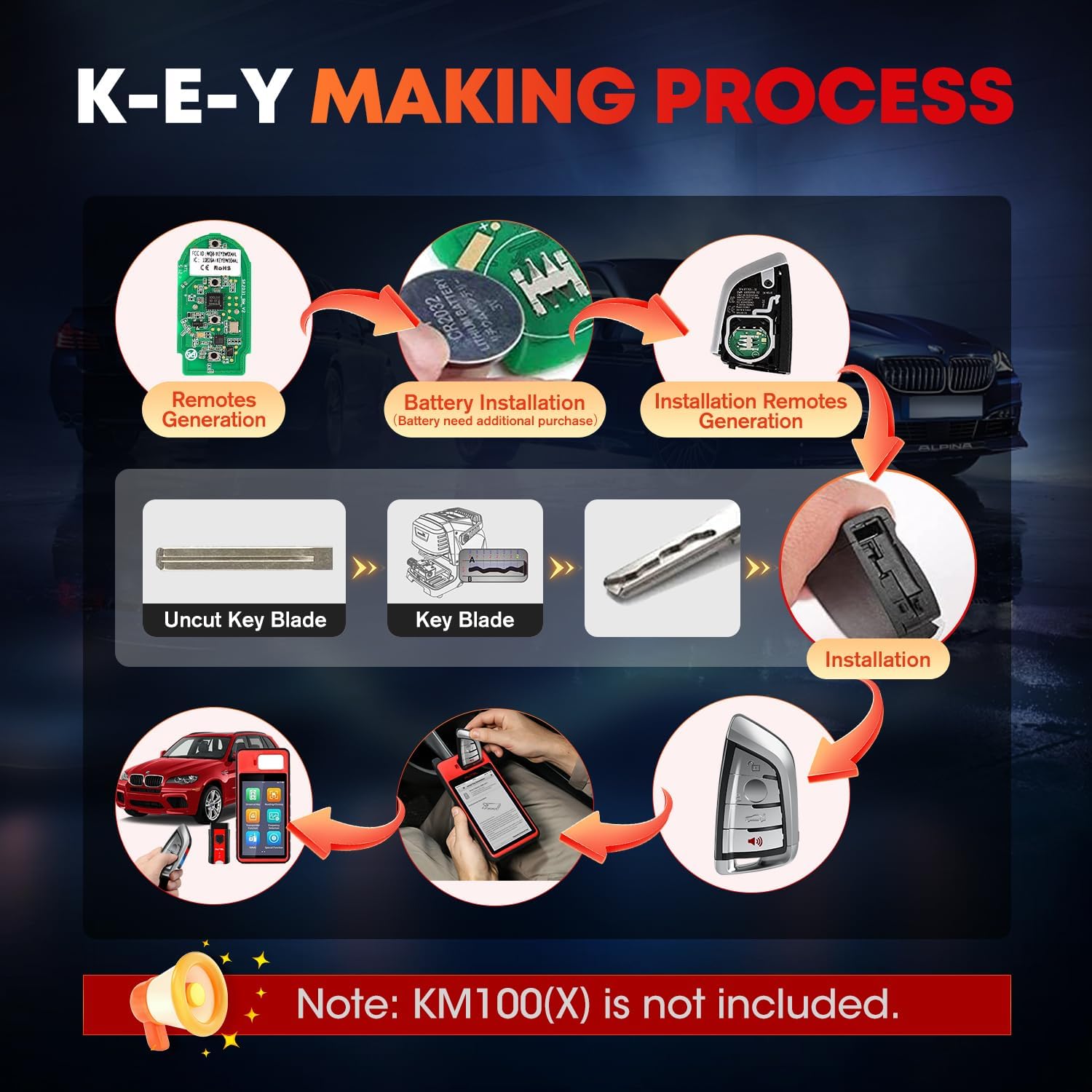
Figure 4.2: Key Making Process. This diagram visually outlines the stages of preparing the key fob, including battery and key blade integration, and the subsequent programming steps.
4.3. Compatibility Confirmation
Before programming, it is crucial to confirm the compatibility of the IKEYBW004AL with your specific vehicle. This key is not universally compatible with all vehicles, and compatibility depends on the programming tool used and your vehicle's specifications.
- Contact Autel support with your vehicle's make, model, year, and VIN (Vehicle Identification Number).
- Specify the functions you require from the key fob.
- Autel support will provide an available solution and confirm compatibility.

Figure 4.3: Important Compatibility Notice. This image highlights the necessity of using an Autel programming tool and the steps to confirm vehicle compatibility before purchase or programming.
5. Дастурҳои истифодабарӣ
5.1. Programming the Key Fob
The Autel MaxiIM IKEYBW004AL is a blank key that requires programming using a compatible Autel MaxiIM tool (e.g., KM100, IM508S, IM608 PRO II). This process links the key fob to your vehicle's immobilizer system.
- Ensure your Autel MaxiIM programming tool is updated to the latest software version.
- Connect the programming tool to your vehicle's OBD-II port.
- On the programming tool, navigate to the "Universal Key" or "IMMO" function.
- Select your vehicle's make, model, and year from the menu.
- Follow the on-screen instructions to generate the universal key. This typically involves placing the IKEYBW004AL into the programming tool's slot.
- Once the key is generated, proceed with the "IMMO Learning" or "Key Learning" procedure as guided by the Autel tool to synchronize the key fob with your vehicle.
- Test all functions (Lock, Unlock, Trunk, Panic) to ensure successful programming.
Video 5.1: How to Program Ikey with KM100. This video demonstrates the process of generating and programming an Autel Ikey using the Autel KM100 programming tool, including vehicle selection and key generation steps.

Figure 5.1: Key Fob Programming. This image shows the Autel IKEYBW004AL key fob being placed into an Autel programming device, ready for the generation process.
5.2. Key Fob Functions
The IKEYBW004AL key fob features four buttons that replicate the functions of your original equipment manufacturer (OEM) key:
- Қулф: Барои қулф кардани ҳамаи дарҳои мошин, тугмаро пахш кунед.
- Қулф: Барои кушодани ҳамаи дарҳои мошин, тугмаро пахш кунед.
- Батон: Press to open the vehicle's trunk.
- Дар воҳима будан: Press and hold to activate the vehicle's alarm system.

Figure 5.2: Key Fob Buttons and Basic Specifications. This image details the four functional buttons on the key fob and provides a summary of its physical and operational characteristics.
5.3. Ultra-Long Range Transmission
The IKEYBW004AL features a dual-band, multi-frequency transmitter (315MHz/434MHz or 868MHz/915MHz) that supports ultra-long range frequency transmission up to 40 meters (130 feet). This allows for reliable remote operation from a greater distance.

Figure 5.3: Remote Transmission Range. This image illustrates the extended range capability of the key fob, showing it can operate a vehicle from up to 130 feet away.
6. Нигоҳдорӣ
6.1. Иваз кардани батарея
When the key fob's remote functions become unreliable or stop working, it may be time to replace the CR2032 battery. Refer to Section 4.1 for detailed instructions on battery installation.
6.2. Нигоҳубин ва тозакунӣ
- Keep the key fob clean by wiping it with a soft, dry cloth.
- Аз истифодаи кимиёвии сахт ё тозакунандаи абразив худдорӣ намоед.
- Protect the key fob from drops, impacts, and extreme temperatures.
- Ensure the key fob remains dry to prevent internal damage.
7. Баррасии мушкилот
If you encounter issues with your Autel MaxiIM IKEYBW004AL, consider the following troubleshooting steps:
- Key Fob Not Responding:
- Check the battery: Ensure the CR2032 battery is correctly installed and has sufficient charge. Replace if necessary (refer to Section 4.1).
- Reprogramming: The key fob may have lost its programming. Attempt to reprogram it using your Autel MaxiIM tool (refer to Section 5.1).
- Vehicle Battery: Ensure your vehicle's battery is not depleted, as this can affect key fob communication.
- Масофаи дурдасти камшуда:
- Replace the battery: A weak battery can significantly reduce the remote's effective range.
- Environmental Interference: Strong radio interference or physical obstructions can affect signal range.
- Тири калид кор намекунад:
- Ensure the key blade was cut accurately by a professional to match your vehicle's lock.
- Масъалаҳои мутобиқат:
- If you did not confirm compatibility prior to purchase, contact Autel support immediately with your vehicle details.
For persistent issues or advanced troubleshooting, please contact Autel customer support.
8. Мушаххасоти
| Хусусият | Мушаххасоти |
|---|---|
| Рақами модел | IKEYBW004AL |
| Бренд | Аутел |
| Шумораи тугмаҳо | 4 (Lock, Unlock, Trunk, Panic) |
| Басомад | Dual-Band (315MHz/434MHz or 868MHz/915MHz) |
| Диапазони дурдаст | То 40 метр (130 фут) |
| Навъи батарея | CR2032 (Not Included) |
| Compatible Autel Tools | KM100, IM508S, IM508S PRO, IM608 II, IM608S II, IM608 PRO II |
| Вазни ашё | 2.39 унция |
| Андозаҳои бастаҳо | 4.65 x 2.32 x 0.63 инч |
| Ранги | Нуқра ва сурх |
9. Кафолат ва дастгирӣ
Autel provides a 1-year warranty for the MaxiIM IKEYBW004AL key fob. For technical support, warranty claims, or any questions regarding product operation or compatibility, please contact Autel customer support.
- Дастгирии почтаи электронӣ: Autelonline @ outlook . com
- Дастгирии техникии якумра: Available for registered products.
- 30-Day Return & Replacement: Refer to your purchase platform's policy for details.


