1. Муқаддима
Welcome to the user manual for your new Telefunken VIDAA XF32VP750M 32-inch Full HD HDR Smart TV. This manual provides essential information for setting up, operating, and maintaining your television. Please read it thoroughly to ensure proper use and to maximize your viewтаҷрибаи ғанӣ.
The Telefunken VIDAA XF32VP750M Smart TV features a 32-inch (80 cm) Full HD display, HDR10 support for enhanced contrast and color, and an integrated triple tuner (DVB-C/T2/S2) for versatile reception. Powered by the VIDAA operating system, it offers access to a wide range of streaming applications and smart features.
2. Маълумот оид ба бехатарӣ
Барои пешгирии зарбаи барқ, сӯхтор ё ҷароҳат ҳамеша чораҳои бехатарии зеринро риоя кунед:
- Телевизорро зери борон ё намӣ нагузоред.
- Телевизорро накушоед вasinг; тамоми хизматрасониро ба кормандони соҳибихтисос фиристед.
- Вентилятсияи дурустро таъмин кунед. Кушодани вентилятсияро манъ накунед.
- Телевизорро дар сатҳи устувор ва ҳамвор ҷойгир кунед, то афтидан онро пешгирӣ кунад.
- Телевизорро аз нурҳои бевоситаи офтоб, манбаъҳои гармӣ ва чанги аз ҳад зиёд дур нигоҳ доред.
- Ҳангоми тӯфони баркӣ ё дар муддати тӯлонӣ истифода нашудани телевизорро аз васлаки барқ ҷудо кунед.
3. Мундариҷаи баста
Please check that all items are present in your TV package:
- Telefunken VIDAA XF32VP750M 32-inch Full HD HDR Smart TV
- Идоракунии дурдаст (бо 2 батареяи AAA дохил карда шудааст)
- TV Stand (feet)
- Дастури корбар (ин ҳуҷҷат)
- Кабели барқ
4. Танзимот
4.1. Танзимоти физикӣ
You can set up your TV using the included stand or by mounting it on a wall (wall mount not included).
Ҷойгиркунии стенд
Carefully place the TV screen-down on a soft, flat surface. Attach the provided stand feet to the designated slots on the bottom of the TV using the screws provided. Ensure they are securely fastened.
Wall Mounting (VESA)
This TV supports VESA wall mounts. The VESA pattern for this model is M4 75x75. Please refer to the wall mount manufacturer's instructions for installation. Ensure the wall mount can support the weight of the TV.
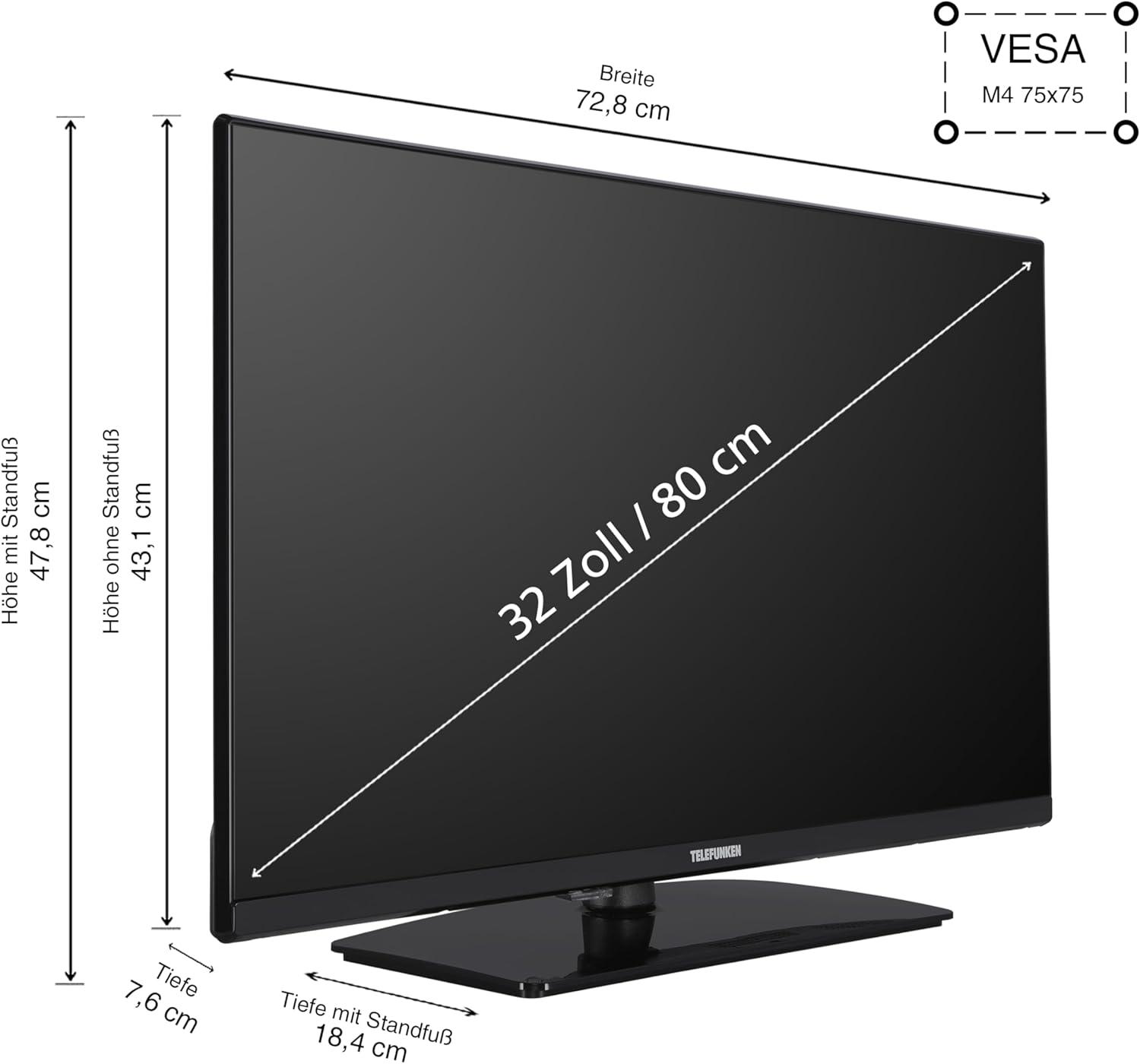
Тасвири 4.1: TV Dimensions and VESA Mount. This diagram illustrates the physical dimensions of the 32-inch TV, showing a width of 72.8 cm, height with stand of 47.8 cm, height without stand of 43.1 cm, and depth with stand of 18.4 cm. It also indicates the VESA M4 75x75 mounting standard for wall installation.
4.2. Пайваст кардани дастгоҳҳо
Your TV offers various connection ports for external devices:
- HDMI (x2): Connect Blu-ray players, game consoles, set-top boxes, or other HDMI-enabled devices. Supports CEC (Consumer Electronics Control) and ARC (Audio Return Channel) on one port.
- USB (x1): Дастгоҳҳои нигаҳдории USB-ро барои бозикунии медиа пайваст кунед.
- LAN (Ethernet): Барои пайвасти интернетии симӣ.
- Антенна (RF/F): Connect your terrestrial or satellite antenna cable.
- Ковокии CI: For Common Interface modules (e.g., for pay-TV services).
- Гӯшмонакҳо: Барои пайваст кардани гӯшмонакҳо.
- Натиҷаи аудио рақамӣ: Барои пайвастшавӣ ба системаҳои аудиоии беруна (масалан, садобарҳо, қабулкунакҳои AV).

Тасвири 4.2: Портҳои пайвастшавӣ тамом шудview. This image displays the various input and output ports available on the TV, such as two HDMI ports, one USB port, a LAN port for internet, an antenna input, a CI slot, a headphone jack, and a digital audio output.
4.3. Танзими бори аввал
After connecting the power cable and turning on the TV for the first time, a setup wizard will guide you through the initial configuration:
- Интихоби забон: Забони дилхоҳи худро интихоб кунед.
- Танзимоти шабака: Ба шабакаи Wi-Fi пайваст шавед ё пайвасти сими LAN-ро истифода баред.
- Сканкунии канал: Select your signal source (Antenna, Cable, or Satellite) and perform an automatic channel scan.
- Минтақаи вақт: Минтақаи вақти маҳаллии худро муқаррар кунед.
5. Истифода бурдани телевизор
5.1. Идоракунии дурдастview
The included remote control allows you to navigate the TV's functions and menus. Batteries are pre-installed.

Тасвири 5.1: Remote Control. This image shows the TV remote control, highlighting dedicated buttons for popular streaming services like YouTube, Netflix, and Prime Video, allowing quick access to your favorite applications.
5.2. Вазифаҳои асосӣ
- Қувва: Press the red power button to turn the TV on or off.
- Ҳаҷм: Use the VOL +/- buttons to adjust the sound level.
- Канал: Барои иваз кардани каналҳо тугмаҳои CH +/- -ро истифода баред.
- Вуруд: Press the INPUT button to select different input sources (HDMI, USB, etc.).
- Навигатсия: Use the arrow keys and OK button to navigate menus.
5.3. VIDAA Smart TV Features
Your Telefunken TV is equipped with the VIDAA operating system, providing a smart TV experience with access to numerous applications and media libraries.

Тасвири 5.2: VIDAA Smart TV Interface. This image displays the home screen of the VIDAA operating system, featuring a clean layout with quick access to popular streaming applications and personalized content recommendations.

Тасвири 5.3: Telefunken TV with Key Features. A front view of the 32-inch TV, visually emphasizing its VIDAA Smart TV capabilities, HDR10 support, and Full HD resolution.
Дастрасӣ ба барномаҳо
From the home screen, you can easily launch applications such as Netflix, Prime Video, Disney+, YouTube, and DAZN. Use the remote's navigation buttons to select and open your desired app.
HDR10 and Full HD Display
The TV supports HDR10 and HLG, delivering stunning images with high contrast, natural colors, and impressive detail sharpness in Full HD resolution.

Тасвири 5.4: HDR10 Visual Enhancement. This image illustrates the difference HDR10 technology makes, showing a split screen where one side has standard image quality and the other displays the vibrant colors and deeper contrasts provided by HDR10.
5.4. Беҳтарин Viewмасофа
Барои беҳтарин viewing experience, consider the recommended viewing distance based on screen size and resolution:

Тасвири 5.5: Беҳтарин Viewing Distance Chart. This chart provides guidelines for the ideal distance between the viewer and the television screen, categorized by screen size and resolution (4K, Full HD, HD), to ensure a comfortable and immersive viewing experience. For a 32-inch Full HD TV, the recommended distance is approximately 160 cm.
6. Нигоҳдорӣ
6.1. Тозакунӣ
- Пеш аз тоза кардан ҳамеша телевизорро аз розетка ҷудо кунед.
- Use a soft, dry cloth to wipe the screen and casing.
- Барои аломатҳои якрав, сабук гampматоъро бо об ё тозакунандаи экрани ҳалим, ки абрешим надорад.
- Never spray cleaning liquids directly onto the screen or TV.
6.2. Нигоҳдорӣ
If storing the TV for an extended period, ensure it is kept in a cool, dry place, protected from dust and extreme temperatures. Use the original packaging if available.
7. Баррасии мушкилот
Агар шумо бо телевизиони худ бо мушкилот рӯ ба рӯ шавед, ба мушкилоти умумӣ ва роҳҳои ҳалли зерин муроҷиат кунед:
| Мушкилот | Сабаби эҳтимолӣ | Ҳалли |
|---|---|---|
| Не қудрат | Power cable disconnected; no power from outlet | Check power cable connection; test outlet with another device |
| Тасвир нест, аммо садо мавҷуд аст | Incorrect input source selected; faulty cable | Press INPUT button to cycle through sources; check HDMI/antenna cable connections |
| Садо нест, аммо тасвир мавҷуд аст | Садо паст ё хеле паст аст; мушкили системаи аудиои беруна | Increase volume; check mute status; verify external audio connections |
| Правленияи дурдаст кор намекунад | Батареяҳо тамом шудаанд; монеа байни дурдаст ва телевизион | Replace batteries; remove any obstructions; ensure remote is pointed at TV sensor |
| Ба Wi-Fi пайваст шуда наметавонад | пароли нодуруст; масъалаи роутер; Телевизор аз роутер хеле дур аст | Re-enter password; restart router; move TV closer to router or use wired connection |
Агар мушкилот боқӣ монад, лутфан бо дастгирии муштариён тамос гиред.
8. Мушаххасоти
Detailed technical specifications for the Telefunken VIDAA XF32VP750M TV:
- Рақами модел: XF32VP750M
- Андозаи экран: 32 инч (80 см)
- Технологияи намоиш: LCD, LED
- Қарор: 1920 x 1080 (HD Full)
- Меъёри навсозӣ: 50 Гц
- Хусусиятҳои махсус: HDR TV, VIDAA Smart TV
- Низоми амал: ВИДАА
- Пайвастшавӣ: 2x HDMI (CEC, ARC), 1x USB, Wi-Fi, LAN, Antenna (DVB-T2/C/S2), CI Slot, Digital Audio Output, Headphone Jack
- Таносуби тараф: 16:9
- Ранги: Сиёҳ
- Андозаҳо (бо стенд): 72.8 см (В) x 18.4 см (D) x 47.8 см (Н)
- Power Consumption (SDR): 26.0 В
- Power Consumption (HDR): 45.0 В
- Истеъмоли қувваи барқ дар ҳолати интизорӣ: 0.5 В
- Синфи самаранокии энергия: E (SDR), G (HDR)

Тасвири 8.1: EU Product Fiche. This document provides comprehensive technical details and energy consumption data for the Telefunken XF32VP750M television, as required by EU regulations.

Тасвири 8.2: EU Energy Label. This label indicates the energy efficiency class 'E' for SDR content and 'G' for HDR content, along with power consumption figures (26 kWh/1000h for SDR, 45 kWh/1000h for HDR) and a QR code linking to the EPREL database. For more details, visit the EPREL database (ID: 50745209).
9. Кафолат ва дастгирӣ
Telefunken provides a guarantee for the availability of spare parts for 7 years from the date of product discontinuation. For technical support or warranty claims, please refer to the contact information provided with your purchase documentation or visit the official Telefunken webсайт.


