1. Муқаддима
Thank you for choosing the VEKOOTO WF8 RV Backup Camera System. This system is designed to enhance your driving and parking safety for RVs, trailers, and trucks by providing clear rear and side views. It features wireless connectivity, HD 1080P display, night vision, and a Blind Spot Detection (BSD) system. Please read this manual thoroughly before installation and operation to ensure proper use and optimal performance.

Тасвири 1.1: Ба охир расидview of the VEKOOTO WF8 RV Backup Camera System components, including the 7-inch monitor and two wireless cameras.
2. Мундариҷаи баста
Лутфан тасдиқ кунед, ки ҳамаи ҷузъҳои дар поён овардашуда ба бастаи шумо дохил карда шудаанд:
- 1x 7-inch Monitor
- 1x пуркунандаи мошин
- 1x U-Bracket
- 1x қавсаи косачаи соркунӣ
- 1x Compatible Furrion Adapter & Pigtail Wire
- 2x Wireless Backup Cameras
- 2x Camera Power Cables
- Антеннаҳои 4х
- 1x Дастури корбар
- Accessories (screws, etc.)

Image 2.1: Visual representation of all items included in the VEKOOTO WF8 product package.
3. Хусусиятҳои маҳсулот
- Furrion Pre-wired Compatibility: Designed for quick installation on Furrion pre-wired vehicles using the included adapter and tail wire plug.
- Enhanced Dual-Antenna Signal: Features upgraded dual antennas and advanced digital signals for improved stability and durability, offering a reliable connection up to 328 feet in open areas and 150 feet for vehicles.
- 1080P HD Monitor with Multi-View: The 7-inch 1080P HD monitor supports up to 4 cameras, allowing for full-screen, split-screen, or quad-screen displays to eliminate blind spots.
- BSD Intelligent Reminder System: Built-in Blind Spot Detection provides audio and visual alerts when persons are detected nearby, enhancing driving safety.
- Сабти пайваста: Supports continuous recording for both reversing and driving, providing an additional layer of security.
- Night Vision & IP69 Waterproof: Equipped with intelligent i-cut modules for automatic night vision activation and IP69 waterproof cameras for all-weather reliability.
- 170° Линзаи васеъкунҷа: Майдони васеъро таъмин мекунад view for improved visibility during parking and reversing.
- Adjustable Guidelines: On-screen guidelines can be adjusted for width and height to suit specific vehicle dimensions.
4. Маълумот оид ба бехатарӣ
Лутфан чораҳои бехатарии зеринро риоя кунед:
- Always ensure the system is installed securely and all connections are tight.
- Кӯшиш накунед, ки маҳсулотро ба қисмҳо ҷудо кунед ё тағир диҳед.
- Keep the monitor and cameras clear of obstructions.
- This system is an aid and should not replace careful driving and observation.
- Ensure the power supply matches the product's voltage requirements (12V DC).
5. Танзим ва насб
5.1 Насби умумӣ
- Насби камера: Mount the wireless backup cameras at the rear of your vehicle or trailer. Connect the camera power cable to a 12V DC power source, typically the vehicle's marker lights, running lights, or tail lights. Ensure a good ground connection.
- Монитор насб: Attach the 7-inch monitor to your dashboard using either the U-bracket or the suction cup bracket.
- Монитор қудрат: Connect the monitor to the vehicle's cigarette lighter socket using the provided car charger.
- Пайвастшавии антенна: Screw the antennas onto both the cameras and the monitor for optimal signal transmission.
5.2 Furrion Pre-wired Installation
For vehicles with Furrion pre-wiring, the installation process is simplified:
- Locate the existing Furrion pre-wired camera housing on your RV or trailer.
- Use the included Furrion adapter and pigtail wire to connect the VEKOOTO camera directly to the Furrion wiring. This eliminates the need for separate camera power wiring.
- Proceed with monitor installation as described in Section 5.1.

Image 5.1: Installation guide showing both general wiring and simplified Furrion pre-wired setup for the camera system.
6. Дастурҳои истифодабарӣ
6.1 Функсияҳои монитор
The 7-inch monitor features touch keys for easy operation:
- Қудрат: Барои фурӯзон/хомӯш кардани монитор пахш кунед.
- CH (канал): Switch between connected cameras (up to 4 channels supported).
- M (Menu): Access the monitor's settings menu.
- + / -: Navigate menu options or adjust settings (e.g., brightness, contrast).
- Хуб: Confirm selection in the menu.

Image 6.1: The 7-inch monitor interface, demonstrating its HD 1080P display, loop recording capability, and options for full, split, or quad-screen views.
6.2 Усулҳои намоиш
The monitor supports various display configurations:
- Тамомсафҳа: Displays a single camera view.
- Экрани тақсимшуда: Displays two camera viewс ҳамзамон.
- Quad Screen: Displays up to four camera views simultaneously (requires additional cameras, not included).
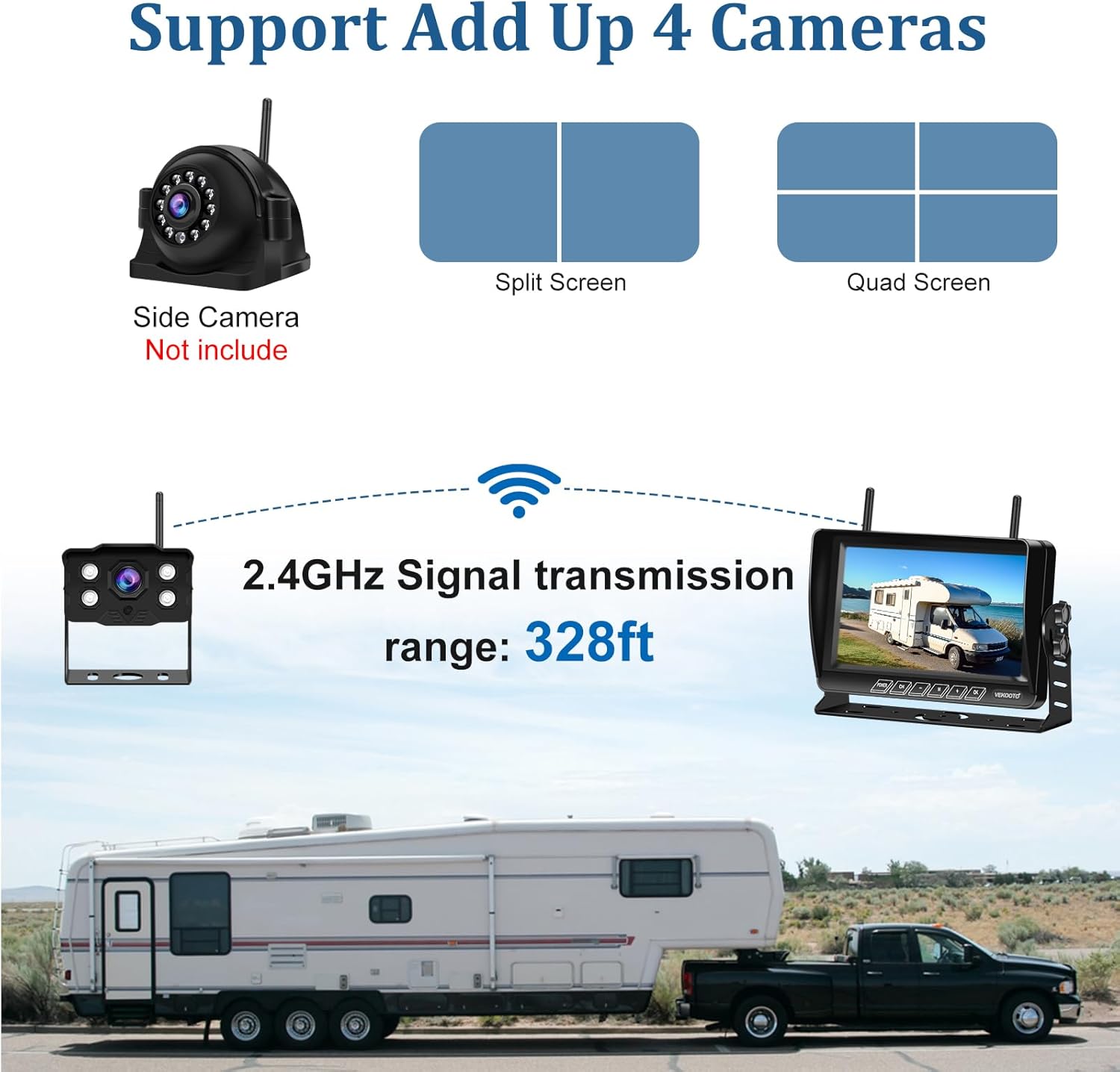
Image 6.2: Illustration of the multi-camera support, showing split-screen and quad-screen display options on the monitor.
6.3 Blind Spot Detection (BSD) System
The integrated BSD system actively monitors for persons in your blind spots. When a person is detected, the monitor will provide both an audible beep and a visual alert on the screen to remind the driver, enhancing safety during maneuvers.
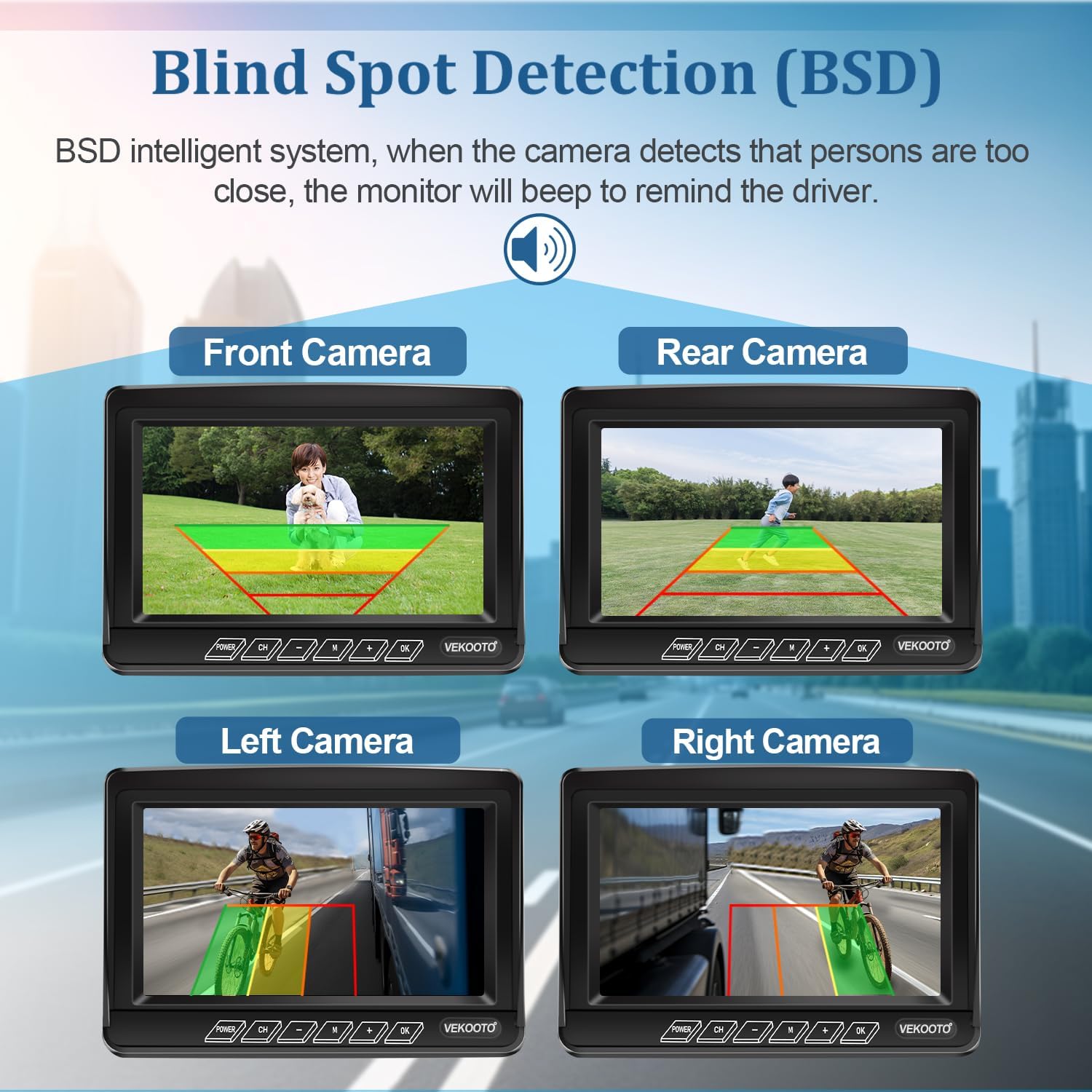
Image 6.3: Visual representation of the BSD system in action, showing detection zones for various camera positions.
6.4 Night Vision and Guidelines
The cameras are equipped with an intelligent i-cut module that automatically switches to night vision mode in low-light conditions, providing clear visibility. The 170° wide-angle lens ensures a broad view. You can also adjust the on-screen parking guidelines (width and height) via the monitor's menu to match your vehicle's dimensions and preferences.

Тасвири 6.4: Намоиши мониторasing clear night vision capabilities, activated by infrared light in low-light environments.
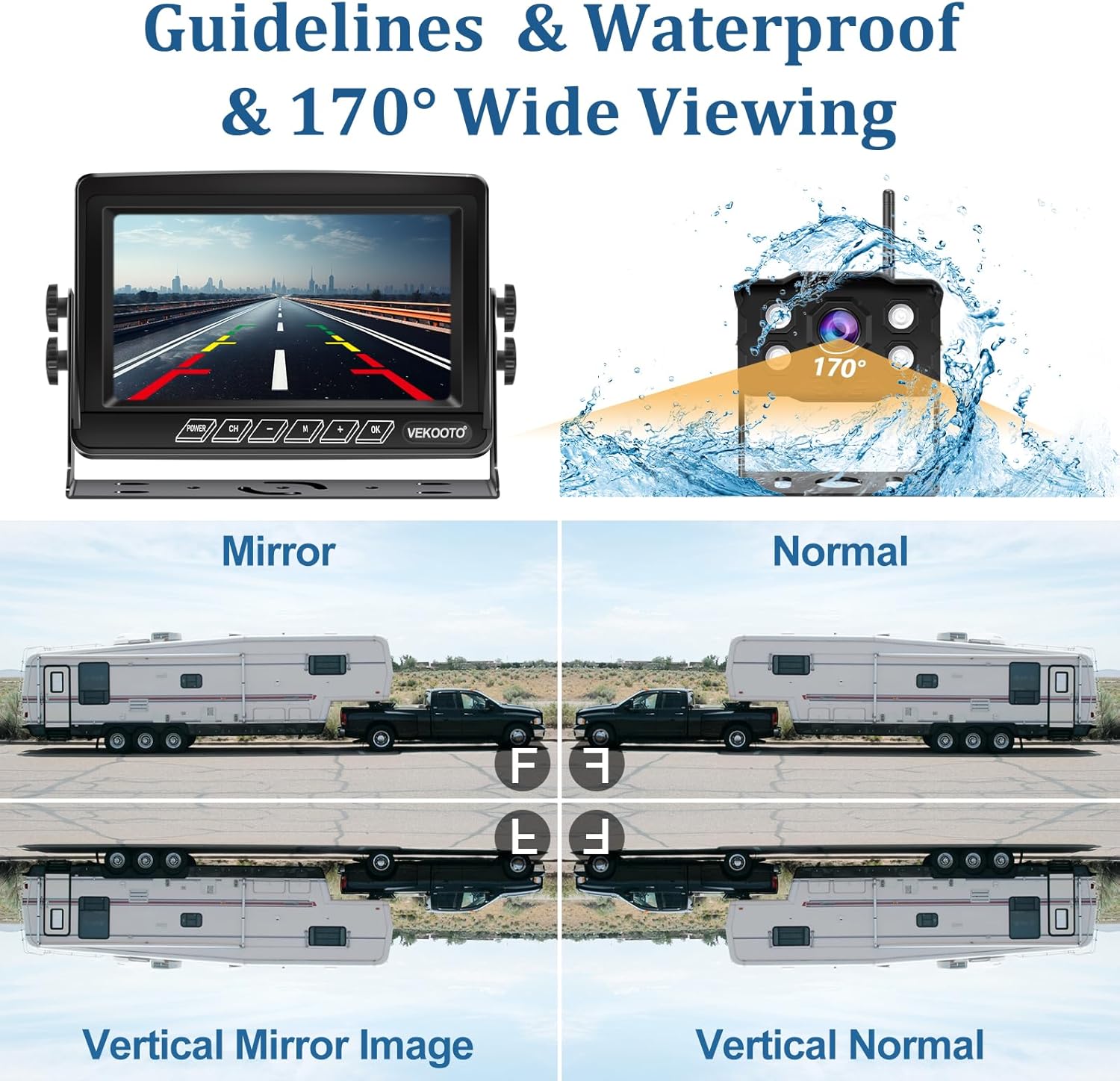
Image 6.5: Illustration of adjustable parking guidelines on the monitor and the waterproof design of the camera.
7. Баррасии мушкилот
If you encounter issues with your VEKOOTO WF8 system, please refer to the following common problems and solutions:
- Дар монитор тасвир нест:
- Ensure the monitor is powered on and the car charger is securely connected.
- Check if the cameras are receiving power and their power cables are properly connected.
- Verify that the antennas are securely attached to both the cameras and the monitor.
- Confirm that the monitor is set to the correct channel for the active camera.
- Poor Signal/Interference:
- Ensure there are no large metal objects or other electronic devices blocking the signal path between the camera and monitor.
- Reposition antennas for better reception.
- Дар наздикии он манбаъҳои қавии электромагнитиро тафтиш кунед.
- Image is Upside Down/Mirrored:
- Access the monitor's menu settings to adjust image orientation (mirror/normal, flip vertical/horizontal).
- BSD System Not Alerting:
- Ensure the BSD feature is enabled in the monitor settings.
- Check that the camera lens is clean and unobstructed.
If problems persist, please contact VEKOOTO customer support for assistance.
8. Мушаххасоти
| Хусусият | Мушаххасоти |
|---|---|
| Рақами модел | WF8 |
| Андозаи экран | 7 инч |
| Ҳалли видео | 1080P HD |
| Диапазони бесим (Майдони кушод) | То 328 фут |
| Wireless Range (Vehicle) | То 150 фут |
| Камера Viewкунҷи ангушт | 170° |
| Рейтинги обногузар | IP69 |
| Ҷилдиtage | 12 Вольт (ДС) |
| Андозаҳои маҳсулот (Монитор) | 7.3"L x 2"W x 5.5"H |
| Вазни ашё | 4.18 фунт (бастаи умумӣ) |
| Дигар Хусусиятҳо | BSD System, Night Vision, Loop Recording, Furrion Pre-wired Compatible |
9. Нигоҳдорӣ
To ensure the longevity and optimal performance of your VEKOOTO WF8 system, follow these maintenance guidelines:
- Тозакунӣ: Линзаҳои камера ва экрани мониторро мунтазам бо матои нарм тоза кунед,amp матоъ. Аз тозакунандаи абразивӣ худдорӣ кунед.
- Пайвастшавӣ: Periodically check all power and antenna connections to ensure they are secure and free from corrosion.
- Санҷиши кабелӣ: Inspect power cables for any signs of wear or damage. Replace if necessary.
- Нигоҳдорӣ: If storing the vehicle for an extended period, consider disconnecting the system to prevent battery drain.
10. Кафолат ва дастгирӣ
VEKOOTO provides a 2-year replacement service for any defects or issues (excluding intentional damage) with your WF8 RV Backup Camera System. Additionally, дастгирии техникии умри is available to assist you with any questions or concerns you may have.
For warranty claims or technical assistance, please contact VEKOOTO customer support through the retailer where you purchased the product or visit the official VEKOOTO webсайт барои маълумоти тамос.


