1. Маълумоти муҳим оид ба бехатарӣ
Operating a laser engraver involves inherent risks. Adhere strictly to all safety guidelines to prevent injury and damage. This device is a Class 4 laser product.
- Муҳофизати чашм: Always wear the provided safety glasses or equivalent laser-protective eyewear when the machine is in operation. The panoramic magnetic eye protection shield filters 97% of strong light, but direct exposure to the laser beam can cause permanent eye damage.
- Вентилятсия: Operate the laser engraver in a well-ventilated area to dissipate fumes and smoke produced during engraving and cutting.
- Бехатарии сӯхтор: Keep a fire extinguisher nearby. Never leave the machine unattended during operation, especially when cutting materials that may ignite.
- Бехатарии моддӣ: Engrave and cut only approved materials. Certain materials can produce toxic fumes or catch fire easily.
- Истгоҳи фавқулодда: Familiarize yourself with the location of the emergency stop button and how to use it.
Хусусиятҳои бехатарии дохилӣ:
- Flame Detector: The IKIER X5 Pro is equipped with a flame detector that will automatically stop processing and trigger a buzzer alarm if it detects a flame.
- Tilt Sensor (Gyroscope): The machine will automatically stop operation and sound an alarm if it tilts more than 15 degrees, preventing accidents from unexpected movement.

Image: The IKIER X5 Pro's integrated flame detector and gyroscope for enhanced operational safety.
2. Мундариҷаи баста
Verify that all components listed below are present in your package before proceeding with assembly.
- IKIER X5 Pro Laser Engraver (main unit)
- Installation Toolkit (screws, wrenches, etc.)
- Кабели барқ
- Адаптери барқ
- USB Flash Drive (containing software and drivers)
- Кабели навъи C
- Хатти пайвасткунандаи меҳвари X
- Шинаҳои фокусӣ
- Айнакҳои бехатарӣ
- Дастури маҳсулот

Image: All components included in the IKIER X5 Pro Laser Engraver package.
3. Монтаж ва насб
The IKIER X5 Pro is designed for quick assembly, typically completed within 10-20 minutes. The full aluminum alloy structure ensures stability and durability.
- Компонентҳоро кушоед: Carefully remove all items from the packaging and place them on a clean, flat surface.
- Чорчӯбро ҷамъ кунед: Follow the step-by-step instructions in the included Product Manual to connect the frame components using the provided toolkit. Ensure all screws are securely tightened, but avoid over-tightening, which can cause rail friction.
- Модули лазерро насб кунед: Mount the laser module onto the gantry. The integral lead screw design ensures precise laser movement.
- Кабелҳои пайвастшавӣ: Connect the power cable, Type C cable, and X-axis connecting line as indicated in the manual.
- Фаъолсозии ибтидоӣ: Connect the power adapter and turn on the machine. Observe for any unusual sounds or movements.

Image: Visual guide for quick assembly, mobile app connection, and direct engraving setup.
4. Дастурҳои истифодабарӣ
Software and Connectivity:
The IKIER X5 Pro supports various operating systems and file formats, offering flexible control options.
- Системаҳои оператсионӣ: Compatible with Linux, Mac OS, and Windows.
- File Форматҳо: Supports SVG, PNG, DXF, TIF, BMP, and PDF.
- Next-Generation APP Control: Utilize the dedicated mobile application for a streamlined user experience and enhanced control functions. This allows for convenient operation directly from your smartphone or tablet.
- Оффлайн кандакорӣ: The machine supports offline engraving, enabling you to engrave projects without a continuous computer connection once the file бор карда мешавад.
- Барқарорсозии талафоти барқ: Дар сурати ногахонии кувваи уtage or accidental interruption, the machine features a power loss recovery function, allowing it to resume engraving from the exact original position.
Engraving and Cutting Process:
- Тайёр кардани мавод: Place your chosen material securely within the working area (410x380mm).
- Фокуси лазер: Use the provided focus shims to set the correct focal distance for optimal engraving and cutting precision. The laser spot area is 0.06*0.06mm, balancing precision and cutting energy.
- Тарҳрезии бор: Тарҳҳои худро интиқол диҳед file to the machine via USB or the connected software/APP.
- Танзими параметрҳо: Adjust engraving/cutting parameters (speed, power, passes) based on the material type and desired outcome.
- Оғози амалиёт: Initiate the engraving or cutting process. Monitor the machine closely, especially during the initial stages.
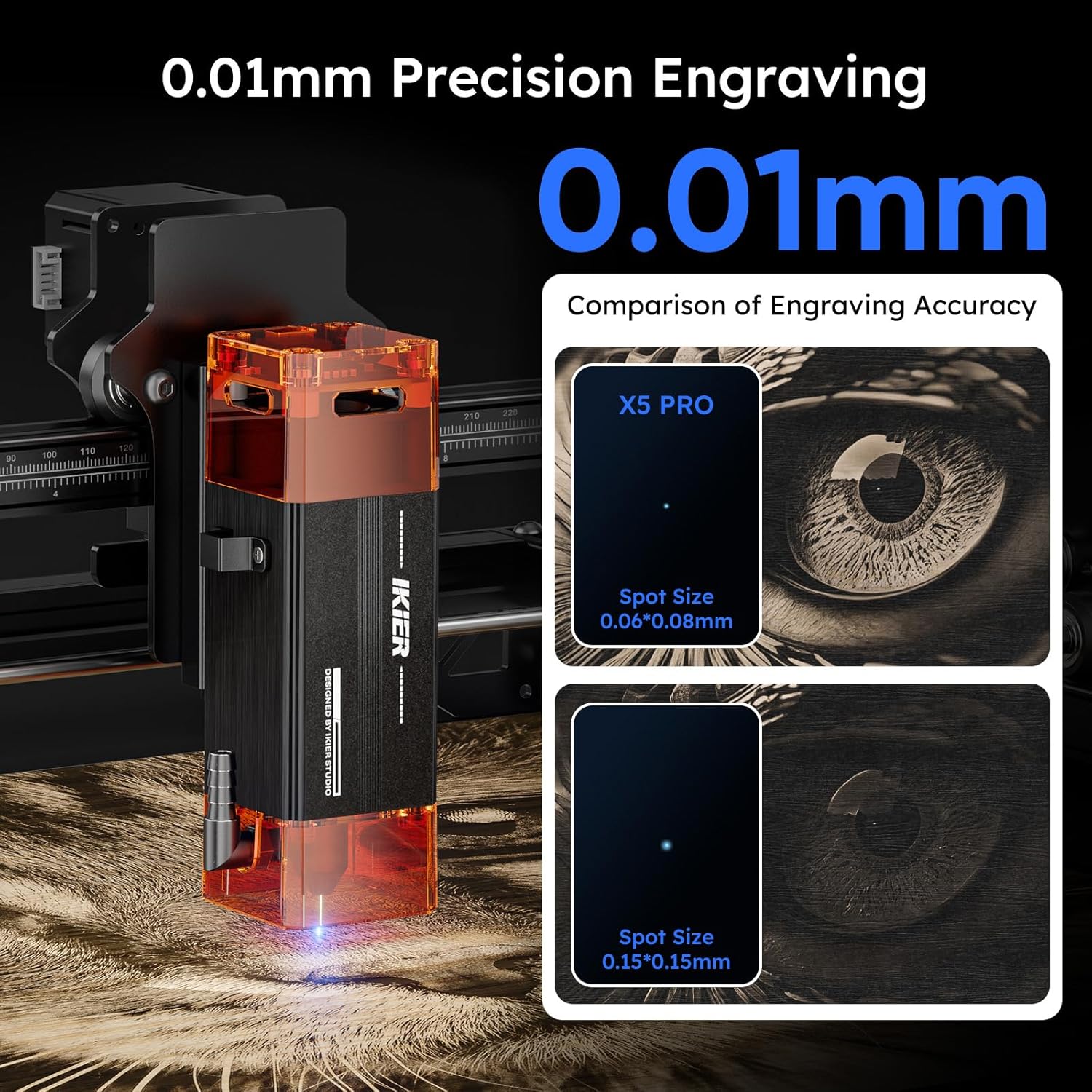
Image: The IKIER X5 Pro offers 0.01mm precision engraving with a fine laser spot size of 0.06*0.06mm.

Image: Demonstrates the 5W laser's ability to cut 5mm Paulownia wood and 3mm black acrylic in a single pass.
5. Мутобиқати моддӣ
The IKIER X5 Pro is suitable for engraving and cutting a wide range of materials. Always test on a small, inconspicuous area first to determine optimal settings.
- Гравюра: Wood, Glass, Plastic, Leather, Rubber, Paper, Cardboard, Anodized Aluminum, Stainless Steel (with coating), Ceramics (with coating), Stone.
- Буридани: Wood (up to 5mm Paulownia), Paper, Cardboard, Leather, Non-transparent Acrylic (up to 3mm black acrylic), Fabric.
Шарҳ: Transparent materials like clear acrylic or glass may require a dark coating (e.g., paint or marker) on the surface for the laser to interact effectively.
6. Нигоҳдорӣ
Regular maintenance ensures the longevity and optimal performance of your IKIER X5 Pro laser engraver.
- Clean Laser Lens: Periodically clean the laser lens with a soft, lint-free cloth and lens cleaning solution to ensure clear laser output.
- Clean Rails and Wheels: Keep the X and Y axis rails and wheels free from dust and debris. A build-up can affect movement precision.
- Check Belt Tension: Ensure the timing belts are properly tensioned. Loose belts can lead to inaccurate engraving.
- Навсозии нармафзор: Check the official IKIER website or APP for any available firmware updates to ensure your machine has the latest features and bug fixes.
7. Баррасии мушкилот
This section addresses common issues you might encounter. For more complex problems, refer to the comprehensive manual or contact customer support.
| Мушкилот | Сабаби эҳтимолӣ | Ҳалли |
|---|---|---|
| Мошин фаъол нест. | Power cable loose, power adapter faulty, power switch off. | Check all power connections. Ensure the power switch is in the 'ON' position. Test power adapter if possible. |
| Laser not firing or weak. | Laser lens dirty, focus incorrect, power setting too low, laser module faulty. | Clean the laser lens. Re-focus the laser using shims. Increase laser power in software. Contact support if issue persists. |
| Engraving/cutting is inaccurate or skipped lines. | Loose belts, dirty rails, stepper motor issue, material not secured. | Check and tighten timing belts. Clean X and Y axis rails. Ensure material is firmly secured. Verify all assembly bolts are appropriately tightened, as over-tightening can cause rough movement. |
| Machine stops unexpectedly with alarm. | Flame detected, machine tilted, emergency stop pressed. | Check for flames or smoke. Ensure the machine is on a stable, level surface. Release emergency stop button if pressed. |
| Software/APP not connecting to machine. | Incorrect cable connection, driver issues, software version mismatch. | Verify USB/Type C cable connection. Reinstall drivers from the USB flash drive. Ensure software/APP is the latest version. |
8. Мушаххасоти
Key technical specifications for the IKIER X5 Pro Laser Engraver.
| Хусусият | Мушаххасоти |
|---|---|
| Модели | IKIER X5 Pro |
| Қувваи баромади лазерӣ | 5000 мВт (5 Вт) |
| Синфи лазерӣ | Синфи 4 |
| Минтақаи нуқтаи лазерӣ | 0.06*0.06мм |
| Майдони кандакорӣ | 410 x 380 мм (16.14 x 14.96 дюйм) |
| Андозаҳои маҳсулот | 22.8 x 22.6 x 7.6 инч |
| Вазни ашё | 12.18 фунт |
| Материал | Хӯлаи алюминий |
| Манбаи нерӯ | AC/DC |
| OS дастгирӣ карда мешавад | Linux, Mac OS, Windows |
| Дастгир карда шудааст File Форматҳо | SVG, PNG, DXF, TIF, BMP, PDF |

Image: The generous 410x380mm working area of the IKIER X5 Pro.
9. Кафолат ва дастгирӣ
For warranty information, please refer to the documentation included with your product or visit the official IKIER website. If you encounter any issues or require technical assistance, please contact IKIER customer support. They are available to help with troubleshooting and provide guidance for optimal use of your laser engraver.
Маълумот барои тамос: Refer to the official IKIER website or the contact details provided in your product manual for the most up-to-date support channels.
Манбаъҳои онлайн: Explore online forums, community groups, and official IKIER tutorials for additional tips and project ideas.


