1. Маҳсулот ба охир расидview
The Macap MI40 Touch Instant Burr Coffee Grinder is a high-performance appliance designed for precise and consistent coffee grinding. Featuring 65mm flat burrs, a responsive 3.5-inch touchscreen, and multiple operating modes, it is suitable for various brewing methods from espresso to cold brew. Its robust construction ensures quiet operation and stability.
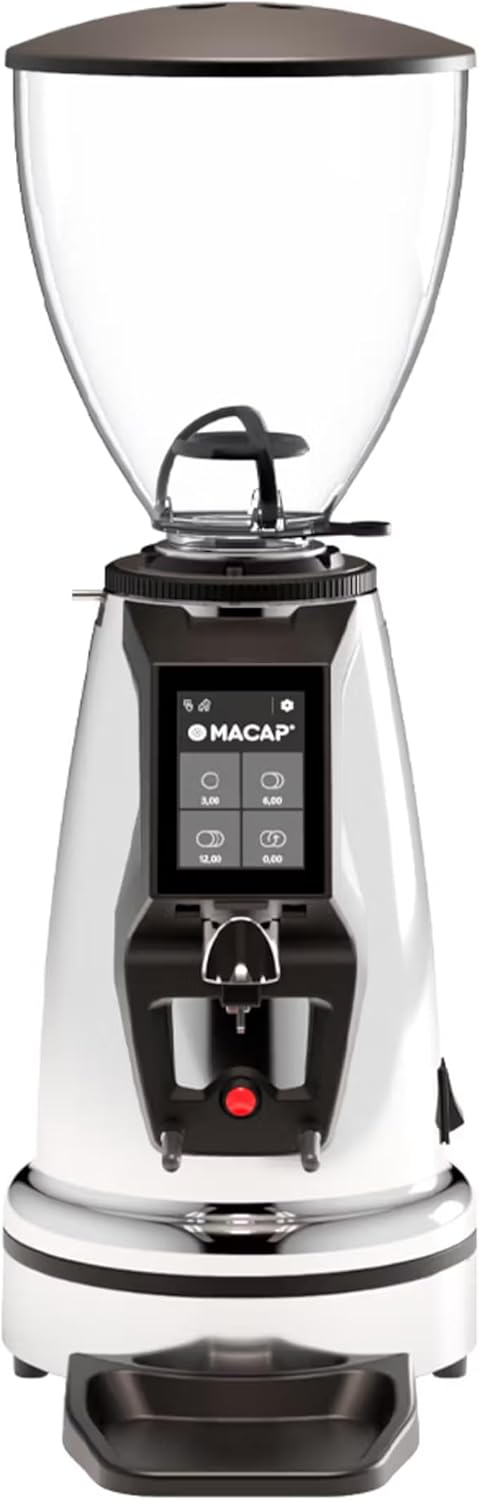
Пеш view of the Macap MI40 Touch Instant Burr Coffee Grinder, showcasing its sleek chrome finish and integrated touchscreen display.
2. Маълумот оид ба бехатарӣ
Please read all safety instructions carefully before operating the grinder to prevent injury or damage.
- Always unplug the grinder from the power outlet before cleaning, maintenance, or if it will be left unattended.
- Do not immerse the grinder, power cord, or plug in water or any other liquid.
- Keep hands and utensils out of the bean hopper and grind chute during operation.
- Ensure the bean hopper lid is securely in place before grinding.
- This appliance is intended for grinding whole roasted coffee beans only. Do not grind other substances.
- Do not operate the grinder with a damaged cord or plug, or if the appliance malfunctions or has been damaged in any manner.
- Дастгоҳро аз дастрасии кӯдакон дур нигоҳ доред.
3. Ҷузъҳо
Familiarize yourself with the main components of your MI40 Touch coffee grinder:
Хоппер: Transparent container for holding whole coffee beans. Capacity: 1.2 Kilograms.

3.5'' Touchscreen Display: Intuitive interface for controlling grind settings, dose programming, and operating modes.

Grind Adjustment Collar: Stepless micrometric adjustment for precise control over grind particle size.

Portafilter Fork & Drip Tray: Adjustable fork to hold your portafilter for hands-free grinding, with a removable drip tray for easy cleaning.
4. Танзимот
Follow these steps to set up your Macap MI40 Touch grinder:
- Кушодани: Carefully remove the grinder and all accessories from the packaging. Retain the packaging for future transport or storage.
- Ҷойгиршавӣ: Суфтакунандаро дар рӯи устувор, ҳамвор ва хушк ҷойгир кунед. Боварӣ ҳосил кунед, ки дар атрофи дастгоҳ вентилятсияи мувофиқ мавҷуд аст.
- Насб кардани бункер: Place the bean hopper onto the grinder body, aligning the tabs. Rotate the hopper clockwise until it locks securely into place.
- Насб кардани табақи қатрагӣ: Slide the removable drip tray into its designated slot at the base of the grinder.
- Пайвасти барқ: Сими барқро ба васлаки барқии заминӣ пайваст кунед.
- Тозакунии ибтидоӣ: Пеш аз истифодаи аввал, берунро бо матои намӣ пок кунедamp cloth. Ensure the burrs and grind chute are free of any packing debris.

Тараф view of the Macap MI40 Touch grinder, illustrating its compact design and the placement of the bean hopper and drip tray.
5. Дастурҳои истифодабарӣ
5.1. Grind Adjustment
The MI40 Touch features stepless micrometric grind adjustment, allowing for precise control over particle size. To adjust the grind:
- Ensure the grinder is off or not actively grinding.
- Rotate the grind adjustment collar located below the bean hopper.
- Гард кардан ақрабаки соат for a finer grind (e.g., for espresso).
- Гард кардан ба самти муқобили соат for a coarser grind (e.g., for drip, French press, or cold brew).
- Make small adjustments and test the grind to achieve the desired consistency for your brewing method.
Аз наздики view of the grind adjustment collar, showing the numerical markings for reference.
5.2. Интерфейси экрани сенсорӣ
The 3.5-inch touchscreen allows for intuitive control and customization of your grinding experience. It features four programmable dose buttons and various settings.
The 3.5-inch touchscreen display showing the main interface with programmable dose buttons.
For a detailed demonstration of the touchscreen interface and its functionalities, please refer to the official video below:
This video demonstrates the various features and customization options of the 3.5-inch touchscreen interface on the Macap MI Series coffee grinders, including dose programming, color customization, and different operating modes.
5.3. Реҷаҳои корӣ
The MI40 Touch offers three primary operating modes:
- Ҳолати стандартӣ: Allows you to select a pre-programmed dose by pressing the corresponding button on the touchscreen. The grinder will dispense the set amount of coffee.
- Реҷаи тела ва маҷақ: Grinding starts when the portafilter activates the button on the fork and stops when the portafilter is removed. This mode is ideal for manual control.
- Barista Hands-Free Mode: Similar to Push and Grind, but designed for continuous grinding as long as the portafilter is in place, allowing baristas to multitask.
6. Нигоҳдорӣ ва тозакунӣ
Regular cleaning and maintenance will ensure optimal performance and longevity of your grinder.
6.1. Тозакунии ҳаррӯза
- Grind Chute: Use a brush or vacuum to clear any residual coffee grounds from the grind chute after each use.
- Суфраи қатрагӣ: Remove and empty the drip tray regularly. Wipe it clean with a damp матоъ кунед ва бодиққат хушк кунед.
- берунӣ: Қисми берунии мошини суфтакуниро бо матои нарм пок кунед,amp матоъ. Тозакунанда ё ҳалкунандаҳои абразивиро истифода набаред.

The removable drip tray and portafilter fork area, designed for easy cleaning.
6.2. Deep Cleaning (Weekly/Bi-Weekly)
- Суфтакунандаро аз барқ ҷудо кунед.
- Хопперро хориҷ кунед: Empty any remaining beans. Rotate the hopper counter-clockwise to unlock and remove it.
- Буррҳои тоза: Use a stiff brush or a specialized grinder brush to remove accumulated coffee oils and grounds from the burrs. You may need to remove the upper burr for thorough cleaning (refer to specific instructions in the full manual for burr removal).
- Clean Grind Chamber: Use a vacuum cleaner with a narrow attachment to remove grounds from the grind chamber.
- Бозсозӣ: Reinstall the burrs (if removed) and the bean hopper securely.
7. Баррасии мушкилот
If you encounter issues with your MI40 Touch grinder, refer to the table below for common problems and solutions.
| Мушкилот | Сабаби эҳтимолӣ | Ҳалли |
|---|---|---|
| Суфтакунанда ба кор намеояд. | васл карда нашудааст; хомӯш кардани барқ; монтажи электр аз кор баромад. | Check power connection; ensure power switch is on; reset circuit breaker. |
| Ягон қаҳва тақсим карда намешавад. | Hopper empty; grind chute clogged; burrs jammed. | Fill hopper; clean grind chute; clear any foreign objects from burrs (unplug first). |
| Гирифтани номувофиқ. | Burrs dirty or worn; grind setting too coarse/fine. | Clean burrs thoroughly; adjust grind setting incrementally. Consider burr replacement if worn. |
| Grinder is excessively noisy. | Foreign object in burrs; loose components. | Unplug and inspect burrs for foreign objects; check for loose parts. If noise persists, contact support. |
| Экрани сенсорӣ ҷавоб намедиҳад. | Хатогии муваққатии нармафзор; масъалаи барқ. | Unplug the grinder for 30 seconds, then plug back in. If issue persists, contact support. |
8. Мушаххасоти
Key technical specifications for the Macap MI40 Touch Instant Burr Coffee Grinder:
| Хусусият | Мушаххасоти |
|---|---|
| Модели | MI40 Touch |
| Навъи Бурр | Flat Burrs |
| Burr Diameter | 65мм |
| Қувваи мотор | 480 Вт |
| Иқтидори бункер | 1.2 килограмм |
| Танзими орд | Микрометрии беқадам |
| Намоиш | 3.5'' Touchscreen |
| Андозаҳои маҳсулот (L x W x H) | 12" x 7.63" x 22" |
| Вазни ашё | 19.58 фунт |
| Кишвари аслӣ | Италия |
9. Кафолат ва дастгирӣ
Macap products are manufactured to high standards and undergo rigorous quality control. For warranty information, technical support, or service inquiries, please refer to the warranty card included with your product or visit the official Macap website. Please have your model number (MI40 Touch) and purchase date available when contacting support.


