1. Муқаддима
This manual provides detailed instructions for the installation, operation, and maintenance of your GIGABYTE GA-B760M D3HP WIFI6 motherboard. Designed for optimal performance and reliability, this motherboard supports Intel Core 14th, 13th, and 12th generation CPUs and features DDR5 memory support, PCIe 4.0 M.2 connectors, and Wi-Fi 6 connectivity. Please read this manual thoroughly before beginning installation to ensure proper setup and to maximize the lifespan of your product.
2. Хусусиятҳои асосӣ
- Дастгирии CPU: Compatible with Intel Core 14th, 13th, and 12th generation processors.
- Тарҳрезии барқ: Features a 4+1+1 phase hybrid digital VRM solution for stable power delivery.
- Хотира: Supports Dual Channel DDR5 memory with 4 DIMM slots and XMP memory module support.
- Нигоҳдорӣ: Equipped with 2 PCIe 4.0 x4 M.2 connectors for high-speed storage.
- Шабака: Includes GbE LAN and Wi-Fi 6 802.11ax for fast and reliable network connectivity.
3. Танзим ва насб
Before installing the motherboard, ensure your system is powered off and disconnected from the power source. Handle the motherboard by its edges to avoid static discharge.
3.1 Тарҳбандии motherboard
Familiarize yourself with the layout of the motherboard components before proceeding with installation.

Расми 1: Аз боло ба поён view of the GIGABYTE GA-B760M D3HP WIFI6 motherboard, showing the CPU socket, DIMM slots, PCIe slots, and various headers.
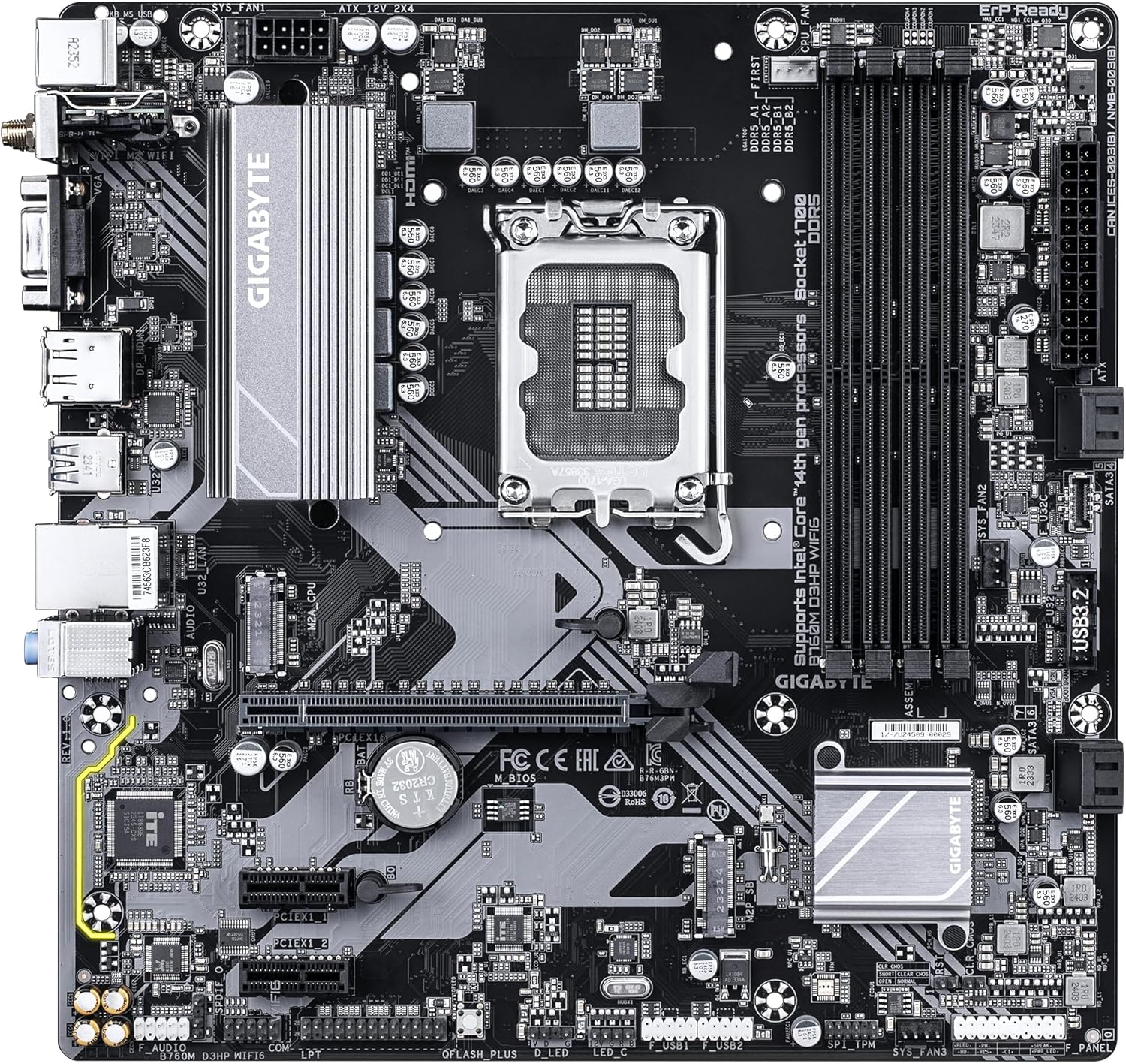
Расми 2: кунҷӣ view of the GIGABYTE GA-B760M D3HP WIFI6 motherboard, highlighting the heatsinks and overall component placement.
3.2 Насби CPU
- Дар motherboard васлаки LGA 1700 CPU ҷойгир кунед.
- Фишанги васлаки CPU-ро кушоед ва лавҳаи боркуниро бардоред.
- CPU-ро бо розетка бодиққат ҳамоҳанг созед, то тамғаи секунҷаи CPU ба тамғаи розетка мувофиқат кунад. CPU-ро ба розетка маҷбур накунед.
- Табақи боркуниро фуроварда, онро бо фишанг мустаҳкам кунед.
- Ба CPU хамираи гармиро молед ва сардкунандаи CPU-ро мувофиқи дастурҳои истеҳсолкунанда насб кунед.
3.3 Насбкунии хотира (RAM).
- Чор слотҳои DDR5 DIMM-ро пайдо кунед.
- Клипҳоро дар ҳар ду канори ковокии DIMM кушоед.
- Чойро дар модули хотираи DDR5 бо калид дар ковокии DIMM мувофиқ кунед.
- Модули хотираро ба слот сахт гузоред, то он даме, ки клипҳо дар ҷои худ ҷойгир шаванд. Боварӣ ҳосил кунед, ки ҳарду клипҳо пӯшидаанд.
- For dual-channel configuration, refer to the motherboard's specific manual for recommended slot pairing.
3.4 Насби дастгоҳи нигаҳдорӣ (SSDs M.2 ва дискҳои SATA)
- M.2 SSD: Locate the M.2 connectors. Remove the M.2 screw/standoff. Insert the M.2 SSD into the slot at a 30-degree angle. Push down the SSD and secure it with the screw/standoff.
- Дискҳои SATA: Кабелҳои маълумотии SATA-ро аз дискҳои нигоҳдории худ (HDD/SSD) ба портҳои SATA дар motherboard пайваст кунед. Кабелҳои барқро аз манбаи барқ ба дискҳо пайваст кунед.
3.5 Пайвастҳои барқ
- Пайвасткунаки асосии 24-pin ATX-ро аз таъминоти барқи худ ба бандари мувофиқи motherboard пайваст кунед.
- Connect the 8-pin ATX 12V CPU power connector to the port near the CPU socket.
3.6 Панели пеши ва Пайвастҳои периферӣ
Connect your case's front panel connectors (power button, reset button, USB ports, audio jacks, LED indicators) to the corresponding headers on the motherboard. Refer to the motherboard's detailed manual for exact pin layouts.

Расми 3: Rear I/O panel of the GIGABYTE GA-B760M D3HP WIFI6 motherboard, showing USB ports, display outputs, audio jacks, Ethernet, and Wi-Fi antenna connectors.
4. Дастурҳои истифодабарӣ
4.1 Танзимоти BIOS
Upon first boot, you may need to enter the BIOS (Basic Input/Output System) to configure settings such as boot order, date/time, and enable specific features. To enter BIOS, press the ДЕЛ key repeatedly during startup. The GIGABYTE UEFI BIOS provides an intuitive graphical interface for configuration.
4.2 Насби драйверҳо
After installing your operating system, install the necessary drivers for the motherboard's components (chipset, audio, LAN, Wi-Fi, etc.). These drivers are typically provided on a support DVD or can be downloaded from the official GIGABYTE webсайт барои модели мушаххаси motherboard шумо.
5. Нигоҳдорӣ
- Тозакунӣ: Regularly clean dust from the motherboard and case fans using compressed air. Ensure the system is powered off and unplugged before cleaning.
- Навсозии BIOS: GIGABYTE-ро мунтазам тафтиш кунед webсайт барои навсозии BIOS. Навсозии BIOS метавонад устувории система, мутобиқат ва иҷроишро беҳтар созад. Ҳангоми навсозии BIOS дастурҳои аз ҷониби GIGABYTE пешниҳодшударо бодиққат иҷро кунед.
- Навсозии ронандагон: Драйверҳои худро навсозӣ кунед, то иҷрои беҳтарин ва мутобиқат бо нармафзор ва сахтафзори навро таъмин кунед.
6. Баррасии мушкилот
- Не қудрат:
- Ҳама пайвастҳои барқро санҷед (24-pin ATX, 8-pin CPU).
- Боварӣ ҳосил кунед, ки таъминоти барқ фурӯзон аст.
- Таъмини қувваи барқро бо системаи дигар ё санҷандаи таъминоти барқ санҷед.
- Намоиши:
- Ensure the monitor is connected to the graphics card (or integrated graphics port if no discrete GPU is used).
- Корти графикӣ ва модулҳои хотираро аз нав ҷойгир кунед.
- Кӯшиш кунед, ки танҳо бо як чӯби RAM пурбор кунед.
- Ноустувории система / садамаҳо:
- Ҳарорати CPU ва GPU-ро тафтиш кунед.
- Ensure all components are properly seated.
- Воситаҳои ташхиси хотираро иҷро кунед, то хатогиҳои RAM-ро тафтиш кунед.
- Update BIOS and drivers.
- Масъалаҳои пайвастшавӣ ба шабака:
- For wired LAN, check the Ethernet cable and router connection.
- For Wi-Fi, ensure antennas are securely attached and drivers are installed.
- Танзимоти шабакаро дар системаи оператсионӣ тасдиқ кунед.
7. Мушаххасоти
| Хусусият | Тафсилот |
|---|---|
| Бренд | GIGABYTE |
| Номи модел | B760M D3HP WIFI6 |
| Васлаки CPU | LGA 1700 |
| Протсессорҳои мувофиқ | Intel Core 14th Gen, Intel Core 13th Gen, Intel Core 12th Gen |
| Навъи чипсет | Intel B760 |
| Технологияи хотираи RAM | DDR5 |
| Суръати соати хотира | 5600 МГц |
| Дастгоҳҳои мувофиқ | Personal Computer, Desktop Computer |
| Платформа | Windows 10, Windows 11 |
| Андозаҳои маҳсулот | 9.61 x 9.61 x 1.38 инч |
| Вазни ашё | 2.2 фунт |
8. Кафолат ва дастгирӣ
Барои маълумоти кафолат ва дастгирии техникӣ, лутфан ба GIGABYTE расмии муроҷиат кунед webсайт ё бо хадамоти муштариёни GIGABYTE тамос гиред. Барои даъвоҳои кафолат далели хариди худро нигоҳ доред.
Расмии GIGABYTE Webсайт: www.gigabyte.com