Муқаддима
Ташаккур ба шумо барои интихоби Blackview W50PRO Smartwatch. This manual provides essential information for setting up, operating, and maintaining your device. Please read it carefully to ensure optimal performance and a safe user experience. Keep this manual for future reference.
Мундариҷаи баста
Боварӣ ҳосил кунед, ки ҳама ашё дар бастаи шумо мавҷуданд:
- Сиёҳview W50PRO Smartwatch
- Тасмаро силикон
- Replacement Nylon Braided Strap
- Сими барқи магнитӣ
- Дастури корбар (ин ҳуҷҷат)

Image: Package contents and product dimensions.
Маҳсулот ба охир расидview
Сиёҳview W50PRO Smartwatch features a 1.45-inch HD touchscreen display, function buttons, a powerful flashlight, and a comfortable silicone strap. Its robust design is suitable for various activities.

Тасвир: Сиёҳview W50PRO Smartwatch with its key features labeled.
Ташкил кардан
1. Пуркунии дастгоҳ
Before first use, fully charge your smartwatch. Connect the magnetic charging cable to the charging points on the back of the watch and plug the USB end into a power adapter (not included) or a computer's USB port. The watch will display a charging indicator.
- Пуркунии пурра одатан тақрибан 3 соатро мегирад.
- The 960mAh battery provides up to 30 days of typical use and 100 days of standby time.

Image: Battery capacity and charging information.
2. Насби барнома
-ро зеркашӣ ва насб кунед "Da Fit" application on your smartphone. You can find it in the App Store (iOS) or Google Play Store (Android).
3. Device Pairing and Bluetooth Calls
To connect your smartwatch and enable Bluetooth calling:
- Download the Da Fit app from your phone's app store.
- Bluetooth-ро дар смартфони худ фаъол созед.
- Open the Da Fit app and add your device.
- Confirm the pairing request on your phone and watch.
- Grant necessary notification permissions within the Da Fit app for calls and messages.
- Once paired, you can make and receive calls directly from your watch.

Image: Connection and calling setup guide.
Дастурҳои амалиётӣ
1. Навигатсияи асосӣ
- Шишаи ламсӣ: Барои паймоиш дар менюҳо ва дастрасӣ ба хусусиятҳо, ба чап/рост, боло/поён лағжед. Барои интихоб клик кунед.
- Тугмаҳои Функсия: Use the physical buttons on the side of the watch for quick access to specific functions or to return to the home screen.
2. Flashlight and Compass
The W50PRO includes a built-in flashlight and compass for outdoor activities.
- Дурахш: Activate the flashlight feature from the watch's menu. It offers fixed and intermittent modes for various situations.
- Компас: Access the compass feature from the watch's menu for accurate directional guidance.
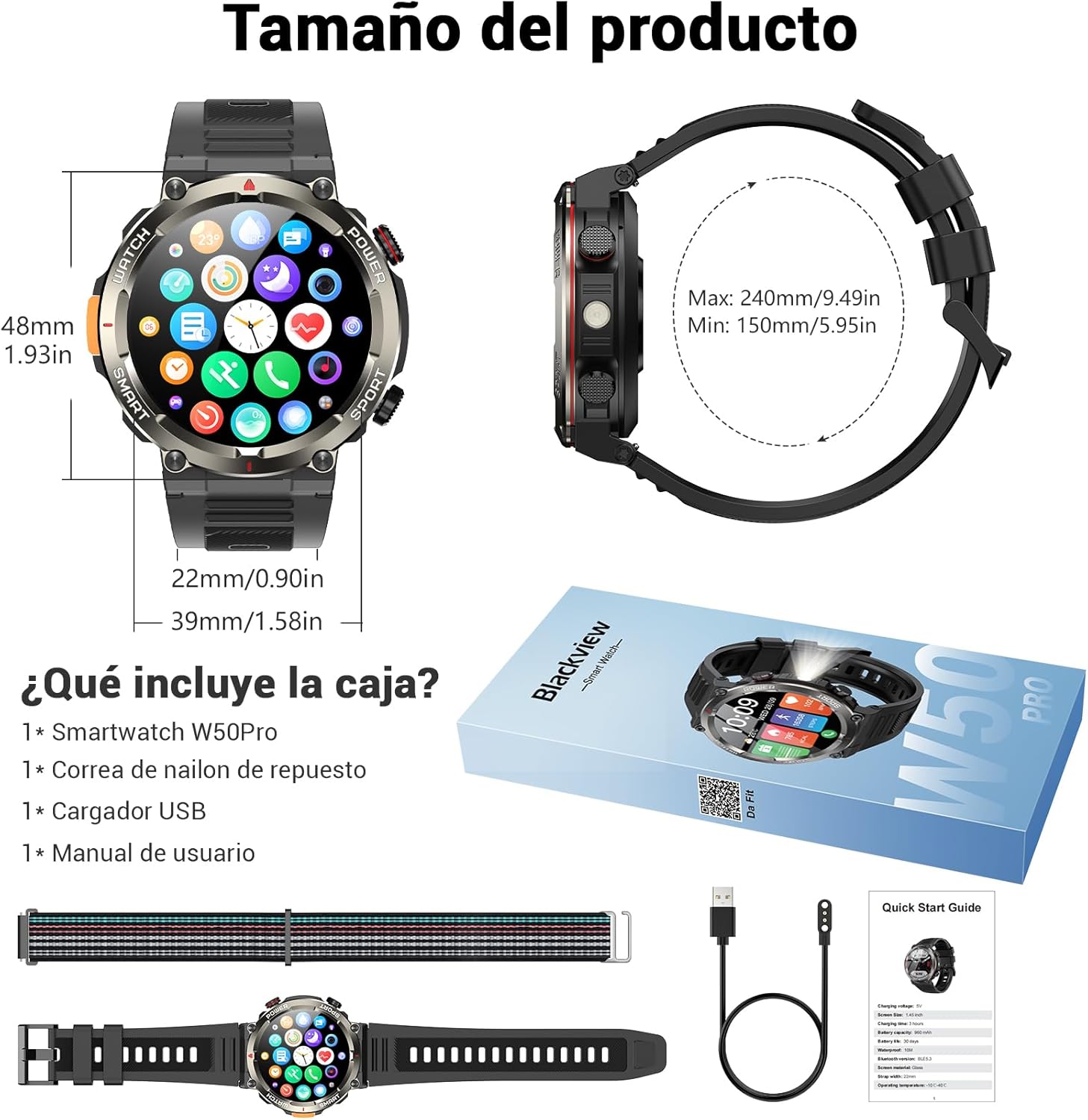
Image: Compass feature for outdoor navigation.

Image: Powerful LED flashlight in action.
3. Зангҳо ва огоҳиҳо тавассути Bluetooth
Once paired with your smartphone, the W50PRO allows you to manage calls and notifications directly from your wrist.
- Занг задан/қабул кардани зангҳо: Use the integrated speaker and microphone to make or answer calls.
- Огоҳиҳо: Receive real-time alerts for text messages, emails, and social media apps.
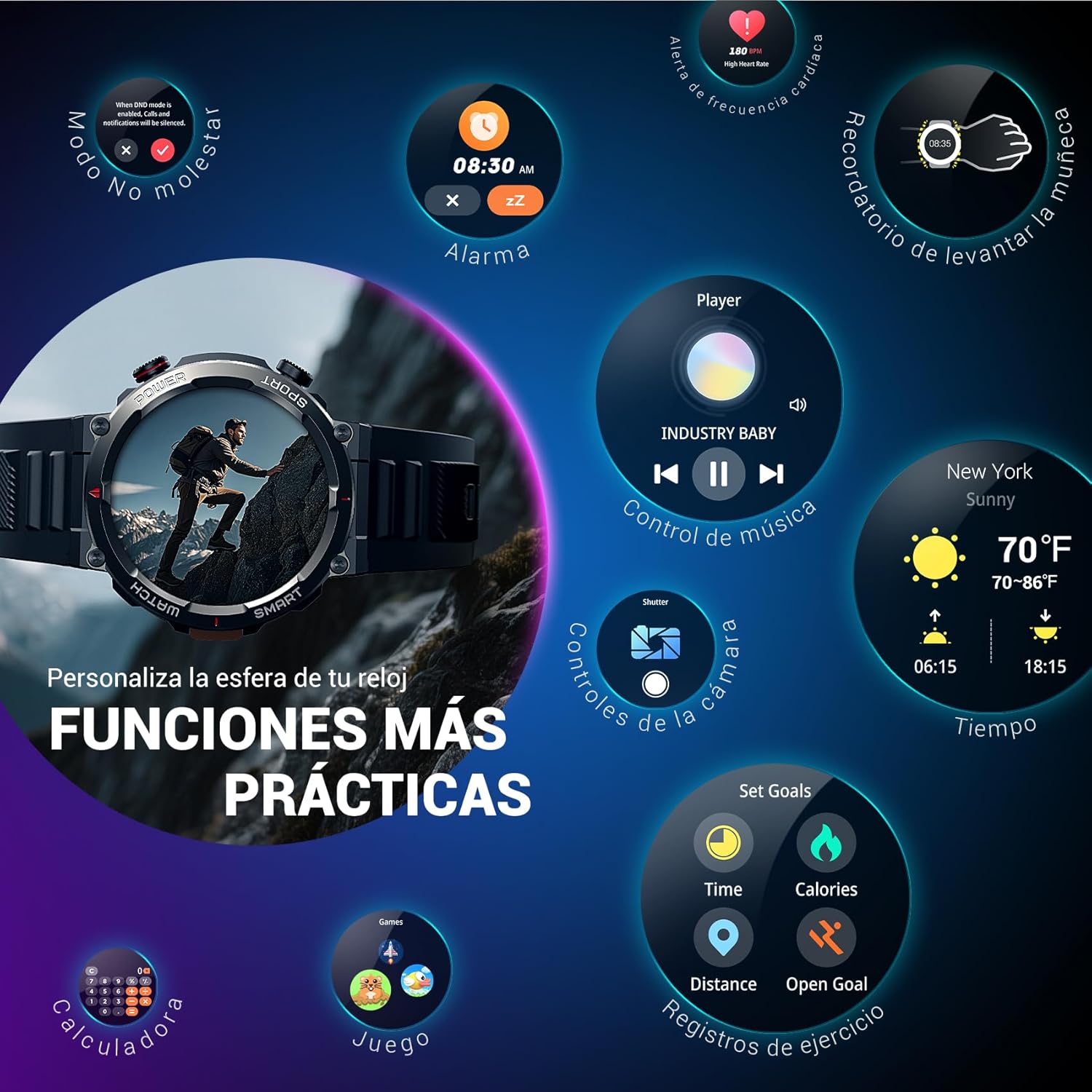
Image: Bluetooth calling and notification features.
4. Мониторинги саломатӣ
The smartwatch is equipped with high-precision sensors to monitor various health indicators:
- Набзи дил: Мониторинги суръати дил дар вақти воқеӣ.
- Оксигени хун (SpO2): Сатҳи оксигени хуни худро назорат кунед.
- Монитори хоб: Tracks sleep quality and patterns.
- Сатҳи стресс: Маълумоти сатҳи стресси шуморо фароҳам меорад.
All health data synchronizes with the Da Fit app for detailed analysis and trend tracking.

Image: Real-time health monitoring features.
5. Усулҳои варзишӣ
The W50PRO offers over 100 integrated sports modes, including running, cycling, climbing, rope skipping, football, and basketball. It accurately records exercise time, distance, steps, calorie consumption, and heart rate changes, providing clear and intuitive performance data. Detailed data can be viewдар барномаи Da Fit нашр шудааст.

Тасвир: тамомview of 100+ sports modes.
6. Мутобиқсозии чеҳраҳои соат
The Da Fit app provides a wide selection of watch faces to suit various styles. You can also upload personal photos as wallpaper and adjust text color and widget layout to create a unique watch interface.

Image: Customizable watch faces.
7. Дигар вазифаҳои амалӣ
Сиёҳview W50PRO includes additional features for daily convenience:
- Пешгӯии обу ҳаво
- Назорати мусиқӣ
- Идоракунии дурдасти камера
- Огоҳӣ
- Ёдраскунии нишастан
- Ёдрас кардани оби нӯшокӣ
- Сониясанҷ
- Вақтсанҷи ақибшумор
- Телефонро ёбед
- Ҳисобкунак
- Бозиҳо
- Танзими равшанӣ

Image: Multiple smart functions available on the smartwatch.
Нигоҳдорӣ
1. Тозакунӣ
Барои пешгирӣ аз асабонияти пӯст ва нигоҳ доштани кори дастгоҳ, соат ва тасмаи интеллектуалии худро мунтазам тоза кунед. Аз собуни нарм истифода баред.amp матоъ барои тоза кардани экран ва casing. For the strap, follow the manufacturer's cleaning recommendations based on the material (silicone or nylon).
2. Муқовимат ба об
Сиёҳview W50PRO Smartwatch features an IP68 water resistance rating. This means it is protected against dust ingress and can withstand immersion in water up to 1.5 meters for up to 30 minutes. It is suitable for daily use, such as hand washing or light rain. Avoid using it in hot water, saunas, or during diving, as steam and high pressure can compromise the seals.

Image: Durability features including IP68 water resistance.
3. Нигоҳубини батарея
Барои дароз кардани мӯҳлати батарея:
- Аз ҳарорати аз ҳад зиёд канорагирӣ кунед.
- Нагузоред, ки батарея зуд-зуд пурра холӣ шавад.
- Charge the device using the provided magnetic charging cable.
Мушкилкушо
Агар шумо бо ранги сиёҳи худ бо мушкилот дучор шаведview W50PRO Smartwatch, try the following:
- Дастгоҳ фаъол нест: Боварӣ ҳосил кунед, ки соат пурра пур шудааст.
- Бо телефон пайваст карда намешавад: Check if Bluetooth is enabled on both devices. Restart both the watch and phone. Ensure the Da Fit app has necessary permissions.
- Маълумоти нодурусти саломатӣ: Ensure the watch is worn snugly on your wrist. Clean the sensors regularly.
- Огоҳиномаҳо гирифта нашудаанд: Verify that notification permissions are granted in the Da Fit app and your phone's settings. Ensure the app is running in the background.
- Муҳлати кӯтоҳи батарея: Reduce screen brightness, disable unnecessary features, and limit frequent heart rate monitoring.
For persistent issues, refer to the Da Fit app's help section or contact customer support.
Мушаххасоти
| Хусусият | Мушаххасоти |
|---|---|
| Бренд | Сиёҳview |
| Модели | W50PRO |
| Андозаи намоиш | 1.45 инч |
| Навъи намоиш | LCD |
| Резолюция | 360 x 360 пиксел |
| Иқтидори батарея | 960 мАч |
| Мӯҳлати муқаррарии батарея | То 30 рӯз |
| Вақти интизорӣ | То 100 рӯз |
| Вақти пуркунии барқ | тахминан. 3 соат |
| Пайвастшавӣ | блутуз |
| Вуруди интерфейси инсон | Buttons, Microphone |
| Муқовимат ба об | IP68 |
| Моделҳои телефонҳои мувофиқ | iOS ва Android |
| Андозаҳои маҳсулот | 8.8 х 2.2 х 18.1 см |
| Вазни маҳсулот | 136 гр |
Кафолат ва дастгирӣ
For warranty information and technical support, please refer to the documentation included with your purchase or visit the official Blackview webсайт. Барои даъвоҳои кафолат далели хариди худро нигоҳ доред.


