Муқаддима
Welcome to the user manual for your new VAIO SX-R Laptop. This document provides essential information to help you set up, operate, maintain, and troubleshoot your device. Please read this manual thoroughly to ensure optimal performance and longevity of your laptop.
Маҳсулот ба охир расидview
The VAIO SX-R is a high-performance laptop designed for productivity and creative tasks. It features an Intel Core Ultra 7 processor, a vibrant 14-inch WQXGA Touch Display, ample memory, and fast storage.
Хусусиятҳои асосӣ
- Протсессор: Intel Core Ultra 7 (16-Core, AI-Boosted) for enhanced speed and responsiveness.
- Намоиш: 14-inch WQXGA Touch Display (2560x1600) offering high resolution and wide color gamut.
- Хотира: 32GB LPDDR5 RAM for superior multitasking.
- Нигоҳдорӣ: 1TB PCIe NVMe SSD for fast data access and ampнигоҳдорӣ.
- Низоми амал: Windows 11 Pro with enterprise-grade security and productivity features.
- Амният: Integrated IR Camera and Fingerprint Reader for secure login.
- Шасси: Durable Carbon Fiber construction.
Laptop Components and Ports

Figure 1: VAIO SX-R Laptop, illustrating the overall design.
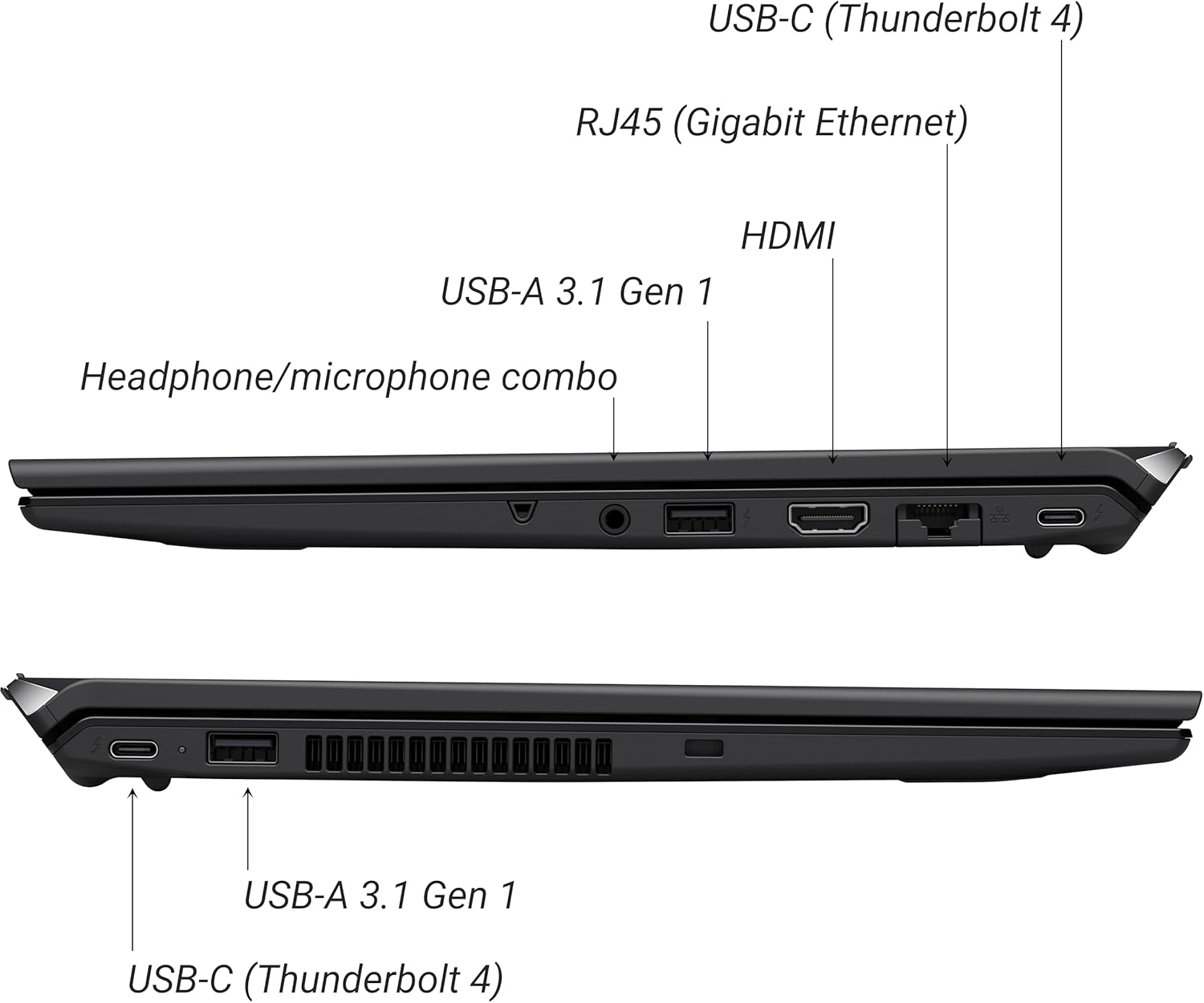
Figure 2: Port layout of the VAIO SX-R Laptop. The left side includes a headphone/microphone combo jack, USB-A 3.1 Gen 1, HDMI, RJ45 (Gigabit Ethernet), and USB-C (Thunderbolt 4). The right side features another USB-C (Thunderbolt 4) and USB-A 3.1 Gen 1 port.
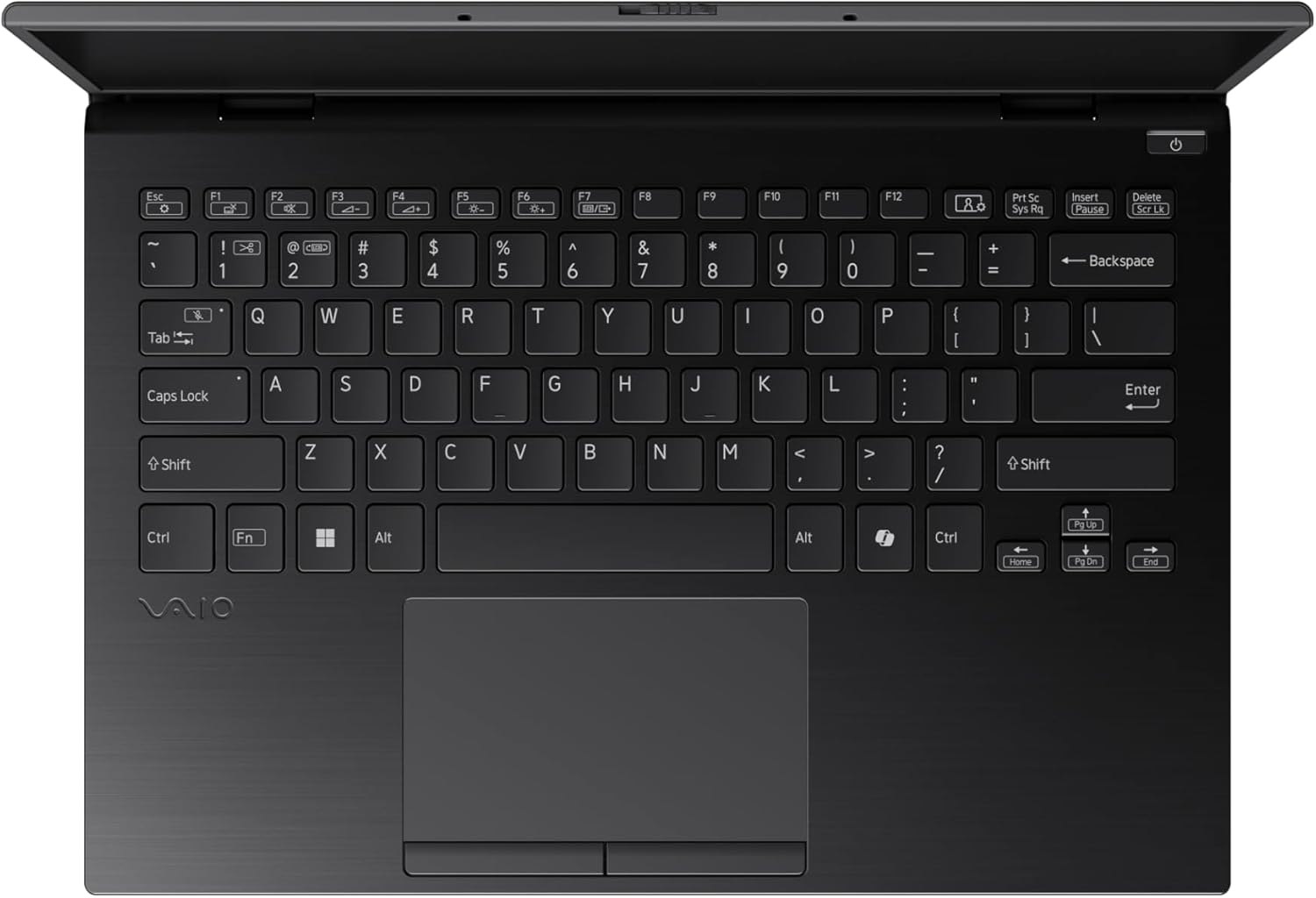
Figure 3: The VAIO SX-R Laptop keyboard and touchpad, featuring a backlit keyboard and integrated fingerprint sensor.
Ташкил кардан
1. Фаъолсозии ибтидоӣ
- Пайваст кардани барқ: Адаптери AC-ро ба бандари барқи ноутбук ва сипас ба васлаки деворӣ пайваст кунед.
- Ноутбуки кушода: Сарпӯши ноутбукро бодиққат кушоед.
- Фаъол: Press the power button, typically located on the top right of the keyboard deck. The power indicator light will illuminate.
2. Танзимоти Windows 11 Pro
Follow the on-screen instructions to complete the initial Windows 11 Pro setup. This includes:
- Интихоби минтақа ва тарҳбандии клавиатураи шумо.
- Пайвастшавӣ ба шабакаи Wi-Fi.
- Қабул кардани шартномаи литсензионӣ.
- Creating or logging in with a Microsoft account.
- Setting up your PIN, fingerprint, or facial recognition (IR Camera).
3. Пайваст кардани дастгоҳҳои периферӣ
You can connect external devices such as mice, keyboards, external monitors, and USB drives to the available ports as shown in Figure 2.
Фаъолият
1. Истифодаи асосӣ
- Клавиатура: Use the integrated backlit keyboard for typing. Function keys (F1-F12) often have secondary functions accessible via the 'Fn' key.
- Touchpad: Сенсории дақиқ имову ишораҳои чанд-сенсорро барои паймоиш дастгирӣ мекунад.
- Шишаи ламсӣ: Interact directly with the 14-inch WQXGA display using touch gestures.
2. Хусусиятҳои амниятӣ
- Хонандаи изи ангушт: Enroll your fingerprints through Windows Settings > Accounts > Sign-in options for quick and secure login.
- IR Camera: Utilize Windows Hello facial recognition for convenient and secure access. Set this up in Windows Settings > Accounts > Sign-in options.
3. Идоракунии барқ
- Ҳолати хоб: Close the lid or press the power button briefly to put the laptop to sleep.
- Пӯшида шудан: Go to Start > Power > Shut down to turn off the laptop completely.
- Оғози дубора: Go to Start > Power > Restart to reboot the system.
Нигоҳдорӣ
1. Тозакунӣ
- Экран: Аз матои мулоим ва матои пок каме истифода баред гampбо об ё тозакунандаи экран. Аз маводи кимиёвии сахт худдорӣ намоед.
- Клавиатура ва шасси: Аз матои мулоим истифода баред. Барои лой якрав, каме гamp матои бо собуни нарм истифодашавандаро истифода бурдан мумкин аст, то боварӣ ҳосил кунед, ки моеъ ба сӯрохиҳо ворид намешавад.
- Бандарҳо: Ҳавои фишурдашударо истифода баред, то чангро аз бандарҳо мулоим тоза кунед.

Figure 4: The VAIO SX-R features a water-resistant keyboard, designed to withstand minor spills.
2. Навсозии нармафзор
Regularly update your Windows operating system and device drivers to ensure optimal performance, security, and compatibility. Access updates via Windows Settings > Windows Update.
3. Нигоҳубини батарея
- Аз ҳарорати аз ҳад зиёд канорагирӣ кунед.
- Батареяро зуд-зуд пурра холӣ накунед.
- Барои нигоҳдории дарозмуддат, батареяро тақрибан то 50-60% пур кунед.
Мушкилкушо
Ин бахш мушкилоти умумиеро, ки шумо метавонед дучор ояд, баррасӣ мекунад.
1. Ноутбук фурӯзон нест
- Боварӣ ҳосил кунед, ки адаптери AC ҳам ба ноутбук ва ҳам ба васлаки барқии корӣ боэътимод пайваст шудааст.
- Бо васл кардани дастгоҳи дигар санҷед, ки васлаки барқ кор мекунад ё не.
- Агар батарея пурра холӣ шуда бошад, пеш аз кӯшиши даргиронидани барқ ба он иҷозат диҳед, ки ҳадди аққал 30 дақиқа пур кунад.
2. Намоиши масъалаҳои
- Намоиши: Барои санҷидани он, ки оё мушкилот дар дисплейи дохилии ноутбук аст, монитори берунаро ба порти HDMI пайваст кунед.
- Дисплейи ларзон/таҳрифшуда: Update your graphics drivers. Adjust display resolution and refresh rate in Windows Settings > System > Display.
3. Мушкилоти пайвастшавии Wi-Fi
- Ensure Wi-Fi is enabled in Windows Settings > Network & internet > Wi-Fi.
- Роутер ва модеми худро бозоғоз намоед.
- Барномаи ҳалли мушкилоти шабакавии Windows-ро иҷро кунед.
4. Иҷрои суст
- Барномаҳои нолозимеро, ки дар замина кор мекунанд, пӯшед.
- Менеҷери Вазифаҳо (Ctrl+Shift+Esc)-ро барои равандҳои серталаб санҷед.
- Ensure your system is up to date and free from malware.
Мушаххасоти
Below are the detailed specifications for the VAIO SX-R Laptop (Model: VJS4R1X0511B).
| Хусусият | Мушаххасоти |
|---|---|
| Бренд | VAIO |
| Номи модел | VAIO SX-R |
| Рақами модели ашё | VJS4R1X0511B |
| Низоми амал | Windows 11 Pro |
| Протсессор | Intel Core Ultra 7 (1.4 GHz) |
| Хотираи RAM | 32 ГБ LPDDR5 |
| Диски сахт | 1 TB PCIe NVMe SSD |
| Андозаи экран | 14 инч |
| Ҳалли экран | 2560 x 1600 пиксел (WQXGA) |
| Корти графикӣ | Графикаи ҳамгирошудаи Intel |
| Навъи бесим | 802.11bgn |
| Портҳои USB 3.0 | 3 |
| Мӯҳлати миёнаи батарея | 10 соат |
| Вазни ашё | 3.1 фунт |
| Андозаҳои маҳсулот | 14.2 x 15 x 3.3 инч |
| Хусусиятҳои махсус | Backlit Keyboard, Fingerprint Reader, HD Audio, Memory Card Slot, Webcam |
Кафолат ва дастгирӣ
1. Маълумот дар бораи кафолат
Your VAIO SX-R Laptop is covered by a manufacturer's warranty. Please refer to the warranty card included with your product packaging for specific terms, conditions, and duration. Keep your proof of purchase for warranty claims.
2. Дастгирии техникӣ
For technical assistance, troubleshooting beyond this manual, or service inquiries, please contact VAIO customer support. You can typically find contact information on the official VAIO website or in the documentation provided with your laptop.
- Дастгирии онлайн: Visit the official VAIO support website for FAQs, driver downloads, and contact options.
- Дастгирии телефон: Refer to your product documentation for regional support phone numbers.


