1. Муқаддима
This manual provides comprehensive instructions for the Inateck AceTouch N0064 Keyboard Case, designed to enhance your tablet experience. Please read this manual carefully before use to ensure proper operation and maintenance.
1.1 Маҳсулот ба охир расидview
The Inateck AceTouch N0064 is a versatile keyboard case featuring a magnetic removable design, adjustable stand modes, a precision touchpad, and comfortable typing keys. It is engineered for productivity and convenience.
1.2 Мутобиқат
This keyboard case is exclusively designed for the following Samsung Galaxy Tab models:
- Samsung Galaxy Tab S10 FE 10.9 inch 2025 (Models: SM-X520, SM-X526, SM-X526B)
- Samsung Galaxy Tab S9 FE 10.9 inch 2023 (Models: SM-X510, SM-X516B, SM-X518U)
- Samsung Galaxy Tab S9 11 inch 2023 (Models: SM-X710, SM-X716B, SM-X718U)

Image: Visual representation of compatible Samsung Galaxy Tab models and their respective sizes.
2. Танзимот
2.1 Пур кардани клавиатура
Before initial use, fully charge the keyboard. Connect the provided USB-C charging cable to the keyboard's charging port and a power source. The charging indicator light will show the charging status.
2.2 Пайвасткунии Bluetooth
- Боварӣ ҳосил кунед, ки клавиатура фаъол ва пур аст.
- On your Samsung Galaxy Tab, navigate to Settings > Connected devices > Bluetooth.
- Bluetooth-ро фаъол созед.
- The keyboard will appear in the list of available devices (e.g., "Inateck Keyboard"). Select it to pair.
- A confirmation message may appear on your tablet. Confirm the pairing.
3. Дастурҳои истифодабарӣ
3.1 Magnetic Removable Design
The keyboard attaches magnetically to the case, allowing for quick attachment and detachment. This design enables seamless transitions between typing and tablet-only use. Simply align the keyboard with the magnetic contacts on the case for secure attachment.

Image: Illustration of the strong magnetic connection between the keyboard and the case.
3.2 Stand Modes
The case supports both portrait and landscape orientations, with an adjustable stand angle ranging from 0 to 160 degrees. This flexibility accommodates various activities such as reading, watching videos, working, or handwriting.
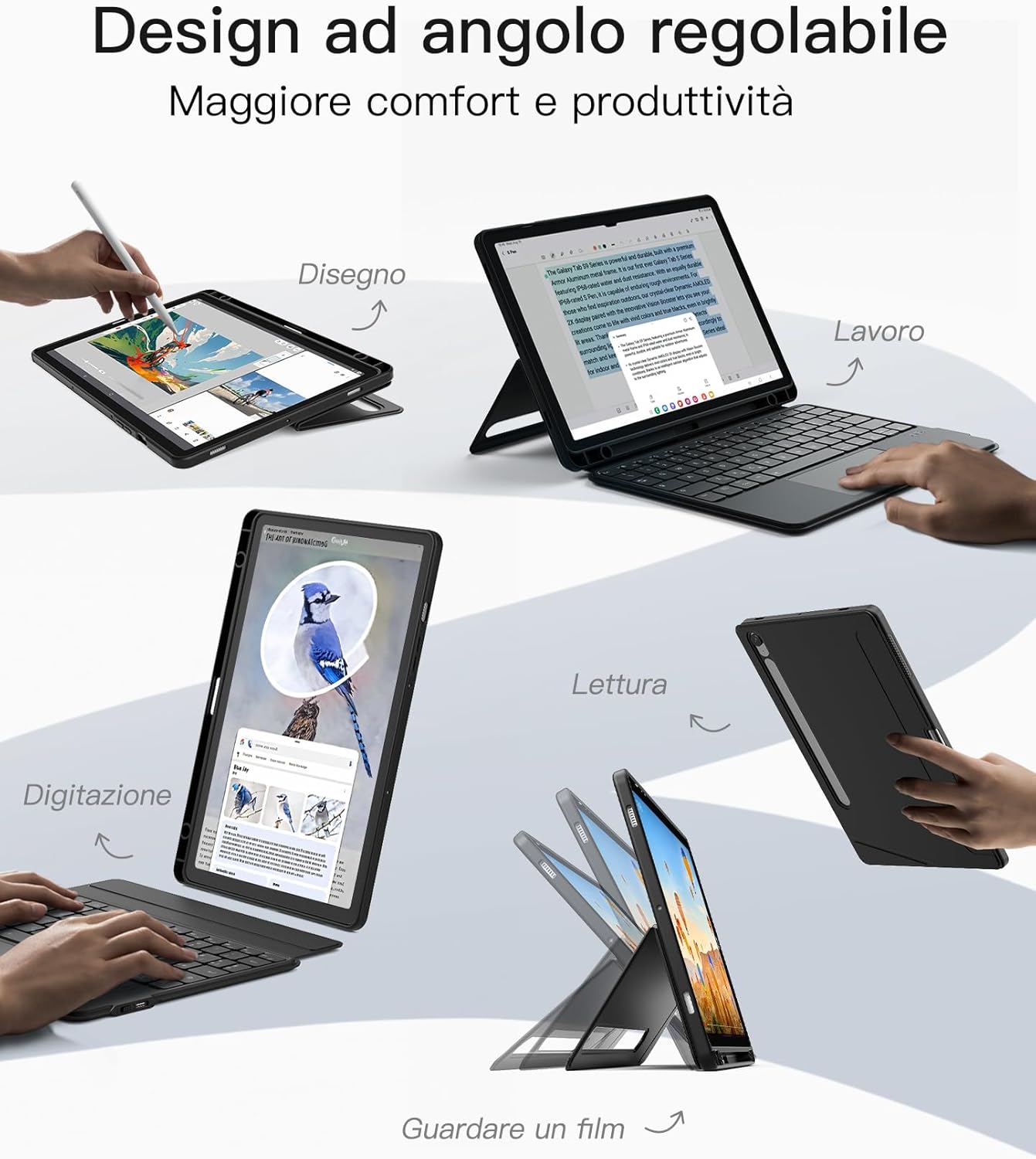
Image: Demonstrates the adjustable angle design for different usage scenarios like drawing, working, reading, and watching movies.

Image: Shows the tablet case configured for a comfortable typing angle, suitable for extended use.
3.3 Touchpad Functionality
The integrated touchpad supports Samsung's Precision Touch function, offering precise and lag-free operation. It also supports multi-finger gestures for efficient navigation, clicking, and switching between applications.

Image: Illustrates the touchpad's high reactivity and support for multi-touch gestures on Samsung devices.
3.4 Хусусиятҳои клавиатура
The keyboard features 15x15mm keycaps designed for a comfortable touch and fit, reducing hand fatigue during prolonged typing. Independent shortcut keys allow for quick multitasking and efficient workflow.

Image: Close-up of the keyboard's key design, highlighting dedicated shortcut keys, scissor structure, and 1mm key travel for precise typing.
3.5 S Pen Holder
The case includes two S Pen holders: one on the side for quick access and another on the back. The back holder features a cutout that supports both storage and charging of your Samsung S Pen, ensuring it is always secure and ready for use.

Image: Depicts the seamless storage solution for the S Pen, including its charging capability within the case.
4. Нигоҳдорӣ
4.1 Тозакунӣ
To clean the keyboard and case, use a soft, damp cloth. Avoid using harsh chemicals or abrasive materials, as these may damage the surfaces. Ensure the keyboard is powered off and disconnected from any power source before cleaning.
4.2 Нигоҳдорӣ
When not in use, store the keyboard case in a cool, dry place away from direct sunlight and extreme temperatures. Avoid placing heavy objects on the case to prevent deformation.
5. Баррасии мушкилот
5.1 Клавиатура ҷавоб намедиҳад
- Боварӣ ҳосил кунед, ки клавиатура фаъол аст ва пурра пур карда шудааст.
- Check Bluetooth connection: Go to your tablet's Bluetooth settings and ensure the keyboard is connected. If not, try re-pairing.
- Restart both the tablet and the keyboard.
5.2 Touchpad Not Working
- Verify the keyboard is properly connected via Bluetooth.
- Ensure the touchpad is not accidentally disabled (check for a function key combination on the keyboard).
- Clean the touchpad surface to remove any dirt or debris.
5.3 Масъалаҳои пайвастшавӣ
- Move the tablet and keyboard closer to each other to ensure they are within Bluetooth range.
- Аз халалдоршавии дигар дастгоҳҳои бесим худдорӣ кунед.
- Forget the device in your tablet's Bluetooth settings and re-pair.
6. Мушаххасоти
| Хусусият | Тафсилот |
|---|---|
| Бренд | Инатек |
| Рақами модел | N0064 |
| Технологияи пайвастшавӣ | Bluetooth 5.3 |
| Иқтидори батарея | 500 мАч (литий-ион) |
| Материал | Силикон, металл |
| Ранги | Сиёҳ |
| Хусусиятҳои махсус | Portrait/Landscape Stand, Removable Keyboard, Touchpad, Dual S Pen Holder |
| Тавсифи клавиатура | Flexible, Scissor-switch mechanism |
| Саёҳати асосӣ | 1 мм |
| Андозаҳо (Баста) | 26.9 х 19.5 х 2.9 см |
| Вазн (Баста) | 603 гр |
7. Кафолат ва дастгирии муштариён
Inateck products come with a standard manufacturer's warranty. For detailed warranty information, product support, or to report any issues, please visit the official Inateck webсайт ё бевосита бо хадамоти муштариёни худ тамос гиред. Лутфан далели хариди худро барои даъвоҳои кафолат нигоҳ доред.


