Муқаддима
This manual provides detailed instructions for the assembly, operation, and maintenance of your HUANUO AI-Powered Electric Standing Desk. Please read this manual thoroughly before use to ensure proper function and safety.
Маълумоти муҳим оид ба бехатарӣ
Always keep children away from the desk when it is in operation. Use the child lock feature to prevent accidental height adjustment. Be cautious when adjusting the desk's height to avoid injury. Ensure the desk is properly anchored to the floor to prevent tipping.
Мундариҷаи баста
Before beginning assembly, verify that all components are present and undamaged. Refer to the parts list included in your packaging.

Figure 1: All components of the HUANUO AI-Powered Electric Standing Desk laid out for assembly.
Танзим ва васлкунӣ
Assembly typically takes less than an hour for one person. While all necessary tools are provided, using a power drill with appropriate bits can expedite the process. The desktop is designed in two pieces for easier shipping and assembly.
- Компонентҳоро кушоед: Ҳама қисмҳоро аз бастабандӣ бодиққат хориҷ кунед ва онҳоро ба рӯи тоза ва нарм гузоред, то харошиданро пешгирӣ кунед.
- Чаҳорчӯбаи мизи корӣ: Follow the included diagrams to connect the desk legs and crossbar. Ensure all screws are tightened securely.
- Мизи кории замима: Secure the two desktop pieces together using the provided connectors and then attach the assembled desktop to the frame.
- Панели идоракуниро насб кунед: Mount the control panel to the underside of the desktop in your preferred location.
- Кабелҳои пайвастшавӣ: Connect the motor and control panel cables to the main control box. Ensure all connections are firm.
- Фаъол: Дастгоҳи мизи кориро ба васлаки барқӣ пайваст кунед.
Video 1: ERGOMAKER Electric Standing Desk assembly guide. This video demonstrates the assembly process for a similar electric standing desk, providing a visual aid for users.
Video 2: Longke store sit stand desk assembly. This video provides a visual walkthrough of the assembly steps for a sit-stand desk, which can be helpful for understanding the process.
Video 3: Electric Standing Desk Height Adjustable assembly. This video illustrates the assembly of an electric standing desk, focusing on the height adjustment mechanism.
Дастурҳои амалиётӣ
Your HUANUO AI-Powered Electric Standing Desk offers multiple ways to adjust its height and manage your ergonomic settings.
Танзими дастӣ баландии
- -ро истифода баред боло (▲) ва Поён (▼) arrow buttons on the control panel to manually adjust the desk to your desired height. The current height will be displayed on the panel.

Figure 2: The smart control panel with height display, memory presets, and adjustment buttons.
Memory Settings (Up to 6 Presets with App)
- Барои захира кардани баландии: Adjust the desk to your desired height. Press the 'М' button, then press one of the numbered preset buttons (1-6) within 3 seconds. The height is now saved to that preset.
- To Use a Saved Height: Simply press the corresponding numbered preset button (1-6). The desk will automatically move to the saved height.
Smart APP Control (Ergo BQ)
- -ро зеркашӣ кунед Ergo BQ барнома аз мағозаи барномаҳои дастгоҳи шумо.
- Follow the in-app instructions to pair your desk via Bluetooth or Wi-Fi.
- The app allows for precise height adjustments, setting up to 6 memory presets, and accessing AI-recommended ergonomic seat height adjustments based on your height and weight.

Figure 3: The HUANUO AI-Powered Electric Standing Desk with its accompanying smartphone application for smart control.
Voice Control (Alexa, Google, Siri)
- Once connected to the Ergo BQ app, integrate your desk with Alexa, Google Assistant, or Siri for hands-free voice commands.
- Use commands like "Alexa, set the desk height to sit" or "Hey Google, set the desk height to stand."
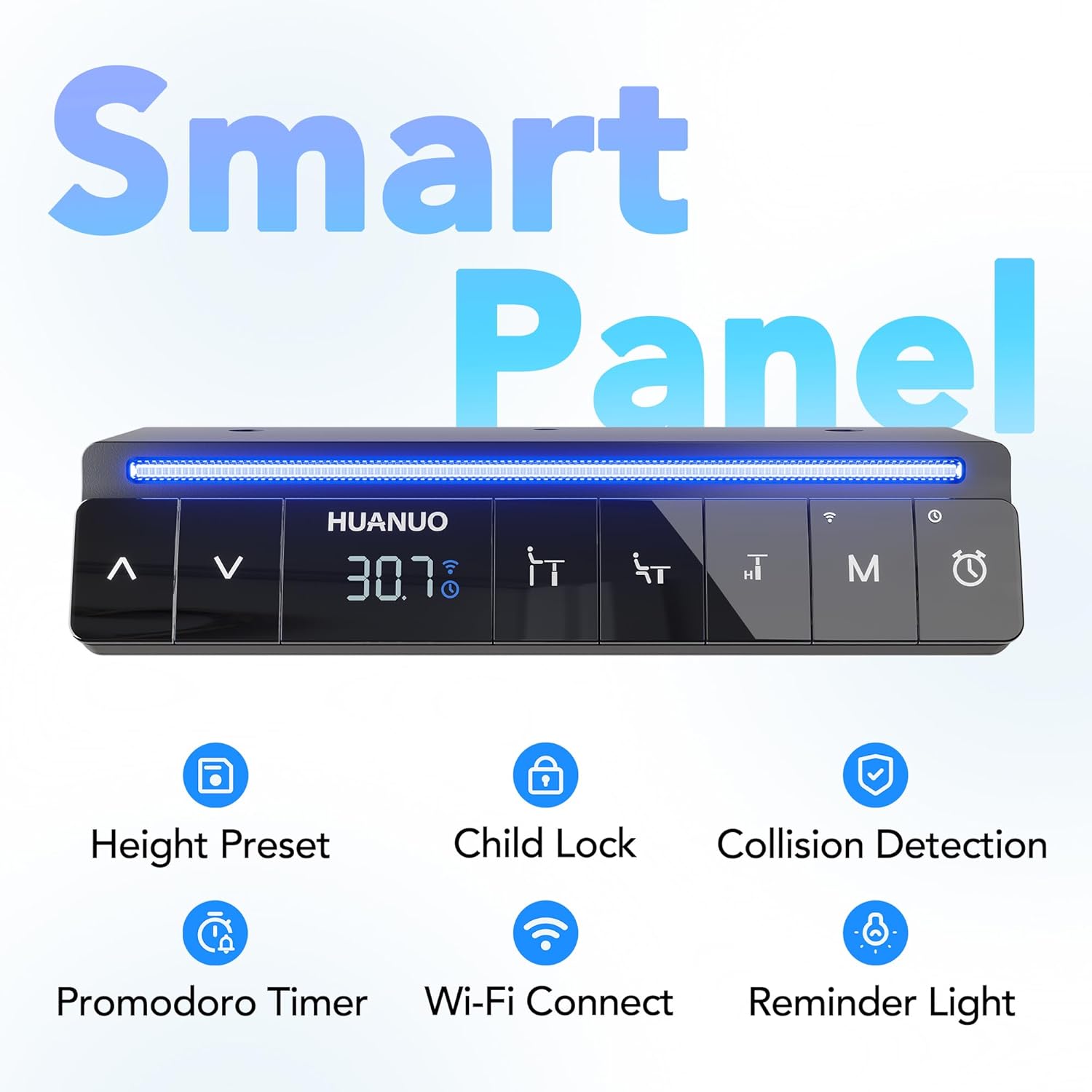
Figure 4: Voice control functionality of the desk, compatible with Alexa, Google, and Siri.
Pomodoro Sit-Stand Cycle & Sedentary Reminder
- Activate the Pomodoro cycle and sedentary reminders through the Ergo BQ app.
- The desk will prompt you to switch between sitting and standing positions at customizable intervals to promote healthier work habits.
Figure 5: The smart control panel highlighting the Pomodoro Timer and Reminder Light features.
Қулфи кӯдак
- Engage the child lock feature via the control panel or Ergo BQ app to prevent unintended operation by children or pets.
Нигоҳдорӣ
- Тозакунӣ: Мизи корӣ ва чаҳорчӯбаро бо нарм тоза кунед, гamp матоъ. Аз маводи кимиёвии сахт ё тозакунандаи абразивӣ худдорӣ намоед.
- Идоракунии кабелӣ: Кабелҳоро мунтазам тафтиш ва ташкил кунед, то печидан ва вайроншавиро пешгирӣ кунед.
- Санҷиш: Periodically inspect all screws and connections to ensure they remain tight.
Мушкилкушо
If you encounter any issues with your desk, please refer to the following common troubleshooting steps:
- Мизи миз ҳаракат намекунад: Check all cable connections to ensure they are securely plugged in. Verify the power outlet is functioning.
- Рамзи хатогӣ нишон дода шуд: Consult the Ergo BQ app or the full product manual for specific error code meanings and solutions.
- Ҳаракати нобаробар: Ensure the desk is placed on a level surface. If necessary, adjust the leveling feet on the desk's base.
- Садо ҳангоми кор: A slight motor sound is normal. If the noise is excessive or unusual, check for any obstructions or loose components.
Мушаххасоти
| Хусусият | Тафсилот |
|---|---|
| Бренд | ХУАНУО |
| Рақами модел | ESD04B-80A-I-US |
| Номи модел | ESD04-I |
| Андозаҳои маҳсулот | 18.9"D x 31.5"W x 28.3"H |
| Андоза | AI-32" x 19" |
| Ранги | Сиёҳ |
| Баландии ҳадди ақал | 72 Сантиметр |
| Баландии ҳадди аксар | 118 Сантиметр |
| Навъи маводҳои болоӣ | Вуди муҳандисӣ |
| Маводи асосӣ | Пӯлоди хӯлаи |
| Вазни ашё | 23.6 фунт |
| Хусусиятҳои махсус | Adjustable Height, Electric, Ergonomic, Lightweight, Rust Resistant |
| UPC | 840478827248 |
Кафолат ва дастгирӣ
Your HUANUO AI-Powered Electric Standing Desk comes with a Кафолати маҳдуд. For specific details regarding the warranty period and coverage, please refer to the documentation included with your product.
For technical assistance or customer support, please contact HUANUO customer service. US-Based Technical Support is available to assist you with any product-related inquiries.


