1. Муқаддима
Thank you for choosing the Hbada P2 Ergonomic Office Chair. This manual provides detailed instructions for the assembly, operation, and maintenance of your new chair. Please read this manual carefully before assembly and use to ensure proper function and longevity of the product. Keep this manual for future reference.
2. Маълумот оид ба бехатарӣ
This product is an office chair with adjustable components. Please ensure you understand and follow the proper usage guidelines and weight limit precautions. Failure to do so may result in injury or damage to the product.
- Дар болои курсӣ наистед.
- Курсиро ҳамчун курсии нишаст истифода набаред.
- Ensure all bolts and screws are securely tightened before use. Periodically check and re-tighten if necessary.
- Do not exceed the maximum weight capacity (not explicitly stated in provided data, but generally around 120-150 kg for office chairs).
- Ҳангоми танзим дастҳо ва ангуштонро аз қисмҳои ҳаракаткунанда дур нигоҳ доред.
- Use the chair on a level surface.
3. Мундариҷаи баста
Лутфан, пеш аз оғози васлкунӣ, мавҷуд будани ҳамаи ҷузъҳоро тафтиш кунед. Агар ягон қисм гум шуда ё вайрон шуда бошад, лутфан бо хадамоти дастгирии муштариён тамос гиред.
- Қафо
- Болишти курсӣ
- Сарпӯш
- Дастбандҳо (2)
- Баллони лифт
- Base (Star Base)
- Катерҳо (5)
- Mechanism (Control Unit)
- Ottoman (if included with your model)
- Маҷмӯаи сахтафзор (винтҳо, шайбаҳо, калиди Алленшакл)
4. Дастурамал оид ба васлкунӣ
Follow these steps carefully to assemble your Hbada P2 office chair. It is recommended to assemble the chair on a soft, clean surface to prevent damage.
- Чархакҳоро ба пойгоҳ пайваст кунед: Ҳар яке аз панҷ чархро ба сӯрохиҳои охири пояи ситора то он даме ки онҳо бо садои баланд ба ҷои худ ҷойгир шаванд, ворид кунед.
- Лифти газро ворид кунед: Place the gas lift cylinder into the center hole of the star base. Ensure it is seated firmly.
- Механизмро ба нишастгоҳ пайваст кунед: Align the mechanism with the pre-drilled holes on the underside of the seat cushion. Secure it using the appropriate screws from the hardware kit. Ensure the front of the mechanism faces the front of the seat.
- Дастакҳои дастӣ ба нишастгоҳро пайваст кунед: Secure the armrests to the sides of the seat cushion using the designated screws. Pay attention to the left and right armrests.
- Пайваст кардани пушт ба нишастгоҳ: Connect the backrest to the seat assembly. Secure it with the provided screws.
- Часпондани сарпӯш: Slide the headrest into the designated slots at the top of the backrest.
- Маҷмӯи нишастгоҳро ба лифтҳои газ пайваст кунед: Carefully place the assembled seat and backrest onto the gas lift cylinder, ensuring the center hole of the mechanism aligns with the top of the gas lift. Press down firmly to secure.
- Attach Ottoman (if applicable): If your model includes an ottoman, follow the specific instructions provided in your package to attach it to the underside of the seat.
Шарҳ: Some users have reported discrepancies in screw labeling within the assembly instructions. Please carefully match screw sizes and types to the corresponding holes during assembly. Refer to the visual diagrams for guidance.

This image illustrates the overall dimensions of the Hbada P2 office chair, including measurements for the headrest, backrest, seat, and overall height and depth. These dimensions are crucial for understanding the chair's fit in your workspace and for personal comfort.
5. Дастурҳои истифодабарӣ
Your Hbada P2 chair offers multiple adjustment features to customize your seating experience.
5.1. Танзими баландии курсӣ
To adjust the chair height, locate the lever on the right side beneath the seat. Pull the lever up while seated to lower the chair, or pull the lever up while standing to raise the chair. Release the lever at your desired height.
5.2. 3D Lumbar Support Adjustment
The 3D lumbar support provides targeted lower back comfort. It features a 5cm vertical adjustment range and 4-stage adjustment to alleviate lower back pressure.
- Танзими амудӣ: Gently push the lumbar support up or down to find the optimal position for your lower back.
- Танзими чуқурӣ: The lumbar support automatically adapts to your back's movement.

This image highlights the advanced 3D lumbar support system of the Hbada P2 chair, demonstrating its ability to adjust vertically, rotate, and flex laterally to conform to the user's back and provide optimal ergonomic support.
5.3. 360° Armrest Adjustment
The armrests are highly adjustable to support various postures and activities.
- Танзими баландӣ: Press the button on the side of the armrest and move it up or down. Release the button to lock it in place (75mm range).
- Танзими пеш/қафо: Slide the armrest pad forward or backward (45mm range).
- Танзими гардиш: Rotate the armrest pad 360 degrees to find your preferred angle.
This image showcases the multi-directional adjustability of the armrests, allowing users to customize their position for optimal comfort and support during various tasks, from typing to gaming.
5.4. 3D Headrest Adjustment
The headrest can be adjusted to support your neck and head comfortably.
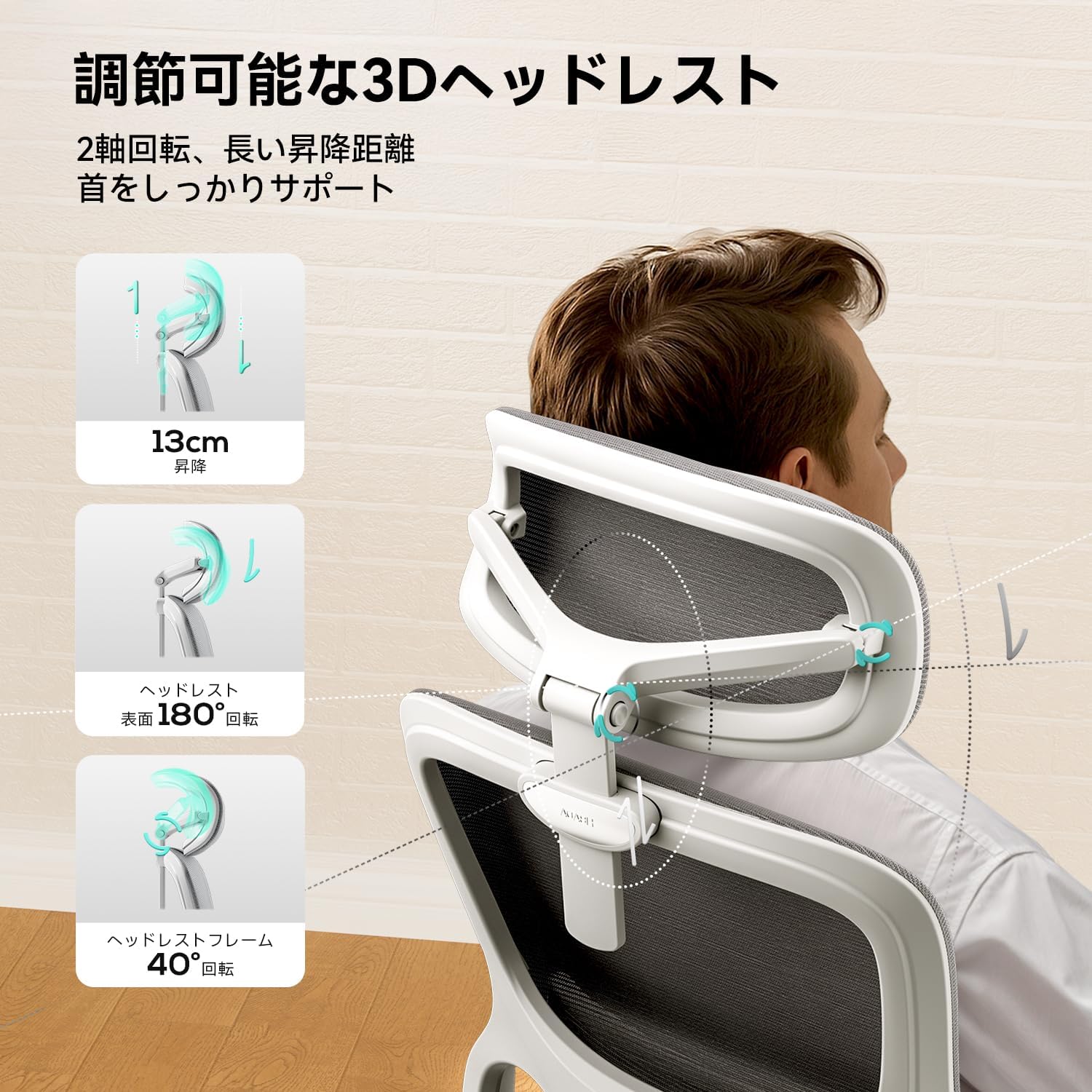
- Танзими баландӣ: Pull the headrest up or push it down (13cm range).
- Танзими кунҷ: The headrest surface can rotate 180 degrees, and the headrest frame can rotate 40 degrees to match your head's curve.

This image illustrates the comprehensive adjustability of the headrest, enabling users to fine-tune its height and angle to provide optimal support for the neck and head, enhancing comfort during extended use.
5.5. Функсияи такя задан
The chair offers a reclining function with multiple lockable angles for different activities.
- Кунҷи такя: Pull the lever on the left side beneath the seat outwards to unlock the recline. Lean back to your desired angle (105° for work, 120° for gaming, 135° for rest). Push the lever inwards to lock the backrest in position.

This image visually explains the chair's reclining capabilities, offering distinct angles optimized for different activities such as focused work, casual gaming, and deep relaxation, all supported by a secure locking mechanism.

This image depicts a user enjoying the full recline and ottoman feature of the Hbada P2 chair, illustrating how the chair can be used for extended periods of relaxation or focused work, adapting to various user needs.
6. Нигоҳдорӣ
Regular maintenance will help preserve the appearance and functionality of your Hbada P2 chair.
- Тозакунӣ: Wipe mesh and plastic surfaces with a soft, damp cloth. For stubborn stains, use a mild soap solution and dry thoroughly. Avoid harsh chemicals or abrasive cleaners.
- Санҷиш: Давра ба давра ҳама винтҳо ва болтҳоро тафтиш кунед, то боварӣ ҳосил кунед, ки онҳо мустаҳкаманд. Агар лозим бошад, дубора сахт кунед.
- Кастрҳо: Clean casters regularly to remove dust and debris that may hinder smooth movement.
- Лифт газ: Do not attempt to disassemble or repair the gas lift cylinder. If it malfunctions, contact customer support.

This image highlights the high-quality mesh material used in the Hbada P2 chair, showcasing its breathable design that provides elastic support and contributes to a comfortable seating experience, while also being easy to clean and maintain.
7. Баррасии мушкилот
If you encounter issues with your Hbada P2 chair, refer to the following common problems and solutions.
- Курсии баландӣ танзим намешавад: Боварӣ ҳосил кунед, ки фишанги газбардор пурра фаъол аст. Агар лифт вайрон бошад, онро иваз кардан лозим аст. Бо хадамоти дастгирии муштариён тамос гиред.
- Ҷалби курсӣ: Check that all assembly screws are securely tightened, especially those connecting the mechanism to the seat and the base to the gas lift. Ensure the casters are fully inserted into the base.
- Backrest does not lock in position: Ensure the recline lock lever is fully engaged. If the mechanism is damaged, it may require professional inspection.
- Armrests do not stay in position: Verify that the locking mechanism for the armrest height adjustment is functioning correctly. If the armrest slides freely, the internal mechanism may be worn or damaged.
- Реллерҳо ҳамвор намеғелонанд: Clean any hair or debris from the caster wheels. If they are still stiff, they may need lubrication or replacement.
- Садои чир-чир: Check and tighten all screws. Applying a small amount of silicone lubricant to moving parts (e.g., mechanism joints, gas lift connection) may help.
8. Мушаххасоти
| Хусусият | Мушаххасоти |
|---|---|
| Бренд | Хбада |
| Рақами модел | P216WVA |
| Ранги | White-with Ottoman |
| Андозаҳои маҳсулот (умқ x паҳнӣ x баландӣ) | 33 х 74 см х 58 см |
| Андозаи баста | 75 х 59 см х 33 см |
| Вазни баста | 20.6 кг |
| Навъи маводи курсӣ | Меш |
| Дастгирии камар | 3D Adjustable (5cm vertical, 4-stage adjustment) |
| Дастпӯшакҳо | 3D Adjustable (75mm height, 45mm front/back, 360° rotation) |
| Сарпӯш | 3D Adjustable (13cm height, 180° surface rotation, 40° frame rotation) |
| Recline Angles | Up to 135° (lockable at 105°, 120°, 135°) |
9. Кафолат ва дастгирӣ
Hbada products are designed for quality and durability. For warranty information, product support, or to purchase replacement parts, please contact the seller or manufacturer directly. Keep your purchase receipt as proof of purchase.
For further assistance, please visit the official Hbada store on Amazon: Hbada Store


