1. тамомview
The Razer BlackShark V3 Wireless Gaming Headset for Xbox is designed for high-performance gaming across multiple platforms. It features advanced wireless technology, high-fidelity audio drivers, and a clear microphone for effective communication.
- Razer HyperSpeed Wireless Gen-2: Provides ultra-low latency wireless audio, with speeds as low as 10 ms.
- Razer TriForce Titanium 50mm Drivers Gen-2: Engineered for precise and powerful sound reproduction, enhancing positional awareness.
- Detachable Razer HyperClear Super Wideband 9.9mm Mic: Captures voice with high-definition clarity across a wide frequency range.
- 3 Усули пайвастшавӣ: Supports simultaneous 2.4 GHz and Bluetooth connections, plus USB-C for versatile use.
- Овози атрофи насли оянда: Compatible with Windows Sonic on Xbox and THX Spatial Audio on PC for immersive audio.
- Pro-Tuned FPS Profiles and Customizable EQ: Offers game-specific EQ profiles and custom equalization settings via Razer Synapse 4.

Image: Razer BlackShark V3 Wireless Gaming Headset on a stand.
2. Дар қуттӣ чӣ мавҷуд аст
Маҷмӯи маҳсулот ҷузъҳои зеринро дар бар мегирад:
- Razer BlackShark V3 Wireless Gaming Headset
- Detachable Razer HyperClear Super Wideband 9.9mm Mic
- Донгли бесими Razer HyperSpeed насли 2
- Сими USB аз навъи A то навъи C
- Дастури корбар (ин ҳуҷҷат)
Видео: Як мансабдор тамом шудview of the Razer BlackShark V3 headset line, highlighting key features and design.
3. Танзимот
3.1 Пуркунии ибтидоӣ
Before first use, fully charge the headset using the provided USB Type A to Type C cable. Connect the USB-C end to the headset and the USB-A end to a powered USB port (e.g., computer, wall adapter).
3.2 Пайваст кардани микрофон
Insert the detachable HyperClear Super Wideband Mic into the microphone port located on the left earcup until it clicks into place.

Image: The detachable HyperClear Super Wideband Microphone.
4. Дастурҳои истифодабарӣ
4.1 Фаъол кардан/хомӯш кардан
- Барои фаъол кардани барқ: Тугмаи фурӯзонро пахш карда нигоҳ доред, то он даме ки нишондиҳандаи LED фурӯзон шавад.
- Барои хомӯш кардан: Тугмаи барқро пахш карда нигоҳ доред, то он даме ки нишондиҳандаи LED хомӯш шавад.
4.2 Назорати баландии овоз
Adjust the volume using the volume wheel located on the earcup.
4.3 Хомӯш кардани микрофон
Toggle the microphone mute switch to enable or disable the microphone.
5. Пайвастшавӣ
The Razer BlackShark V3 offers three primary modes of connectivity:
- 2.4 GHz Wireless (Razer HyperSpeed Wireless Gen-2): For ultra-low latency connection to PC, Mac, PlayStation, Nintendo Switch, and Xbox. Use the included USB-C dongle.
- Блутуз: For wireless connection to smartphones and other Bluetooth-enabled devices.
- Сими USB-C: For a direct wired connection and charging.
The headset supports simultaneous 2.4 GHz and Bluetooth audio, allowing you to mix audio from two devices concurrently.

Image: The Razer HyperSpeed Wireless Gen-2 USB-C dongle.

Image: Visual representation of the three connectivity modes.
6. Хусусиятҳои аудио
6.1 Razer TriForce Titanium 50mm Drivers Gen-2
These drivers provide clear highs, rich mids, and powerful bass, optimized for competitive gaming to deliver precise audio cues.
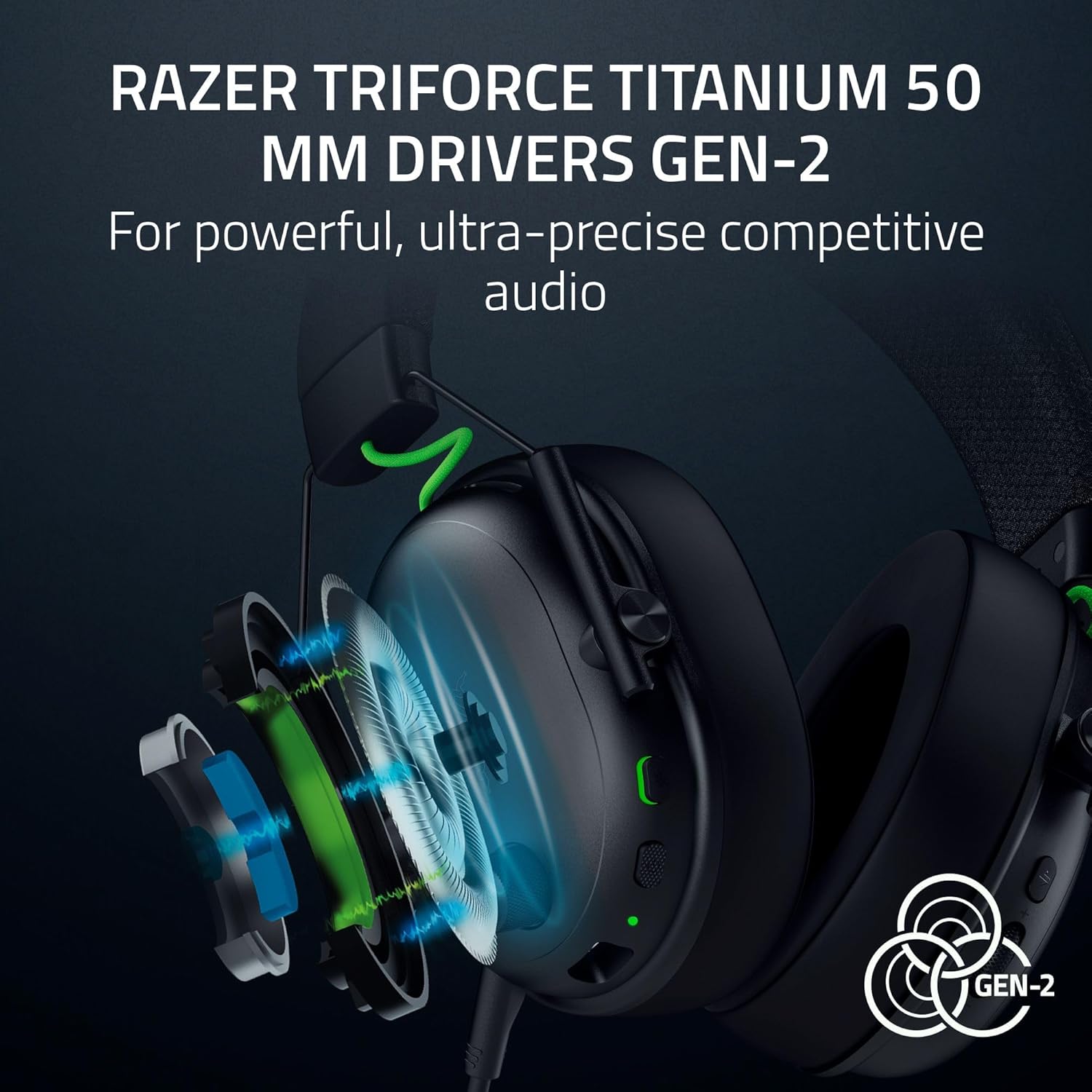
Тасвир: таркида view of the TriForce Titanium 50mm Drivers.
6.2 Овози атроф
Experience enhanced positional audio with Windows Sonic on Xbox and THX Spatial Audio on PC. This feature provides an expanded soundstage for improved in-game awareness.

Image: Visual representation of surround sound technology.
6.3 Customizable EQ Profiles
Utilize Razer Synapse 4 (on PC) to access pro-tuned FPS profiles and create custom equalization settings to optimize your audio experience for different games or media. These settings can be saved directly to the headset.

Image: Razer Synapse 4 interface for customizing EQ settings.
7. Микрофон
The detachable Razer HyperClear Super Wideband 9.9mm Mic is designed for high-definition voice capture. Its wide frequency response ensures clear and natural communication. The microphone can be removed when not in use.
8. Мушаххасоти
| Хусусият | Мушаххасоти |
|---|---|
| Номи модел | BlackShark V3 |
| Технологияи пайвастшавӣ | Bluetooth, USB, Wireless (2.4 GHz) |
| Технологияи алоқаи бесим | 2.4 GHz, Bluetooth |
| Гӯшмонакҳо Jack | USB-C |
| Навъи драйвери аудио | Ронандаи динамикӣ |
| Андозаи драйвери аудио | 50 миллиметр |
| Ҷавоби басомад | 28 КГц |
| Ҳассосият | 106 дБ |
| Назорати садо | Sound Isolation (Passive Noise Control) |
| Дастгоҳҳои мувофиқ | Mac, Nintendo Switch, PC, PlayStation, Xbox, Smartphones |
| Материал | Металл |
| Вазни ашё | 1.7 фунт |
| Батареяҳо | 1 батареяи литий ион лозим аст (дохил карда шудааст) |
9. Нигоҳдорӣ
9.1 Тозакунӣ
Wipe the headset with a soft, dry cloth. Avoid using harsh chemicals or abrasive materials. For earcups, gently wipe with a damp матоъ пӯшед ва пеш аз истифода дар ҳаво комилан хушк кунед.
9.2 Нигоҳубини батарея
To prolong battery life, avoid fully discharging the headset frequently. Charge the headset regularly, even if not in constant use. Store in a cool, dry place.
10. Баррасии мушкилот
10.1 Аудио / аудиои фосилавӣ нест
- Боварӣ ҳосил кунед, ки гӯшмонак фаъол аст ва пурра пур карда шудааст.
- Verify the correct audio output device is selected in your system settings (PC/Mac/Console).
- For 2.4 GHz wireless, ensure the USB-C dongle is securely connected to your device and within range.
- For Bluetooth, ensure the headset is paired and connected to your device. Try re-pairing if issues persist.
- Сатҳи баландии овозро ҳам дар гӯшмонак ва ҳам дастгоҳи пайвасти худ санҷед.
10.2 Микрофон кор намекунад
- Ensure the microphone is securely plugged into the headset.
- Check that the microphone mute switch on the headset is not engaged.
- Verify the correct microphone input device is selected in your system's audio settings.
- Adjust microphone volume/gain settings in your system or communication software.
10.3 Масъалаҳои пайвастшавӣ
- If experiencing 2.4 GHz interference, try moving closer to the dongle or ensuring no other devices are causing interference.
- For Bluetooth, ensure the headset is not simultaneously connected to another device that might be interfering.
- Ҳам гӯшмонак ва ҳам дастгоҳи пайвастшударо аз нав фаъол созед.
11. Кафолат ва дастгирӣ
This Razer product is covered by a limited manufacturer's warranty. For detailed warranty information, please refer to the official Razer webсомона ё корти кафолати дар бастабандии маҳсулоти шумо мавҷудбуда.
For technical support, driver downloads, and further assistance, visit the official Razer support page:
Optional protection plans may be available for purchase separately:
- Нақшаи 2-солаи муҳофизат
- Нақшаи 3-солаи муҳофизат
- Муҳофизати пурра (нақшаи моҳона)


