Муқаддима
Welcome to the user manual for your SJCAM C400 Vlogging Combo 4K Pocket Handheld Camera. This manual provides essential information for setting up, operating, maintaining, and troubleshooting your device. Please read it thoroughly to ensure optimal performance and longevity of your camera.
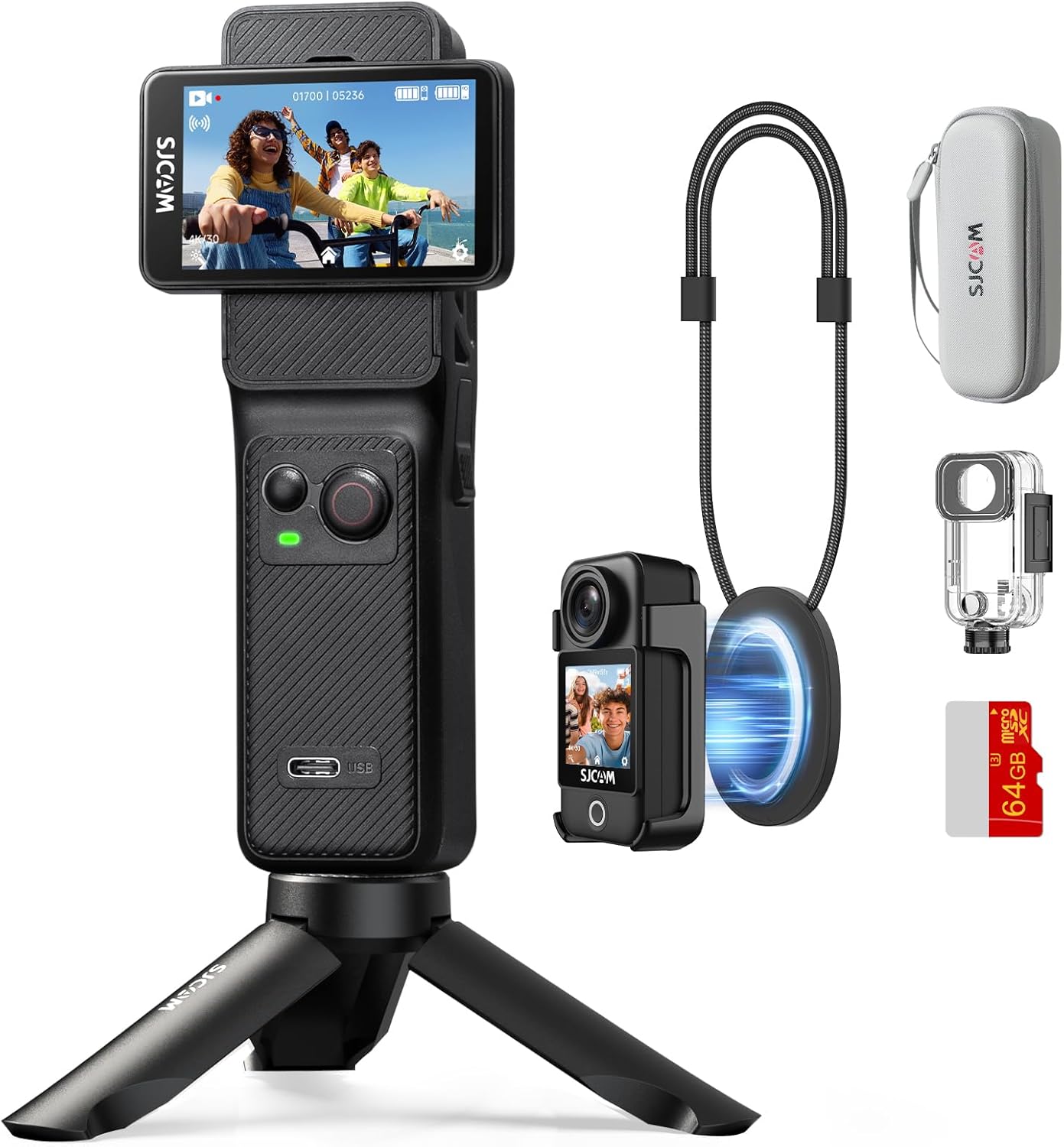
Figure 1: The SJCAM C400 Vlogging Combo 4K Pocket Handheld Camera and included accessories.
Ташкил кардан
1. Дар қуттӣ чӣ мавҷуд аст
Бастаи SJCAM C400-и шумо дорои ҷузъҳои зерин мебошад:
- Назоратчии дастӣ
- Модули камера
- Парвандаи обногузар
- Кӯҳи Чорчӯба
- Клипи бозгашт
- Ланёр
- Халтаи нигоҳдорӣ
- Лангари магнитӣ
- Кӯҳи Пойгоҳ
- Бурида
- microSD Card (64GB)
- Curved and Flat Mount
- Адаптер
- Сими USB
- 3m Adhesive Sticker
- Газворро хушконед

Figure 2: Contents of the SJCAM C400 Vlogging Combo package.
2. Пуркунии дастгоҳ
Before first use, fully charge the camera and handheld controller using the provided USB cable. Connect the USB cable to the charging port on the handheld controller and a compatible USB power adapter (not included). The camera module charges automatically when attached to the handheld controller.
3. Гузоштани корти MicroSD
Locate the microSD card slot on the camera module. Gently insert the provided 64GB microSD card until it clicks into place. Ensure the card is inserted correctly to avoid damage. The camera supports microSD cards for storing footage.
4. Assembling the Camera
The SJCAM C400 features a detachable design. To assemble, align the camera module with the slot on the handheld controller and slide it into place until it securely locks. To detach, press the release button and slide the camera module off.

Figure 3: Attaching the camera module to the handheld controller.
5. Фурӯзон/хомӯшкунӣ
To power on the device, rotate the screen on the handheld controller. The camera will automatically activate. To power off, rotate the screen back to its closed position, and the camera will automatically fold and lock.

Figure 4: Rotating the screen to power on the camera.
Дастурҳои амалиётӣ
1. Basic Controls and Touch Screen
The C400 features a 2.29-inch touch screen for intuitive navigation and settings adjustment. Use the physical buttons on the handheld controller for quick access to common functions like recording and mode switching. The screen can be rotated to switch between horizontal and vertical shooting modes.

Figure 5: The rotating screen allows for flexible shooting orientations.
2. Усулҳои тирандозӣ
Камера барои мувофиқ кардани вазъиятҳои гуногун режимҳои гуногуни аксбардориро пешниҳод мекунад:
- Видеои 4K Ultra HD: Captures high-resolution video at 30 frames per second.
- Сабти давр: Қадимтарин хӯрокро пайваста сабт мекунад ва аз нав менависадtagд вақте ки корти хотира пур аст.
- Slow-Motion Video: Records at a higher frame rate for slow-motion playback.
- Аксҳои зудгузар: Captures a series of still images at set intervals to create a time-lapse video.
- Тир тирандозӣ: Якчанд аксҳоро пай дар пай зуд мегирад.
- Тирпарронии вақтӣ: Sets a timer before capturing a photo.
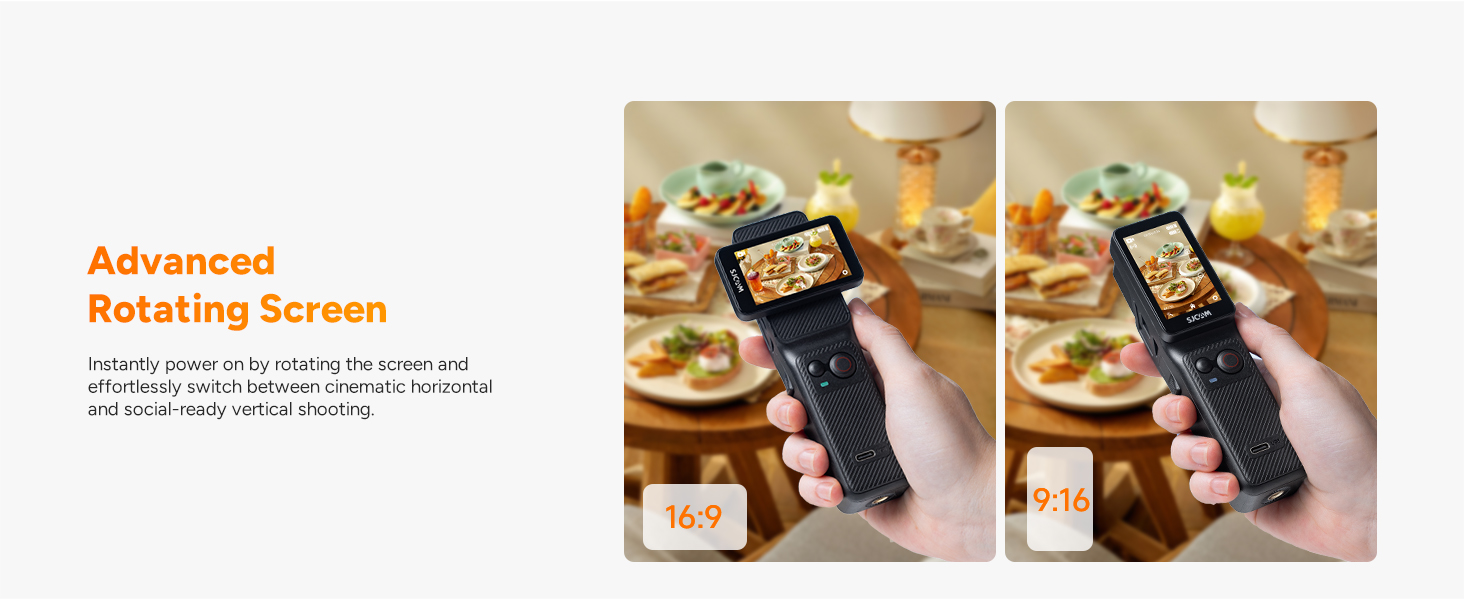
Figure 6: The camera supports various creative shooting modes like Time-Lapse and Slow Motion.
3. Муътадилсозии тасвир
The C400 is equipped with a 6-axis Electronic Image Stabilization (EIS) system and horizon correction. This technology helps to ensure smooth and stable video footage, even during dynamic activities or in shaky environments.

Figure 7: Demonstrating the effectiveness of 6-Axis Gyro Stabilization and Horizon Steady.
4. Wireless Handheld Controller and App Connectivity
The handheld controller allows for remote operation of the camera module. With 5G WiFi connectivity, you can use the dedicated SJCAM app for remote control, precise parameter settings, real-time footagд пешview, and live sharing. This enhances shooting freedom and flexibility.

Figure 8: The wireless handheld controller allows for remote operation up to 8 meters.
5. Waterproof Functionality
When enclosed in its professional waterproof case, the SJCAM C400 can be used in water up to 30 meters (98 feet) deep, making it suitable for activities like snorkeling, surfing, or cycling in the rain.

Figure 9: The SJCAM C400 is waterproof up to 30 meters with the included case.
6. Hands-Free POV and Portability
The camera module can be detached and used with accessories like the magnetic lanyard or back clip for hands-free, first-person view (POV) recording. Its compact size makes it highly portable for any adventure.

Figure 10: The detachable camera module enables effortless hands-free POV recording.
7. Ҷараёни мустақим ва WebҲолати камера
The C400 supports direct live streaming to compatible platforms without complex equipment. It can also function as a plug-and-play webcam when connected to a computer, offering convenient use for video calls or content creation.

Figure 11: The C400 can be used for live streaming and as a webкамера
8. Муҳлати батарея
The camera is designed for extended use, offering up to 7 hours (460 minutes) of continuous 4K shooting on a single charge, suitable for all-day recording needs.

Figure 12: The SJCAM C400 provides up to 7 hours of battery life for 4K shooting.
9. Видеои расмии маҳсулот
Видео 1: Намоиши видеоии расмии маҳсулотasing the features and use cases of the SJCAM C400 Pocket Vlogging Camera.
Нигоҳдорӣ
1. Тоза кардани камера
Use the provided wipe cloth or a soft, lint-free cloth to clean the camera lens and touch screen. For stubborn smudges, a small amount of lens cleaning solution can be applied to the cloth, not directly to the lens. Ensure the camera is powered off before cleaning.
2. Нигоҳубини батарея
To prolong battery life, avoid fully discharging the battery frequently. Store the camera in a cool, dry place when not in use for extended periods. Charge the battery periodically if stored for a long time to prevent deep discharge.
3. Нигоҳдорӣ
Store the camera and its accessories in the provided storage bag to protect them from dust, scratches, and impacts. Keep the device away from extreme temperatures and humidity.
Мушкилкушо
1. Камера фаъол нест
- Ensure the battery is charged. Connect the handheld controller to a power source.
- Verify the camera module is correctly attached to the handheld controller.
- Confirm the screen is rotated to the 'on' position.
2. Connectivity Issues with App
- Check if the camera's 5G WiFi is enabled.
- Ensure your smartphone or tablet is within range and connected to the camera's WiFi network.
- Ҳам камера ва ҳам дастгоҳи мобилии худро аз нав оғоз кунед.
- Update the SJCAM app to the latest version.
3. Blurry or Unstable Footage
- Линзаи камераро тоза кунед.
- Ensure the 6-axis EIS and Horizon Correction features are enabled in the settings.
- Check for sufficient lighting conditions.
4. MicroSD Card Errors
- Ensure the microSD card is properly inserted.
- Format the microSD card using the camera's settings (this will erase all data).
- Try a different compatible microSD card.
Мушаххасоти
| Номи бренд | SJCAM |
| Номи модел | C400 Combo |
| Вазни ашё | 1.72 фунт |
| Андозаҳои бастаҳо | 7.17 x 6.77 x 2.95 инч |
| Батареяҳо | 1 9V батарея лозим аст (дохил карда шудааст) |
| Технологияи сенсори акс | CMOS |
| Қарори сабти видео | 4K |
| Дарозии максималии фокус | 20 |
| Навъи хотираи флеш | Micro SD |
| Формати сабти видео | MP4 |
| Андозаи экран | 2.29 инч |
| Технологияи пайвастшавӣ | Вай-фай |
| Хусусиятҳои махсус | 7H long power supply, Horizon Steady, Lightweight Portable fashion pocket handheld, Portrait and Landscape Switching, Built-in Microphone, Shock-resistant Dual Touch Screen, Anti Shake, Slow Motion, Time Lapse, 8X Zoom, Low light Vision |
Кафолат ва дастгирӣ
For warranty information and customer support, please refer to the official SJCAM webсайт ё фурӯшандаи худ тамос гиред. Барои ҳама даъвоҳои кафолат далели хариди худро нигоҳ доред.


