Муқаддима
Welcome to the OUKITEL C3 Cell Phone user manual. This guide provides essential information to help you set up, operate, and maintain your new smartphone. Please read this manual thoroughly to ensure proper usage and to maximize your device's potential.
Дар қуттӣ чӣ ҳаст
Upon opening your OUKITEL C3 package, you should find the following items:
- 1x OUKITEL C3 Cell Phone
- 1x Пуркунандаи 10W
- 1x кабели маълумот
- 1x Қуттии телефон
- 1x Дастури корбар

Image: Contents of the OUKITEL C3 package, including the phone, charger, data cable, phone case, and manual.
Video: An unboxing demonstration of the OUKITEL C3 Cell Phone, showing the phone and its included accessories.
Маҳсулот ба охир расидview
The OUKITEL C3 is a 4G Android smartphone featuring a 6.52-inch waterdrop screen, a 5000mAh battery, and a dual-camera system. It is designed for everyday communication and multimedia use.
Хусусиятҳои асосӣ:
- Намоиш: 6.52-inch HD Waterdrop Screen (540x1200 resolution, 450nit brightness)
- Протсессор: Unisoc T310
- Хотира: 16GB RAM (4GB fixed + 12GB virtual) + 64GB ROM, expandable up to 1TB via TF card
- Батарея: 5000mAh with 10W fast charging and OTG reverse charging support
- Камераҳо: Камераи асосӣ 13 мегапикселӣ, камераи пеши 5 мегапикселӣ
- Низоми амал: Android 14
- Пайвастшавӣ: 4G Dual SIM, Bluetooth 5.0, Wi-Fi, GPS, GLONASS, Beidou, Galileo
- Амният: Face ID
- Андозаҳо: Ғафсӣ 9.3 мм, вазн 198 г
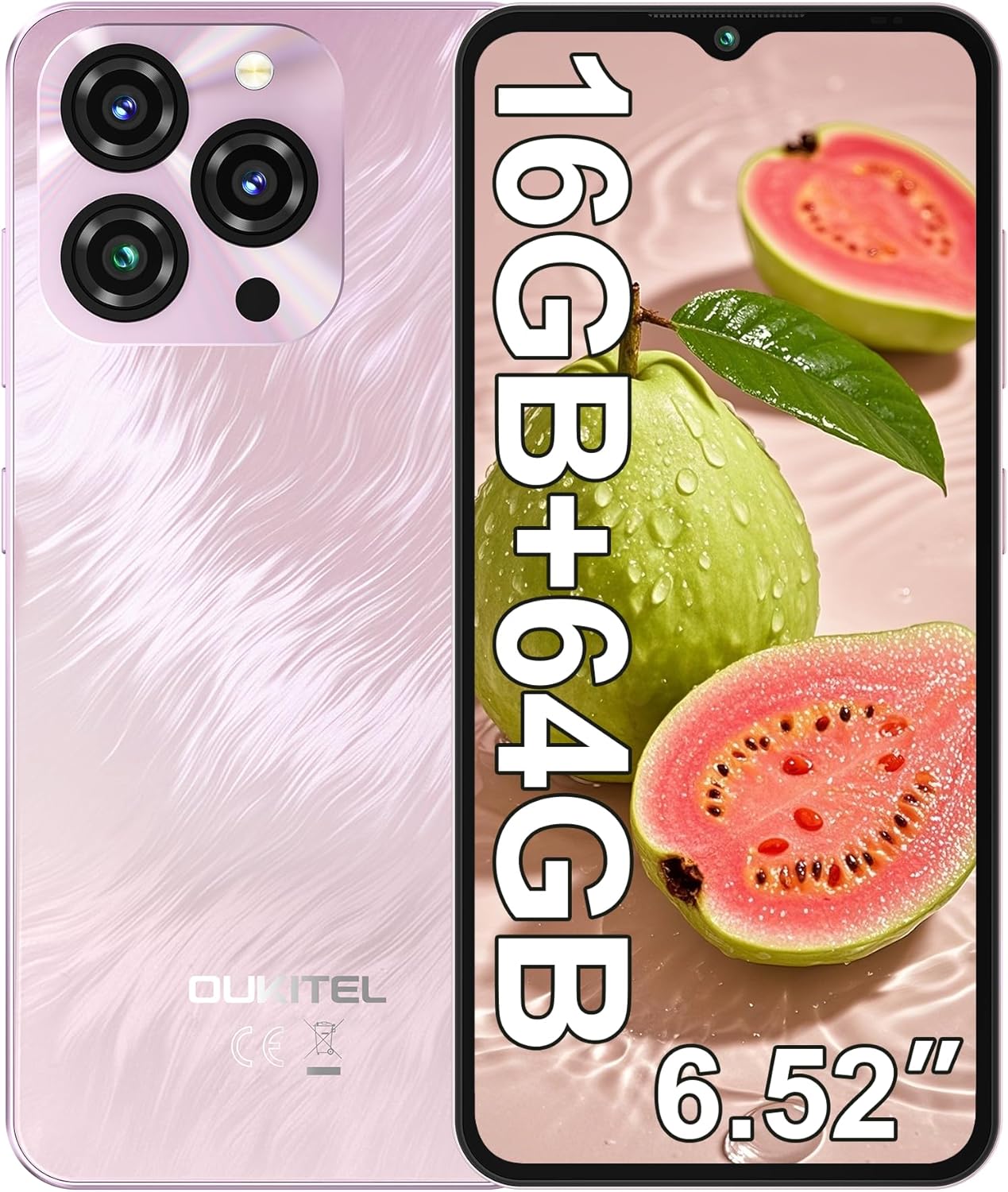
Image: The OUKITEL C3 Cell Phone, showcasing дизайн ва модули камераи он.

Image: Close-up of the OUKITEL C3's 6.52-inch waterdrop display, highlighting its visual quality.

Image: Visual representation of the OUKITEL C3's slim 9.3mm thickness and 198g weight.
Ташкил кардан
1. Насби корти SIM ва корти TF
OUKITEL C3 ду корти Nano SIM ё як корти Nano SIM ва як корти TF (microSD)-ро барои нигоҳдории васеъшуда дастгирӣ мекунад.
- Табақчаи SIM-кортро дар паҳлӯи телефон ҷойгир кунед.
- Insert the SIM ejector tool (included in the box) into the small hole next to the tray and push gently until the tray pops out.
- Place your Nano SIM card(s) and/or TF card into the designated slots on the tray. Ensure the gold contacts face downwards and the cards are correctly oriented.
- Табақчаро бодиққат ба телефон дубора ҷойгир кунед, то он даме ки он бо паҳлӯи дастгоҳ яксон шавад.

Image: Diagram showing the SIM card tray, 3.5mm audio jack, and USB-C port on the OUKITEL C3.
2. Фаъолсозии ибтидоӣ ва насб
- Press and hold the Power button (located on the right side of the phone) until the OUKITEL logo appears.
- Барои интихоби забони худ, пайваст шудан ба шабакаи Wi-Fi ва насб кардани ҳисоби Google-и худ, дастурҳои дар экран бударо иҷро кунед.
- You will also be guided through setting up security features like Face ID during this process.
3. Пуркунии дастгоҳ
Before first use, it is recommended to fully charge your OUKITEL C3.
- Connect the USB data cable to the 10W charger.
- Пуркунандаи барқро ба васлаки барқ пайваст кунед.
- Нуги USB-C-и кабелро ба порти пуркунии барқ дар поёни телефони худ пайваст кунед.
- Тасвири батарея дар экран ҳолати пуркунии барқро нишон медиҳад.

Image: Illustration of the OUKITEL C3's 5000mAh battery and charging process.
Дастурҳои амалиётӣ
1. Навигатсияи асосӣ (Android 14)
Your OUKITEL C3 runs on Android 14, offering an intuitive user experience.
- Экрани асосӣ: Барои гузаштан дар байни экранҳои хонагӣ ба чап ё рост лағжед. Барои танзими виджетҳо, обои деворӣ ва танзимот фазои холиро пахш карда нигоҳ доред.
- Обовари барнома: Барои дастрасӣ ба ҳама барномаҳои насбшуда аз поёни экран боло лағжед.
- Огоҳиҳо ва Танзимоти зуд: Аз болои экран ба поён лағжед view огоҳиҳо ва тугмаҳои дастрасӣ ба танзимоти зуд (Wi-Fi, Bluetooth ва ғайра).
- Барномаҳои охирин: Swipe up from the bottom and hold (or tap the square navigation button if enabled) to see recently used applications.

Image: The OUKITEL C3 displaying the Android 14 operating system interface with various applications.
2. Истифодаи камера
The OUKITEL C3 is equipped with a 13MP main camera and a 5MP front camera.
- Барномаи "Камера"-ро аз экрани асосӣ ё ҷадвали барнома кушоед.
- Switch between the front and rear cameras using the camera switch icon.
- Барои аксбардорӣ тугмаи пардаро клик кунед.
- Explore different modes like Video, Portrait, or Panorama if available in the camera app.

Image: Visual detailing of the OUKITEL C3's 13MP main camera and 5MP front camera capabilities.
3. Пайвастшавӣ
- Вай-фай: Барои пайваст шудан ба шабакаҳои дастрас ба Танзимотҳо > Шабака ва интернет > Wi-Fi гузаред.
- Блутуз: Барои пайваст шудан бо дастгоҳҳои Bluetooth ба монанди гӯшмонакҳо ё баландгӯякҳо, ба Танзимотҳо > Дастгоҳҳои пайвастшуда > Bluetooth равед.
- НИЗОМИ МУАЙЯНКУНИИ ҶАҲОНИИ ҶОИ ИСТ: Location services are enabled by default. You can manage them in Settings > Location. The phone supports GPS, GLONASS, Beidou, and Galileo for accurate positioning.
- OTG: The OUKITEL C3 supports USB On-The-Go (OTG), allowing you to connect USB devices like flash drives or keyboards using an OTG adapter (sold separately).
4. Face ID
Face ID provides a convenient and secure way to unlock your phone.
- Go to Settings > Security & privacy > Device unlock > Face unlock.
- Follow the on-screen instructions to register your face. Ensure good lighting and hold the phone at eye level.
- Пас аз сабти ном, шумо метавонед телефони худро танҳо бо нигоҳ кардан ба камераи пешӣ кушоед.
Нигоҳдорӣ
1. Нигоҳубини батарея
- Нагузоред, ки телефонро ба ҳарорати шадид дучор кунед.
- Use only the provided charger and cable for optimal charging performance and safety.
- Барои нигоҳдории дарозмуддат, батареяро то тақрибан 50% пур кунед ва дастгоҳро хомӯш кунед.
2. Навсозии нармафзор
Regularly check for and install software updates to ensure your phone has the latest features, security patches, and performance improvements.
- Ба Танзимотҳо> Система> Навсозии система гузаред.
- Tap "Check for update" and follow the instructions if an update is available.
3. Тоза кардани дастгоҳи худ
- Барои тоза кардани экран ва қафои телефон матои мулоим ва рафдорро истифода баред.
- Аз истифодаи кимиёвии сахт ё маводи абразивӣ худдорӣ намоед.
- Барои доғҳои якрав, каме гampматоъ бо об ё тозакунандаи экран, ки барои электроника пешбинӣ шудааст.
Мушкилкушо
| Мушкилот | Ҳалли имконпазир |
|---|---|
| Телефон фаъол нест. | Боварӣ ҳосил кунед, ки батарея пур карда шудааст. Пуркунандаи барқро пайваст кунед ва пеш аз кӯшиши дубора фаъол кардани барқ чанд дақиқа интизор шавед. |
| Занг задан ё қабул кардани зангҳо/паёмҳои матнӣ имконнопазир аст. |
|
| Барномаҳо суст ё ях мекунанд. |
|
| Батарея зуд холӣ мешавад. |
|
| Face ID not working. |
|

Image: Important information regarding OUKITEL C3's carrier compatibility, specifically T-Mobile support.
Мушаххасоти
| Хусусият | Тафсилот |
|---|---|
| Номи модел | OUKITEL C3 |
| Низоми амал | Android 14 |
| Намоиш | 6.52 Inches HD Waterdrop Screen, 540 x 1200 Resolution, 60 Hz Refresh Rate |
| RAM | 16 GB (4GB fixed + 12GB virtual) |
| Захираи дохилӣ (ROM) | 64 ГБ |
| Захираи васеъшаванда | Up to 1 TB via TF Card |
| Камераи асосӣ | 13 МП |
| Камераи пеши | 5 МП |
| Иқтидори батарея | 5000 мАч |
| Пур кардан | 10W Fast Charging, Supports OTG Reverse Charging |
| Пайвастшавӣ | 4G Cellular Technology, Bluetooth 5.0, Wi-Fi |
| Навигатсия | GPS, ГЛОНАСС, Бейду, Галилео |
| Jack Audio | 3.5 мм |
| Навъи корти SIM | Дучанд нано SIM |
| Андозаҳо | ғафсӣ 9.3мм |
| Вазн | 198 грамм (тақрибан 14.9 унсия) |
| Supported Carrier | T-Mobile (Does not support Metro PCS, AT&T, Verizon) |
Видео: Ба охир расидview of the OUKITEL C3 Cell Phone's main features and specifications.
Кафолат ва дастгирӣ
For warranty information and technical support, please refer to the warranty card included in your product package or visit the official OUKITEL webсайт. Барои даъвоҳои кафолат далели хариди худро нигоҳ доред.
Маълумот барои тамос: Please refer to the contact details provided in your product documentation or on the OUKITEL official website for customer service and support.


