Муқаддима
Thank you for choosing the GMBACK Wireless Pro Controller. This manual provides detailed instructions for setting up, operating, and maintaining your controller to ensure optimal performance and an enhanced gaming experience. Please read this manual thoroughly before use.
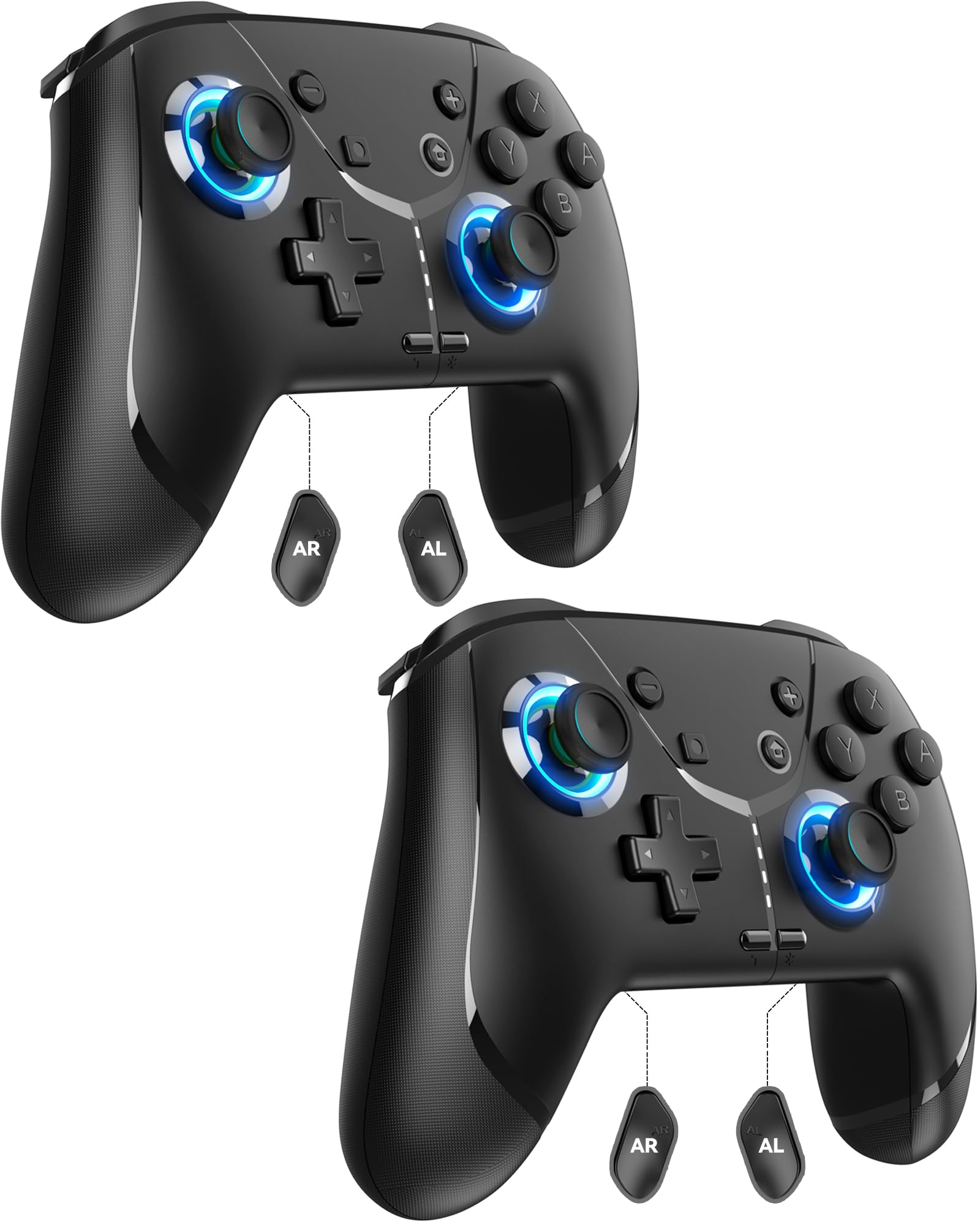
Image: GMBACK Wireless Pro Controller, front view.
Мундариҷаи баста
- 2 x GMBACK Wireless Pro Controllers
- 2 x кабелҳои пуркунандаи USB-C
- 1 x Дастури корбар
Сар кардани кор
1. Ҷуфтшавӣ бо Nintendo Switch
- Боварӣ ҳосил кунед, ки консоли Nintendo Switch-и шумо фаъол аст ва ба нармафзори охирини система навсозӣ шудааст.
- Аз Менюи HOME ро интихоб кунед «Назоратчиён», пас 'Тағйир додани дастак/тартиб'.
- On the GMBACK controller, press and hold the Тугмаи синхронизатсия (located on the top edge near the USB-C port) for 3-5 seconds until the LED indicators begin to flash rapidly.
- The controller will automatically pair with the Switch. Once paired, the player LED(s) on the bottom of the controller will light up solid.

Image: GMBACK Wireless Pro Controller connected to a Nintendo Switch console.
2. Connecting to PC (Wired)
- Connect the GMBACK controller to your PC using the provided USB-C cable.
- The controller will be recognized as a standard gamepad. Drivers may install automatically.
- For optimal compatibility, ensure your PC's operating system is up to date.
3. Пур кардани контроллер
- Connect the controller to a USB power source (e.g., Switch dock, PC, USB wall adapter) using the provided USB-C cable.
- The LED indicators will show charging status. A full charge typically takes 2-3 hours.
- The controller features an 800mAh battery, providing approximately 15-20 hours of playtime on a full charge.

Image: Visual representation of the 800mAh battery, 15-20 hours playtime, and 2-3 hours charging time.
Key Features & Functions
1. Loop Macro Function
The controller supports a loop macro function, allowing you to record and replay a sequence of up to 30 seconds of button presses and joystick movements. This includes joysticks, triggers, D-pad, ABXY, and +/- buttons.
- Барои сабт: Refer to the detailed instructions in the included user manual for specific recording steps.
- To Start/Stop Loop: -ро нигоҳ доред Тугмаи Турбо ва Тугмаи макрос simultaneously. The controller will automatically replay your recorded actions in a continuous loop.

Тасвир: Қафо view of the controller highlighting the AR and AL programmable buttons and the text 'Loop Macro Function'.
2. Сенсори гироскопии 6-меҳварӣ
The integrated 6-axis gyro sensor provides precise motion detection, allowing for intuitive control in compatible games that utilize motion sensing. This enhances immersion and gameplay accuracy.

Image: Controller being used for a racing game, illustrating the 6-Axis Gyro Sensor feature.
3. Customizable Turbo Function
The controller offers three adjustable turbo speeds for rapid-fire actions. This feature can be set to either auto-fire or manual-fire mode.
- Барои танзим кардани суръати турбо: Refer to the included user manual for specific button combinations to cycle through the three turbo speeds.
- To Activate/Deactivate Turbo: -ро пахш кунед Тугмаи Турбо along with the desired action button.

Image: Controller displaying the 'Auto & Manual Turbo' feature with a gaming background.
4. Танзими дугонаи ларзиш
Experience immersive feedback with four levels of dual vibration intensity: None, Weak, Medium, and Strong. Adjust the vibration to your preference for different games.
- Барои танзими ларзиш: Consult the user manual for the specific button combination to cycle through vibration levels.

Image: Controller illustrating the four levels of dual vibration: None, Weak, Medium, Strong.
5. Равшании RGB
The controller features dynamic RGB lighting around the joysticks, enhancing the visual appeal during gameplay. The lighting can be adjusted or turned off.
- To Adjust RGB Lighting: Refer to the user manual for instructions on changing lighting modes or turning off the lights.

Image: Controller showcasing its RGB lighting feature around the joysticks.
6. Remappable ABXY Buttons
The ABXY buttons can be remapped to switch between Nintendo Switch and Xbox layouts, providing flexibility for different gaming preferences without needing to physically remove any buttons.
- To Remap ABXY: Follow the instructions in the user manual for the specific button sequence to switch layouts.

Image: Controller illustrating the ABXY button function switching between Nintendo Switch and Xbox layouts.
7. Screenshot and Home Wake-up
- The controller includes a dedicated Тугмаи скриншот for capturing in-game moments.
- Дар Тугмаи хонагӣ can be used to wake up your Nintendo Switch console from sleep mode.
Нигоҳдорӣ
- Тозакунӣ: Барои тоза кардани контроллер аз матои нарм ва хушк истифода баред. Аз истифодаи маводи кимиёвии сахт ё маводҳои абразивӣ худдорӣ намоед.
- Нигоҳдорӣ: Контроллерро дар ҷои хунук ва хушк аз нури бевоситаи офтоб ва ҳарорати аз ҳад зиёд дур нигоҳ доред.
- Нигоҳубини батарея: Барои дароз кардани мӯҳлати кори батарея, аз холӣ кардани пурраи контроллер зуд-зуд худдорӣ кунед. Онро мунтазам пур кунед, ҳатто агар он доимо истифода нашавад ҳам.
Мушкилкушо
- Контроллер пайваст нест:
- Боварӣ ҳосил кунед, ки контроллер пур карда шудааст.
- Verify the Switch is in 'Change Grip/Order' mode.
- Try restarting both the Switch and the controller.
- Боварӣ ҳосил кунед, ки ягон дастгоҳи бесими дигар халал намерасонад.
- Тугмаҳо ҷавоб намедиҳанд:
- Check if the controller is properly paired.
- Test button functionality in Switch system settings.
- Ensure the controller's firmware is up to date (if applicable, check GMBACK support webсайт).
- Мушкилоти пуркунии барқ:
- Сими USB-C-и додашударо истифода баред.
- Манбаи дигари барқи USB-ро санҷед.
- Боварӣ ҳосил кунед, ки порти пуркунандаи контроллер тоза ва аз партовҳо холӣ аст.
Мушаххасоти
| Хусусият | Тафсилот |
|---|---|
| Модели | HD6900 |
| Мутобиқати | Nintendo Switch 2, Switch, Switch Lite, Switch OLED, Windows PC (wired) |
| Иқтидори батарея | 800 мАч |
| Вақти бозӣ | 15-20 соат |
| Вақти пуркунии барқ | 2-3 соат |
| Пайвастшавӣ | Бесим (Bluetooth), Симӣ (USB-C) |
| Хусусиятҳои махсус | Loop Macro, 6-Axis Gyro Sensor, Dual Vibration (4 levels), Adjustable Turbo (3 speeds), RGB Lighting, Remappable ABXY, Screenshot, Home Wake-up |
| Вазни ашё | 8.5 унция |
| Андозаҳои бастаҳо | 6.54 x 5.31 x 5.28 инч |
Видеои расмии маҳсулот
Видео: Ба охир расидview of the GMBACK Wireless Switch Controller, demonstrating its features and compatibility with Nintendo Switch, Switch Lite, and Switch OLED consoles.
Кафолат ва дастгирӣ
GMBACK products come with a standard manufacturer's warranty. For detailed warranty information, technical support, or any inquiries regarding your controller, please refer to the contact information provided on the product packaging or visit the official GMBACK webсайт.

Image: Icon representing customer support.
