Маълумоти муҳим оид ба бехатарӣ
Please read this manual carefully before installation and use. Keep this manual for future reference.
- Иқтидори вазн: Иқтидори максималии вазнро аз 33 фунт (15 кг) зиёд накунед. Зиёд кардани ин меъёр метавонад боиси осеби ҷиддӣ ё хисороти молӣ гардад.
- Андозаи монитор: The monitor arm supports monitors up to 42 inches. The VESA extender supports monitors from 17 to 35 inches. Ensure your monitor's size and weight are within these limits.
- Мутобиқати VESA: The arm supports VESA patterns 75x75mm and 100x100mm. The extender converts these to 200x100mm and 200x200mm. Verify your monitor's VESA pattern before installation.
- Ғафсии мизи корӣ: C-clamp requires a desk thickness between 0.39 inches (10mm) and 2.76 inches (70mm). Ensure your desk can support the combined weight of the arm, monitor, and extender.
- Маҷлис: Assemble the product according to the instructions. Improper assembly may cause damage or serious personal injury.
- Қисмҳои ҳаракаткунанда: This product contains moving parts. Exercise caution during adjustment to avoid pinching or crushing injuries.
- Нигоҳдорӣ: Periodically check all screws and connections to ensure they are secure. Retighten as necessary.
Мундариҷаи баста
Verify that all components are present and undamaged before proceeding with installation. If any parts are missing or damaged, please contact MOUNTUP customer support.
- Мониторинги Ассамблея
- C-Clamp База
- VESA Extender Bracket (2 pieces)
- VESA Extender Plate
- Hardware Kit (screws, washers, spacers, Allen wrenches)

Тасвир: тамомview of the MOUNTUP Heavy Duty Single Monitor Arm, including the main arm, C-clamp, and the VESA extender components.
Мушаххасоти
| Бренд | МОНТУП |
| Модели | Heavy Duty Single Monitor Arm with VESA Extender |
| Monitor Arm Compatibility | Monitors up to 42 inches |
| VESA Extender Compatibility | Monitors 17-35 inches |
| Иқтидори вазн | 4.4 - 33 фунт (2 - 15 кг) |
| VESA Patterns (Arm) | 75х75мм, 100х100мм |
| VESA Patterns (Extender) | Converts to 200x100mm, 200x200mm, 150x150mm, 100x200mm |
| Ғафсии миз (C-Cl)amp) | 0.39 - 2.76 инч (10 - 70 мм) |
| Диапазони баландӣ | 9.3 - 22.1 инч |
| Максимум тамдид | 23.8 инч |

Image: Illustration highlighting the monitor arm's robust load capacity of up to 33 lbs.

Image: Diagram showing the monitor arm's height adjustment range from 9.3 to 22.1 inches and a maximum extension of 23.8 inches.
Насб ва насб
Step 1: Install the C-Clamp База
- C-cl-ро ҷойгир кунедamp base on the edge of your desk.
- Ensure the desk thickness is between 0.39 and 2.76 inches.
- C-cl-ро пурзӯр кунедamp screw until the base is securely fastened to the desk. Do not overtighten.

Image: The monitor arm's C-clamp securely attached to a desk, demonstrating its stable mounting.
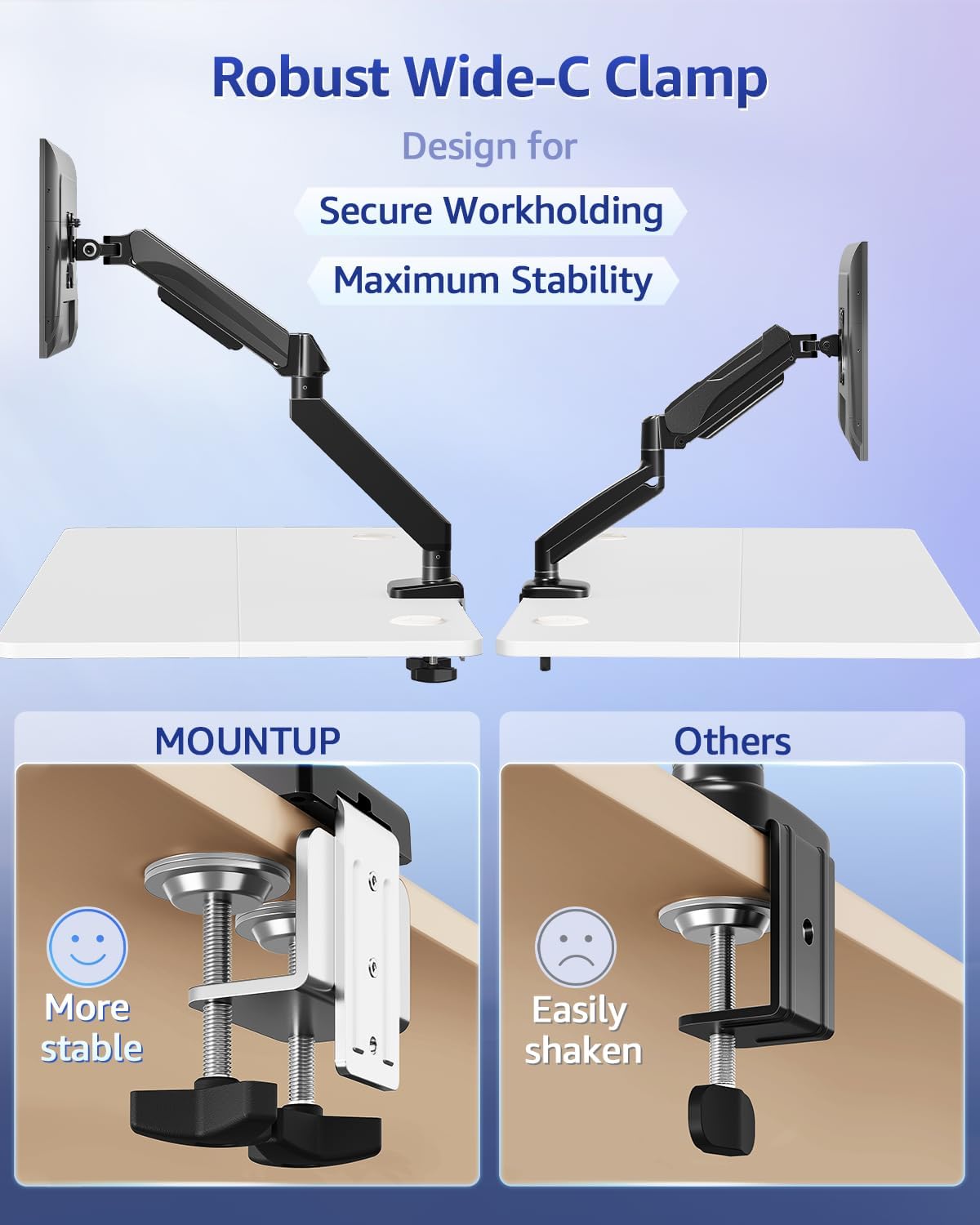
Image: A visual comparison highlighting the wider and more stable design of the MOUNTUP C-clamp compared to a standard clamp.
Step 2: Assemble the VESA Extender (if needed)
If your monitor has a VESA pattern larger than 100x100mm (e.g., 200x100mm or 200x200mm), use the VESA extender bracket.
- Attach the two extender brackets to the VESA extender plate using the provided screws. Ensure the ridge on the extender plate aligns with the brackets for a secure fit.
- Securely fasten the extender assembly to your monitor's VESA mounting holes using the appropriate screws from the hardware kit.

Image: Step-by-step visual guide for assembling the VESA extender brackets onto the main plate using screws.

Тасвир: Муфассал view of the VESA extender plate, showing its design for adapting to various VESA patterns.

Image: A diagram illustrating the various VESA patterns (200x100mm, 150x150mm, 200x200mm, 100x200mm) supported by the extender.

Image: A visual comparison showing a monitor that previously could not be mounted (before) and how the VESA extender enables mounting for larger VESA patterns (after).
Step 3: Attach Monitor to Arm
- Slide the monitor (with or without the VESA extender attached) onto the VESA head of the monitor arm.
- Secure the monitor to the VESA head using the provided screws. Ensure all screws are tightened to prevent the monitor from detaching.
Дастурҳои амалиётӣ
Adjusting Monitor Position
The MOUNTUP monitor arm allows for flexible adjustment of your monitor's position to achieve optimal ergonomics.
- Танзими баландӣ: Gently push or pull the monitor up or down to the desired height. The gas spring mechanism will hold it in place.
- Танзими чархиш: Tilt the monitor screen up or down to reduce glare and find a comfortable viewкунҷи дохилӣ.
- Танзими гардиш: Rotate the monitor horizontally (left or right) to share your screen or change viewсамт.
- Танзими гардиш: Rotate the monitor 360 degrees to switch between landscape and portrait orientation.
Танзими шиддат
If the monitor arm is too stiff or too loose, you may need to adjust the gas spring tension.
- Locate the tension adjustment screw on the arm (usually near the pivot points).
- Use the provided Allen wrench to turn the screw:
- Гард бо самти соат (-) ба кам кардан tension (for lighter monitors or if the arm is too stiff).
- Гард баръакси самти ақрабаки соат (+) ба афзоиш tension (for heavier monitors or if the arm sags).
- Adjust gradually and test the arm's movement after each adjustment until it holds your monitor securely at any position.
Нигоҳдорӣ
- Тозакунӣ: Wipe the monitor arm and VESA extender with a soft, damp матоъ. Истифодаи тозакунакҳои абразивӣ ё маҳлулҳое, ки метавонанд ба марра зарар расонанд, худдорӣ намоед.
- Санҷишҳои даврӣ: Regularly inspect all screws and connections (C-clamp, VESA plate, arm joints) to ensure they remain tight. Retighten any loose fasteners to maintain stability and safety.
- Молидани: The gas spring mechanism is maintenance-free and does not require lubrication.
Мушкилкушо
Monitor Sags or Does Not Hold Position
- Ҳалли: The gas spring tension is likely too low for your monitor's weight. Increase the tension by turning the adjustment screw counter-clockwise (+) with the provided Allen wrench until the arm can hold the monitor in place.
- Check Weight: Ensure your monitor's weight is within the 4.4 - 33 lbs capacity.
Arm is Too Stiff to Move
- Ҳалли: The gas spring tension is likely too high. Decrease the tension by turning the adjustment screw clockwise (-) with the provided Allen wrench.
Monitor Wobbles
- Ҳалли: Check if the C-clamp is securely tightened to the desk. Ensure all VESA mounting screws are tight. Verify that the monitor arm joints are properly secured.
- Desk Stability: Ensure your desk itself is stable and not prone to wobbling.
Кафолат ва дастгирӣ
MOUNTUP products are designed for durability and performance. For specific warranty information, please refer to the documentation included with your purchase or visit the official MOUNTUP webсайт.
If you encounter any issues or have questions regarding the installation or operation of your MOUNTUP Heavy Duty Single Monitor Arm and VESA Extender, please contact MOUNTUP customer support for assistance.
Маълумот барои тамос: Please refer to your product packaging or the MOUNTUP official webсайт барои тафсилоти охирини тамос барои дастгирии муштариён.


