1. Муқаддима
Thank you for choosing the RebotAi A11 Android 15 Tablet. This manual provides essential information for setting up, operating, maintaining, and troubleshooting your device. The RebotAi A11 features an 11-inch 2.5K IPS display, a powerful MediaTek Helio G100 Octa-Core processor, 24GB RAM, 128GB ROM, and an 8200 mAh battery, designed for a smooth and immersive user experience.
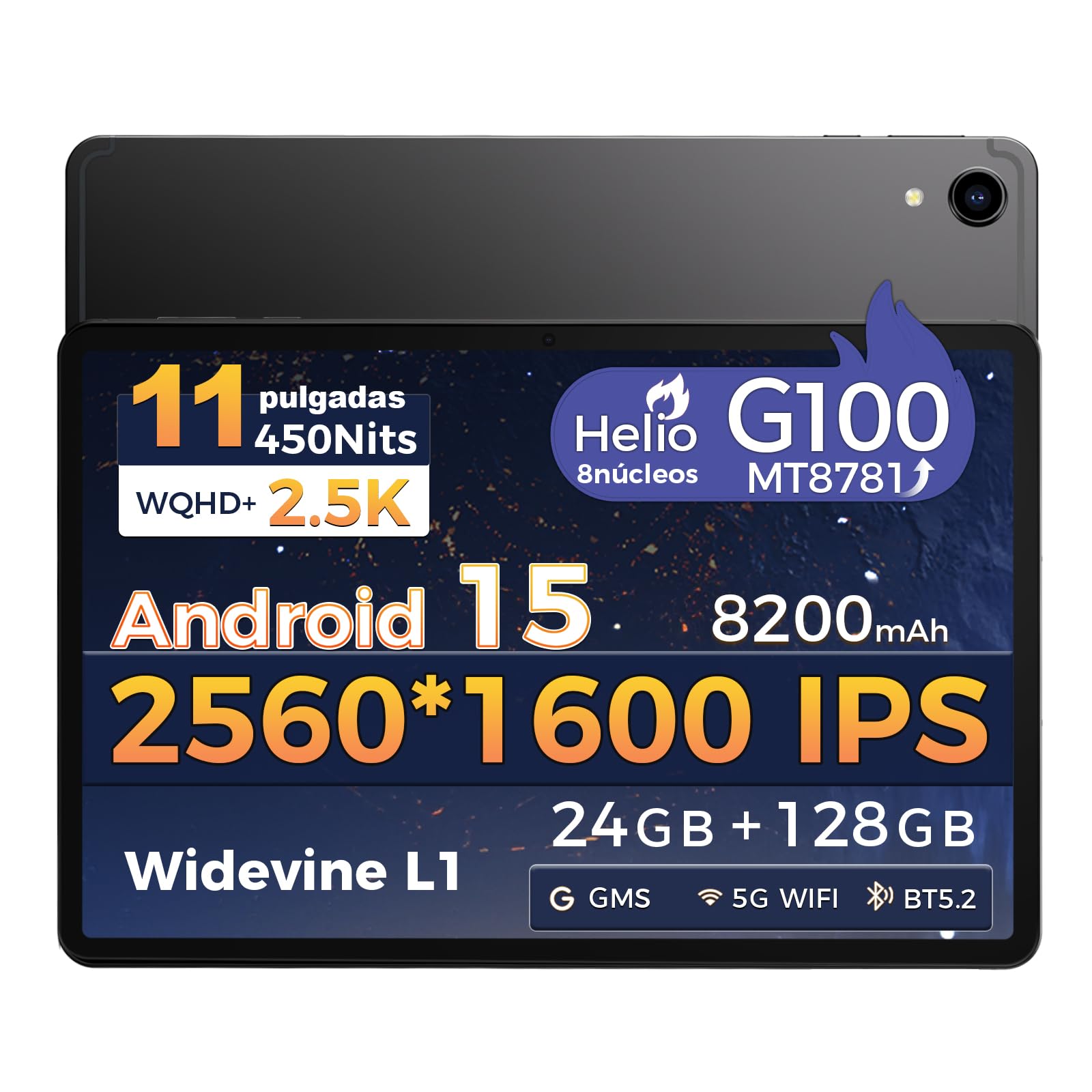
Тасвир: Пеш view of the RebotAi A11 Tablet.
2. Дар қуттӣ чӣ мавҷуд аст
Upon opening your RebotAi A11 package, please ensure all the following items are present:
- Планшети RebotAi A11 (x1)
- Leather Case (x1)
- USB-C to USB-C Charging Cable (x1)
- Стилус (x1)
- SIM Ejector Pin (x1)
- Дастури корбар (x1)
Note: In accordance with global environmental guidelines, the RebotAi A11 tablet does not include a wall charger. Only a USB-C charging cable is provided.
Image: Contents of the RebotAi A11 Tablet package.
3. Танзимот
3.1 Пур кардани батарея
Before first use, fully charge your tablet. Connect the provided USB-C cable to the tablet's USB-C port and the other end to a compatible USB wall charger (not included) or a computer. The tablet supports 20W PD fast charging.
3.2 Фурӯзон/хомӯш кардан
- Барои фаъол кардан: Press and hold the Power button located on the side of the tablet until the RebotAi logo appears.
- Барои хомӯш кардани барқ: Press and hold the Power button until the power options appear on the screen, then select "Power Off."
- Барои аз нав оғоз кардан: Press and hold the Power button until the power options appear, then select "Restart."
3.3 Танзимоти ибтидоӣ
When you power on the tablet for the first time, follow the on-screen instructions to:
- Забони худро интихоб кунед.
- Ба шабакаи Wi-Fi пайваст шавед.
- Бо ҳисоби Google-и худ ворид шавед ё ҳисоби нав эҷод кунед.
- Қулфи экранро танзим кунед (PIN, намуна, парол ё кушодани рӯй).
3.4 Ҷойгиркунии корти MicroSD
The RebotAi A11 supports MicroSD cards up to 1TB for expanded storage. Use the provided SIM ejector pin to open the card tray, insert the MicroSD card into the designated slot, and then close the tray securely.
3.5 Истифодаи қаламфур
The included stylus can be used for precise navigation, drawing, writing, and signing documents on the tablet's screen. No charging is required for the stylus.

Тасвир: тараф view of the RebotAi A11 Tablet, showing ports and buttons.
4. Дастурҳои истифодабарӣ
4.1 Хусусиятҳои намоиш
The RebotAi A11 features an 11-inch IPS Full HD 2.5K anti-glare display with a resolution of 2560 x 1600 pixels. It supports Widevine L1 certification for high-definition streaming and dynamic brightness adjustment. The anti-glare screen and immersive reading mode help prevent eye fatigue.

Image: The RebotAi A11's 2.5K high-definition display with eye protection and automatic brightness.

Image: Widevine L1 support for premium streaming services.
4.2 Иҷро ва нигоҳдорӣ
The tablet is powered by the MediaTek Helio G100 Octa-Core processor (MT8781), featuring 2 high-performance Cortex-A76 cores and 6 power-efficient Cortex-A55 cores. This ensures smooth operation for daily tasks, social media, video playback, and light gaming. It comes with 8GB base RAM, expandable by 16GB virtual RAM for a total of 24GB, and 128GB of internal storage, expandable up to 1TB via a MicroSD card.

Image: The Helio G100 chip, demonstrating high performance and energy efficiency.

Image: Large capacity storage with 24GB RAM and 128GB ROM, expandable to 1TB.
4.3 Камера
The RebotAi A11 is equipped with a 5MP front-facing camera and a 16MP rear-facing camera. These cameras are suitable for video calls, online meetings, and capturing everyday moments with clear and natural images.

Image: The 5MP front and 16MP rear cameras for clear photos and video calls.
4.4 Идоракунии батарея
The tablet features an 8200 mAh high-capacity battery, providing long-lasting power for reading, online courses, video playback, and office work. It supports 20W PD fast charging, allowing the device to be fully charged quickly.

Image: Powerful 8200 mAh battery with 20W fast charging for extended use.
4.5 Пайвастшавӣ
The RebotAi A11 supports dual-band Wi-Fi (2.4GHz and 5GHz) with 802.11ac for fast and stable internet access. It also includes Bluetooth 5.2 for energy-efficient wireless connections and GPS for precise navigation, compatible with Beidou, Galileo, and GLONASS.

Image: Fast connectivity and precise positioning with dual-band Wi-Fi, Bluetooth 5.2, and GPS.
4.6 Multitasking
With the dual-screen function, you can run two applications simultaneously on a single screen. This allows for seamless navigation, watching videos while chatting, or consulting information while working.

Image: Dual-screen functionality for fluid multitasking.
4.7 Аудио
Equipped with dual BOX speakers, the tablet offers an immersive audio experience for both movies and music. The balanced reproduction of highs and lows creates a pleasant listening experience.

Image: Immersive and crystal-clear audio from dual BOX speakers.
4.8 Intelligent Sensors
The A11 is equipped with intelligent sensors and AI, offering a more intelligent user experience. The gyroscope improves immersion in games, while the magnetometer ensures precise navigation, even in tunnels. Other sensors include G-sensor (automatic rotation), proximity sensor (automatic screen off), and ambient light sensor (adjustable backlight).

Image: Intelligent detection with various sensors for enhanced user experience.
4.9 Хусусиятҳои физикӣ
The tablet features a uniform metallic body crafted with advanced nano-coating technology, providing a smooth and delicate touch while being durable. Its surface is resistant to fingerprints and scratches, offering a high-quality texture and feel. It is surprisingly light at 510g and thin at 7.8mm.

Image: The tablet's lightweight and slim design, achieved through nano-molding technology.
5. Нигоҳдорӣ
5.1 Тоза кардани планшетатон
Барои тоза кардани планшетатон аз матои мулоим ва бе пахта истифода баред. Барои доғҳои якрав, каме гampen the cloth with water or a screen-safe cleaner. Avoid using harsh chemicals, abrasive materials, or excessive moisture.
5.2 Навсозии нармафзор
Regularly check for and install software updates to ensure optimal performance, security, and access to new features. You can usually find this option in Танзимотҳо > Система > Навсозии система.
5.3 Нигоҳубини батарея
Барои дароз кардани мӯҳлати батарея:
- Аз ҳарорати аз ҳад зиёд канорагирӣ кунед.
- Нагузоред, ки батарея зуд-зуд пурра холӣ шавад.
- Пас аз пур кардани планшет, пуркунандаи барқро аз барқ ҷудо кунед.
- Равшании экранро ба сатҳи бароҳат танзим кунед.
6. Баррасии мушкилот
| Мушкилот | Ҳалли имконпазир |
|---|---|
| Планшет фаъол намешавад | Ensure the battery is charged. Connect to a power source for at least 30 minutes. If it still doesn't turn on, try a forced restart by holding the power button for 10-15 seconds. |
| Экран ҷавоб намедиҳад | Restart the tablet. If the issue persists, perform a factory reset (data will be lost). |
| Масъалаҳои пайвасти Wi-Fi | Роутери Wi-Fi ва планшетро аз нав оғоз кунед. Шабакаро дар танзимоти планшет фаромӯш кунед ва дубора пайваст шавед. Боварӣ ҳосил кунед, ки шумо дар доираи сигнали Wi-Fi ҳастед. |
| Барномаҳо вайрон мешаванд ё ях мекунанд | Тоза кардани кэш ва маълумот барои барномаи мушкил дар Танзимотҳо > Барномаҳо. If the issue continues, uninstall and reinstall the app. Ensure sufficient storage space is available. |
| Батарея зуд холӣ мешавад | Reduce screen brightness, close unused apps, disable Wi-Fi/Bluetooth when not in use. Check battery usage in Танзимотҳо > Батарея барои муайян кардани барномаҳое, ки ба нерӯи барқ ниёз доранд. |
7. Мушаххасоти
| Хусусият | Мушаххасоти |
|---|---|
| Бренд | RebotAi |
| Силсилаи моделҳо | A11 |
| Андозаҳои маҳсулот | 25 х 15 х 5 см |
| Вазн | 900 гр |
| Ранги | Грей |
| Андозаи экран | 11 инч |
| Ҳалли экран | 2560 x 1600 пиксел (2.5K) |
| Истеҳсолкунандаи коркардкунанда | MediaTek |
| Модели коркардкунанда | Helio G100 (MT8781) |
| Суръати протсессор | 2.2 ГГц |
| Андозаи RAM | 8 GB (expandable to 24 GB with virtual RAM) |
| Иқтидори нигоҳдорӣ | 128 ГБ (то 1 ТБ тавассути MicroSD васеъшаванда) |
| Қафо Webҳалли камера | 16 МП |
| Пеш Webҳалли камера | 5 МП |
| Низоми амал | Android 15 |
| Пайвасти бесим | Wi-Fi 6 (802.11ac, 802.11n), Bluetooth 5.2, GPS |
| Иқтидори батарея | 8200 мАч |
| Мӯҳлати миёнаи батарея | 24 соат |
| Пуркунии зуд | 20 Вт ПД |
8. Кафолат ва дастгирӣ
RebotAi offers a Кафолати 2 сол for your tablet, ensuring peace of mind with your purchase. We are committed to providing excellent customer service.
8.1 Дастгирии муштариён
If you encounter any technical issues or have questions regarding the use of your RebotAi A11 tablet, our customer support team is available 24/7. You can contact us through the seller contact option on the Amazon product page.

Image: RebotAi customer service support information.


