1. Муқаддима
Thank you for choosing the JOMAA VM604 Wireless Ergonomic Vertical Mouse. This advanced mouse is designed to provide superior comfort and efficiency, reducing wrist strain during prolonged use. Featuring multi-device connectivity, adjustable DPI, and a unique multi-function dial, the VM604 is an ideal tool for various computing environments.
Лутфан, пеш аз истифодаи маҳсулот, дастури мазкурро бодиққат хонед, то кори дурусти онро таъмин кунед ва мӯҳлати хизмати онро ба ҳадди аксар расонед.
2. Маҳсулот ба охир расидview
2.1 Мундариҷаи баста
- JOMAA VM604 Ergonomic Vertical Mouse
- Қабулкунаки USB (2.4G)
- Сими пуркунандаи USB-C
- Дастури корбар
2.2 Mouse Components
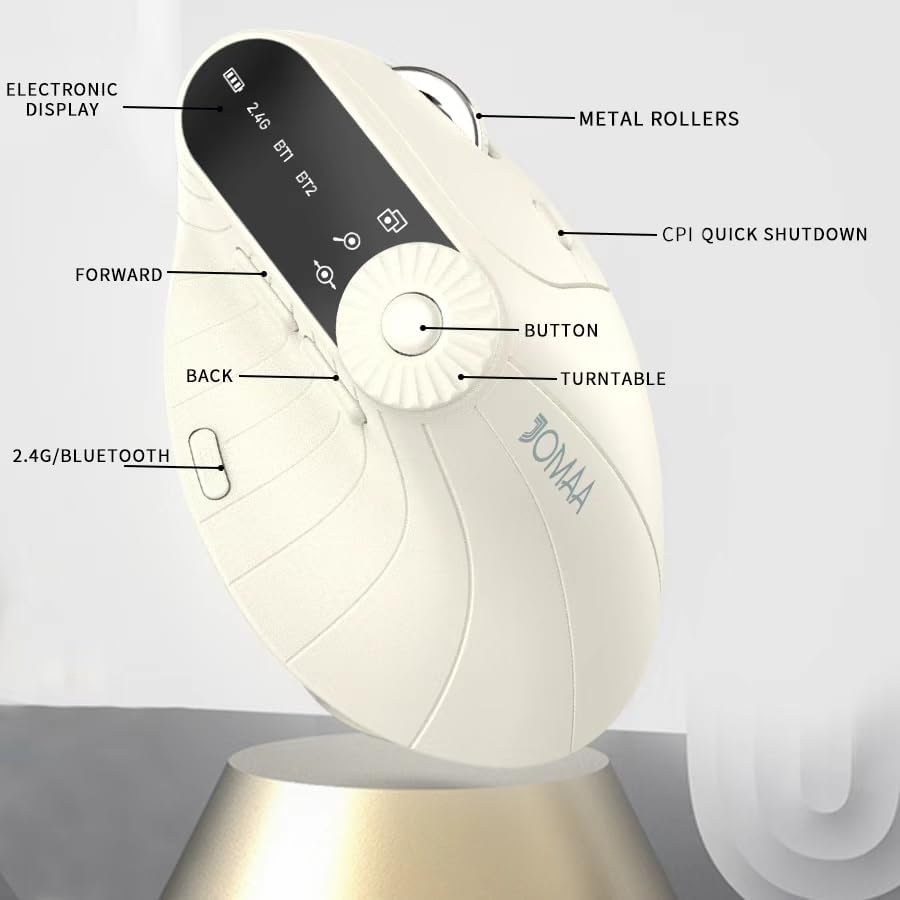
Тасвири 1: Labeled components of the JOMAA VM604 mouse, highlighting the electronic display, metal rollers, CPI quick shutdown, forward/back buttons, turntable, and 2.4G/Bluetooth switch.
- Тугмаи чапро пахш кунед: Standard left mouse function.
- Тугмаи ростро пахш кунед: Standard right mouse function.
- Чархи ҳаракат: Барои ҳаракатдиҳии амудӣ.
- Тугмаи пеш: Ба пеш ҳаракат мекунад web браузерҳо ё file кашфкунандагон.
- Тугмаи Бозгашт: Ба қафо дарун ҳаракат мекунад web браузерҳо ё file кашфкунандагон.
- Multi-function Turntable/Dial: Offers three functions: 1. Window switching, 2. Zoom in/out (for pages and images), 3. Page moves left/right (for Excel).
- DPI/CPI Adjustment Button: Cycles through DPI settings (1000/1200/1600/2400).
- Electronic Display: Shows battery level, connection mode (2.4G, BT1, BT2), and DPI setting.
- Connection Mode Switch (Bottom): Toggles between 2.4G, Bluetooth 1 (BT1), and Bluetooth 2 (BT2) modes.
- Power ON/OFF Switch (Bottom): Мушро фаъол ё хомӯш мекунад.
- Порти пуркунандаи USB-C: Located at the front of the mouse.
- USB Receiver Storage Slot: Located at the bottom of the mouse.
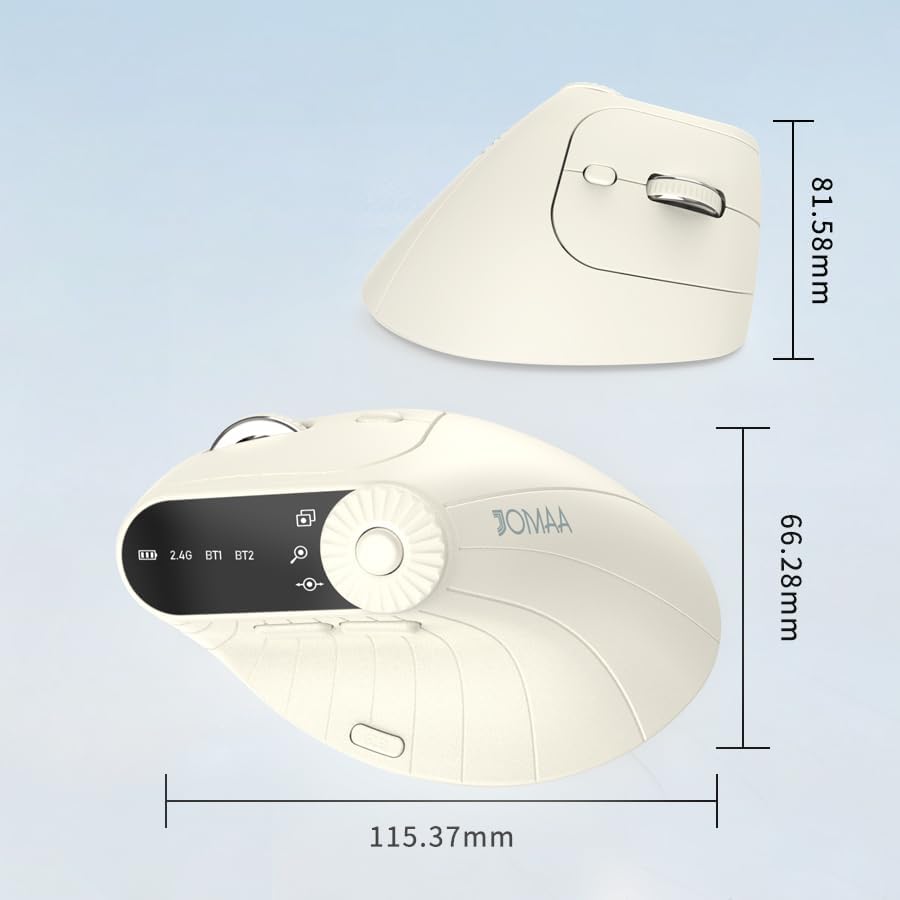
Тасвири 2: Dimensions of the JOMAA VM604 mouse, showing its ergonomic vertical design.

Тасвири 3: Illustration of the JOMAA VM604's 57-degree ergonomic design, promoting a natural handshake posture to reduce wrist pressure.
3. Танзимот
3.1 Пур кардани муш
The JOMAA VM604 mouse features a built-in rechargeable battery. To charge:
- Connect the provided USB-C charging cable to the charging port at the front of the mouse.
- Нӯги дигари сими USB-ро ба манбаи барқи USB пайваст кунед (масалан, порти USB-и компютер, адаптери девории USB).
- The electronic display will indicate charging status.

Тасвири 4: The JOMAA VM604 mouse connected via USB-C for charging, with a visible charging indicator on the electronic display.
3.2 Пайвасти бесими 2.4G
For a stable and fast wireless connection:
- Locate the USB receiver stored in the slot at the bottom of the mouse.
- Қабулкунаки USB-ро ба порти дастраси USB дар компютери худ пайваст кунед.
- Turn on the mouse using the ON/OFF switch at the bottom.
- Slide the connection mode switch to the '2.4G' position. The mouse should automatically connect to your computer.
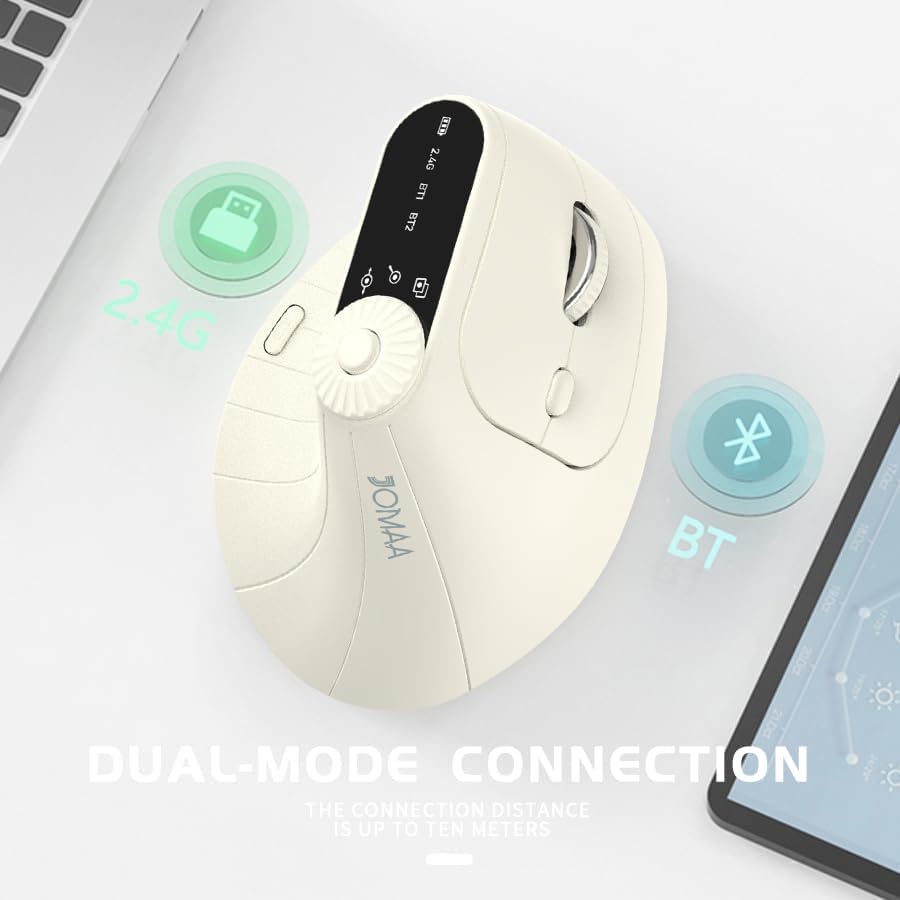
Тасвири 5: The JOMAA VM604 mouse illustrating its dual-mode connection capabilities, including the 2.4G USB receiver and Bluetooth options.
3.3 Bluetooth Connection (BT1/BT2)
The mouse can connect to two different Bluetooth devices:
- Turn on the mouse using the ON/OFF switch at the bottom.
- Slide the connection mode switch to either 'BT1' or 'BT2' position.
- For the first Bluetooth connection or to reset a connection, press and hold the connection mode switch for 3-5 seconds until the Bluetooth indicator on the electronic display starts blinking.
- On your device (PC, Laptop, MacBook), go to Bluetooth settings and search for 'JOMAA VM604' (or similar name).
- Select the mouse to pair. The indicator light will stop blinking once connected.
- To switch between connected devices, simply double-click the connection mode switch to cycle through 2.4G, BT1, and BT2.
4. Дастурҳои истифодабарӣ
4.1 Танзими DPI
Adjust the mouse sensitivity (DPI/CPI) to suit your preference:
- Press the DPI Adjustment Button (Component 7) located near the multi-function dial.
- Each press will cycle through the available DPI settings: 1000, 1200, 1600, and 2400.
- The electronic display will show the current DPI setting.
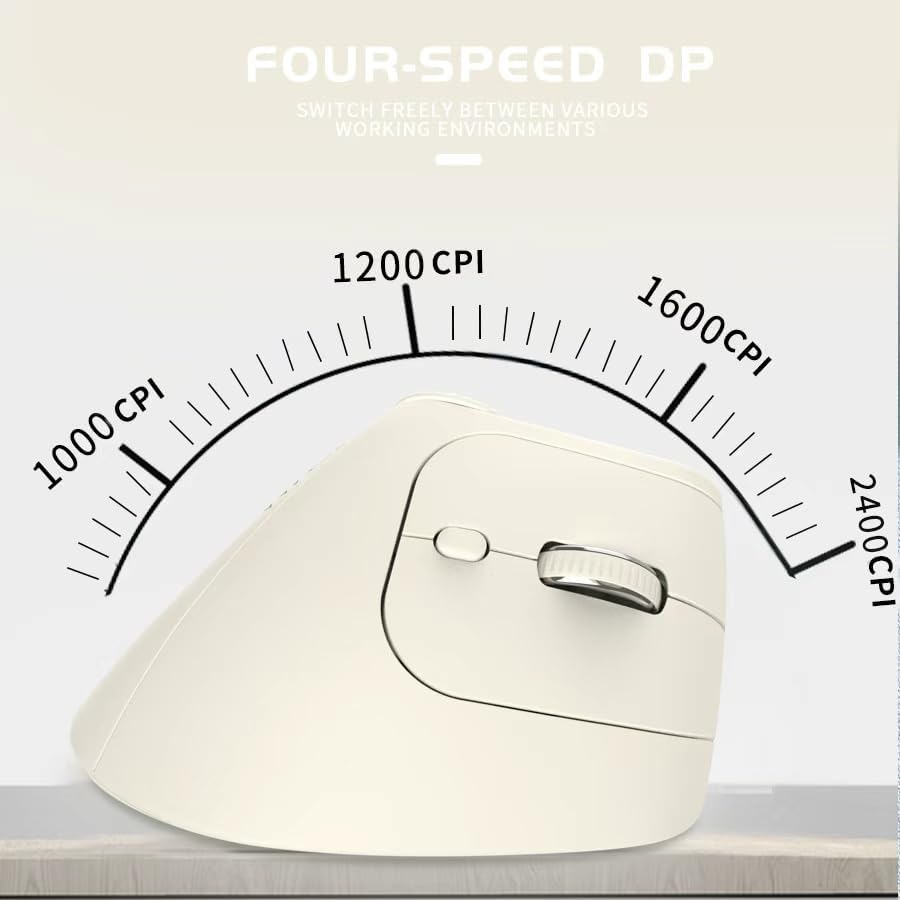
Тасвири 6: The JOMAA VM604 mouse highlighting its four-speed CPI settings (1000, 1200, 1600, 2400) for precise optical tracking.
4.2 Multi-Function Turntable
The unique turntable (Component 6) provides enhanced control:
- Window Switching: Rotate the dial to quickly switch between open application windows.
- Баланд кардан/Кум кардан: Rotate the dial to zoom in or out on pages and images.
- Page Left/Right: Useful for navigating large spreadsheets in applications like Excel.

Тасвири 7: The multi-function knob on the JOMAA VM604 mouse, demonstrating its uses for window switching, zooming in/out on pages and images, and moving pages left/right in applications like Excel.
4.3 Forward/Back Buttons
Use the Forward (Component 4) and Back (Component 5) buttons for quick navigation in web браузерҳо ва file кашфкунандагон.
5. Нигоҳдорӣ
5.1 Тозакунӣ
Барои нигоҳ доштани самаранокии беҳтарин ва гигиена:
- Пеш аз тоза кардан, мушро хомӯш кунед.
- нармро истифода баред, гamp матоъ барои тоза кардани сатҳи муш.
- Аз истифодаи кимиёвии сахт ё маводи абразивӣ худдорӣ намоед.
- Periodically clean the optical sensor at the bottom with a cotton swab.
5.2 Нигоҳубини батарея
Барои дароз кардани мӯҳлати батарея:
- Батареяро зуд-зуд пурра холӣ накунед.
- Charge the mouse regularly, even if not completely depleted.
- If the mouse will not be used for an extended period, turn it off.

Тасвири 8: The JOMAA VM604 mouse demonstrating its intelligent hibernate mode, which activates after 60 seconds of inactivity to save power.
6. Баррасии мушкилот
- Муш ҷавоб намедиҳад: Ensure the mouse is turned on and fully charged. Check the connection mode (2.4G or Bluetooth) and ensure it's correctly paired/connected to your device. For 2.4G, try plugging the USB receiver into a different port. For Bluetooth, try re-pairing the device.
- Cursor movement is erratic: Clean the optical sensor at the bottom of the mouse. Ensure the surface you are using is clean and suitable for mouse operation. Adjust the DPI setting to a lower value if the cursor is too fast.
- Масъалаҳои пайвасти Bluetooth: Ensure your device's Bluetooth is enabled. Try forgetting the device in your Bluetooth settings and re-pairing. Ensure the mouse is in the correct BT1 or BT2 mode and in pairing mode (blinking indicator).
- Multi-function dial not working: Ensure the mouse is properly connected. Some functions may require specific application support.
7. Мушаххасоти
| Хусусият | Тафсилот |
|---|---|
| Андозаҳои маҳсулот | 6 x 4 x 0.04 инч |
| Вазни ашё | 7.4 унция |
| Рақами модели ашё | VM604 |
| Батареяҳо | 1 9V batteries required (included) - Note: Product features built-in rechargeable battery, 9V battery information may be a listing error. |
| Технологияи пайвастшавӣ | Bluetooth, USB (2.4G Wireless) |
| Хусусияти махсус | Ergonomic Design, Multi-function Turntable, Adjustable DPI, Rechargeable |
| Технологияи муайянкунии ҳаракат | Оптикӣ |
| Танзимоти DPI | 1000/1200/1600/2400 |
| Ранги | Beiga |
8. Кафолат ва дастгирӣ
JOMAA products are designed and manufactured to the highest quality standards. This product is covered by a limited warranty from the date of purchase. For detailed warranty information, technical support, or customer service inquiries, please refer to the contact information provided on the product packaging or visit the official JOMAA webсайт.
Лутфан далели хариди худро барои даъвоҳои кафолат нигоҳ доред.
9. Видеои расмии маҳсулот
Видео 1: Як барview of the JOMAA VM604 Ergonomic Mouse, showcasing its unique vertical design and comfortable grip. This video highlights the physical appearance and ergonomic benefits of the mouse.


