Муқаддима
This manual provides detailed instructions for the safe and efficient operation of your Bewinner MP3 Music Player with Camera, Model Bewinner6rb3g52470-11. Please read this manual thoroughly before using the device and retain it for future reference.
Маҳсулот ба охир расидview
The Bewinner MP3 Music Player is a versatile portable device designed for audio playback, photo and video capture, and other multimedia functions. It features a compact design, a responsive touchscreen, and expandable storage.

The Bewinner MP3 Music Player, featuring a digital display and integrated camera, shown alongside its USB-C charging cable.
Хусусиятҳои асосӣ:
- Иқтидори нигаҳдории калон: Supports up to 128GB memory card expansion, allowing storage of over 10,000 songs. Compatible with MP3, WMA, WAV, APE, FLAC, AAC LC, M4A, and OGG audio formats.
- Full HD 720P Digital Camera: Integrated camera for recording photos and videos in 720P resolution.
- Ҳаёти батареяи дароз: 500mAh battery provides up to 48 hours of battery life after a 2-hour charge.
- Пайвастшавӣ ба Bluetooth 5.4: For wireless pairing with headphones or speakers.
- Интерфейси экрани сенсорӣ барои корбар: Responsive 2.01-inch touchscreen for effortless navigation.
- Бисёрфунксионалӣ: Includes video playback (requires format conversion), FM radio, photo viewing, e-books, wallpapers, alarms, stopwatch, and voice recorder.
- Баландгӯяки дарунсохт: Allows sharing audio without external devices.

This image illustrates the compact size of the Bewinner MP3 Player, easily fitting into a pocket or held in one hand, highlighting its portability.
Ташкил кардан
1. Пуркунии дастгоҳ:
Before first use, fully charge the MP3 player. Connect the included USB-C cable to the device's charging port and the other end to a USB power adapter (not included) or a computer's USB port. The device typically charges in approximately 2 hours.
2. Installing a Memory Card:
The device supports microSD cards up to 128GB (not included with this model). Locate the memory card slot on the side of the player. Gently insert the microSD card with the gold contacts facing down until it clicks into place. To remove, push the card in slightly until it springs out.
3. Фурӯзон/хомӯшкунӣ:
Press and hold the power button (usually located on the side or top) for a few seconds to turn the device on or off. A short press will typically turn the screen on or off.
Дастурҳои амалиётӣ
1. Basic Navigation:
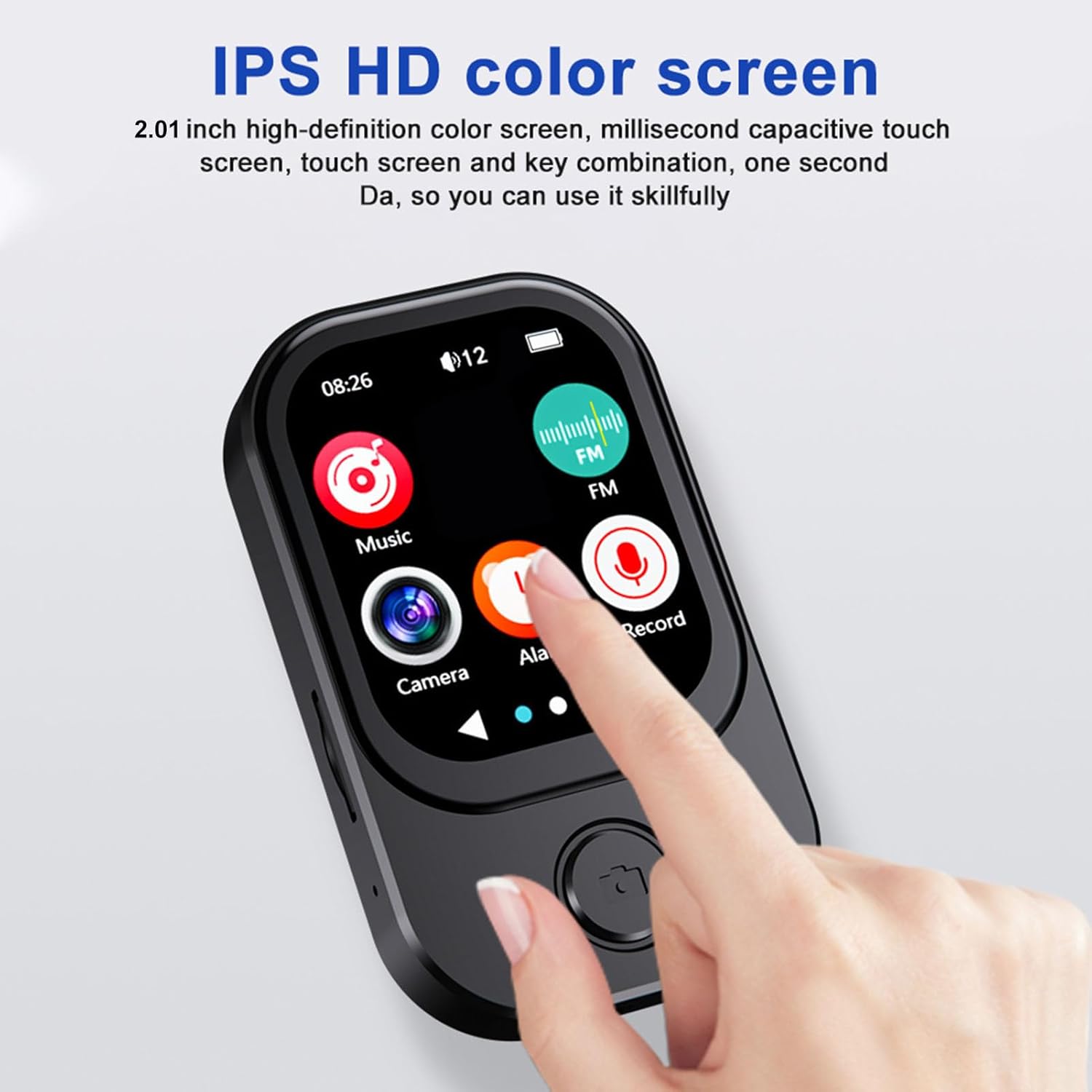
The Bewinner MP3 Player features a 2.01-inch touchscreen. Swipe left or right to navigate between application screens. Tap an icon to open an application. Use the back button (if present) or swipe gestures to return to the previous screen.

Ин тасвир маълумоти муфассал медиҳад view of the MP3 player's 2.01-inch IPS HD color screen, showcasing its responsive touchscreen interface and intuitive icon layout for easy navigation.
2. Бозии мусиқӣ:
- Tap the 'Music' icon on the home screen.
- Китобхонаи мусиқии худро аз рӯи рассом, албом, жанр ё ҷузвдон паймоиш кунед.
- Барои оғози навохтани суруд ламс кунед.
- Барои бозӣ/таваққуф, гузарондани трекҳо ва танзими баландии овоз, тугмаҳои идоракунии экранро истифода баред.
Supported audio formats include MP3, WMA, WAV, APE, FLAC, AAC LC, M4A, and OGG.
3. Camera Function:
The device includes a 720P digital camera. The lens can rotate 90 degrees for flexible shooting angles.

Three distinct icons illustrate the versatile capabilities of the MP3 player's integrated camera: recording audio, capturing video, and taking still photographs.
- Tap the 'Camera' icon.
- Аз байни режими аксбардорӣ ё видео интихоб кунед.
- Tap the shutter icon to take a photo or start/stop video recording.
4. Пайвасти Bluetooth:
To pair with Bluetooth headphones or speakers:
- Ба "Танзимот" равед ва "Bluetooth" -ро интихоб кунед.
- Bluetooth-ро фаъол созед.
- Боварӣ ҳосил кунед, ки дастгоҳи Bluetooth-и шумо дар ҳолати ҷуфтшавӣ қарор дорад.
- Select your device from the list of available devices to pair.
5. Дигар вазифаҳо:
- Радиои FM: Tap the 'FM' icon to access the radio. You may need to connect wired headphones (not included) to act as an antenna.
- Навозиши видео: The player supports video playback. Note that some video formats may require conversion to AVI (240x288 resolution) for optimal performance.
- Сабткунандаи овоз: Tap the 'Record' icon to start recording voice memos.
- E-books & Photo Viewэ: Access these functions via their respective icons to view матн files or images stored on the device.
A visual representation of the MP3 player's advanced features, including its 720p camera with a 90-degree rotating lens, IPS true retinal display, and icons for music, FM radio, camera, alarm, and record functions.
6. OTG Connection:
The device supports OTG (On-The-Go) connectivity, allowing direct connection to compatible mobile phones for file transfer. Use a suitable OTG cable (not included) to connect the MP3 player to your smartphone.

The MP3 player is shown connected to a mobile phone using an OTG cable, demonstrating its ability to transfer files directly to a smartphone for sharing or backup.
Нигоҳдорӣ
- Тозакунӣ: Барои тоза кардани дастгоҳ матои мулоими хушкро истифода баред. Аз истифодаи маводи тозакунандаи моеъ ё маводи абразивӣ худдорӣ намоед.
- Нигоҳдорӣ: Плеери MP3-ро дар ҷои хунук ва хушк, дур аз нури бевоситаи офтоб ва ҳарорати аз ҳад зиёд нигоҳ доред.
- Нигоҳубини батарея: Барои дароз кардани мӯҳлати хизмати батарея, аз пурра холӣ кардани батарея зуд-зуд худдорӣ намоед. Дастгоҳро мунтазам пур кунед, ҳатто агар муддати тӯлонӣ истифода нашавед.
- Пешгирӣ кардани таъсир: Дастгоҳро аз афтидан ва зарбаҳо муҳофизат кунед, ки метавонанд ба ҷузъҳои дохилӣ ё экран зарар расонанд.
Мушкилкушо
| Мушкилот | Ҳалли имконпазир |
|---|---|
| Дастгоҳ фурӯзон намешавад. | Ensure the battery is charged. Connect to a power source and try again. If unresponsive, perform a hard reset (refer to device specifications for reset method, if available). |
| Аудиоро шунидан мумкин нест. | Check volume levels. Ensure headphones or Bluetooth speakers are properly connected and functioning. Verify audio file мутобиқати формат. |
| Корти хотира эътироф нашудааст. | Ensure the memory card is inserted correctly. Try reinserting the card. Test with a different compatible memory card. Format the card if necessary (this will erase all data). |
| Camera not functioning. | Ensure sufficient storage space on the memory card. Check camera settings. Restart the device. |
| Мушкилоти пайвасткунии Bluetooth. | Ensure both devices are in pairing mode and within range. Turn Bluetooth off and on again on both devices. Clear previous pairings if necessary. |
Мушаххасоти
| Хусусият | Тафсилот |
|---|---|
| Рақами модел | Bewinner6rb3g52470-11 |
| Андозаҳо | Тақрибан 67.5 x 41 x 13.5 мм / 2.7 x 1.6 x 0.5 дюйм |
| Вазн | 3.74 унция |
| Ранги | Сиёҳ |
| Батарея | Батареяи дарунсохти литий-ионии 500 мАч |
| Экран | Экрани 2.01 дюймаи IPS |
| Версияи Bluetooth | БТ 5.4 |
| Қарори акс | 1280х720 |
| Ҳалли видео | 1280х720 |
| Формати видео | AVI (Resolution 240x288 for playback) |
| Порти пуркунандаи барқ | Навъи C |
| Порти аудио | 3.5мм |
| Дастгирии корти хотира | Up to 128GB (microSD, not included) |
Кафолат ва дастгирӣ
For warranty information or technical support, please refer to the product packaging or contact Bewinner customer service through their official channels. You can also visit the Мағозаи Bewinner дар Amazon барои захираҳои иловагӣ.


