1. Муқаддима
The Audizio Desio is a versatile digital radio that combines classic aesthetics with modern audio technology. It features DAB, DAB+, and FM tuning for clear radio reception, along with Bluetooth 5.0 for wireless streaming, a USB port for media playback, and a 3.5mm AUX input for wired connections. The radio is equipped with a 2.4-inch color LCD display and integrated stereo speakers, making it suitable for various environments such as living rooms, kitchens, or bedrooms.
This manual provides detailed instructions for setting up, operating, and maintaining your Audizio Desio radio. Please read it thoroughly before use to ensure proper functionality and to maximize your listening experience.
2. Маълумот оид ба бехатарӣ
- Боварӣ ҳосил кунед, ки баландии адаптери барқ ду баробар астtage matches your local power supply before connecting.
- Дастгоҳро ба борон, намӣ ё ҳарорати аз ҳад зиёд нагузоред.
- Дастгоҳро дар наздикии манбаъҳои гармӣ ё зери нури бевоситаи офтоб ҷойгир накунед.
- в-ро кушоедasinг; тамоми хизматрасониро ба кормандони соҳибихтисос фиристед.
- Дастгоҳро аз майдонҳои магнитии қавӣ дур нигоҳ доред.
- Дастгоҳро танҳо бо матои мулоим ва хушк тоза кунед.
3. Мундариҷаи баста
Лутфан тафтиш кунед, ки ҳама ашё ҳангоми кушодан мавҷуд аст:
- Audizio Desio DAB/DAB+/FM Radio
- Адаптери барқ (DC 5V)
- Назорати дурдаст
- Дастури корбар
4. Идоракунӣ ва Пайвастшавӣ
Назорати панели пеши
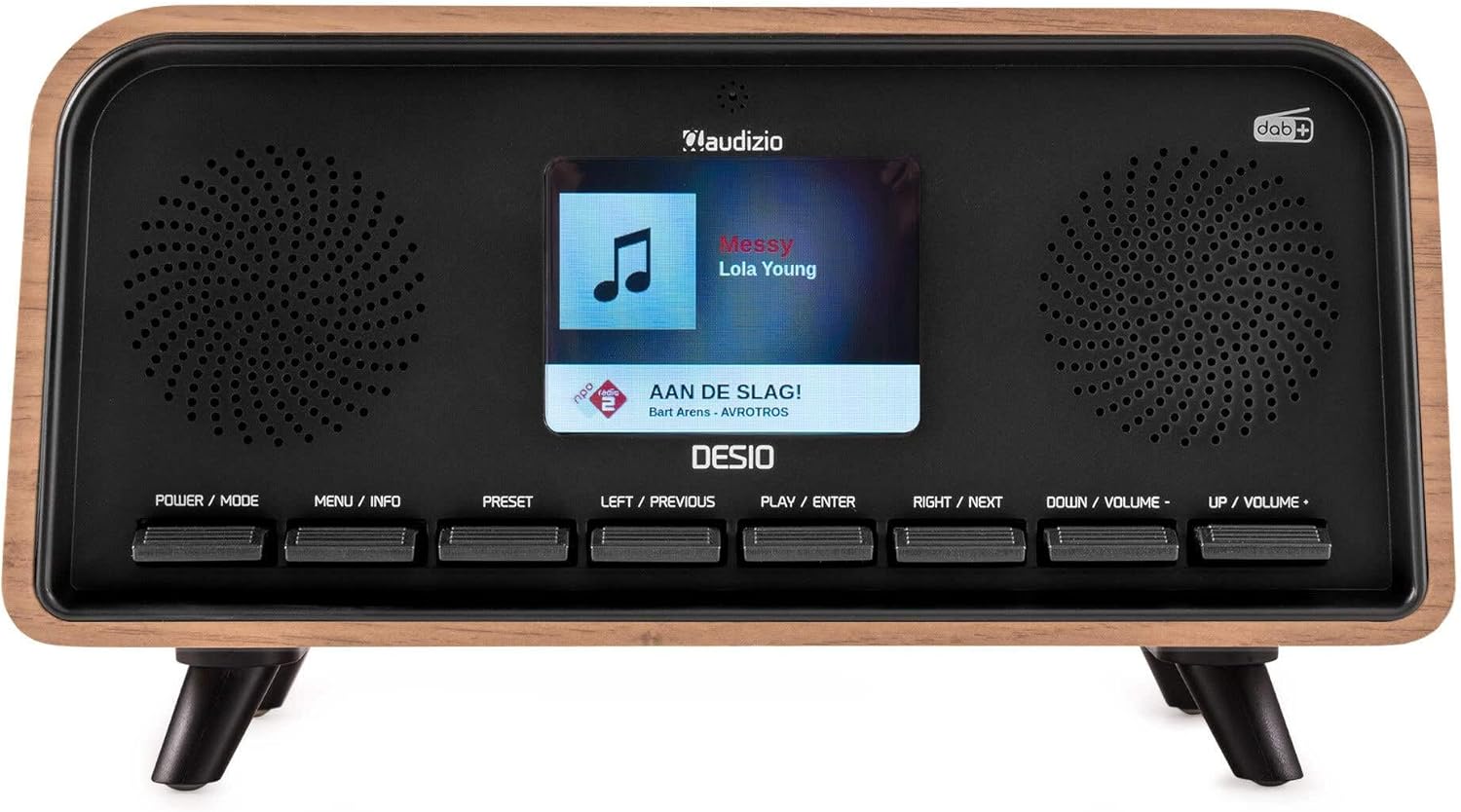
Пеш view of the Audizio Desio radio, showing the display playing music with artist and track information. The control buttons are visible below the screen.
- POWER / MODE: Press to turn on/off. Press and hold to switch between DAB, FM, Bluetooth, USB, and AUX modes.
- MENU / INFO: Press to access menu options. In playback mode, press to cycle through information display.
- Пешакӣ: Press to recall saved stations. Press and hold to save current station.
- LEFT / PREVIOUS: Navigate left in menus, or skip to previous track/station.
- PLAY / ENTER: Confirm selection in menus, or play/pause media.
- RIGHT / NEXT: Navigate right in menus, or skip to next track/station.
- DOWN / VOLUME -: Decrease volume, or navigate down in menus.
- UP / VOLUME +: Increase volume, or navigate up in menus.
Пайвастҳои панели пушти сар
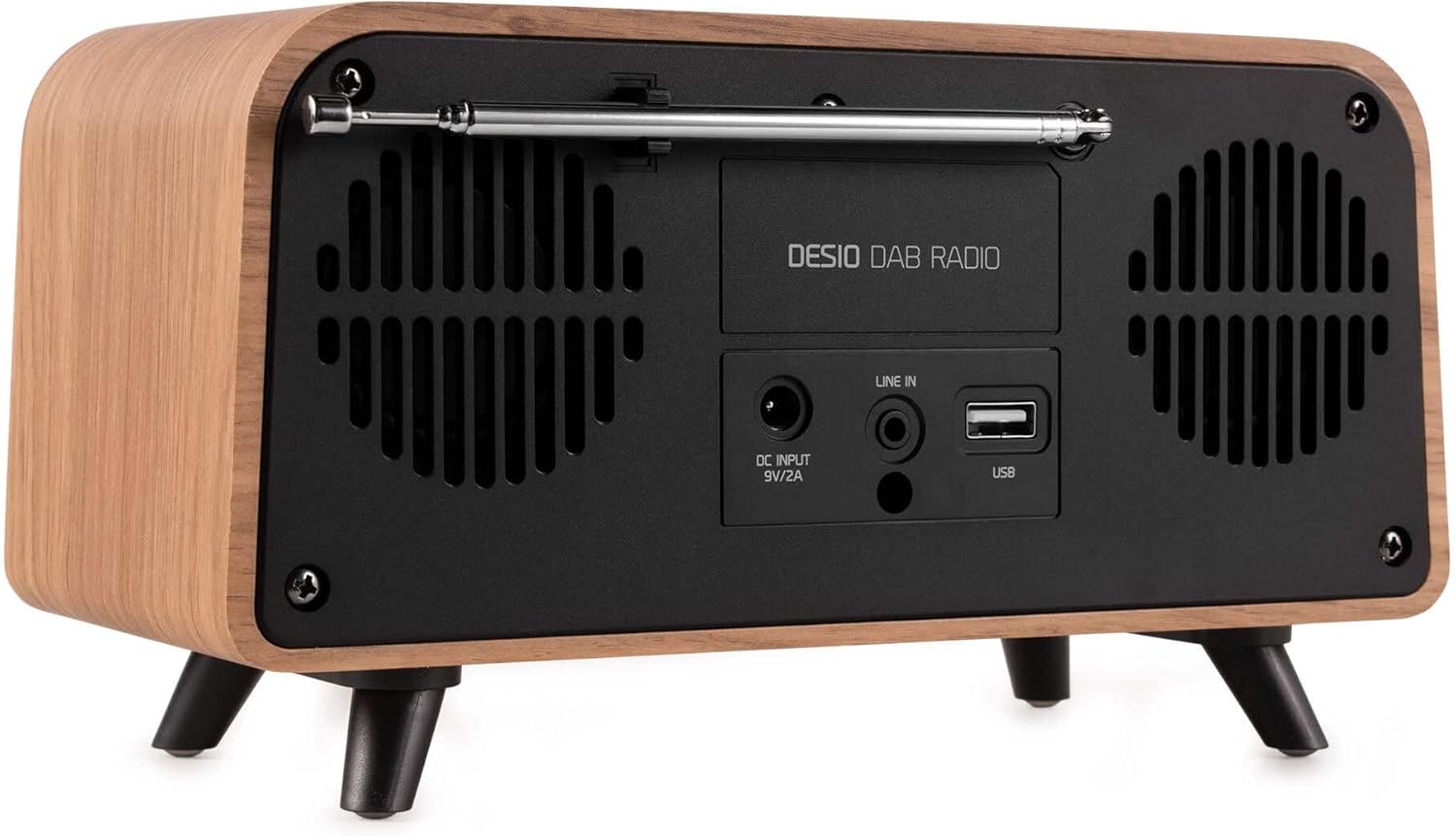
Қафо view of the Audizio Desio radio, highlighting the DC INPUT 9V/2A, LINE IN (3.5mm AUX), and USB ports. The telescopic antenna is extended.
- DC INPUT 9V/2A: Адаптери барқии додашударо дар ин ҷо пайваст кунед.
- LINE IN (3.5mm AUX): Дастгоҳҳои аудиоии беруна бо истифода аз сими аудиоии 3.5 мм пайваст кунед.
- USB: Диски флеши USB-ро барои навозиш MP3 ҷойгир кунед.
- Антеннаи телескопӣ: Extend fully for optimal DAB/DAB+ and FM reception.
5. Танзимоти ибтидоӣ
- Пайваст кардани барқ: Plug the provided DC 5V power adapter into the DC INPUT port on the rear of the radio, then plug the adapter into a wall outlet.
- Антеннаро дароз кунед: Fully extend the telescopic antenna located on the rear of the unit for best reception.
- Фаъол: -ро пахш кунед ҚУРД / РЕЖИМ тугмаи пахш кардани радио.
- First-time DAB Scan: Upon first power-on, the radio will automatically perform a full scan for DAB/DAB+ stations. This may take a few minutes. The display will show the scanning progress.
- Вақт/санаро таъин кунед: The time and date will usually be set automatically via DAB signal. If not, you can manually set them via the menu.
6. Дастурҳои истифодабарӣ
6.1 Фаъолияти радиоии DAB/DAB+

Пеш view of the Audizio Desio radio, displaying a DAB radio station ('NPO Klassiek') and current time.
- Select DAB Mode: -ро пахш кунед ҚУРД / РЕЖИМ button repeatedly until 'DAB' is displayed.
- Скан кардани истгоҳҳо: If no stations are found or you wish to rescan, press МЕНЮ / INFO, баъд истифода баред LEFT / PREVIOUS or РОСТ / ОЯНДА to select 'Full Scan' and press PLAY / ENTER.
- Истгоҳро интихоб кунед: -ро истифода баред LEFT / PREVIOUS or РОСТ / ОЯНДА buttons to browse available stations. Press PLAY / ENTER барои интихоб кардани истгоҳ.
- Наҷоти пешакӣ: Барои захира кардани истгоҳ, тугмаро пахш карда нигоҳ доред ПАХШИНОСОН тугма. Истифода баред LEFT / PREVIOUS or РОСТ / ОЯНДА to choose a preset number (1-50), then press PLAY / ENTER тасдиқ кардан.
- Бозгашти пешакӣ: Барои бозхонди истгоҳи захирашуда, тугмаи ПАХШИНОСОН button (do not hold). Use LEFT / PREVIOUS or РОСТ / ОЯНДА барои интихоби танзимоти дилхоҳ, пас тугмаи пахш кунед PLAY / ENTER.

Пеш view of the Audizio Desio radio, showing the 'Preset Recall' menu on the display, indicating empty preset slots.
6.2 Фаъолияти радиои FM
- Ҳолати FM-ро интихоб кунед: -ро пахш кунед ҚУРД / РЕЖИМ button repeatedly until 'FM' is displayed.
- Сканкунии худкор: Пахш кунед ва доред PLAY / ENTER to automatically scan for and save available FM stations.
- Танзими дастӣ: Истифода баред LEFT / PREVIOUS or РОСТ / ОЯНДА барои танзими дақиқи басомад.
- Save/Recall Presets: Follow the same procedure as for DAB radio (Section 6.1).
6.3 Bluetooth (BT) Operation

Пеш view of the Audizio Desio radio, with the display showing 'BT' (Bluetooth) mode and 'Connected' status.
- Select BT Mode: -ро пахш кунед ҚУРД / РЕЖИМ button repeatedly until 'BT' is displayed. The radio will enter pairing mode, indicated by a flashing Bluetooth icon.
- Дастгоҳи ҷуфт: On your smartphone, tablet, or laptop, enable Bluetooth and search for available devices. Select 'Audizio Desio' from the list.
- Пайвастшавӣ: Once paired, the display will show 'Connected'. You can now stream audio from your device to the radio.
- Назорати бозӣ: Use your connected device or the radio's PLAY / ENTER, LEFT / PREVIOUS, ва РОСТ / ОЯНДА тугмаҳо барои назорати бозикунии.
6.4 Бозии USB

Пеш view of the Audizio Desio radio, with the display showing 'USB' mode, current time, and details of an MP3 file бозида мешавад.
- Диски USB-ро ворид кунед: Insert a USB flash drive (formatted to FAT32) containing MP3 fileс-ро ба порти USB дар қафои радио пайваст кунед.
- Ҳолати USB-ро интихоб кунед: -ро пахш кунед ҚУРД / РЕЖИМ button repeatedly until 'USB' is displayed. The radio will automatically start playing the first compatible audio file.
- Гузариш Files: Истифода баред LEFT / PREVIOUS or РОСТ / ОЯНДА to skip tracks. Press PLAY / ENTER таваққуф/давом додани навозиш.
6.5 Вуруди AUX
- Дастгоҳро пайваст кунед: Connect an external audio device (e.g., MP3 player, smartphone) to the 'LINE IN' (3.5mm AUX) port on the rear of the radio using a 3.5mm audio cable (not included).
- Ҳолати AUX-ро интихоб кунед: -ро пахш кунед ҚУРД / РЕЖИМ button repeatedly until 'AUX' is displayed.
- Бозиро назорат кунед: Playback is controlled directly from your connected external device. Adjust volume using the radio's volume controls.
6.6 Alarm and Timer Functions
- Танзими ҳушдорҳо: Access the alarm settings via the МЕНЮ / INFO button. You can set multiple alarms with customizable sources (DAB, FM, Buzzer), volume, and recurrence (daily, weekdays, weekends).
- Вақти хоб: The sleep timer allows the radio to turn off automatically after a set period. Access this function via the МЕНЮ / INFO button and select the desired duration.
- Функсияи ҳифз: When an alarm sounds, press any button (except Power) to activate the snooze function for a short period.
7. Нигоҳдорӣ
- Тозакунӣ: Use a soft, dry, lint-free cloth to clean the radio's surface. Do not use abrasive cleaners, waxes, or solvents.
- Нигоҳубини антенна: Handle the telescopic antenna carefully to avoid bending or breaking.
- Нигоҳдорӣ: If storing the radio for an extended period, disconnect it from the power supply and store it in a cool, dry place.
8. Баррасии мушкилот
| Мушкилот | Сабаби эҳтимолӣ | Ҳалли |
|---|---|---|
| Не қудрат | Адаптери барқ пайваст нашудааст ё васлаки нодуруст. | Check power adapter connection and try a different outlet. |
| Қабули сусти DAB/FM | Antenna not fully extended or poor signal area. | Fully extend the antenna. Try repositioning the radio. Perform a full scan. |
| Bluetooth пайваст нест | Radio not in BT mode, device not in pairing mode, or too far away. | Ensure radio is in BT mode. Put your device in pairing mode. Move device closer to the radio (within 10m). |
| Бозии USB кор намекунад | USB drive not inserted correctly, unsupported file format, or drive not FAT32. | Reinsert USB drive. Ensure files are MP3. Check USB drive format (FAT32). |
| No sound from AUX | Radio not in AUX mode, cable faulty, or external device volume low. | Select AUX mode. Check 3.5mm cable. Increase volume on both radio and external device. |
9. Мушаххасоти техникӣ
- Бренд: Аудизио
- Модели: Desio
- Технологияи танзимкунанда: FM, DAB+
- Блутуз: Version 5.0 (Range: 10m)
- Параметрҳои бозикунии: Bluetooth, USB, 3.5mm AUX input
- Пойгоҳҳои пешакӣ муқарраршуда: 50
- Намоиш: 2.4 дюйм LCD Ранги
- Функсияҳо: Alarm, Sleep Timer, Snooze, Dimming, Week/Weekend Alarm
- Max Speaker Power: 30 ватт
- Таъмини нерӯ: DC 5V (Power Adapter)
- Андозаҳои маҳсулот (H x W x D): 32 х 16 х 18 см
- Вазн: 1.66 кг
10. Кафолат ва дастгирӣ
This product comes with a standard manufacturer's warranty. For detailed warranty terms and conditions, please refer to the documentation provided at the time of purchase or contact your retailer.
For technical support, troubleshooting assistance, or service inquiries, please contact the Audizio customer support team or your local dealer. Please have your product model number (Desio) and purchase information ready when contacting support.