1. Муқаддима
The Hantek DSO2D50 is a high-performance digital storage oscilloscope designed for precise signal analysis and measurement. It features a 500MHz bandwidth, 2GSa/s real-time sampling rate, and an 80K memory depth. This instrument also integrates a 25MHz arbitrary waveform generator, making it a versatile tool for various electronic testing and development applications.
This manual provides essential information for the safe and effective operation of your DSO2D50 oscilloscope. Please read it thoroughly before use and retain it for future reference.
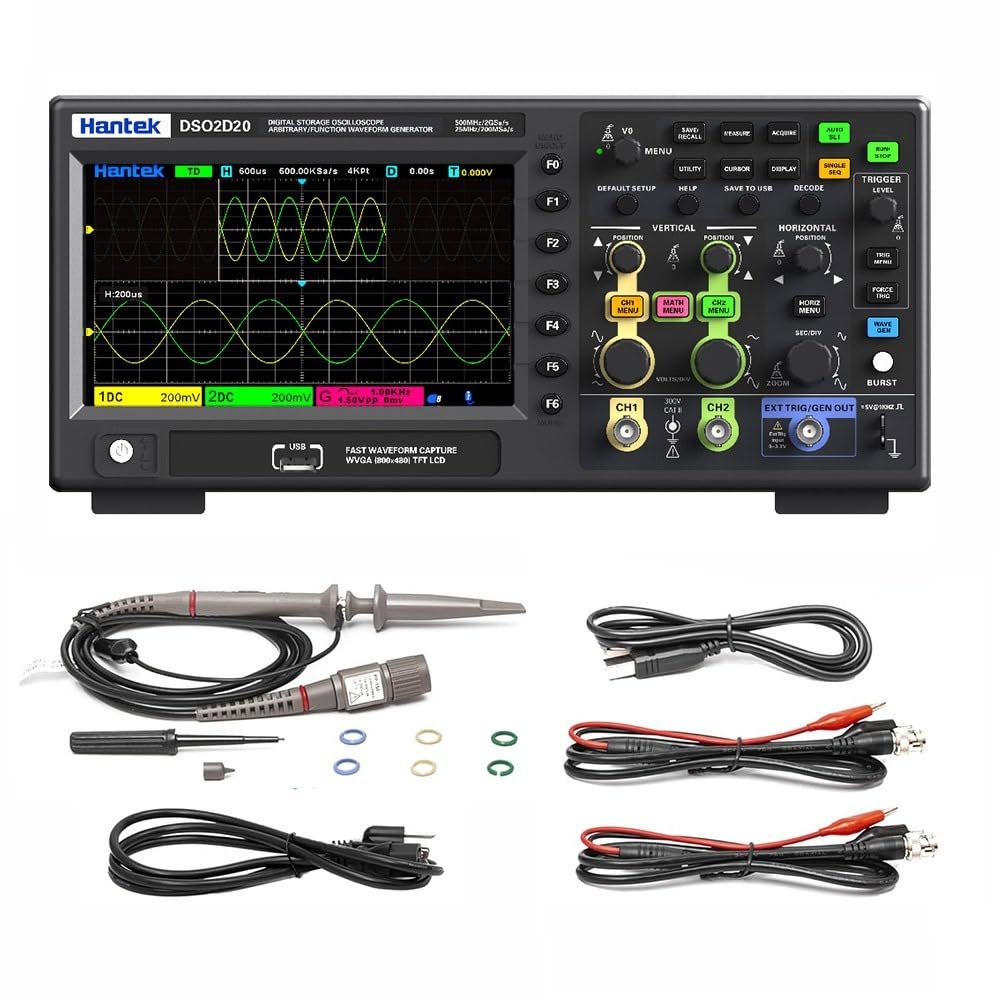
Расми 1.1: Пеш view of the Hantek DSO2D50 Digital Storage Oscilloscope.
Хусусиятҳои асосӣ:
- 2 Analog Channels + 1 External Trigger Channel
- Маҷрои 500 МГс
- 2 GSa/s Real-time SampLing Rate
- 80K Memory Depth
- Built-in 25MHz Arbitrary Waveform Generator
- 32 Automatic Measurement Functions
- 9 Triggering Modes
- Supports 1MΩ/50Ω Impedance Switching
- Multiple Data Storage Options (CSV, images, waveforms)
- Дисплейи 7 дюймаи LCD
2. Маълумот оид ба бехатарӣ
Огоҳӣ:
- To prevent electric shock, do not open the instrument casinг. Ҳама хидматрасониро ба кормандони соҳибихтисос муроҷиат кунед.
- Осциллографро дар ҳолати тар ё намӣ истифода набаред.amp шароит.
- Таъмини таъминоти барқ voltage ба талаботи асбоб мувофиқат мекунад.
- Use only the power cord and accessories specified by the manufacturer.
- Before making any connections, ensure the instrument is powered off.
- Always connect the ground lead of the probe to the circuit ground before connecting the probe tip to the test point.
- Observe all terminal ratings to prevent fire or electric shock.

Figure 2.1: Rear panel showing power input and safety warning.
Ҷилди хатарнокtage inside, do not remove the cover unless by specified personnel.
3. Мундариҷаи баста
Боварӣ ҳосил кунед, ки бастаи шумо ҷузъҳои зеринро дар бар мегирад:
- 1 x Hantek DSO2D50 Bench Digital Storage Oscilloscope
- 2 x Passive Probes (typically 1:1/10:1 switchable)
- 1 хати барқ
- 1 x кабели USB
- 1 x Дастури корбар (ин ҳуҷҷат)
- 1 x Calibration Certificate (may vary)
If any items are missing or damaged, please contact your dealer or Hantek customer support immediately.
4. Маҳсулот ба охир расидview
4.1 Идоракунӣ ва пайвасткунакҳои панели пеш
The front panel of the DSO2D50 features the display, control buttons, knobs, and input connectors for channels and the arbitrary waveform generator output.

Расми 4.1: Муфассал view of the control panel and input connectors.
Самтҳои асосӣ инҳоянд:
- Майдони намоиш: 7-inch TFT LCD for waveform display and menu navigation.
- Тугмаҳои функсионалӣ (F0-F6): Context-sensitive buttons along the right side of the display.
- Тугмаҳои меню: Buttons like DEFAULT SETUP, UTILITY, CURSOR, DISPLAY, SAVE TO USB, DECODE, HELP.
- Назорати амудӣ: VOLTS/DIV knobs and CH1 MENU, CH2 MENU, MATH MENU buttons for adjusting vertical scale and channel settings.
- Назорати уфуқӣ: SEC/DIV knob and HORIZ MENU, ZOOM buttons for adjusting horizontal scale and time base.
- Идоракунии триггерҳо: TRIGGER LEVEL knob and TRIG MENU, FORCE TRIG buttons for setting trigger conditions.
- Arbitrary Waveform Generator (AWG) Controls: WAVE GEN button and EXT TRIG/GEN OUT connector.
- Воридоти канал: CH1 and CH2 BNC connectors.
- External Trigger/AWG Output: EXT TRIG/GEN OUT BNC connector.
- Порти хости USB: Барои пайваст кардани дастгоҳҳои нигаҳдории USB.
4.2 Пайвасткунакҳои панели пушти сар
The rear panel includes the power input and ventilation.
- Вуруди барқ AC: Барои пайваст кардани сими барқ.
- Вентилятсия: For cooling the instrument.
5. Танзимот
5.1 Пайвастшавии барқ
- Боварӣ ҳосил кунед, ки тугмаи барқи осциллограф дар ҳолати OFF аст.
- Сими барқи додашударо ба вуруди барқи AC дар панели қафои осциллограф пайваст кунед.
- Нӯги дигари сими барқро ба васлаки зеризаминии AC пайваст кунед.
5.2 Пайвастшавӣ ва ҷуброни зонд
- Connect a passive probe to one of the CH1 or CH2 BNC input connectors.
- Set the probe attenuation switch (if applicable) to 10X.
- Connect the probe ground clip to the oscilloscope's ground terminal (usually a dedicated terminal or the ground ring of the BNC connector).
- Connect the probe tip to the probe compensation output (usually a square wave test signal output on the front panel).
- Осциллографро фаъол созед.
- -ро пахш кунед АВТО МАЗМУР button. The oscilloscope will automatically adjust settings to display the compensation signal.
- Adjust the compensation screw on the probe until a flat-top square wave is displayed on the screen. This ensures accurate measurements.
6. Дастурҳои истифодабарӣ
6.1 Намоиши шакли мавҷи асосӣ
- Осциллографро фаъол созед.
- Connect a compensated probe to CH1.
- Connect the probe tip to the signal source you wish to measure.
- -ро пахш кунед АВТО МАЗМУР button. The oscilloscope will automatically adjust the vertical, horizontal, and trigger settings to display a stable waveform.
- -ро истифода баред VOLTS/DIV knob to adjust the vertical scale (ampлитуда).
- -ро истифода баред SEC/DIV knob to adjust the horizontal scale (time base).
- -ро истифода баред МАВКЕ knobs to move the waveform vertically or horizontally.
6.2 1MΩ/50Ω Impedance Switching
The DSO2D50 supports switching between 1MΩ (high impedance) and 50Ω (low impedance) input impedance. This is crucial for adapting to different measurement scenarios and ensuring signal integrity, especially for high-frequency signals or when matching transmission lines.

Figure 6.1: Menu for selecting input impedance.
To switch impedance:
- -ро пахш кунед CH1 MENU or CH2 MENU button for the desired channel.
- Navigate through the menu options using the function buttons (F0-F6) until you find the "Impedance" setting.
- Якеро интихоб кунед 1МΩ or 50 Ом as required for your measurement.
- Шарҳ: When using 50Ω impedance, ensure your signal source is also 50Ω terminated to prevent reflections.
6.3 Measurement and Statistical Functions
The oscilloscope provides 32 automatic measurement functions and threshold measurement functions. These tools support statistical analysis, allowing you to display five measurement values: current value, average value, maximum value, minimum value, and standard deviation.

Расми 6.2: Мисample of automatic measurement display.
To access measurement functions:
- -ро пахш кунед ТАДБИР тугма.
- Use the function buttons to select the desired measurement type (e.g., Frequency, Period, Vpp, Vmax, Vmin, Rise Time, Fall Time).
- The selected measurements will appear on the screen.
- Ба view statistical values, navigate to the statistical menu within the MEASURE options.
6.4 Built-in Arbitrary Waveform Generator (AWG)
The DSO2D50 includes a 25MHz arbitrary waveform generator capable of outputting five standard waveforms: sine wave, square wave, triangle wave, exponential wave, noise, and DC. It also supports custom arbitrary waveform output.

Figure 6.3: Arbitrary Waveform Generator settings interface.
To use the AWG:
- Connect a BNC cable from the EXT TRIG/GEN OUT connector to the input of the device under test or an oscilloscope channel.
- -ро пахш кунед WAVE GEN тугма.
- Use the function buttons to select the desired waveform type (Sine, Square, Triangle, etc.).
- Adjust parameters such as Frequency, Amplitude, and Offset using the corresponding menu options and knobs.
- Ensure the AWG output is enabled within the menu.
6.5 Triggering Modes
The oscilloscope offers 9 triggering modes to stabilize and capture specific events in your waveform. Common modes include Edge, Pulse, Video, Slope, and more advanced options for serial bus decoding.
To set up a trigger:
- -ро пахш кунед TRIG MENU тугма.
- Select the desired trigger type (e.g., Edge, Pulse).
- Adjust the trigger source (CH1, CH2, EXT), slope (rising/falling edge), and level using the TRIGGER LEVEL knob and menu options.
- The trigger level is indicated by a horizontal line on the display.
6.6 Нигоҳдорӣ ва бозхонди маълумот
The DSO2D50 allows you to save and recall various data types, including CSV files, images, reference waveforms, and waveform data, to a USB storage device.
To save data:
- Insert a USB flash drive into the USB Host port on the front panel.
- -ро пахш кунед SAVE TO USB тугма.
- Select the desired save type (e.g., Image, Waveform, CSV) and file format from the menu.
- Амали наҷотро тасдиқ кунед.
6.7 Функсияҳои пешрафта
- Функсияҳои математикӣ: Perform waveform arithmetic operations (e.g., A+B, A-B, A*B, A/B, FFT) and support cursor measurements for detailed analysis.
- FFT Scale Display: Provides a clear display for frequency domain analysis, making it easier to read results.
- Усули XY: Use XY mode to analyze the phase relationship between two signals. This is useful for Lissajous figures.
- Serial Protocol Triggering and Decoding: Supports protocols such as UART, LIN, CAN, SPI, and IIC, enabling easy analysis of serial bus data.
- SCPI Remote Control: Standard SCPI commands are supported for easy system setup and remote control via USB.
7. Нигоҳдорӣ
7.1 Тозакунӣ
- Clean the instrument's exterior with a soft cloth dampбо шустушӯй ва об ҳалим анҷом дода мешавад.
- Do not use abrasive cleaners or solvents that may damage the casing ё намоиш.
- Боварӣ ҳосил кунед, ки моеъ ба дастгоҳ ворид намешавад.
7.2 Нигоҳдорӣ
- Вақте ки дар муддати тӯлонӣ истифода набаред, осциллографро дар муҳити хушк ва тоза нигоҳ доред.
- Аз ҳарорати аз ҳад зиёд ва намӣ худдорӣ кунед.
- Disconnect all probes and the power cord before storage.
7.3 Калибрченкунӣ
The DSO2D50 is factory calibrated. For continued accuracy, periodic calibration by qualified service personnel is recommended, typically every 1-2 years depending on usage.
8. Баррасии мушкилот
| Мушкилот | Сабаби эҳтимолӣ | Ҳалли |
|---|---|---|
| Пас аз фурӯзон шудан намоиш нест. | Power cord not connected, power switch off, or power supply issue. | Check power cord connection. Ensure power switch is ON. Verify power outlet functionality. |
| Ягон шакли мавҷ нишон дода нашудааст. | Probe not connected, signal source off, vertical/horizontal scale incorrect, or trigger not set. | Check probe connection. Ensure signal source is active. Press АВТО МАЗМУР. Adjust VOLTS/DIV and SEC/DIV. Check trigger settings. |
| Unstable waveform. | Incorrect trigger settings. | Adjust trigger level. Change trigger type (e.g., from Auto to Normal). Check trigger source. |
| Андозаҳо нодурустанд. | Probe compensation incorrect, probe attenuation setting mismatch, or incorrect impedance. | Perform probe compensation. Ensure probe attenuation (1X/10X) matches oscilloscope setting. Verify input impedance (1MΩ/50Ω). |
| USB storage not recognized. | Incompatible USB drive, drive not formatted correctly, or drive issue. | Try a different USB drive. Ensure drive is formatted to FAT32. |
9. Мушаххасоти
The following table outlines the key specifications for the Hantek DSO2D50 Digital Storage Oscilloscope.
| Параметр | Мушаххасоти |
|---|---|
| Модели | DSO2D50 |
| Каналҳо | 2 Analog Channels + 1 External Trigger Channel |
| Маҷрои маҷрои | 500 МГц |
| SampLing Rate | 2 GSa/s (Real-time) |
| Амиқии хотира | 80 Kpt |
| Генератори шакли мавҷи худсарона | 25 MHz (Sine, Square, Triangle, Exponential, Noise, DC) |
| Ҳассосияти амудӣ | 500 µV/div - 10 V/div |
| Импеданси вуруд | 1 MΩ ±2% || 15 pF ±5 pF; 50 Ω ±2% |
| Ҳаҷми ҳадди вурудtage | 300 V CAT II (1MΩ) |
| Намоиш | 7-дюймаи TFT LCD |
| Усулҳои триггер | Edge, Pulse, Video, Slope, Overtime, Window, Pattern, Interval, UART, LIN, CAN, SPI, IIC |
| Андозагириҳои худкор | 32 types, with statistical analysis |
| Интерфейс | USB Host, USB Device |
| Таъмини нерӯ | 100-240В AC, 50/60Гц |
| Истеъмоли қувваи барқ | <50Вт |
| Андозаҳо | (Refer to package dimensions, typically 5.91 x 3.94 x 0.79 inches for package, actual unit size will be larger) |
| Вазн | 12.1 фунт (Вазни ашё) |
Шарҳ: Specifications are subject to change without notice. For the most current specifications, please refer to the manufacturer's official webсайт.
9.1 Муқоисаи модел
The Hantek DSO2D50 is part of a series of oscilloscopes. The following table provides a comparison with other models in the series, highlighting key differences.

Figure 9.1: Model comparison table for Hantek oscilloscopes.
This table helps to understand the DSO2D50's position within the product line, specifically noting its 500MHz bandwidth, 2GSa/s sampling rate, 80K storage depth, and integrated arbitrary function generator (AFG).
10. Кафолат ва дастгирӣ
10.1 Маълумот дар бораи кафолат
Hantek products are typically covered by a limited warranty against defects in materials and workmanship. The specific warranty period and terms may vary by region and product. Please refer to the warranty card included with your product or visit the official Hantek webсайт барои гирифтани маълумоти муфассал дар бораи кафолат.
Квитансияи хариди худро ҳамчун далели харид барои даъвоҳои кафолат нигоҳ доред.
10.2 Дастгирии муштариён
For technical assistance, troubleshooting, or service inquiries, please contact Hantek customer support:
- Истеҳсолкунанда: Qingdao Hantek Electronic Co., Ltd
- Адрес: ш. #35 Building, No. 780 Baoyuan Road, High-tech Zone, Qingdao, Shandong, China 266114
- Webсайт: (Please refer to the official Hantek website for contact forms or email addresses)
When contacting support, please have your product model (DSO2D50) and serial number ready.


