


ProPlex Codeclock Timecode Display and Distribution Device
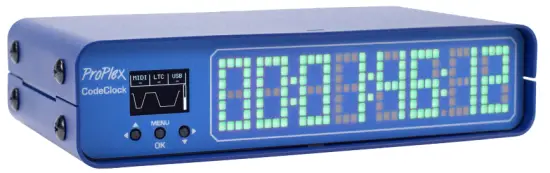
Барview
TMB authorizes its customers to download and print this electronically published manual for professional use only.
TMB нусхабардорӣ, тағир додан ё паҳн кардани ин ҳуҷҷатро барои ҳама гуна мақсадҳои дигар, бе розигии хаттии мустақим манъ мекунад.
TMB ба саҳеҳии маълумоти ҳуҷҷати дар ин ҷо овардашуда боварӣ дорад, аммо барои ҳама гуна талафот, ки дар натиҷаи мустақим ё ғайримустақими хатоҳо ё истисноҳо, хоҳ тасодуфан ё ягон сабаби дигар рух медиҳад, масъулият ё масъулиятро ба дӯш намегирад.
ТАВСИФИ МАҲСУЛОТ
The ProPlex CodeClock is a member of our LTC Device system, which is designed to generate, distribute and monitor timecode. Our rugged, compact mini-enclosure design is perfect for desktop programmers to throw in bag while also being flexible enough to install in a rack with an optional RackMount Kit. With custom color selection on a clean dot-matrix display, the CodeClock is the ultimate tool to synchronize and monitor timecode streams.
ХУСУСИЯТХОИ АСОСЙ
- Large RGB LED matrix clock displays time and changes color depending on status
- Receives timecode over LTC (XLR3), MIDI (DIN), or USB MIDI
- Redistributes selected timecode over LTC outputs
- 3x Neutrik XLR3 outputs are transformer-isolated and have adjustable level (-18dBu to +6dBu)
- OLED control panel with an intuitive user interface and waveform display
- Built-in timecode generator capable of running at any standard framerate
- Compact, lightweight, rugged, reliable. Backpack friendly
- Available rackmount kit options
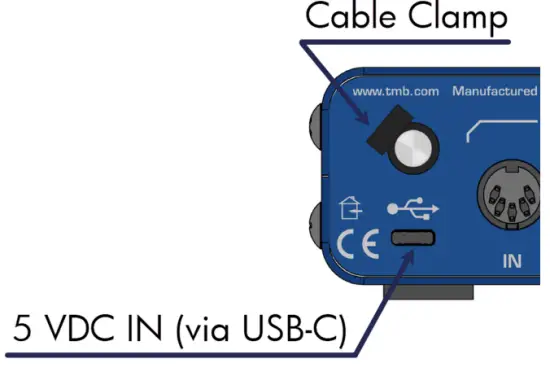
- Powered via USB-C. Cable retainer prevents accidental disconnection
Рамзҳои фармоиш
| ҚИСМҲО | PROUDCT NAME |
| PPCODECLME | PROPLEX CODECLOCK TIMECODE DEVICE |
| PP1RMKITSS | PROPLEX 1U RACKMOUNT KIT, SMALL, SINGLE |
| PP1RMKITSD | PROPLEX 1U RACKMOUNT KIT, SMALL, DUAL |
| PP1RMKITS+MD | PROPLEX 1U DUAL COMBINATION SMALL + MEDIUM |
МОДЕЛИ БАРГАШТVIEW
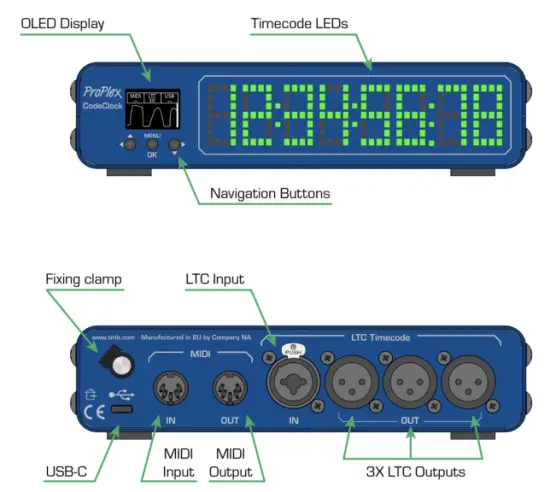
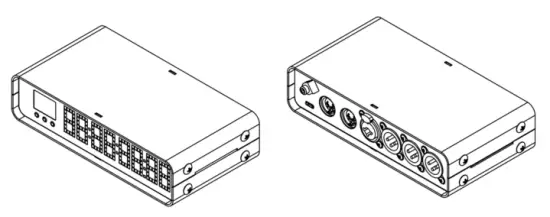
FULL DIMENSIONAL WIREFRAME DRAWINGS
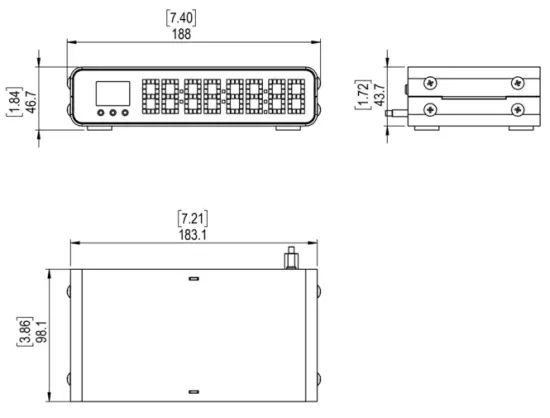
ТАШКИЛ КАРДАН
Чорабиниҳои бехатарӣ
Лутфан ин дастурҳоро бодиққат хонед.
Ин дастури корбар дорои маълумоти муҳим дар бораи насб, истифода ва нигоҳдории ин маҳсулот мебошад
- Боварӣ ҳосил кунед, ки дастгоҳ ба ҳаҷми дуруст пайваст шудаастtagд, ва он сатр ҷилдиtage аз он чизе, ки дар мушаххасоти дастгоҳ нишон дода шудааст, баландтар нест
- Боварӣ ҳосил кунед, ки ҳангоми кор дар наздикии дастгоҳ маводи сӯхтанӣ нест
- Ҳангоми овезон кардани арматура ҳамеша сими бехатариро истифода баред
- Пеш аз хидматрасонӣ ё иваз кардани сӯзишворӣ ҳамеша аз манбаи барқ ҷудо кунед (агар лозим бошад)
- Ҳарорати максималии муҳити зист (Ta) 40°C (104°F) аст. Дастгоҳро дар ҳарорати болотар аз ин нишондод кор накунед
- Дар сурати пайдо шудани мушкилоти ҷиддии корӣ, истифодаи дастгоҳро фавран қатъ кунед. Таъмир бояд аз ҷониби кормандони ботаҷриба ва ваколатдор анҷом дода шавад. Ба наздиктарин маркази ваколатдори кӯмаки техникӣ муроҷиат кунед. Танҳо қисмҳои эҳтиётии OEM бояд истифода шаванд
- Дастгоҳро ба бастаи диммер пайваст накунед
- Боварӣ ҳосил кунед, ки сими барқ ҳеҷ гоҳ печида ё вайрон нашудааст
- Ҳеҷ гоҳ сими барқро бо кашидан ё кашидани сим ҷудо накунед
Огоҳӣ! There are no user-serviceable parts inside the unit. Do not open the housing or attempt any repairs yourself. In the unlikely event your unit may require service, please see the limited warranty information at the end of this document
КУШОДАН
Upon receipt of the unit, carefully unpack the carton and check the contents to ensure that all parts are present and in good condition. Notify the shipper immediately and retain packing material for inspection if any parts appear to be damaged from shipping or if the carton itself shows signs of mishandling. Save the carton and all packing materials. If a unit must be returned to the factory, it is important that it be returned in the original factory box and packing.
ЧИ ДАРОМАД
- ProPlex CodeClock
- Сими USB-C
- Нигоҳдори кабел clamp
- QR Code downloads card
ТАЛАБОТИ КУВВА
The ProPlex CodeClock is powered via USB-C cable connected to any standard 5 VDC wall charger or computer USB port The included cable retainer is a threaded insert which attaches to the USB-C cable. It provides some strain relief and helps prevent accidental disconnection
МОНТАЖ
The ProPlex CodeClock enclosure was designed with the touring programmer in mind. We wanted these devices to be lightweight, packable and stackable – so we fitted them with oversized rubber feet to keep them stationary on most surfaces
These units are also compatible with Small RackMount Kits should they need to be semi-permanently mounted for touring applications
RACKMOUNT INSTALLATION INSTRUCTIONS
ProPlex RackMount Kits are available for both Single-Unit and Dual-Unit mounting configurations
To fasten the rack ears or joiners to the ProPlex PortableMount chassis, you must remove the two chassis screws on each side at the front of the chassis. These same screws are used to securely fasten the RackMount ears and joiners to the chassis
For dual-unit configurations, both sets of front and rear chassis screws will be used
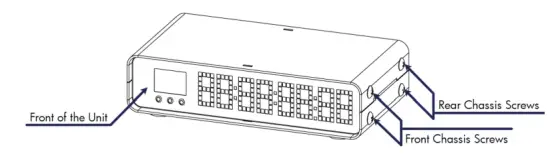
МУҲИМ: Be sure to reinsert the screws into the unit after ears have been removed. Store RackMount Kit in a safe location until needed again. Spare screws are available from TMB if needed
RACKMOUNT INSTALLATION INSTRUCTIONS
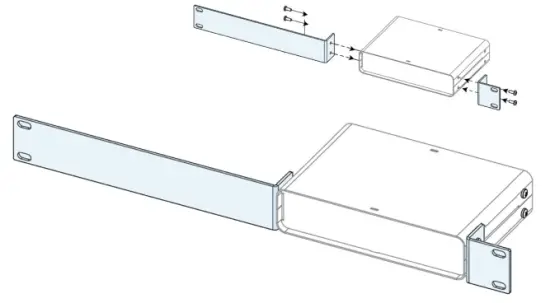
The Single-Unit Small RackMount Kit is comprised of two rack ears, ONE long and ONE short. The diagram below depicts the completed installation of the RackMount Kit. These rack ears are designed to be symmetrical, so that the short and long ears can be interchangeable
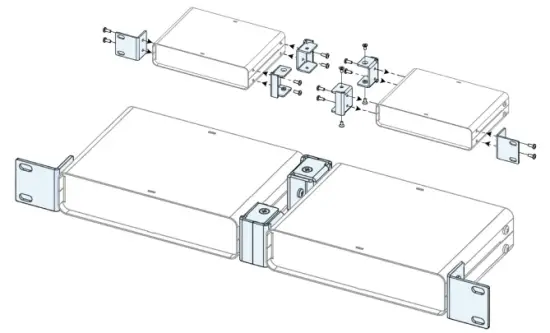
The Dual-Unit Small RackMount Kit has TWO short rack ears plus TWO joiners. The diagram below depicts the completed installation of the RackMount Kit. This configuration requires the TWO center joiners attached at both front and rear
INSTALLING THE DUAL JOINERS
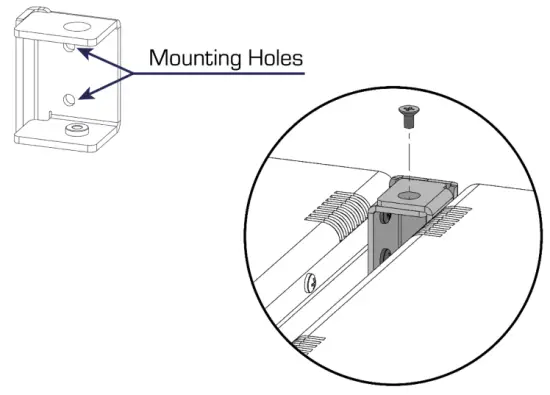
The Dual-Unit Small RackMount Kit includes FOUR joining links and FOUR countersunk flat head screws. These links are designed to nest into each other and are secured with the included screws and threaded holes.
Each link piece is identical. Simply rotate the joining link and line up the installation holes to install on either the left or right side of the corresponding unit.
АМАЛИЁТ
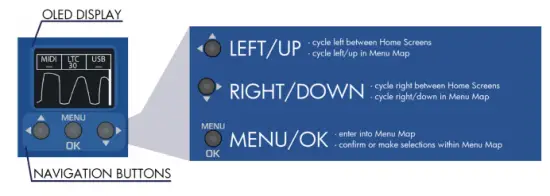
The ProPlex CodeBride can be easily configured with the onboard OLED Display and navigation buttons on the front of the unit
Харитаи меню
ЭКРАНИ ХОНА
The CodeClock has 2 HOME SCREENS that display different parameters of incoming timecode streams. Cycle between these screens by pressing either the тугма
тугма
Экрани асосӣ 1
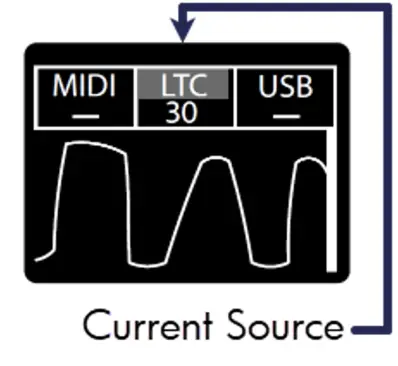
The formats and rates of incoming timecode streams show at the top of the screen with the current active source highlighted.
The Oscillogram and voltage level bar underneath indicate signal level from incoming LTC source only
Шарҳ: Ideally the LTC IN steam should resemble a square wave with high output level. If level is too low, try increasing the volume at the source to improve the signal
Экрани асосӣ 2
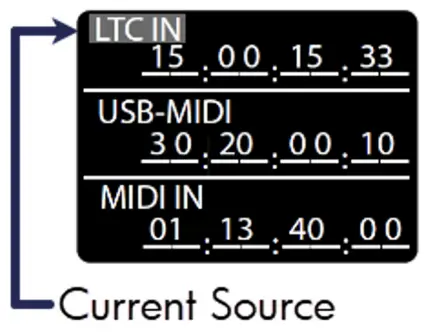
This screen displays all sources of timecode that the CodeClock can detect
Whichever source is considered active will be highlighted with a blinking background
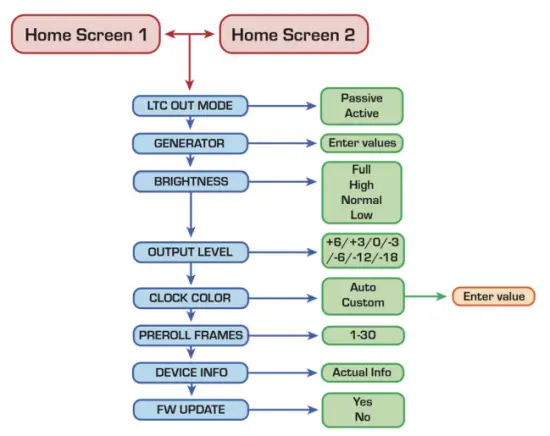
Менюи асосӣ
The Main Menu can be accessed by pressing the  button and majority of options can be exited via the
 тугма
тугма
Scroll with the button and confirm selection with the тугма.
Шарҳ: Not all menus will fit on the device screen so you will need to scroll to access some menus. The right side of most menu screens will will display a scroll bar which will help indicate the depth of scroll navigation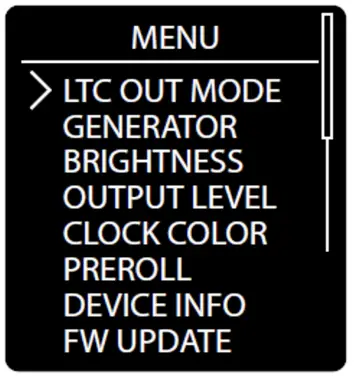
LTC Output Mode
Indicates how LTC timecode is redistributed
Ҳолати ғайрифаъол: Incoming LTC is physically connected to LTC OUT ports through relay and signal is not altered
Ҳолати фаъол: LTC timecode has regenerated timing and signal level
Истифода баред then to confirm selection with the button to cycle between modes. The asterisk indicator will denote the currently selected output level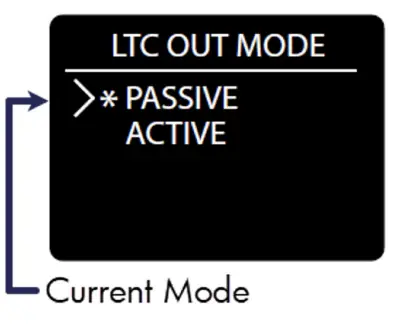 Генератори Timecode
The CodeClock can generate clean, high output LTC out of the three isolated XLR3 ports (located on the rear of each unit)
-ро истифода баред button, then confirm selection with the button to cycle between the various generator options
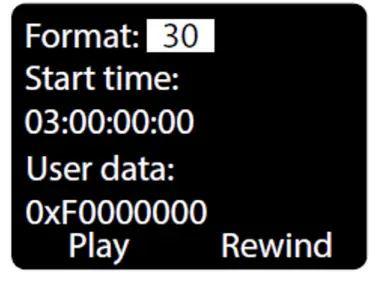
Формат: Select between different industry standard FPS rates 23.976, 24, 25, 29.97ND, 29.97DF, and 30 FPS
Вақти оғоз: Specify a start time of HH:MM:SS:FF using navigation buttons
Маълумоти корбар: specify user data in 0x00000000 hex format Play, Pause, Rewind: user playback controls for generated timecode.
Шарҳ: you must remain on this screen to continuously use the LTC generator. If you exit this screen, the generator will stop automatically, and the current source will change over to the next active source
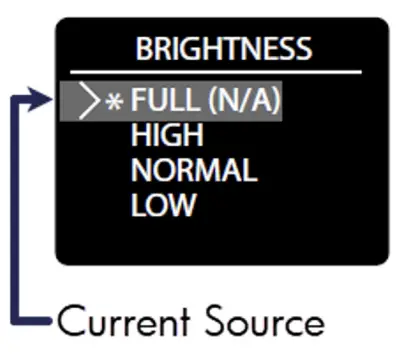
Равшании экран
There are 4 Brightness settings for the segment display:
FULL HIGH NORMAL LOW
-ро истифода баред button, then confirm with the button to choose between the various levels. The asterisk indicator will denote the current screen level
Сатҳи баромад
Boost or cut the output level from +6 dBu to -12 dBu. Everything outputting via the two isolated XLR3 ports is affected by this level change. This includes:
- Баромади генератор
- Re-transmitted timecode formats from other inputs
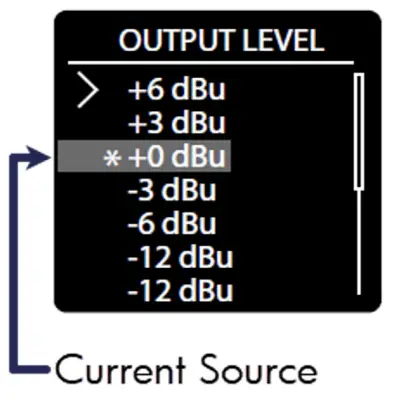
-ро истифода баред button, then confirm with the button to choose between the various output levels. The asterisk indicator will denote the currently selected output level
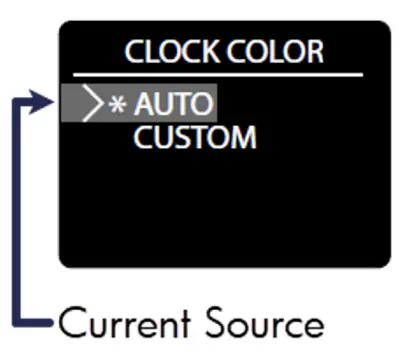
Ранги соат
The CodeClock allows the user to customize the display color of the RGB segments or use our ‘auto’ display
-ро истифода баред button, then confirm with the button to choose between the two color modes. The asterisk indicator will denote the currently selected mode
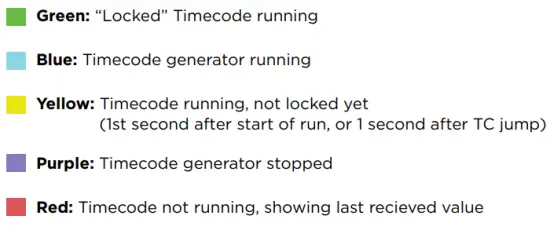
Ранги худкор: Clock color will change the display color depending on the state of the signal
Калиди ранг:
Ранги фармоишӣ
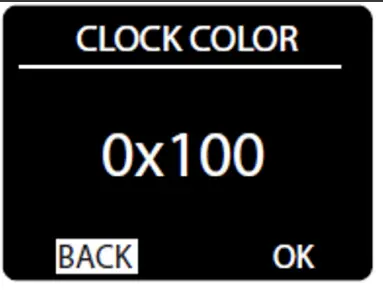
User can customize the RGB color with hex digit values
- Истифода баред to select and highlight a digit, then press барои тасдиқи интихоб
- Сипас истифода баред to change value (from 0-F) and press боз барои наҷот.
- As you alter the value, you should see the clock color intensity change in response to your edit
- RGB intensity values are represented by the format: 0x (r-value) (g-value) (b-value)
- Where 0xF00 is full red, 0x0F0 is full green and 0x00F is full blue
- When the desired color is displayed, highlight the OK button on screen and press наҷот додан
Pre-roll Frames
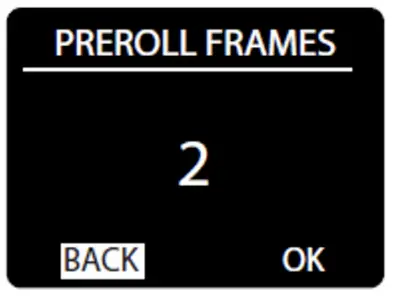
Pre-roll is the number of valid frames needed to consider the timecode source to be valid and begin forwarding it to the outputs
-ро истифода баред button to highlight the Pre-roll value, then press the button to edit
-ро истифода баред button to set the Pre-roll frames (1-30) and to save the value
Шарҳ: Active streams will always show the incoming LTC stream starting from the 1st received frame, regardless of Pre-roll settings
Маълумот дар бораи дастгоҳ
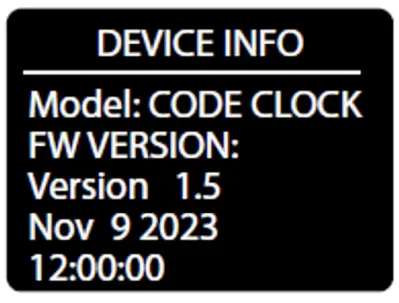
Device Info displays status information of the unit.
The information displayed is:
Номи дастгоҳ
Версияи FW
FW Build date
пахш кунед баромадан
Навсозии нармафзор
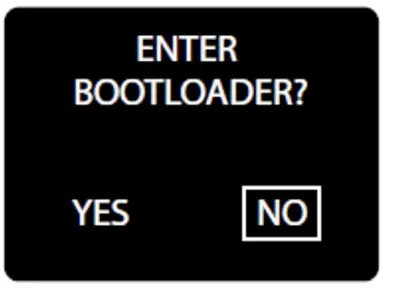
-ро истифода баред button to highlight YES, then press the button to enter Bootloader mode. The CodeClock screen should display a note to
“Use USB to Update Firmware” to let you know it is ready
Now the device should respond to updates sent from the Tiva Programmer software – visit tmb.com ё почтаи электронӣ techsupport@tmb.com for information on currently available updates and further instructions
Шарҳ: In the case of entering the bootloader accidentally, you must power cycle the device to exit and return to normal operation
Амалиёти пассивӣ
CodeClock is capable of passive operation, where no power is needed
to pass LTC through from the input to the outputs. We designed CodeClock so that each output uses an isolation transformer to help stabilize passive operation.
Isolation helps to avoid ground loops and other potential signal noise issues between the source and receiver, and among receivers.
However, the implementation of these transformers introduces an attenuation (insertion loss) to the signal at < 1dB typical to 2dB max
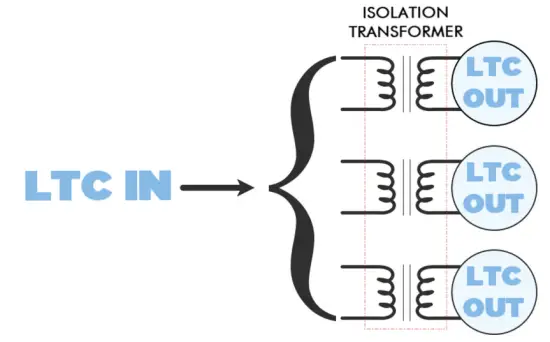
This additional signal level loss is normally insignificant and should cause no issue in most cases. BUT if the LTC signal was low to begin with, then the signal might attenuate to a level where it stops working.
Attenuation Recommendations
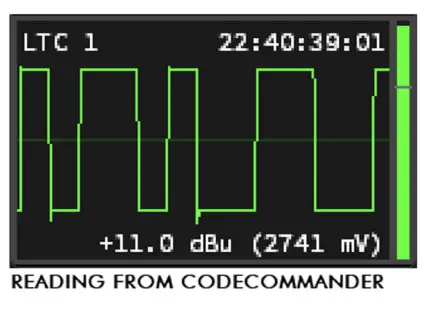
We always recommended having good headroom when working with timecode. LTC should not be sinusoidal like audio – rather, it is a digital signal that is encoded in a square audio wave
When visualizing LTC, you would generally want to see a high-amplitude square-wave with steep ascents
One fundamental difference between audio and LTC is the acceptable signal level. A “clipped” or overloaded signal is usually something to avoid in audio signals, but it may actually be necessary for accurate LTC timecode synchronization
The goal is to have incoming LTC at 0dBu (775mV), which is also the default output level for active CodeClock and the other LTC family devices
If the incoming LTC signal is low, you may need to boost the level of the sound card in the system. How much may depend on the source
Laptop sound cards
- Built-in sound laptop sound cards are usually unbalanced and often require an adapter from mini-jack to XLR – this results in loss around- 10dBu (316mV)
- It is essential to have PC volume at 100% to avoid sync issues with receives
Professional sound cards
- Pro equipment generally has a much higher output level – usually 70-80%is sufficient for normal operation with LTC
The final recommendation is to always use high-quality cables and adapters. Damaged cables or adapters can unintentionally cause more signal attenuation and lead to issues with LTC stability
ТОЗА ВА НИГАХДОРЙ
Dust build-up in connector ports can cause performance issues and can potentially lead to further damage during normal wear and tear
CodeClock devices need occasional cleaning to maintain best performance, especially units used in harsher environmental conditions
THE FOLLOWING ARE GENERAL CLEANING GUIDELINES:
- Always disconnect from power before attempting any cleaning
- Wait until unit has cooled and discharged completely before cleaning
- Use vacuum or dry compressed air to remove dust/debris in and around connectors
- Use a soft towel or brush to wipe and buff the chassis body
- To clean the navigation screen, apply isopropyl alcohol with a soft lens cleaning tissue or lint free cotton
- Alcohol pads and q-tips may help remove any grime and residue from navigation buttons
МУҲИМ:
Be sure all surfaces are dry before attempting to power on again
ТЕХНИКИИ ТЕХНИКИ
| Рақами қисм | PPCODECLME |
|
Пайвасткунаки барқ |
USB-C Connector with cable retainer to prevent accidental power disconnection. Also transmits and receives USB MIDI. |
| MIDI Input Connector | DIN 5-Pin Female |
| MIDI Output Connector | DIN 5-Pin Female |
| LTC Input Connector | Neutrik™ Combination 3-Pin XLR and 1/4” TRS female |
| LTC Output Connectors | Neutrik™ 3-Pin XLR Male |
| Ҷилди амалиётӣtage | 5 VDC |
| Истеъмоли қувваи барқ | 4.5 Вт Макс. |
| Ҳарорати корӣ. | TBA |
| Андозаҳо (HxWxD) | 1.72 x 7.22 x 4.42 дюйм [43.7 x 183.5 x 112.3 мм] |
| Вазн | 1.4 фунт [0.64 кг] |
| Вазни интиқол | 1.6 фунт [0.73 кг] |
МАЪЛУМОТ ДАР БОРАИ КАФОЛАТИ МАХДУД
Дастгоҳҳои паҳнкунии маълумотҳои ProPlex аз ҷониби TMB бар зидди маводҳои ноқис ё коркард дар тӯли ду (2) сол аз рӯзи фурӯши аслӣ аз ҷониби TMB кафолат дода мешавад.
Кафолати TMB бо таъмир ё иваз кардани ҳама қисме, ки нуқсонаш собит мешавад ва то ба охир расидани мӯҳлатҳои кафолати мувофиқ ба TMB даъво пешниҳод шудааст, маҳдуд мешавад.
Ин Кафолати Маҳдуд эътибор надорад, агар камбудиҳои маҳсулот дар натиҷаи инҳо бошанд:
- Кушодани casing, таъмир ё танзим аз ҷониби касе ғайр аз TMB ё шахсони махсус ваколатдор аз ҷониби TMB
- Садама, зӯроварии ҷисмонӣ, муносибати нодуруст ё нодуруст истифода бурдани маҳсулот.
- Зарари бар асари барқ, заминҷунбӣ, обхезӣ, терроризм, ҷанг ё амали Худо.
TMB барои ҳама гуна меҳнат ё маводи истифодашуда барои иваз ва/ё таъмири Маҳсулот бидуни иҷозати хаттии TMB масъулият ба дӯш намегирад. Ҳама гуна таъмири Маҳсулот дар саҳро ва ҳама гуна пардохтҳои меҳнатии алоқаманд бояд аз ҷониби TMB пешакӣ иҷозат дода шавад. Хароҷоти боркашонӣ барои таъмири кафолат 50/50 тақсим карда мешавад: Фармоишгар барои интиқоли маҳсулоти ноқис ба TMB пардохт мекунад; TMB барои интиқоли маҳсулоти таъмиршуда, ҳамлу нақли заминӣ ба фармоишгар пардохт мекунад.
Ин кафолат хисороти минбаъда ё хароҷоти ҳама гуна намуди онро фаро намегирад.
A Return Merchandise Authorization (RMA) Number must be obtained from TMB prior to return of any defective merchandise for warranty or non-warranty repair. For repair enquiries, please contact TMB via email at TechSupport@tmb.com ё ба яке аз маконҳои мо дар зер телефон кунед:
TMB ИМА
Хиёбони 527.
Сан Фернандо, CA 91340
Штатхои Муттахида
Тел: +1 818.899.8818
TMB UK
21 Роҳи Армстронг
Southall, UB2 4SD
Англия
Тел: +44 (0)20.8574.9700
You may also contact TMB directly via email at TechSupport@tmb.com
ТАРТИБИ БОЗГАШТ
Лутфан бо TMB тамос гиред ва пеш аз интиқол додани ашё барои таъмир чиптаи таъмир ва рақами иҷозати баргардонидани молро дархост кунед. Омода бошед, ки рақами намунавӣ, рақами силсилавӣ ва тавсифи мухтасари сабаби бозгашт, инчунин суроғаи интиқоли бозгашт ва маълумоти тамосро пешниҳод кунед. Пас аз коркарди чиптаи таъмир, RMA # ва дастурҳои баргардонидан тавассути почтаи электронӣ ба мухотиб фиристода мешавад file.
Ҳама баста(ҳо)-и интиқолро бо ATTN: RMA# равшан нишон диҳед. Лутфан таҷҳизоти пешакӣ пардохтшуда ва дар бастаи аслӣ то ҳадди имкон баргардонед. Кабелҳо ё замимаҳоеро дар бар намегиред (агар тартиби дигаре тавсия нагардида бошад). Агар бастаи аслӣ мавҷуд набошад, боварӣ ҳосил кунед, ки ҳама гуна таҷҳизотро дуруст бастабандӣ кунед ва муҳофизат кунед. TMB барои ҳама гуна зарари интиқол, ки дар натиҷаи бастабандии номуносиб аз ҷониби ирсолкунанда бармеояд, масъулият надорад.
Зангҳои боркашонӣ tags барои таъмири интиқол ба TMB дода намешавад, аммо TMB борро барои баргардонидан ба муштарӣ пардохт мекунад, агар таъмир барои хидматрасонии кафолат мувофиқ бошад. Таъмири бе кафолат аз ҷониби технике, ки барои таъмир таъин шудааст, аз рӯи нархнома мегузарад. Ҳама хароҷоти алоқаманд барои қисмҳо, меҳнат ва интиқоли бозгашт бояд пеш аз анҷоми ҳама гуна корҳо дар шакли хаттӣ иҷозат дода шаванд.
TMB ҳуқуқ дорад, ки бо салоҳдиди худ барои таъмир ё иваз кардани маҳсулот(ҳо) ва муайян кардани ҳолати кафолати ҳама гуна таҷҳизот истифода барад.
МАЪЛУМОТ БАРОИ ТАМОС
ШАРБ-КАРАРИ ЛОС-АНЧЕЛЕС
527 Парк хиёбони | Сан Фернандо, CA 91340, ИМА Тел: +1 818.899.8818 | Факс: +1 818.899.8813 sales@tmb.com
TMB 24/7 ДАСТГИРИИ ТЕХНИКӢ
ИМА/Канада: +1.818.794.1286
Бепул: 1.877.862.3833 (1.877.TMB.DUDE) UK: +44 (0)20.8574.9739
Бепул: 0800.652.5418
techsupport@tmb.com
LOS ANGELES +1 818.899.8818 LONDON +44 (0)20.8574.9700 NEW YORK +1 201.896.8600 BEIJING +86 10.8492.1587 CANADA +1 519.538.0888 RIGA +371 6389 8886
Ширкати пурраи хидматрасонӣ, ки дастгирии техникӣ, хидматрасонии муштариён ва пайгирӣ мекунад.
Providing products and services for the industrial, entertainment, architectural, installation, defense, broadcast, research, telecommunications, and signage industries.Servicing the global market from offices in Los Angeles, London, New York, Toronto, Riga and Beijing.
Ҳуҷҷатҳо / Сарчашмаҳо
 |
ProPlex Codeclock Timecode Display and Distribution Device [pdf] Дастури корбар Codeclock Timecode Display and Distribution Device, Timecode Display and Distribution Device, Display and Distribution Device, Distribution Device |